Raspberry Pi RGB Box
Three knobs, one each for red, green, and blue, mix the color of a NeoPixel strip inside a clear project box.
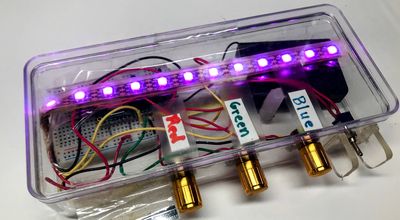
Raspberry Pi RGB Box
Key Features
- How to read a potentiometer with an Analog-to-Digital Converter (ADC).
- How to control NeoPixel LED colors with RGB values.
- How to map a sensor reading to a color value.
- How to build a fun, interactive hardware project.
Key Benefits
- Free, open lessons. The Learning MicroPython textbook has the kit page, wiring, and MicroPython code.
- Classroom friendly. Built on a solderless breadboard or no-solder connectors.
- Try before you build. An interactive MicroSim on the kit page runs in the browser.
- Instant feedback. Students see their code's results on lights or a display.
- Budget. About $15 (under $10 when parts are bought in batches of ten).
Parts
| Part (price) | Role |
| Raspberry Pi Pico ($4) | Microcontroller |
| 10K Potentiometer | Input knob |
| Single-Color and RGB LEDs | LEDs |
| WS2812B NeoPixels | LEDs |
| 830-Point Breadboard ($1.10) | Breadboard |
| Micro-USB Data Cable ($2.50) | Power and programming cable |
Microcontroller listed first. Prices shown only where known; see the source book for quantities, wiring, and current prices.
About this kit: From the Learning MicroPython collection.
Source: Learning MicroPython
Source: Learning MicroPython