Mood Ring Thermometer
The SHT40 sensor paired with a low-cost round GC9A01 "smartwatch" display that changes color with the temperature.
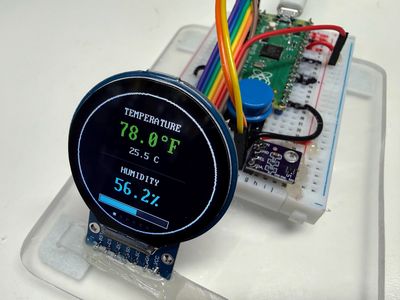
Mood Ring Thermometer
Key Features
- Wire a sensor and a round color screen to a Raspberry Pi Pico.
- Test each part on its own before you put them together.
- Explain what a pixel is and how x and y numbers find a spot on the screen.
- Change a temperature from Celsius to Fahrenheit.
- Read a short program and explain how it picks a color.
- Change a setting and predict what the display will show.
Key Benefits
- Free, open lessons. The Learning MicroPython textbook has the kit page, wiring, and MicroPython code.
- Classroom friendly. Built on a solderless breadboard or no-solder connectors.
- Wireless-ready. The Pico W option adds Wi-Fi for time sync and web projects.
- Instant feedback. Students see their code's results on lights or a display.
- Real-world data. Students read sensors and turn measurements into decisions.
- Budget. About $9 (sum of the listed parts: Pico $4, SHT40 $1.65, GC9A01 display $3.19).
Parts
| Part (price) | Role |
| Raspberry Pi Pico ($4) | Microcontroller |
| GC9A01 Round TFT ($3.19) | Display |
| Momentary Push Buttons | Input button / switch |
| SHT40 | Sensor |
| 830-Point Breadboard ($1.10) | Breadboard |
| Micro-USB Data Cable ($2.50) | Power and programming cable |
Microcontroller listed first. Prices shown only where known; see the source book for quantities, wiring, and current prices.
About this kit: From the Learning MicroPython collection.
Source: Learning MicroPython
Source: Learning MicroPython