Knob Clock Kit
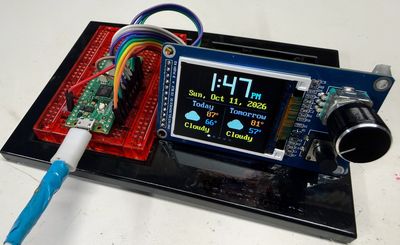
A color-screen clock with one turn-and-press knob and one button. Students start by blinking a light and finish with five clock faces.
Source book: Clocks and Watches
Kit page: https://dmccreary.github.io/clocks-and-watches/kits/rect-tft-display/
Printable one-pager: rect-tft-display-one-pager.html
Features
- Set its own time. It asks the internet what time it is.
- Show the time your way. Choose big digital numbers, or a clock face
- Tell you the weather. Today's and tomorrow's forecast appear with
- Time laps and count down. It works as a stopwatch that records
- Switch with a turn of the knob. Turn the knob to step through all
Benefits
- Free, open lessons: the Clocks and Watches textbook has the kit page, wiring, and MicroPython code.
- Ready-made curriculum: 18 additional lab pages walk students through the build step by step.
- Classroom friendly: built on a solderless breadboard or no-solder connectors.
- Wireless-ready: the Pico W option adds Wi-Fi for time sync and web projects.
- Instant feedback: students see their code's results on lights or a display.
- Real-world data: students read sensors and turn measurements into decisions.
- Budget: about $16 (display board with knob and button $5.53, Pico 2 W about $5, breadboard $2, wires $1, USB cable $2).
Parts
- Raspberry Pi Pico W ($5) — Microcontroller with Wireless
- GC9B72 Smartwatch Display ($5.39) — Display
- Momentary Push Buttons — Input button / switch
- Piezo Buzzer / Speaker — Sound output
- KY-040 Rotary Encoder — Input knob
- ST7735 1.8" TFT — Display
- ST7789 TFT — Display
- 830-Point Breadboard ($1.10) — Breadboard
- Micro-USB Data Cable ($2.50) — Power and programming cable