Learning MicroPython Glossary of Terms
This glossary contains 510 terms used in our Learning MicroPython course. Each term has a precise, concise definition and an example of how the term is used.
Abstraction
A cognitive process of reducing complexity by focusing on the essential features of a concept, system, or problem while omitting unnecessary details.
Example: In our example programs we hide the unnecessary details of the specific hardware configuration of a project by putting all the hardware pin numbers in a config.py file.
Accelerometer
An accelerometer is a sensor that measures acceleration forces along one or more axes (X, Y, Z). It detects motion, vibration, and the direction of gravity (which indicates tilt).
Example: Holding a phone upright versus sideways triggers a screen rotation because the accelerometer detects gravity differently.
Accelerometer X/Y/Z Axes
An accelerometer reports acceleration separately for three perpendicular directions: X (left-right), Y (forward-back), and Z (up-down). Each axis returns a value in g-force or m/s².
Example: When a Pico with an accelerometer is lying flat, the Z axis reads approximately 1g (Earth's gravity) and X and Y read near 0.
Active Buzzer
An active buzzer is an electronic component that makes a beeping sound when you apply power to it. It has a built-in oscillator, so it only needs a steady voltage to produce a tone.
Example: Connect an active buzzer to a GPIO pin set HIGH and it immediately starts beeping.
Active High vs Active Low
Active high means a signal is "on" when the pin reads HIGH (3.3V). Active low means a signal is "on" when the pin reads LOW (0V). Knowing which type your component uses prevents confusing backward behavior.
Example: Many buttons on microcontroller boards are active low — the pin reads LOW when the button is pressed.
ADC Resolution (bits)
ADC resolution is the number of bits an analog-to-digital converter uses to represent a voltage. More bits mean finer steps and a more precise reading.
Example: The Raspberry Pi Pico's ADC has 16-bit resolution, giving 65,536 possible values between 0 V and 3.3 V.
ADC Voltage Reference
The ADC voltage reference is the maximum voltage the analog-to-digital converter can measure. Input voltages are compared against this reference to produce a digital number.
Example: On the Pico the reference is 3.3 V, so a 1.65 V input produces a reading of roughly 32,768 on a 16-bit ADC.
ADC.read_u16() Method
ADC.read_u16() is a MicroPython method that reads the current analog voltage on a pin and returns an unsigned 16-bit integer between 0 and 65,535.
Example: value = adc.read_u16() stores the raw sensor reading in value.
ADXL345 Accelerometer
The ADXL345 is a three-axis digital accelerometer that communicates over I2C or SPI. It measures acceleration up to ±16g and is commonly used in motion detection and tilt projects.
Example: accel = ADXL345(i2c); x, y, z = accel.acceleration reads acceleration in m/s² on all three axes.
AI Code Generation
AI code generation is when an artificial intelligence tool writes program code for you based on a description you provide. The AI learns from millions of code examples to suggest working solutions.
Example: Typing "write a MicroPython program to blink an LED every second" into an AI chatbot produces ready-to-run code.
AI Code Review
AI code review is when an artificial intelligence tool reads your program and points out bugs, style problems, or ways to make it better.
Example: Pasting your sensor-reading loop into an AI chat and asking "What is wrong with this?" can catch off-by-one errors quickly.
AI Concept Explanation
AI concept explanation is using an artificial intelligence tool to get a plain-language description of a technical idea you do not understand yet.
Example: Asking an AI "What is I2C in simple terms?" can explain bus protocols in a way that is easier to understand than a datasheet.
AI Hardware Suggestion
AI hardware suggestion is asking an artificial intelligence tool to recommend electronic components or circuits for a project based on your goals and budget.
Example: Describing your robot project to an AI and asking which motor driver IC to buy is an AI hardware suggestion.
Algorithm Design
Algorithm design is the process of planning the exact steps a program must follow to solve a problem. A good algorithm is clear, correct, and efficient.
Example: Before writing a line-follower program, planning "read sensor → if left dark turn right, if right dark turn left" is algorithm design.
Algorithms
A step-by-step procedure or set of rules for solving a problem or accomplishing a task.
In MicroPython, this includes both software algorithms and the logic for controlling hardware components.
Ambient Light Sensing
Ambient light sensing is measuring the brightness of the surrounding environment using a light-sensitive component. The measured value can trigger actions based on lighting conditions.
Example: A desk lamp that turns on automatically when a room gets dark uses ambient light sensing.
Ampy
An obsolete MicroPython support tool created by Adafruit but no longer supported. Please see the mpremote tool for the current best practice.
Analog Signal
An analog signal is a continuously varying electrical voltage or current that can take any value within a range. Unlike digital signals, analog signals are not limited to just HIGH or LOW.
Example: The output of a microphone is an analog signal because the voltage changes smoothly with sound pressure.
Analog to Digital Converter
A component that takes an analogue signal and changes it to a digital one.
Every ADC has two parameters, its resolution, measured in digital bits, and its channels, or how many analogue signals it can accept and convert at once.
- Also know as: ADC
Analog-to-Digital Converter (ADC)
An analog-to-digital converter (ADC) is a circuit that measures an analog voltage and converts it into a whole number a microcontroller can use. The Raspberry Pi Pico has a built-in ADC.
Example: adc = machine.ADC(26) sets up the ADC on pin GP26 of the Pico.
APDS9960 Color Detection
The APDS9960 color detection feature measures the red, green, blue, and clear light levels in the environment. The sensor outputs separate numeric values for each color channel.
Example: Holding a red object in front of the APDS9960 returns a high red value and low blue and green values.
APDS9960 Gesture Sensor
The APDS9960 is a small sensor chip that can detect hand gestures (up, down, left, right), proximity, color, and ambient light all in one device using infrared light.
Example: Swiping your hand left over the APDS9960 can be programmed to skip a song on a music player.
APDS9960 I2C Driver
The APDS9960 I2C driver is a MicroPython library that handles the low-level I2C communication needed to read data from the APDS9960 sensor chip.
Example: After importing the driver, sensor = APDS9960(i2c) creates an object you can use to call sensor.gesture().
APDS9960 Proximity Detection
The APDS9960 proximity detection feature measures how close an object is to the sensor using reflected infrared light. It returns a value from 0 (far) to 255 (very close).
Example: Placing your hand 2 cm from the sensor returns a high proximity value near 200.
Arithmetic Operators
Arithmetic operators are symbols used in code to perform math. The main ones are + (add), - (subtract), * (multiply), / (divide), // (floor divide), % (remainder), and ** (power).
Example: duty = pwm_value * 100 // 65535 uses *, //, and // to scale a reading.
Assembler in MicroPython
Assembler in MicroPython is a built-in feature (using the @micropython.asm_thumb decorator) that allows writing ARM Thumb assembly language instructions directly inside a Python function for maximum speed.
Example: A tight inner loop that needs to run millions of times per second can be written as an assembler function using @micropython.asm_thumb.
Assignment Operators
Assignment operators store a value into a variable. The basic one is =. Shorthand forms like += add to a variable's current value.
Example: count += 1 is the same as writing count = count + 1.
Audio Amplifier
An audio amplifier is a circuit or chip that makes an audio signal louder so it can drive a speaker. Microcontrollers produce low-power audio signals that need amplification.
Example: A PAM8403 amplifier chip can boost the Pico's audio output to drive a small 3 W speaker.
Audio Playback
Audio playback is playing back a stored sound file (such as a WAV file) through a speaker. A microcontroller sends audio data to a digital-to-analog converter or an I2S amplifier.
Example: Reading a WAV file from the Pico's flash and streaming it over I2S to a speaker module plays the sound.
Audio Sampling Rate
Audio sampling rate is the number of audio measurements taken per second when recording or playing back sound. Higher rates capture higher-frequency sounds with more accuracy.
Example: CD-quality audio uses 44,100 samples per second (44.1 kHz). Many MicroPython projects use 8,000 or 16,000 Hz to save memory.
Back-EMF Protection
Back-EMF (electromotive force) protection prevents the voltage spike produced by a spinning motor from damaging other components when the motor suddenly stops or reverses.
Example: A flyback diode placed across a motor's terminals absorbs back-EMF spikes.
10-Bar LED Array
A 10-bar LED array is a component that contains 10 individual LEDs in a row, side by side in one package. Each LED can be controlled independently to show a bar-graph level meter.
Example: Lighting the bottom three LEDs of a 10-bar array to show a low battery level is a common use of this component.
Bill of Materials (BOM)
A bill of materials (BOM) is a complete list of all components needed to build a project, including part names, quantities, and where to buy them.
Example: A robot BOM might list: 1× Raspberry Pi Pico, 1× L293D motor driver, 2× DC motors, 4× AA batteries.
Bitmap Drawing
Bitmap drawing means placing individual pixels or small images on a display by setting the color of each dot directly. It is a basic way to create graphics on small screens.
Example: Loading a 16×16 pixel icon stored as a byte array and copying it to an OLED display uses bitmap drawing.
Blit
A special form of copy operation; it copies a rectangular area of pixels from one framebuffer to another. It is used in MicroPython when doing drawing to a display such as an OLED display.
Blocking vs Non-Blocking
Blocking code pauses the program and waits until a task finishes. Non-blocking code starts a task and immediately moves on, checking back later to see if it is done.
Example: time.sleep(1) is blocking. Using a timer interrupt to count seconds is non-blocking.
BME280 Humidity Reading
A BME280 humidity reading is the relative humidity percentage returned by the BME280 sensor. Relative humidity tells you how much water vapor is in the air compared to the maximum possible.
Example: sensor.humidity on a BME280 object might return 55.3, meaning the air is 55.3% saturated with water vapor.
BME280 I2C Driver
The BME280 I2C driver is a MicroPython library that communicates with the BME280 sensor over the I2C bus to retrieve temperature, humidity, and pressure readings.
Example: After importing the library, bme = BME280(i2c=i2c) creates a sensor object you can query.
BME280 Pressure Reading
A BME280 pressure reading is the atmospheric air pressure measured by the BME280 sensor, usually expressed in hectopascals (hPa). Pressure changes with altitude and weather.
Example: At sea level the reading is around 1013 hPa. At high altitude it drops significantly.
BME280 Sensor
The BME280 is a small sensor chip that measures temperature, humidity, and air pressure all in one package. It communicates over I2C or SPI.
Example: bme.temperature might return 23.5 for 23.5 °C when the sensor is queried.
BME280 Temperature Reading
A BME280 temperature reading is the air temperature in degrees Celsius returned by the BME280 sensor. The sensor is accurate to within ±1 °C.
Example: print(bme.temperature) might display 21.7 on a warm day indoors.
Boolean
A Boolean is a data type that can only hold one of two values: True or False. Booleans are used in conditions to decide which path a program takes.
Example: button_pressed = True stores a Boolean that a while button_pressed: loop can check.
Boot.py File
boot.py is a special MicroPython file that runs automatically when the microcontroller first powers on, before main.py runs. It is used for early setup tasks like connecting to Wi-Fi.
Example: Putting Wi-Fi connection code in boot.py ensures the Pico W is online before the main program starts.
BOOTSEL
A button on the pico that when pressed during power up will allow you to mount the device as a USB drive. You can then drag-and-drop any uf2 image file to reset or update the runtime libraries.
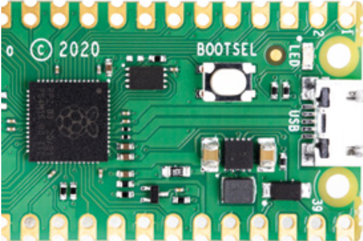
- Also known as: Boot Selection
Breadboard
A breadboard is a reusable plastic board with holes and hidden metal strips that let you connect electronic components without soldering. It is the most common tool for building prototype circuits.
Example: Pushing an LED and a resistor into the same row on a breadboard connects them electrically.
Breadboard Prototype
A breadboard prototype is a test version of a circuit built on a breadboard using jumper wires and components. It lets you test a design before making it permanent.
Example: Building your motor control circuit on a breadboard first lets you fix wiring mistakes before soldering.
Breadboard Rails
Breadboard rails are the long rows along the top and bottom edges of a breadboard, usually marked with red (+) and blue (−) lines. They are designed to distribute power and ground across the board.
Example: Connecting the Pico's 3.3 V output to the red rail lets every component on the board access power through a short jumper wire.
Breadboard Rows
Breadboard rows are the short horizontal groups of five holes in the middle section of a breadboard. All five holes in one row are connected together internally.
Example: Placing a resistor lead and an LED lead in the same row connects them without any additional wire.
Brightness Control
Brightness control means adjusting how bright an LED or display appears, usually by changing the PWM duty cycle. A higher duty cycle means more on-time and therefore more brightness.
Example: Setting pwm.duty_u16(32768) makes an LED glow at half brightness.
Brightness Scaling
Brightness scaling is adjusting the color values of NeoPixel LEDs or other lights to make them dimmer without changing their color. Each red, green, and blue value is multiplied by a fraction.
Example: Multiplying (255, 0, 0) by 0.5 gives (127, 0, 0), which is half-brightness red.
Bus Frequency Setting
Bus frequency setting controls how fast data is sent over a communication bus like I2C or SPI, measured in hertz. Faster frequencies transfer data more quickly but can cause errors with long wires.
Example: I2C(0, freq=400000) sets the I2C bus to 400 kHz (fast mode).
Button Debouncing
Button debouncing is a technique to prevent a single button press from being read as multiple presses. Mechanical buttons "bounce" electrically for a few milliseconds when pressed.
Example: After detecting a button press, waiting 20 ms before reading the button again removes the bouncing effect.
Button Input
Button input means reading the state of a push button connected to a GPIO pin to detect when a user presses it. The pin reads HIGH or LOW depending on whether the button is pressed.
Example: if button.value() == 0: checks whether an active-low button is currently pressed.
Capacitive Touch Sensing
Capacitive touch sensing detects when a finger touches or comes close to a surface by measuring a tiny change in electrical capacitance. No mechanical moving parts are required.
Example: The TTP223 touch sensor module uses capacitive sensing to detect a finger tap with no force needed.
Capacitor
A capacitor is an electronic component that stores electrical energy in an electric field and releases it quickly. Capacitors are used to smooth out voltage fluctuations and filter signals.
Example: Placing a 100 µF capacitor across a motor's power supply terminals reduces voltage spikes when the motor starts.
Castellated Edge
Plated through holes or vias located in the edges of a printed circuit board that make it easier to solder onto another circuit board.

The word "Castellated" means having grooves or slots on an edge and is derived from the turrets of a castle.
The Raspberry Pi Pico uses castellated edges so that it can be used with headers on a breadboard or soldered directly to a PC board. This is the most flexible way to manufacturing boards today.
Channels
Channels refers to the number of separate analog input signals an analog-to-digital converter (ADC) can accept and convert independently. Each channel is connected to a different pin on the microcontroller.
Example: The Raspberry Pi Pico's built-in ADC has three user-accessible channels on pins GP26, GP27, and GP28, so you can read three different analog sensors at the same time.
Character LCD Display
A character LCD (liquid crystal display) shows text characters on a grid of fixed-size cells. Common sizes are 16 characters wide by 2 rows (16×2) or 20×4.
Example: A 16×2 LCD can display two short sentences like "Temp: 23 C" on line one and "Humidity: 55%" on line two.
CircuitPython vs MicroPython
CircuitPython is a version of MicroPython made by Adafruit that focuses on ease of use and has a large library of hardware drivers. MicroPython is the original smaller implementation aimed at a wider range of microcontrollers.
Example: CircuitPython shows a USB drive on your computer automatically; standard MicroPython requires a separate tool like Thonny to transfer files.
Code Organization
Code organization is arranging a program's functions, variables, and logic into a clear structure so it is easy to read, test, and change later. Well-organized code uses meaningful names and groups related code together.
Example: Putting all motor control functions in motors.py and all sensor functions in sensors.py is good code organization.
Collision Avoidance Logic
Collision avoidance logic is a set of rules in a robot program that causes the robot to stop or turn when a sensor detects an object in its path.
Example: if distance < 10: robot.stop(); robot.turn_right() is simple collision avoidance logic.
Collision Avoidance Robot
A collision avoidance robot is a robot programmed to detect obstacles using sensors and change direction automatically to avoid running into them.
Example: A robot with an HC-SR04 ultrasonic sensor that reverses and turns when anything comes within 15 cm is a collision avoidance robot.
Color Sensing Principles
Color sensing works by shining light onto a surface and measuring how much of specific wavelengths (red, green, blue) are reflected back. The reflected amounts reveal the surface color.
Example: A red apple reflects mostly red light and absorbs green and blue, so a color sensor returns high red and low green and blue values.
Color Wheel Animation
A color wheel animation cycles LED colors through the full spectrum of hues in order, creating a smoothly changing rainbow effect. The hue value increases from 0 to 255 continuously.
Example: Incrementing the hue in an HSV-to-RGB loop and updating NeoPixels every frame produces a color wheel animation.
Comment in Code
A comment in code is text that the Python interpreter ignores completely. Comments are written with a # symbol and are meant to explain the code to human readers.
Example: # Turn on the LED before a led.value(1) line explains what the next line does.
Common Wiring Errors
Common wiring errors are mistakes made when connecting components, such as swapping SDA and SCL on an I2C device, connecting to the wrong voltage rail, reversing LED polarity, or missing a ground connection.
Example: An OLED showing nothing is often caused by a common wiring error — swapping the SDA and SCL pins.
Comparison Operators
Comparison operators compare two values and return True or False. They include == (equal), != (not equal), <, >, <=, and >=.
Example: if temperature >= 30: uses the >= comparison operator to check if temperature is at or above 30 degrees.
Compass Heading Calculation
Compass heading calculation converts the raw magnetic field values from X and Y axes into a direction in degrees (0–360) using the atan2 math function.
Example: heading = math.degrees(math.atan2(y, x)) converts magnetometer readings to a compass bearing.
Component Selection
Component selection is the process of choosing the right electronic parts for a project based on voltage, current, size, cost, and availability requirements.
Example: Choosing between the L293D and the DRV8833 motor driver depends on the current your motors need and the voltage your battery provides.
Computational Thinking
A problem-solving approach that involves breaking down complex problems into smaller, more manageable parts using fundamental concepts from computer science. It encompasses four key components:
- Decomposition - Breaking problems into smaller, more manageable parts
- Pattern Recognition - Identifying similarities or patterns among problems
- Abstraction - Focusing on important information while ignoring irrelevant details
- Algorithms - Developing step-by-step solutions that can be understood by both humans and computers
For example: When creating a MicroPython project to monitor room temperature, computational thinking would involve:
- Decomposing the task into reading sensor data, processing measurements, and displaying results
- Recognizing patterns in temperature changes over time
- Abstracting away hardware-specific details into configuration files
- Designing algorithms to convert raw sensor data into meaningful temperature readings
Computer Program
A computer program is a set of instructions written in a programming language that tells a computer or microcontroller what to do. Programs are stored as files and run when needed.
Example: A MicroPython program stored as blink.py on a Pico tells the board to flash an LED on and off repeatedly.
Conda Virtual Environment
A Conda virtual environment is an isolated Python installation managed by the Conda tool. It lets you install specific package versions for one project without affecting other projects.
Example: Running conda create -n micropython-tools python=3.11 creates a separate environment for MicroPython development tools.
Conditional Statement
A conditional statement runs a block of code only if a certain condition is true. In Python, the keywords if, elif, and else create conditional statements.
Example: if temperature > 30: fan.on() turns on a fan only when it gets too hot.
Continuity Test
A continuity test uses a multimeter to check whether there is a complete electrical path between two points. A beep or low resistance reading means the circuit is connected.
Example: Touching the multimeter probes to both ends of a wire that passed a continuity test confirms the wire is not broken.
Continuous Rotation Servo
A continuous rotation servo is a servo motor modified (or designed) to spin continuously in either direction instead of moving to a specific angle. Speed and direction are controlled by the PWM pulse width.
Example: A pulse width near 1.5 ms stops the servo; 1.0 ms makes it spin one way and 2.0 ms makes it spin the other way.
Core 0 and Core 1
Core 0 and Core 1 are the two independent processor cores inside the RP2040 chip. By default MicroPython runs on Core 0. Core 1 can run a second program simultaneously.
Example: Running a motor control loop on Core 0 and a sensor reading loop on Core 1 allows both tasks to run at the same time without one slowing the other.
Current
Current is the flow of electric charge through a conductor, measured in amperes (A) or milliamperes (mA). More current means more charge flowing per second.
Example: A standard LED needs about 20 mA of current to glow at full brightness.
Current-Limiting Resistor
A current-limiting resistor is a resistor placed in series with a component (like an LED) to prevent too much current from flowing and damaging it.
Example: A 330-ohm resistor in series with an LED on a 3.3 V GPIO pin limits current to about 10 mA.
Custom Drawing Functions
Custom drawing functions are programmer-written functions that draw specific shapes or UI elements on a display by calling lower-level pixel or line commands.
Example: A draw_battery(level) function that draws a battery icon using rectangles on an OLED is a custom drawing function.
Cytron Maker Pi RP2040
The Cytron Maker Pi RP2040 is an educational robot controller board built around the RP2040 chip. It includes built-in motor drivers, servo connectors, Grove ports, and a buzzer, making it easy to build robots.
Example: The Maker Pi RP2040 lets you connect two DC motors and four servos without needing any extra driver boards.
DAC (Digital-to-Analog Converter)
A digital-to-analog converter (DAC) turns a digital number into an analog voltage. It is the opposite of an ADC and is used to generate audio signals or smooth control voltages.
Example: Sending audio sample values to a DAC chip produces an analog audio waveform that a speaker can play.
Data Type
A data type tells Python what kind of value a variable holds, such as a whole number, a decimal, text, or true/false. Python uses the data type to decide what operations are allowed.
Example: 23 is an integer, 23.5 is a float, and "hello" is a string — three different data types.
DC Motor
A DC (direct current) motor converts electrical energy into spinning motion. The speed and direction depend on the voltage and polarity applied to its two terminals.
Example: Connecting a DC motor to a motor driver and setting one pin HIGH makes the motor spin in one direction.
Debugging Strategies
Systematic approaches to finding and fixing errors in both software and hardware configurations, including using print statements, LED indicators, and serial monitoring.
Our course uses the Thonny Integrated Development Environment (IDE) which has extensive tools to help with debugging including the ability to set breakpoints and examine state variables.
- See our Debugging section for tips on debugging MicroPython with Thonny.
Debugging Strategy
A debugging strategy is a planned approach to finding and fixing errors in a program. Good strategies include reading error messages carefully, adding print statements, and testing small parts of the code one at a time.
Example: If a sensor reading is always zero, a good debugging strategy is to first check the wiring, then print raw ADC values to see if any signal is coming in at all.
Debugging with AI
Debugging with AI means pasting an error message or broken code into an AI assistant and asking it to explain what is wrong and how to fix it.
Example: Copying a TypeError traceback into an AI chat and asking "Why does this crash?" often reveals the problem quickly.
Debugging with Thonny
Debugging with Thonny means using the Thonny integrated development environment's built-in tools — like the variable viewer, step-through execution, and console — to find errors in a MicroPython program.
Example: Clicking "Step Into" in Thonny runs your program one line at a time so you can watch variables change and spot where things go wrong.
Decomposition
The process of breaking down complex problems into smaller, more manageable parts that can be solved independently.
Example: In a MicroPython program, this could involve separating hardware initialization, sensor reading, and display updating into distinct functions or modules.
Decomposition is a fundamental skill for not just programmers, but also for prompt engineers using generative AI models. A good decomposition prompt is "Please break this project down into discrete steps."
dht Module in MicroPython
The dht module is a built-in MicroPython library for reading DHT11 and DHT22 temperature and humidity sensors. It handles the single-wire communication protocol the sensors use.
Example: import dht; sensor = dht.DHT11(Pin(2)) creates a sensor object on GP2.
DHT.humidity() Method
DHT.humidity() returns the last measured relative humidity percentage from a DHT11 or DHT22 sensor. You must call DHT.measure() first to trigger a new reading.
Example: sensor.measure(); print(sensor.humidity()) prints the current humidity, like 55.
DHT.measure() Method
DHT.measure() triggers the DHT11 or DHT22 sensor to take a new temperature and humidity reading. After calling it, use DHT.temperature() and DHT.humidity() to get the values.
Example: sensor.measure() must be called before reading values, and the sensor needs at least 1 second between measurements.
DHT.temperature() Method
DHT.temperature() returns the last measured temperature in degrees Celsius from a DHT11 or DHT22 sensor. You must call DHT.measure() first.
Example: sensor.measure(); print(sensor.temperature()) prints the temperature, like 23.
DHT11 Sensor
The DHT11 is a low-cost digital temperature and humidity sensor. It measures temperature from 0–50 °C (±2 °C accuracy) and humidity from 20–90% RH. It uses a single data wire to communicate.
Example: sensor = dht.DHT11(Pin(2)); sensor.measure(); print(sensor.temperature(), sensor.humidity()) reads both values.
DHT22 Sensor
The DHT22 is a more accurate digital temperature and humidity sensor than the DHT11. It measures temperature from −40 to 80 °C (±0.5 °C) and humidity from 0–100% RH.
Example: For a weather station needing better accuracy, the DHT22 is worth its higher cost over the DHT11.
Dictionary
A dictionary is a Python data type that stores pairs of keys and values. You look up a value by its key instead of by position. Dictionaries are written with curly braces.
Example: sensors = {"temp": 23.5, "humidity": 55} lets you access the temperature as sensors["temp"].
Differential Drive
Differential drive is a method of steering a robot using two independently controlled wheels or motors. The robot turns by running one motor faster or slower than the other.
Example: Running the left motor faster than the right motor causes a differential drive robot to turn right.
4-Digit 7-Segment Display
A 4-digit 7-segment display shows four numeric digits using 7-segment LED indicators. These modules usually use a driver chip (like the TM1637) to reduce the number of needed wires.
Example: A 4-digit 7-segment display can show a clock reading like "12:45" using the TM1637 driver and just two GPIO pins.
Digital Input
A digital input is a GPIO pin configured to read either HIGH (3.3 V) or LOW (0 V) from an external signal or component such as a button or sensor.
Example: pin = Pin(14, Pin.IN) sets up GP14 as a digital input on the Pico.
Digital Output
A digital output is a GPIO pin configured to output either HIGH (3.3 V) or LOW (0 V) to control an external component like an LED or relay.
Example: led = Pin(25, Pin.OUT); led.value(1) turns on the Pico's onboard LED.
Digital Signal
A digital signal is an electrical signal that can only be in one of two states: HIGH or LOW (on or off). Microcontrollers use digital signals to communicate with most components.
Example: The data line of an I2C bus is a digital signal that switches between HIGH and LOW to send bytes of data.
Diode
A diode is an electronic component that allows current to flow in only one direction. It is used for protection, signal detection, and converting AC to DC.
Example: Placing a diode in series with a battery connection prevents damage if the battery is accidentally inserted backward.
Display Color Formats
Display color formats describe how color information is stored for each pixel. Common formats include MONO (1 bit per pixel, black/white), RGB565 (16 bits, thousands of colors), and RGB888 (24 bits, millions of colors).
Example: The SSD1306 OLED uses a 1-bit mono format; the ILI9341 TFT uses 16-bit RGB565 format.
DMA (Direct Memory Access)
Direct memory access (DMA) is a hardware feature that moves data between memory and a peripheral device without involving the main processor. DMA frees the CPU to do other work during transfers.
Example: Using DMA to stream audio samples to an I2S amplifier lets the RP2040's CPU run other code at the same time.
DRV8833 Motor Driver IC
The DRV8833 is a dual H-bridge motor driver that can control two DC motors or one stepper motor. It handles up to 1.5 A per channel and has built-in current limiting and thermal protection.
Example: The Cytron Maker Pi RP2040 board includes a DRV8833 driver so you can connect DC motors without an extra module.
DS18B20 1-Wire Interface
The DS18B20 uses the 1-Wire protocol, which lets it communicate over a single data wire plus ground. Multiple sensors can share the same single wire.
Example: Connecting the DS18B20's data pin to GP2 with a 4.7 kΩ pull-up resistor is all the hardware needed for 1-Wire communication.
DS18B20 Multiple Sensors
Multiple DS18B20 sensors can share a single data wire because each sensor has a unique 64-bit address. The microcontroller addresses each sensor separately to get its temperature.
Example: Three DS18B20 sensors on one wire allow measuring temperature at three different points in a fish tank simultaneously.
DS18B20 Temperature Sensor
The DS18B20 is a waterproof digital temperature sensor that communicates over the 1-Wire bus. It measures temperatures from −55 °C to +125 °C with ±0.5 °C accuracy.
Example: ds.convert_temp(); time.sleep_ms(750); temp = ds.read_temp(rom) reads the temperature from a DS18B20 sensor.
ds18x20 Module
ds18x20 is a MicroPython module that provides functions to search for DS18B20 sensors on a 1-Wire bus and read their temperature values.
Example: ds = DS18X20(OneWire(Pin(2))) creates a sensor object on pin GP2.
Dupont Connectors
Pre-made low-cost used and used to connect breadboards to hardware such as sensors and displays.
The connectors are available in male and female ends and are typically sold in lengths of 10 or 20cm. They have a with a 2.54mm (100mill) pitch so they are easy to align with our standard breadboards. They are typically sold in a ribbon of mixed colors for around $2.00 US for 40 connectors.
- Also known as: Jumper Wires
- Sample eBay Search for Jumper Wires
E-Ink Technology
E-ink (electronic ink) technology displays images by moving tiny charged black and white particles inside microcapsules. The image stays on screen with no power needed until it changes.
Example: An e-ink price tag in a shop shows its number all day without any battery drain.
E-Paper Display
An e-paper display is a screen that uses e-ink technology to show sharp text and images that remain visible with zero power consumption. Updating the screen requires a short burst of power.
Example: A Pico-powered weather station can use an e-paper display to show the forecast and then sleep for hours to save battery.
E-Paper Low Power
E-paper low power refers to the ability of e-paper displays to hold an image indefinitely without any electricity. Power is only needed when the display updates.
Example: A name badge with an e-paper display powered by a coin cell battery can last months before the battery runs out.
E-Paper Refresh Rate
E-paper refresh rate is how long it takes for an e-paper display to update its image. Full refreshes take 1–3 seconds, which is much slower than LCD or OLED screens.
Example: After calling display.update(), the Waveshare e-paper takes about 2 seconds to show the new image.
E-Paper SPI Interface
E-paper displays typically use SPI (Serial Peripheral Interface) to receive image data from the microcontroller. Additional control pins handle busy, reset, and data/command signals.
Example: A Waveshare 2.9-inch e-paper module connects to the Pico using five SPI-related pins.
Eight-Key Piano Program
An eight-key piano program is a MicroPython project that reads eight buttons and plays a different musical note through a buzzer for each button pressed.
Example: Pressing the first button plays middle C (262 Hz) while pressing the fifth button plays G (392 Hz).
Encoder Interrupt Handler
An encoder interrupt handler is a function that runs automatically each time a rotary encoder's pin changes state. Using interrupts ensures no pulses are missed, even during fast rotation.
Example: encoder_pin.irq(trigger=Pin.IRQ_RISING, handler=count_pulse) calls count_pulse() every time a new encoder pulse arrives.
Error and Exception
An error is a problem that stops a program from running. In Python, errors are raised as exceptions, which are objects describing what went wrong. A try-except block can catch them.
Example: Trying to divide by zero raises a ZeroDivisionError exception that crashes the program unless it is caught.
Error Message Reading
Error message reading is the skill of looking at the error text and traceback that MicroPython prints when a program crashes, to understand what went wrong and where.
Example: Seeing AttributeError: 'NoneType' object has no attribute 'read' tells you that a variable expected to hold a sensor object is None — probably because initialization failed.
ESP32
A series of low-cost, low-power system on a chip microcontrollers with integrated Wi-Fi and dual-mode Bluetooth.
Typical costs for the ESP32 is are around $10 US on eBay.
- Sample on eBay $5
- Sample on Amazon $11
- Sample on SparkFun $21
- ESP32 Quick Reference
- Sample eBay Search for ESP32 from $5 to $20
ESP32 Microcontroller
The ESP32 is a powerful microcontroller with built-in Wi-Fi and Bluetooth. It has two processor cores, more memory than the Pico, and supports MicroPython.
Example: The ESP32 is popular for IoT projects because its built-in Wi-Fi lets it send sensor data to the cloud without extra hardware.
ESP8266 Microcontroller
The ESP8266 is an older, lower-cost microcontroller with built-in Wi-Fi. It supports MicroPython and was very popular for simple IoT projects before the ESP32 was released.
Example: An ESP8266 board like the Wemos D1 Mini can run a MicroPython web server on Wi-Fi for just a few dollars.
Event-Driven Programming
Event-driven programming is a style where a program waits for events (like button presses or timer ticks) and runs specific functions in response. The program does not run in a straight line from top to bottom.
Example: Setting up pin.irq(handler=my_func) so my_func runs when a button is pressed is event-driven programming.
External LED Circuit
An external LED circuit is an LED and current-limiting resistor connected to a GPIO pin outside the microcontroller board. It is brighter and more visible than the built-in LED.
Example: Connecting a red LED with a 330-ohm resistor between GP15 and GND creates an external LED circuit.
Fast Fourier Transform (FFT)
The fast Fourier transform (FFT) is a mathematical algorithm that breaks a signal (like audio) into its individual frequency components. It shows which frequencies are loud and which are quiet.
Example: Running an FFT on microphone data produces a list of amplitude values for each frequency, which can be shown as a spectrum display.
FFT Algorithm
The FFT algorithm is an efficient method of computing the discrete Fourier transform. It reduces the number of calculations needed, making real-time frequency analysis possible even on small microcontrollers.
Example: The MicroPython ulab library includes an FFT function that can analyze audio data on a Pico in milliseconds.
FFT Optimization
FFT optimization refers to techniques that make the FFT run faster or use less memory on a microcontroller. These include using fixed-point math, reducing sample size, or using hardware acceleration.
Example: Using 256 samples instead of 1024 makes the FFT four times faster, which is an important optimization on a Pico.
File Read and Write
File read and write operations let a MicroPython program save data to and load data from files stored on the microcontroller's flash memory or an SD card.
Example: f = open("log.txt", "w"); f.write("23.5\n"); f.close() saves a temperature reading to a file.
File Transfer to Pico
File transfer to Pico is the process of copying Python scripts and library files from your computer to the Raspberry Pi Pico's internal flash memory using a tool like Thonny or mpremote.
Example: Dragging main.py onto the Pico in Thonny's file manager uploads the script so it runs on the next power-on.
Flash Memory on Pico
Flash memory on the Pico is 2 MB of non-volatile storage where the MicroPython firmware and your program files are saved. Data stays in flash memory even when power is removed.
Example: Saving main.py to the Pico puts it in flash memory so it runs automatically on the next power-up.
Flashing Firmware
Flashing firmware means copying new software (the MicroPython runtime) onto a microcontroller's flash memory. This is usually done once to prepare the board for MicroPython programming.
Example: Holding the BOOTSEL button on a Pico while plugging it in, then copying the MicroPython .uf2 file to the drive that appears, flashes the firmware.
Float
A float is a number with a decimal point, like 3.14 or −0.5. Floats can represent fractions and very large or very small numbers. In Python, the type is called float.
Example: temperature = 23.7 stores a float because temperature readings often have decimal places.
Flowchart
A flowchart is a diagram that shows the steps in an algorithm using boxes and arrows. Different box shapes represent different types of steps, like decisions or actions.
Example: Drawing a flowchart for a thermostat program shows a diamond "Is it too hot?" box with YES and NO paths.
Flyback Diode
A flyback diode (also called a freewheeling diode) is placed across a motor or relay coil to absorb the voltage spike produced when the coil's magnetic field collapses suddenly.
Example: A 1N4001 diode across a DC motor's terminals, oriented to block normal current, protects the motor driver from back-EMF spikes.
For Loop
A for loop repeats a block of code a set number of times or once for each item in a list. The for keyword starts the loop.
Example: for i in range(10): print(i) prints the numbers 0 through 9.
Formatted Strings
The ability to use a simplified syntax to format strings by added the letter "f" before the string. Values within curly braces are formatted from variables.
1 2 3 | |
returns
1 | |
Formatted string support was added to MicroPython in release 1.17. Most formats work except the date and time formats. For these we must write our own formatting functions.
- Also known as: f-strings
- Also known as: Literal String Interpolation
- From Python Enhancement Proposal: PEP 498
- Official Python documentation on string formatting
- Link to Formatted Strings Docs: formatted strings
- PyFormat library for formatting strings: PyFormat.info
Forward/Backward Motion
Forward/backward motion in a robot is achieved by running both drive motors in the same direction at the same speed. Reversing both motors makes the robot go backward.
Example: motor_left.forward(); motor_right.forward() makes a differential drive robot move straight ahead.
Frame Buffer
A frame buffer is a section of memory that holds a complete image for a display. The program draws into the frame buffer, then copies the whole image to the screen at once.
Example: The SSD1306 driver uses a 1 KB frame buffer in RAM. You call oled.show() to copy it to the OLED screen.
Framebuf Module
The framebuf module is a built-in MicroPython module that provides fast drawing operations (pixels, lines, text, rectangles) for display buffers. Many display drivers use it internally.
Example: import framebuf gives you access to FrameBuffer and its drawing methods.
framebuf.FrameBuffer Class
framebuf.FrameBuffer is a MicroPython class that creates an in-memory drawing surface. You can draw pixels, lines, text, and rectangles, then display the buffer on a screen.
Example: fb = framebuf.FrameBuffer(buf, 128, 64, framebuf.MONO_HLSB) creates a black-and-white drawing buffer for a 128×64 OLED.
framebuf.MONO_HLSB Format
MONO_HLSB is a frame buffer pixel format where each pixel is one bit (black or white) and pixels are packed horizontally, with the most significant bit first. It is used by most monochrome OLED displays.
framebuf.RGB565 Format
RGB565 is a frame buffer pixel format that stores each pixel as a 16-bit value: 5 bits for red, 6 bits for green, and 5 bits for blue. It is used by color TFT displays.
Example: A 128×128 color TFT display needs a 32,768-byte frame buffer in RGB565 format.
Framebuffer
A region of your microcontroller RAM that stores a bitmap image of your display.
For a 128X64 monochrome display this would be 128 * 64 = 8,192 bits or 1,024 bytes (1K). Color displays must store up to 8 bytes per color for each color (red, green and blue).
Function Call
A function call is the instruction that runs a function that has already been defined. You write the function's name followed by parentheses, passing any needed arguments inside them.
Example: blink(3) is a function call that runs the blink function with the argument 3.
Function Definition
A function definition is the code that creates a reusable block of instructions. In Python, you write def followed by the function's name, any parameters, and then the code to run.
Example: def blink(times): ... defines a function called blink that accepts one parameter.
Garbage Collection
Garbage collection is the automatic process of freeing memory that is no longer being used by a program. MicroPython does this periodically to prevent the microcontroller from running out of RAM.
Example: Calling gc.collect() manually triggers garbage collection and can free several kilobytes of memory immediately.
gc Module
The gc module in MicroPython provides functions to control and monitor garbage collection. You can trigger collection manually, check free heap memory, and enable or disable automatic collection.
Example: import gc; gc.collect(); print(gc.mem_free()) shows how much free RAM is available after collecting garbage.
Generative AI for Coding
Generative AI for coding means using AI tools (like chatbots) to help write, explain, fix, or improve computer programs. The AI generates code based on text descriptions you provide.
Example: Typing "write MicroPython code to read a DHT11 sensor every 5 seconds and print the results" into an AI chatbot produces working code.
Git Basics
Git is a version control system that tracks changes to files over time. The basic workflow is: make changes, git add those files, git commit to save a snapshot, and git push to upload to a server.
Example: Running git commit -m "Add sensor reading function" saves a named snapshot of your project that you can return to later.
GPIO Numbering
GPIO numbering refers to the system used to identify each pin on a microcontroller. The Raspberry Pi Pico uses "GP" numbers (like GP0, GP1) which may differ from the physical pin positions on the board.
Example: GP25 is the Pico's onboard LED pin, but it is at physical pin position 20 on the board.
GPIO Pin
A GPIO (General Purpose Input/Output) pin is an electrical connection point on a microcontroller that can be programmed to either send or receive digital signals. Each pin can be controlled individually in software.
Example: pin = Pin(15, Pin.OUT) sets up GP15 as a GPIO output pin on the Pico.
Graphic LCD (CU1609C)
The CU1609C is a graphic liquid crystal display that can show both text and pixel-level graphics. It is larger than a character LCD and offers more display flexibility.
Ground (GND)
Ground (GND) is the common reference voltage (0 V) in a circuit. All voltage measurements are made relative to ground, and it completes the electrical path back to the power supply.
Example: Every component in a circuit must connect its negative terminal back to GND for current to flow.
Gyroscope
A gyroscope is a sensor that measures angular velocity — how fast an object is rotating around each of its three axes (X, Y, Z). Values are usually in degrees per second.
Example: The MPU6050 chip contains both an accelerometer and a gyroscope, making it an IMU.
H-Bridge Circuit
An H-bridge is a circuit arrangement of four switches (usually transistors or MOSFETs) that can send current through a motor in either direction. Changing which pair of switches is closed reverses the motor.
Example: Turning switches A and D on (while B and C are off) spins the motor forward; swapping to B and C reverses it.
Half-Step vs Full-Step
Full-step mode energizes two stepper motor coils at a time, producing strong torque. Half-step mode alternates between one and two coils, giving twice as many steps per revolution for smoother and more precise motion.
Example: A motor with 2048 full steps per revolution has 4096 half steps per revolution, allowing more precise positioning.
Hardware Debouncing
Hardware debouncing uses an external capacitor and resistor (or a dedicated IC) to smooth out the rapid voltage fluctuations from a bouncing button, so the microcontroller only sees one clean transition.
Example: Adding a 100 nF capacitor between a button pin and GND provides hardware debouncing.
HC-SR04 Echo Pin
The echo pin on the HC-SR04 ultrasonic sensor goes HIGH when the ultrasonic pulse is sent and returns LOW when the echo is received. The time it stays HIGH is proportional to distance.
Example: pulse_duration = machine.time_pulse_us(echo_pin, 1) measures how long the echo pin stays HIGH in microseconds.
HC-SR04 Trigger Pin
The trigger pin on the HC-SR04 ultrasonic sensor starts a distance measurement when it receives a 10-microsecond HIGH pulse from the microcontroller.
Example: Setting the trigger pin HIGH for 10 µs and then LOW tells the HC-SR04 to send an ultrasonic burst.
HC-SR04 Ultrasonic Sensor
The HC-SR04 is an ultrasonic distance sensor that measures the distance to an object by sending a sound pulse and timing how long the echo takes to return. It measures from 2 cm to 400 cm.
Example: An HC-SR04 mounted on the front of a robot can detect a wall 20 cm ahead and trigger an avoidance maneuver.
Heap Memory
Heap memory is the region of RAM used for dynamically created objects like lists, strings, and class instances. The garbage collector manages heap memory automatically in MicroPython.
Example: Creating a new list with data = [] allocates space on the heap for that list.
Heap Viewer
A heap viewer is a tool (available in some IDEs or through the gc module) that shows how much heap memory is free and how much is used, helping you diagnose MemoryError crashes.
Example: Calling gc.mem_free() and gc.mem_alloc() in Thonny's console acts as a simple heap viewer.
HIGH and LOW States
HIGH and LOW are the two possible states of a digital signal. HIGH typically means 3.3 V on a Pico, and LOW means 0 V (ground).
Example: led.value(1) sets a pin to HIGH (on), and led.value(0) sets it to LOW (off).
HMC5883L Compass Sensor
The HMC5883L is a three-axis magnetic field sensor that communicates over I2C. It measures the Earth's magnetic field to calculate compass heading.
Example: Reading the X and Y magnetic field values from an HMC5883L and passing them to atan2 gives a compass bearing in degrees.
HSTX Display Interface
HSTX (High-Speed Serial Transmit) is a feature of the RP2350 chip (the successor to the RP2040) designed to drive high-speed displays like DVI and HDMI directly from the microcontroller.
Example: The Raspberry Pi Pico 2 uses HSTX to output DVI video to a monitor without an external display controller chip.
HSV Color Model
The HSV (Hue, Saturation, Value) color model describes colors using hue (the color wheel angle 0–360), saturation (how vivid the color is), and value (brightness). It is more intuitive for creating color animations than RGB.
Example: Cycling the hue from 0 to 360 while keeping saturation and value at maximum produces a smooth rainbow animation.
HTTP GET Request
An HTTP GET request is a way of asking a web server for data by sending a URL. The server responds with the requested content, such as a weather report in JSON format.
Example: response = urequests.get("http://api.open-meteo.com/v1/forecast?...") retrieves weather data from a web API.
HTTP Protocol
The HTTP (Hypertext Transfer Protocol) is the set of rules used to transfer data between web browsers and web servers. MicroPython on the Pico W can act as an HTTP client or a simple server.
Example: A Pico W can use HTTP to fetch the current temperature from an online weather API over Wi-Fi.
I2C
A communications protocol common in microcontroller-based systems, particularly for interfacing with sensors, memory devices and liquid crystal displays.
I2C is similar to SPI, it's a synchronous protocol because it uses a clock line.
- Also Known as: Inter-integrated Circuit
- See also: SPI
I2C Address
An I2C address is a unique 7-bit number (0–127) that identifies each device on an I2C bus. Every I2C device must have a different address so the controller knows which one to talk to.
Example: The SSD1306 OLED display usually has I2C address 0x3C, while the BME280 sensor uses 0x76 or 0x77.
I2C Bus SDA and SCL
SDA (Serial Data) and SCL (Serial Clock) are the two wires that make up an I2C bus. SDA carries the data, and SCL carries the clock signal that keeps both devices in sync.
Example: On the Raspberry Pi Pico, GP0 is SDA and GP1 is SCL for the default I2C bus 0.
I2C Debugging
I2C debugging means finding and fixing problems with I2C communication, such as wrong addresses, missing pull-up resistors, or incorrect bus speed settings.
Example: If i2c.scan() returns an empty list, the first debugging step is checking that SDA and SCL wires are not swapped.
I2C Protocol
I2C (Inter-Integrated Circuit) is a two-wire serial communication protocol that lets a microcontroller talk to multiple sensors and displays using just two shared wires: SDA and SCL.
Example: A Pico can communicate with an OLED display, a temperature sensor, and a compass all on the same two I2C wires.
I2C Scanner
An I2C scanner is a short program that checks every possible I2C address and prints the addresses of any devices it finds on the bus. It is used to confirm devices are wired correctly.
Example: Running print(i2c.scan()) returns [60, 118] if an SSD1306 (address 60 = 0x3C) and a BME280 (address 118 = 0x76) are connected.
I2C Scanner Program
An I2C scanner program is a complete MicroPython script that initializes an I2C bus and prints the hexadecimal addresses of all responding devices. It is an essential debugging tool.
Example: A typical scanner uses i2c.scan() and formats the output as hex: for addr in addrs: print(hex(addr)).
I2C.readfrom() Method
I2C.readfrom(addr, nbytes) reads nbytes bytes of data from the I2C device at addr and returns them as a bytes object.
Example: data = i2c.readfrom(0x76, 6) reads 6 bytes from the BME280 sensor at address 0x76.
I2C.scan() Method
I2C.scan() is a MicroPython method that checks all 128 possible I2C addresses and returns a list of addresses where devices responded.
Example: devices = i2c.scan() might return [60] if only an SSD1306 OLED is connected.
I2C.writeto() Method
I2C.writeto(addr, buf) sends the bytes in buf to the I2C device at address addr. It is used to send commands or configuration values to I2C peripherals.
Example: i2c.writeto(0x3C, b'\x00\xAF') sends a command byte to an SSD1306 display to turn it on.
I2S Audio Output
I2S (Inter-IC Sound) audio output streams digital audio samples from a microcontroller to a DAC or amplifier over a three-wire digital bus, producing analog audio for a speaker.
Example: Sending 16-bit, 22,050 Hz audio samples over I2S to a MAX98357A produces clear sound from a small speaker.
I2S for Audio
I2S (Inter-IC Sound) is the standard way to send digital audio data from a microcontroller to an audio amplifier or DAC chip. Audio samples are sent as a stream of numbers over three wires.
Example: Sending 44,100 audio samples per second over I2S to a MAX98357A amplifier plays high-quality audio through a speaker.
I2S Protocol
I2S (Inter-IC Sound) is a three-wire serial bus designed specifically for sending digital audio data between chips. The three lines carry the clock, word select (left/right channel), and data.
Example: The RP2040 has two I2S peripherals built in that can stream audio data without using the main CPU.
I2S Standard
The I2S standard (Inter-IC Sound) is a synchronous serial bus specification for transmitting digital audio data between integrated circuits. It uses three lines: SCK (bit clock), WS (word select/channel), and SD (data).
Example: The RP2040 includes I2S hardware that follows the I2S standard, making it compatible with any I2S amplifier or DAC chip.
If-Else Statement
An if-else statement runs one block of code if a condition is true and a different block if the condition is false. It lets a program choose between two paths.
Example: if light < 100: led.on() else: led.off() turns an LED on in the dark and off in the light.
ILI9341 Color Depth (16-bit)
The ILI9341 TFT display uses 16-bit color (RGB565), which gives 65,536 possible colors. Each pixel's color is stored as a 2-byte number encoding red, green, and blue values.
ILI9341 SPI Interface
The ILI9341 TFT display controller uses SPI to receive pixel data and commands from the microcontroller. It requires MOSI, SCK, CS, DC, and RESET pins.
Example: Initializing display = ILI9341(spi, cs=Pin(5), dc=Pin(6), rst=Pin(7)) prepares an ILI9341 display for drawing.
ILI9341 TFT Driver
The ILI9341 is a popular color TFT display controller that drives 240×320 pixel displays. MicroPython libraries for ILI9341 provide functions to draw shapes, text, and images.
Example: A 2.8-inch color touchscreen module for the Pico often uses an ILI9341 controller.
IMU (Inertial Measurement Unit)
An IMU (Inertial Measurement Unit) is a sensor module that combines an accelerometer and a gyroscope (and sometimes a magnetometer) to measure an object's motion and orientation.
Example: The MPU6050 is an IMU that can tell a drone's flight controller how fast it is rotating and which way it is tilting.
Indentation in Python
Indentation in Python is the use of spaces (usually 4) or tabs at the start of code lines to show which lines belong to a block (like an if, for, or def). Python requires consistent indentation — it is not just style.
Example: The body of a while True: loop must be indented, or Python raises an IndentationError.
INMP441 I2S Interface
The INMP441 microphone outputs digital audio over the I2S bus instead of an analog voltage. This gives cleaner audio at longer cable distances and easier connection to the RP2040's I2S hardware.
Example: Connecting the INMP441's SCK, WS, and SD pins to the Pico's I2S pins allows recording audio directly in MicroPython.
Input Validation
Input validation is checking that data entered by a user or received from a sensor is in the correct format and within acceptable limits before using it in a program.
Example: Checking that a user's temperature input is between −50 and 150 before storing it prevents nonsense values from crashing the program.
Integer
An integer is a whole number with no decimal point, such as 5, −3, or 0. Python uses the type name int for integers. Integers can be added, subtracted, multiplied, and divided.
Example: count = 0; count += 1 stores the integer 0 and then increases it by 1.
Interactive Mode
Interactive mode is when you type MicroPython commands directly into the REPL (Read-Eval-Print Loop) and each command runs immediately. It is great for testing single lines of code.
Example: Typing print(2 + 2) in interactive mode instantly shows 4 without needing to save a file.
Internal LED
The internal LED is a small LED built directly onto the microcontroller board, connected to a specific GPIO pin. On the Raspberry Pi Pico it is connected to GP25.
Example: led = Pin(25, Pin.OUT); led.toggle() switches the Pico's internal LED on or off.
Interrupt Handler
An interrupt handler (also called an interrupt service routine or ISR) is a function that runs automatically when a specific hardware event occurs, such as a pin changing state or a timer firing.
Example: def button_pressed(pin): count += 1 is a simple interrupt handler that increments a counter each time a button is pressed.
Interrupt Request
A hardware signal that interrupts the normal flow of program execution to handle a high-priority event.
When an Interrupt ReQuest (IRQ) occurs, the microcontroller saves its current state, handles the interrupt event through an Interrupt Service Routine (ISR), and then returns to its previous task. In MicroPython, IRQs are used with Pin objects using the irq() method to handle events like button presses or sensor triggers. The irq() method binds an event on a device like a button to a specific MicroPython function.
See the Button Lab for an full example of how IRQs are used to respond to a button press.
Here is a sample of MicroPython
1 2 3 4 5 6 7 8 | |
- also known as: IRQ
Interrupts
A type of signal used to pause a program and execute a different program.
We use interrupts to pause our program and execute a different program when a button is pressed. Interrupts are also known as IRQs Interrupt ReQuest
IP Address
An IP (Internet Protocol) address is a unique number assigned to each device on a network. It has four numbers separated by dots, like 192.168.1.42. It tells the network where to send data.
Example: After connecting to Wi-Fi, print(wlan.ifconfig()) shows the Pico W's assigned IP address.
IR Distance Sensor
An infrared (IR) distance sensor measures how far away an object is by emitting infrared light and detecting how much bounces back. Output is usually an analog voltage proportional to distance.
Example: A Sharp GP2Y0A21 IR sensor outputs about 2.5 V when an object is 10 cm away and less voltage as the object moves farther away.
IR Emitter and Detector
An IR emitter sends out infrared light (invisible to the human eye), and an IR detector senses that light. Together they can detect objects, edges, or remote-control signals.
Example: In a line-follower robot, an IR emitter and detector pair detects whether the surface below is dark (line) or light (floor) by measuring reflected IR intensity.
IRQ (Interrupt Request)
An IRQ (Interrupt Request) is a signal that tells the processor to stop what it is doing and run an interrupt handler function. In MicroPython, GPIO pins, timers, and UART can generate IRQs.
Example: pin.irq(trigger=Pin.IRQ_RISING, handler=my_func) sets up an IRQ that calls my_func whenever the pin voltage rises from LOW to HIGH.
Iteration
The process of repeating a set of instructions until a specific condition is met.
Understanding iteration is essential for MicroPython programs that need to work with many similar items such as NeoPixels. They are also used to continuously monitor sensors or update displays in a loop.
JSON Parsing
JSON (JavaScript Object Notation) parsing means converting a JSON-formatted text string into a Python dictionary or list that a program can work with.
Example: data = ujson.loads('{"temp": 23.5}') creates a dictionary so data["temp"] returns 23.5.
Jumper Wire
A jumper wire is a short, flexible wire with connector ends used to link components on a breadboard or to connect a microcontroller's pins to a circuit.
Example: A female-to-male jumper wire connects a Raspberry Pi Pico's GP0 pin to a breadboard row.
L293D Motor Driver IC
The L293D is an integrated circuit that contains two H-bridge circuits, allowing a microcontroller to control two DC motors independently in either direction with up to 600 mA per motor.
Example: Connecting a L293D between the Pico and two DC motors allows the robot to drive both motors forward, backward, or in opposite directions.
L298N Motor Driver IC
The L298N is a dual H-bridge motor driver IC similar to the L293D but rated for higher currents (up to 2 A per channel). It is often mounted on a breakout board with screw terminals.
Example: An L298N module can drive two large DC motors for a bigger robot that the smaller L293D cannot handle.
Larson Scanner Kit
A Larson scanner kit is an educational project that uses a row of LEDs to produce the back-and-forth sweeping "eye" animation popularized by science fiction TV shows like Knight Rider.
Example: Eight NeoPixel LEDs in a row with code that moves a bright dot back and forth creates a Larson scanner.
LCD 16x2
An LCD 16×2 is a character liquid crystal display that shows 16 characters per line across 2 lines. It is one of the most common small displays used in electronics projects.
Example: Displaying "Hello World!" on a 16×2 LCD using the lcd_api module is a classic beginner project.
LCD Cursor Control
LCD cursor control means moving the blinking text cursor to a specific column and row before printing characters. This lets you display text precisely where you want it on the screen.
Example: lcd.move_to(0, 1) moves the cursor to the first character of the second line before printing.
LCD PCF8574 I2C Backpack
The PCF8574 I2C backpack is a small adapter board that connects to the back of a character LCD and converts the LCD's parallel interface into a two-wire I2C interface, saving GPIO pins.
Example: With a PCF8574 backpack, a 16×2 LCD only needs SDA and SCL wires instead of eight data pins.
lcd_api Module
The lcd_api module is a MicroPython library that provides simple methods for writing text to character LCD displays using the PCF8574 I2C backpack.
Example: lcd.putstr("Temp: 23C") displays the string on the LCD using the lcd_api library.
LDR (Light-Dependent Resistor)
An LDR (Light-Dependent Resistor), also called a photoresistor, is a component whose resistance decreases as light intensity increases. It is used to measure ambient light levels.
Example: Connecting an LDR in a voltage divider with a fixed resistor creates an analog voltage that the Pico's ADC can read to measure brightness.
LED (Light Emitting Diode)
An LED (Light Emitting Diode) is an electronic component that produces light when current flows through it in the correct direction. LEDs come in many colors and are very energy efficient.
Example: A red LED connected to a GPIO pin with a 330-ohm resistor lights up when the pin is set HIGH.
LED as Output Indicator
Using an LED as an output indicator means programming a GPIO pin to turn an LED on or off to show the status of a program — for example, on when Wi-Fi is connected and off when it is not.
Example: wifi_led.value(wlan.isconnected()) keeps an LED lit whenever the Pico W is connected to Wi-Fi.
LED Blink Program
An LED blink program repeatedly turns an LED on, waits, turns it off, and waits again. It is the "Hello, World!" of microcontroller programming and confirms the board is working.
Example: A blink loop: while True: led.on(); sleep(0.5); led.off(); sleep(0.5).
LED Current Rating
An LED's current rating is the maximum amount of current (usually 20–30 mA) the LED is designed to carry without burning out. Always use a current-limiting resistor to stay within this limit.
Example: A standard red LED has a current rating of 20 mA, so a 165-ohm resistor limits current correctly from a 3.3 V pin.
LED Fade with PWM
LED fade with PWM is a technique that makes an LED gradually brighten and dim by increasing and decreasing the PWM duty cycle in a loop.
Example: Looping duty from 0 to 65535 and setting pwm.duty_u16(duty) creates a smooth fade-in effect.
LED Forward Voltage
LED forward voltage is the voltage drop across an LED when it is conducting current. This voltage must be subtracted when calculating the resistor needed to limit current.
Example: A red LED has a forward voltage of about 2.0 V, so with a 3.3 V supply you have only 1.3 V across the resistor.
LED Level Meter
An LED level meter is a row of LEDs that light up progressively to show the magnitude of a value, like audio volume or battery level.
Example: Using a 10-bar LED array with a potentiometer input, you can build an LED level meter that shows the knob position as a bar of lit LEDs.
LED Strip Wiring
LED strip wiring connects the power (5 V), ground, and data line of an LED strip (like WS2812B NeoPixels) to a power supply and a microcontroller's GPIO pin.
Example: NeoPixel strip wiring needs a 300–500 ohm resistor on the data line and a large capacitor across the 5 V power supply to prevent damage.
Left/Right Turn Control
Left/right turn control in a robot sets the two drive motors to run at different speeds or in opposite directions to make the robot turn. The greater the speed difference, the sharper the turn.
Example: Setting the left motor to full speed and the right motor to zero makes a differential-drive robot spin sharply to the right.
Level Shifter for NeoPixel
A level shifter is a circuit that converts the Pico's 3.3 V data signal to 5 V, which is required by WS2812B NeoPixel LEDs for reliable communication.
Example: A 74AHCT125 chip is a common one-way level shifter used between a Pico and NeoPixel strips.
Light Sensor (Photoresistor)
A light sensor using a photoresistor measures brightness by changing its resistance based on how much light hits it. Connected in a voltage divider, it produces an analog voltage for an ADC to read.
Example: A photoresistor pointing at the sky lets a Pico detect when it gets dark and automatically turn on a light.
Line Follower Robot
A line follower robot uses IR sensors to detect a dark line on a light surface and follows the line automatically by adjusting motor speeds based on sensor readings.
Example: If the left sensor detects the line, the robot turns left. If the right sensor detects it, the robot turns right.
Line Sensor (IR)
A line sensor is an IR emitter-detector pair mounted close to the ground that tells whether the surface below is dark (the line) or light (the background) by measuring reflected IR light.
Example: Returning 0 when over the dark tape and 1 when over the white floor is typical line sensor behavior.
List
A list is a Python data type that stores multiple values in order. Items are written inside square brackets, separated by commas. Lists can be changed after they are created.
Example: readings = [23.1, 23.4, 23.0, 23.7] stores four temperature readings in a list.
Logic Probe
A logic probe is a simple test tool that lights up to show whether a digital signal is HIGH, LOW, or pulsing. It is useful for quickly checking if a GPIO pin is working correctly.
Example: Touching a logic probe to a suspected PWM output shows a flicker if the pin is toggling as expected.
Logical Operators
Logical operators combine Boolean conditions. and returns True only if both conditions are true. or returns True if at least one is true. not reverses a condition.
Example: if button and not alarm: door.unlock() only unlocks the door if the button is pressed AND the alarm is not active.
Loop Invariant
A loop invariant is a condition that is always true at the start of each loop iteration. Understanding loop invariants helps prove that a loop produces the correct result.
Example: In a loop that sums a list, the invariant "total equals the sum of all elements seen so far" holds at the start of each iteration.
Low-Power Sleep Mode
Low-power sleep mode is a state where a microcontroller shuts down most of its circuits to use very little battery power. It wakes up when triggered by a timer, pin change, or other event.
Example: machine.lightsleep(10000) puts the Pico into a low-power state for 10 seconds, consuming far less current than normal operation.
MAC Address
A MAC (Media Access Control) address is a unique hardware identifier assigned to a network interface, like the Wi-Fi chip in a Pico W. It is 48 bits long and usually written as six pairs of hex digits.
Example: wlan.config('mac') returns the Pico W's MAC address as a bytes object.
machine.ADC Class
machine.ADC is a MicroPython class that represents an analog-to-digital converter channel. Creating an ADC object links it to a specific pin that can read analog voltages.
Example: adc = machine.ADC(26) creates an ADC object connected to pin GP26.
machine.I2C Class
machine.I2C is a MicroPython class that creates and manages an I2C bus. You specify which bus number and which pins to use for SDA and SCL.
Example: i2c = machine.I2C(0, sda=Pin(0), scl=Pin(1), freq=400000) creates an I2C bus at 400 kHz.
machine.I2S Class
machine.I2S is a MicroPython class that controls the I2S audio bus on the RP2040. It can stream audio data to a DAC or amplifier chip.
Example: i2s = machine.I2S(0, sck=Pin(10), ws=Pin(11), sd=Pin(12), mode=I2S.TX, bits=16, format=I2S.MONO, rate=22050, ibuf=2000) sets up I2S audio output.
machine.Pin Class
machine.Pin is a MicroPython class that controls a single GPIO pin. You create a Pin object by specifying the pin number and its mode (input or output).
Example: led = machine.Pin(25, machine.Pin.OUT) creates a Pin object for the Pico's onboard LED.
machine.PWM Class
machine.PWM is a MicroPython class that enables pulse-width modulation on a GPIO pin. You set the frequency and duty cycle to produce a PWM signal.
Example: pwm = machine.PWM(Pin(15)); pwm.freq(1000); pwm.duty_u16(32768) creates a 1 kHz PWM signal at 50% duty cycle on GP15.
machine.PWM for Servo
machine.PWM is used to generate the 50 Hz PWM signal needed to control servo motors. By setting the duty cycle correctly, you command the servo to any angle in its range.
Example: servo = machine.PWM(Pin(15)); servo.freq(50); servo.duty_u16(4915) centers a standard servo.
machine.SPI Class
machine.SPI is a MicroPython class that configures the SPI bus for communication with SPI peripherals like displays and SD cards.
Example: spi = machine.SPI(0, baudrate=4000000, polarity=0, phase=0) creates a 4 MHz SPI bus.
machine.time_pulse_us()
machine.time_pulse_us(pin, pulse_level) measures how long in microseconds a pin stays at pulse_level (HIGH or LOW). It is used to measure the echo pulse from an ultrasonic sensor.
Example: duration = machine.time_pulse_us(echo, 1) times how long the echo pin stays HIGH.
machine.Timer
machine.Timer is a MicroPython class that creates a hardware timer that can call a function repeatedly at a set interval or just once after a delay.
Example: timer = machine.Timer(); timer.init(freq=2, mode=Timer.PERIODIC, callback=blink) calls blink two times per second.
machine.UART Class
machine.UART is a MicroPython class that sets up a UART (serial) port for communication with other devices that use serial protocols.
Example: uart = machine.UART(0, baudrate=9600, tx=Pin(0), rx=Pin(1)) creates a 9600 baud serial connection.
Magnetic Field Sensing
Magnetic field sensing measures the strength and direction of a magnetic field using a magnetometer chip. The readings are used to calculate compass headings or detect nearby magnets.
Example: A compass app reads the X and Y components of Earth's magnetic field from an HMC5883L sensor to display the current heading.
Main.py File
main.py is the main MicroPython script that runs automatically on a microcontroller after boot.py finishes. It contains the main program logic for your project.
Example: Saving your LED blink loop as main.py on the Pico means it starts running every time the board is powered on.
Maker Nano RP2040
The Maker Nano RP2040 is a small microcontroller board by Cytron in the Arduino Nano form factor, powered by the RP2040 chip. It includes onboard NeoPixels, a piezo buzzer, and Grove connectors.
Example: Its compact Arduino Nano size lets you use Maker Nano RP2040 in shields and breadboards designed for the Arduino Nano.
Maker Nano RP2040 Kit
The Maker Nano RP2040 Kit is an educational electronics kit built around the Cytron Maker Nano RP2040 board, which has a nano-Arduino form factor and is pre-loaded with useful features for learning MicroPython.
Maker Pi Pico
The Maker Pi Pico is a base board for the Raspberry Pi Pico made by Cytron. It adds Grove connectors, LEDs, and breakout pins to make the Pico easier to use in educational projects.
Maker Pi Pico Kit
The Maker Pi Pico Kit is a collection of components and projects designed to work with the Maker Pi Pico board, covering topics from basic LED control to sensors and displays.
Maker Pi RP2040 Kit
The Maker Pi RP2040 Kit is a complete educational robotics kit built around the Cytron Maker Pi RP2040 board. It includes motors, sensors, and example programs for learning MicroPython robotics.
Example: The kit comes with two DC motors, an ultrasonic sensor, and example code for a collision-avoidance robot.
Mario Theme Program
A Mario theme program is a MicroPython project that plays the famous Super Mario Bros. theme song using a buzzer connected to a PWM pin. Each note is played at the correct frequency for the correct duration.
Example: The program stores note frequencies and durations in two lists and loops through them, calling pwm.freq(note) for each.
MAX7219 Intensity Control
The MAX7219 LED driver includes a built-in intensity register that sets the brightness of all connected LEDs from 0 (dimmest) to 15 (brightest) without changing the GPIO signals.
Example: Sending display.brightness(5) through SPI sets the LED matrix to medium brightness.
MAX7219 LED Driver
The MAX7219 is an integrated circuit that controls up to 64 LEDs (an 8×8 matrix or eight 7-segment digits) using just three SPI wires from the microcontroller.
Example: A single MAX7219 can drive a full 8×8 LED matrix without needing 64 separate GPIO pins.
MAX7219 SPI Interface
The MAX7219 communicates with the microcontroller over SPI using three pins: CLK (clock), DIN (data in), and CS (chip select). Data is sent as 16-bit packets.
Example: spi.write(b'\x09\xFF') sends a command to the MAX7219 to enable BCD decoding mode.
Measuring Battery Voltage
Measuring battery voltage means reading the voltage of a battery with the ADC to determine how charged it is. A voltage divider is often used to bring the battery voltage within the ADC's input range.
Example: Dividing a 9 V battery voltage by 3 with a resistor divider gives 3 V, which is within the Pico's ADC range.
Memory Management
Memory management is how a program allocates, uses, and frees RAM. In MicroPython, the garbage collector handles most memory management automatically, but large objects must be managed carefully on small microcontrollers.
Example: Deleting large byte arrays when you are done with them (del buf) helps the garbage collector reclaim RAM quickly.
Micro:bit
The micro:bit is a pocket-sized microcontroller board designed for education in the UK. It has a 5×5 LED matrix, buttons, accelerometer, and wireless features built in, and can run MicroPython.
Example: Typing from microbit import *; display.show("Hi") in the micro:bit MicroPython editor scrolls "Hi" across its LED matrix.
Microcontroller
A microcontroller is a small computer on a single chip that contains a processor, memory, and programmable input/output pins. It runs one program at a time and is used to control electronic devices.
Example: The RP2040 is the microcontroller chip inside the Raspberry Pi Pico.
Microphone INMP441
The INMP441 is a small digital microphone that outputs audio data over the I2S bus. It is sensitive and produces low-noise recordings suitable for voice and sound-level projects.
Example: Connecting the INMP441 to the Pico's I2S pins lets you record audio samples at up to 44.1 kHz.
Microphone Sensitivity
Microphone sensitivity is how well a microphone converts sound pressure into an electrical signal. Higher sensitivity means louder output for the same sound level, making quiet sounds easier to detect.
Example: The INMP441 has a sensitivity of −26 dBFS at 94 dB SPL, meaning loud sounds produce about half the maximum digital output.
MicroPython
A set of Python libraries and tools developed specifically for microcontrollers.
MicroPython was originally developed by Damien George and first released in 2014. It includes many of the features of mainstream Python, while adding a range of new ones designed to take advantage of the facilities available on Raspberry Pi Pico and other microcontroller boards like the ESP32.
MicroPython File System
The MicroPython file system is a small storage area in the microcontroller's flash memory where you can save Python scripts and data files. It works like a tiny USB drive.
Example: Running os.listdir() in the REPL shows all files currently saved on the Pico's flash file system.
MicroPython Firmware
MicroPython firmware is the compiled software image that installs the MicroPython runtime onto a microcontroller. Without it, the board cannot run MicroPython programs.
Example: The MicroPython firmware for the Pico is a .uf2 file downloaded from micropython.org and copied onto the board.
MicroPython Interpreter
The MicroPython interpreter is the program running on the microcontroller that reads and executes MicroPython code. It translates Python instructions into hardware actions.
Example: When you type led.on() in the REPL, the MicroPython interpreter immediately sets the LED pin to HIGH.
MicroPython Modules
MicroPython modules are files or built-in libraries that add extra functionality to a MicroPython program. You load a module with the import statement.
Example: import machine loads the machine module that provides access to GPIO pins, ADC, PWM, and timers.
MicroPython REPL
The MicroPython REPL (Read-Eval-Print Loop) is an interactive prompt where you type one line of MicroPython at a time and immediately see the result. It appears over USB serial.
Example: Connecting to the Pico with Thonny and typing 1 + 1 in the shell panel shows 2 immediately.
MicroPython Standard Library
The MicroPython standard library is the collection of built-in modules that come with every MicroPython installation. It includes modules for hardware control, math, file access, and networking.
Example: utime, machine, gc, and ujson are all part of the MicroPython standard library.
MicroSwitch Bumper Bot
A MicroSwitch Bumper Bot is a robot that uses physical microswitches as bumper sensors. When the robot bumps into something, a switch is triggered, and the robot reverses and turns.
Example: Two microswitches mounted on the front corners of a robot chassis detect left and right collisions separately.
MIDI Protocol
MIDI (Musical Instrument Digital Interface) is a communication standard that allows electronic musical instruments and computers to exchange note and control information. MicroPython can send MIDI over UART.
Example: Sending uart.write(bytes([0x90, 60, 127])) over UART plays middle C on a MIDI synthesizer.
Minicom Serial Monitor
Minicom is a terminal program on Linux and Mac that lets you connect to a microcontroller's serial port to see its output and type commands, similar to Thonny's serial console.
Example: Running minicom -b 115200 -D /dev/ttyACM0 opens a serial connection to a Pico at 115200 baud.
Modular Programming
Modular programming means dividing a large program into smaller, self-contained files (modules) that each handle one task. This makes programs easier to understand, test, and reuse.
Example: Putting robot sensor code in sensors.py and motor code in motors.py, then importing both in main.py, is modular programming.
Module Import
A module import brings a Python module's functions and classes into the current program so they can be used. The import keyword is used to do this.
Example: from machine import Pin imports only the Pin class from the machine module so you can write Pin(25, Pin.OUT) instead of machine.Pin(25, machine.Pin.OUT).
MOSFET
A MOSFET (Metal Oxide Semiconductor Field Effect Transistor) is a transistor that uses voltage on its gate pin to switch large currents on and off. MOSFETs are very efficient switches for motors and high-power LEDs.
Example: An N-channel MOSFET can switch a 12 V motor on and off using a 3.3 V signal from a Pico's GPIO pin.
Motor Deadband
Motor deadband is the range of PWM duty cycle values where a motor receives some power but does not actually move, because the force is too small to overcome friction. Knowing the deadband helps set the minimum effective speed.
Example: If a motor only starts turning above 30% duty cycle, you set the minimum command to 30% to avoid sending useless signals.
Motor Direction Control
Motor direction control changes which way a DC motor spins by reversing the polarity of the voltage applied to it. An H-bridge circuit in a motor driver handles this safely.
Example: Setting IN1 HIGH and IN2 LOW spins motor A forward; swapping to IN1 LOW and IN2 HIGH reverses it.
Motor Free-Run Current
Motor free-run current is the amount of current a DC motor draws when it is spinning freely with no load. It is much lower than stall current and represents normal operating conditions.
Example: A small DC motor might draw 200 mA free-running but 1500 mA when stalled. Your power supply must handle the stall current.
Motor Speed Control
Motor speed control adjusts how fast a DC motor spins by changing the PWM duty cycle sent to the motor driver. Higher duty cycle means more average voltage and faster speed.
Example: motor_pwm.duty_u16(32768) sets the motor to half speed; motor_pwm.duty_u16(65535) sets it to full speed.
Motor Stall Current
Motor stall current is the maximum current a DC motor draws when it is prevented from turning (stalled). It is the highest current the motor will ever use and can damage motor drivers or batteries if not accounted for.
Example: Always choose a motor driver rated for at least the stall current of the motor it controls.
Moving Rainbow Project
The moving rainbow project is a MicroPython program that animates a smooth rainbow of colors across a NeoPixel LED strip by continuously shifting hue values along the strip.
Example: Offsetting the hue by the strip index position plus a slowly increasing counter creates a rainbow that appears to slide along the strip.
MP3 to WAV Conversion
MP3 to WAV conversion changes a compressed MP3 audio file into an uncompressed WAV file. MicroPython cannot decode MP3 directly, so you convert audio files on a computer first, then load the WAV onto the Pico.
Example: Using a free tool like Audacity to export an MP3 as a 16-bit, 22 kHz WAV file makes it playable by a MicroPython I2S audio program.
MPG Shell
A simple MicroPython shell based file explorer for ESP8266 and WiPy MicroPython based devices.
The shell is a helper for up/downloading files to the ESP8266 (over serial line and Websockets) and WiPy (serial line and telnet). It basically offers commands to list and upload/download files on the flash FS of the device.
Mpremote
A versatile MicroPython support tool that has become the recommended replacement for ampy and rshell.
mpremote is the preferred tools supported by the MicroPython runtime.
mpremote offers an array of features, including:
- Remote REPL access
- Remote script execution
- Mounting local directories
This integration streamlines the development process by providing a unified interface for interacting with MicroPython devices. For detailed information and guidance on using mpremote, you can refer to the official MicroPython documentation.
mpremote File Commands
mpremote file commands are a set of command-line instructions in the mpremote tool that let you copy, list, delete, and manage files on a MicroPython device from your computer.
Example: mpremote cp main.py :main.py copies main.py from your computer to the root of the Pico's file system.
mpremote Run
The mpremote Run is command-line program from the MicroPython project for running MicroPython devices directly
from the host terminal shell. It allows you to execute MicroPython program from within any shell script.
Example: mpremote run blink.py runs blink.py on the connected Pico without saving it permanently.
MPU6050 Accelerometer/Gyroscope
The MPU6050 is a popular IMU chip that combines a 3-axis accelerometer and a 3-axis gyroscope in one package. It communicates over I2C at address 0x68 or 0x69.
Example: Reading the gyroscope from an MPU6050 gives rotation rates in degrees per second around X, Y, and Z axes.
Multi-Core Programming
Multi-core programming uses both processor cores of a dual-core microcontroller (like the RP2040) to run two tasks truly at the same time, improving performance.
Example: Running sensor reading on Core 0 and display updates on Core 1 with _thread.start_new_thread(display_loop, ()) is multi-core programming.
Multimeter
A multimeter is a handheld test instrument that measures voltage, current, and resistance. It is the most useful debugging tool for electronics projects.
Example: Setting a multimeter to DC volts and touching its probes to a GPIO pin and GND shows whether the pin is HIGH or LOW.
Musical Note Frequencies
Musical note frequencies are the specific vibration rates (in Hz) that correspond to musical pitches. Middle C is 262 Hz; A above middle C (A4) is 440 Hz.
Example: Storing NOTES = {"C4": 262, "D4": 294, "E4": 330} lets you look up frequencies by note name when playing a melody.
NeoPixel LED
A NeoPixel LED is an RGB LED with a tiny built-in control chip (WS2812B) that lets a microcontroller set its red, green, and blue brightness using a single data wire. Many NeoPixels can be chained together.
Example: strip[0] = (255, 0, 0) sets the first NeoPixel in a strip to bright red.
NeoPixel Matrix
A NeoPixel matrix is a grid of NeoPixel LEDs arranged in rows and columns. The microcontroller addresses each LED by its position in the strip and can display patterns, images, or scrolling text.
Example: An 8×8 NeoPixel matrix has 64 individually controllable RGB LEDs in a square grid.
neopixel Module
The neopixel module is a built-in MicroPython library for controlling WS2812B NeoPixel LEDs. It handles the precise timing needed to send color data to the LEDs.
Example: import neopixel; strip = neopixel.NeoPixel(Pin(28), 8) creates a controller for 8 NeoPixels on GP28.
NeoPixel Power Requirements
NeoPixel LEDs can draw a lot of current — up to 60 mA per LED at full white brightness. Long strips need a separate 5 V power supply rather than relying on the microcontroller's USB power.
Example: A strip of 30 NeoPixels at full white could draw up to 1.8 A (30 × 60 mA), far more than a USB port safely provides.
NeoPixel Rotary Kit
The NeoPixel Rotary Kit is an educational project that combines a NeoPixel LED ring with a rotary encoder, letting users change colors or brightness by turning a knob.
Example: Turning the knob clockwise shifts the lit LED around the ring while turning counterclockwise shifts it back.
NeoPixel Strip
A NeoPixel strip is a flexible band of WS2812B RGB LEDs connected in a chain. One data wire from the microcontroller controls all the LEDs on the strip.
Example: A 1-meter NeoPixel strip with 60 LEDs per meter can display a full rainbow across its length.
NeoPixel.fill() Method
NeoPixel.fill(color) sets every LED on a NeoPixel strip or matrix to the same color all at once. It is faster than setting each LED individually when you want a solid color.
Example: strip.fill((0, 0, 255)); strip.write() turns all LEDs blue.
NeoPixel.show() Method
NeoPixel.show() (also called write() in some libraries) sends the color data stored in memory to all the NeoPixel LEDs, updating their actual displayed colors.
Example: Changing color values in the strip array has no visible effect until you call strip.write().
network Module
The network module in MicroPython provides classes for connecting to Wi-Fi and managing network interfaces. It is essential for any wireless project.
Example: import network; wlan = network.WLAN(network.STA_IF) creates a Wi-Fi station interface object.
network.WLAN Class
network.WLAN is a MicroPython class representing a Wi-Fi interface. You use it to activate the radio, connect to a network, and check connection status.
Example: wlan = network.WLAN(network.STA_IF); wlan.active(True); wlan.connect("MySSID", "MyPassword") starts a Wi-Fi connection.
Non-Blocking Programming
Non-blocking programming is a coding style where the program never pauses and waits for something. Instead, it checks whether a task is done each time through the main loop.
Example: Checking if utime.ticks_diff(utime.ticks_ms(), last_time) > 1000: instead of calling time.sleep(1) is non-blocking.
NPN Transistor
An NPN transistor is a three-pin semiconductor device (Base, Collector, Emitter) that uses a small current into the Base to switch or amplify a larger current through the Collector and Emitter.
Example: A small current from a Pico GPIO pin into an NPN transistor's Base can switch a 500 mA current to power a motor.
NTP Time Sync
NTP (Network Time Protocol) time sync is the process of setting a microcontroller's clock to the correct time by requesting the current time from an internet time server.
Example: After connecting to Wi-Fi, calling ntptime.settime() sets the Pico W's real-time clock to the correct UTC time.
Obstacle Detection
Obstacle detection is the ability of a robot to sense objects in its path using sensors such as ultrasonic, IR, or bump sensors, and respond by stopping or changing direction.
Example: When the ultrasonic sensor reads less than 10 cm, the robot stops and turns — that is obstacle detection in action.
Ohm's Law
Ohm's Law is the relationship between voltage (V), current (I), and resistance (R) in a circuit: V = I × R. Knowing any two values lets you calculate the third.
Example: To find the resistor needed for an LED drawing 10 mA from a 3.3 V pin with a 2 V LED forward voltage: R = (3.3 − 2) / 0.01 = 130 ohms.
OLED Bounce Animation
An OLED bounce animation is a program that draws a shape (like a ball) on an OLED display and makes it move, bouncing off the screen edges by reversing its direction when it hits a wall.
Example: A ball at position (x, y) with velocity (dx, dy) reverses dx when it reaches the left or right edge.
OLED Display
OLED (Organic polymer light emitting diode) displays are small but bright displays with high contrast, low power and a wide viewing angle. We use these displays throughout our labs. The small displays are around 1" (diagonal) and only cost around $4 to $5. Larger 2.24" displays cost around $20. These displays work both with 4-wire I2C and 7-wire SPI connections.
Typical chips that control the OLED include the SSD1306 driver chips.
- See: Graph Displays
OLED Framebuffer
The OLED framebuffer is a block of RAM that holds the pixel data for the entire display. Drawing functions write into the framebuffer, and then oled.show() transfers it to the OLED hardware.
Example: The SSD1306 128×64 display has a 1,024-byte framebuffer (128 × 64 ÷ 8 bits per byte).
OLED Pong Game
An OLED Pong game is a two-player or single-player game programmed to run on an OLED display, using paddles controlled by buttons or potentiometers to bounce a ball back and forth.
Example: Each frame, the game moves the ball, checks for paddle and wall collisions, redraws everything to the framebuffer, and calls oled.show().
OLED Real-Time Sensor Display
An OLED real-time sensor display is a project that reads a sensor (temperature, humidity, distance) continuously and shows updated values on an OLED screen every few seconds.
Example: Reading the BME280 every 2 seconds and calling oled.text() then oled.show() creates a live weather station display.
OLED SH1106 Controller
The SH1106 is an OLED display controller similar to the SSD1306 but designed for displays wider than 128 pixels. It requires a slightly different driver than the SSD1306.
Example: A 1.3-inch OLED module often uses an SH1106 controller instead of the more common SSD1306.
OLED SSD1306 Controller
The SSD1306 is the most common controller chip for small monochrome OLED displays. It manages the display's memory and rendering and communicates via I2C or SPI.
Example: Almost every cheap 0.96-inch OLED module sold online uses an SSD1306 controller.
OLED SSD1352 Controller
The SSD1352 is an OLED controller used in certain color OLED displays. It supports more colors than the monochrome SSD1306 and uses SPI for communication.
oled.fill() Method
oled.fill(color) fills the entire OLED framebuffer with one color — either 0 (black/off) or 1 (white/on). It is used at the start of each draw cycle to clear the screen.
Example: oled.fill(0) clears the display before drawing new content.
oled.fill_rect() Method
oled.fill_rect(x, y, w, h, color) fills a solid rectangle at position (x, y) with width w, height h, and the given color (0 or 1) in the OLED framebuffer.
Example: oled.fill_rect(0, 56, 128, 8, 1) fills the bottom 8 rows of the display white to create a status bar.
oled.line() Method
oled.line(x1, y1, x2, y2, color) draws a straight line between two points on the OLED framebuffer.
Example: oled.line(0, 32, 127, 32, 1) draws a horizontal white line across the middle of a 64-pixel-tall OLED.
oled.pixel() Method
oled.pixel(x, y, color) sets a single pixel at position (x, y) to the given color (0 or 1) in the OLED framebuffer.
Example: oled.pixel(64, 32, 1) lights up the center pixel of a 128×64 OLED.
oled.rect() Method
oled.rect(x, y, w, h, color) draws an outline rectangle (not filled) at position (x, y) with width w and height h.
Example: oled.rect(10, 10, 108, 44, 1) draws a white border rectangle near the edges of the display.
oled.show() Method
oled.show() copies the current framebuffer contents to the OLED display hardware, making all pending drawings visible on screen.
Example: After drawing text and shapes, calling oled.show() is required to actually update the pixels you see.
oled.text() Method
oled.text(string, x, y, color) writes a text string to the OLED framebuffer starting at pixel position (x, y). Each character is 8×8 pixels.
Example: oled.text("Hello!", 0, 0, 1) writes "Hello!" in the top-left corner of the OLED.
onewire Module
The onewire module is a MicroPython library that implements the 1-Wire bus protocol, allowing communication with 1-Wire devices like the DS18B20 temperature sensor.
Example: ow = onewire.OneWire(Pin(2)) creates a 1-Wire bus on pin GP2.
open() Function
open(filename, mode) is a Python built-in function that opens a file for reading ("r"), writing ("w"), or appending ("a"). It returns a file object with methods to read or write data.
Example: f = open("data.txt", "w") opens (or creates) data.txt for writing.
os.listdir() Method
os.listdir(path) returns a list of filenames in the given directory on the MicroPython file system. Called without arguments it lists the root directory.
Example: print(os.listdir()) might show ['main.py', 'boot.py', 'data.txt'].
os.mkdir() Method
os.mkdir(path) creates a new directory at the given path on the MicroPython file system.
Example: os.mkdir("/logs") creates a /logs folder on the Pico's flash storage.
os.remove() Method
os.remove(path) deletes a file at the given path from the MicroPython file system.
Example: os.remove("old_data.txt") permanently deletes that file from the Pico's storage.
Over-the-Air Update Concept
Over-the-air (OTA) updating means downloading new firmware or code to a microcontroller through its wireless connection, without needing to plug it into a computer. It is complex to implement on MicroPython but possible.
Example: A deployed Pico W weather station could check a server for new code and update itself overnight using an OTA process.
Parallel Circuit
A parallel circuit has components connected across the same two points so each component receives the full source voltage. Adding more components does not reduce voltage but increases total current.
Example: Three LEDs wired in parallel each glow at the same brightness because each gets the full 3.3 V.
Passive Buzzer
A passive buzzer is an electronic buzzer that makes no sound on its own. It requires a rapidly switching PWM signal from the microcontroller to vibrate and produce a tone.
Example: Setting a PWM output to 440 Hz on a passive buzzer makes it play the note A4 (concert A).
Pattern Recognition
The ability to identify similarities, differences, and patterns in problems or data.
This is particularly important in MicroPython when dealing with sensor data patterns or implementing repeated behaviors in similar physical computing projects.
Periodic vs One-Shot Timer
A periodic timer fires repeatedly at a fixed interval. A one-shot timer fires only once after a set delay. Both are available through machine.Timer in MicroPython.
Example: Timer.PERIODIC fires a callback every 500 ms. Timer.ONE_SHOT fires it once after 500 ms and then stops.
Persistent Storage
Persistent storage is memory that keeps its data after power is removed. On a Pico, the flash memory is persistent, so files saved there survive power-offs and reboots.
Example: Writing sensor readings to a CSV file in flash storage means the data is still there when the Pico is powered on again the next day.
Photoresistor (LDR)
A photoresistor (also called an LDR, Light-Dependent Resistor) is a component whose electrical resistance decreases when exposed to light. It is used in voltage dividers to produce an analog voltage that represents brightness.
Example: In bright sunlight, an LDR's resistance might drop to 1 kΩ; in a dark room it might rise to 1 MΩ.
Physical Computing
The area of computer science where a program reads sensors and controls things in the real world, like lights, motors, and speakers.
In physical computing, a microcontroller such as the Raspberry Pi Pico is the bridge between your code and the physical world. It reads input from sensors, such as a button or a temperature sensor, and sends output to devices, such as an LED or a motor. This is different from regular programs that only work with information on a screen.
Pico Pinout Diagram
The Pico pinout diagram shows you the ways that each Pin can be used. Different colors are used for GPIO numbers, I2C, and SPI interfaces.
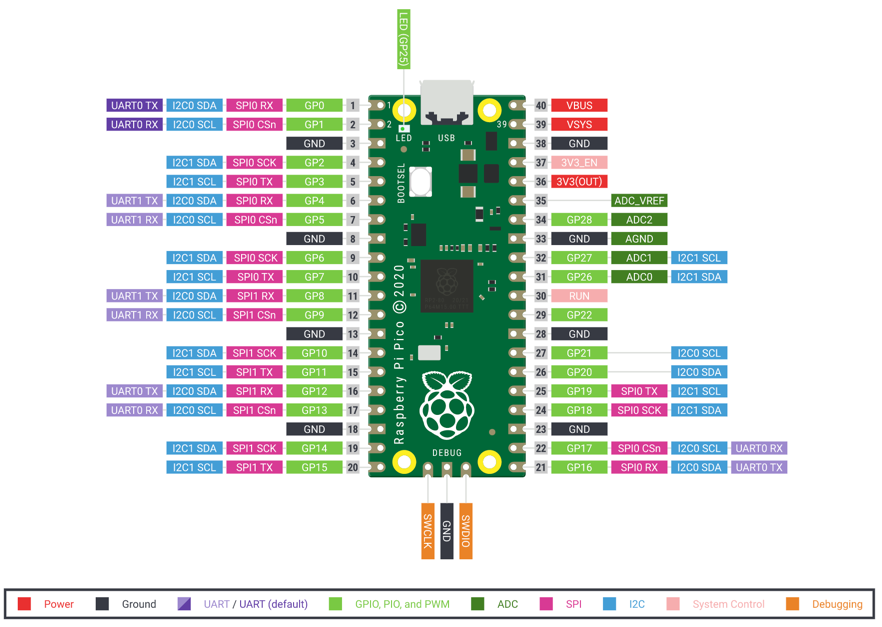
Pico W Wireless Module
The Pico W's wireless module is an Infineon CYW43439 chip that provides 2.4 GHz Wi-Fi (802.11n) and Bluetooth 5.2. It connects to the RP2040 over SPI internally on the board.
Example: MicroPython accesses the Pico W's wireless module through the network library without needing to know it communicates internally over SPI.
Pin Modes (Input/Output)
Pin modes control whether a GPIO pin is set up to send signals (output) or receive signals (input). In MicroPython you set the mode when creating a Pin object.
Example: Pin(15, Pin.OUT) makes GP15 an output; Pin(14, Pin.IN) makes GP14 an input.
Pin.IN Mode
Pin.IN is the MicroPython constant that configures a GPIO pin to receive digital signals from external components. The pin voltage can then be read with .value().
Example: button = Pin(14, Pin.IN, Pin.PULL_UP) creates an input pin with an internal pull-up resistor.
Pin.irq() Method
Pin.irq(trigger, handler) sets up an interrupt on a GPIO pin that calls a handler function when the pin voltage changes. trigger specifies whether to respond to rising edges, falling edges, or both.
Example: btn.irq(trigger=Pin.IRQ_FALLING, handler=on_press) calls on_press() each time the button is pressed.
Pin.OUT Mode
Pin.OUT is the MicroPython constant that configures a GPIO pin to send digital signals (HIGH or LOW) to external components.
Example: led = Pin(25, Pin.OUT) configures GP25 as an output pin for the onboard LED.
Pin.value() Method
Pin.value() reads (on an input pin) or sets (on an output pin) the digital state of a GPIO pin. With no argument it returns 0 (LOW) or 1 (HIGH). With an argument it sets the state.
Example: if sensor_pin.value() == 1: checks whether a digital sensor is currently HIGH.
Ping-Servo Scanner
A ping-servo scanner is a robot project that mounts an ultrasonic sensor on a servo motor and rotates it to measure distances in different directions, building a simple map of the surroundings.
Example: Sweeping the servo from 0° to 180° in 10° steps and recording the HC-SR04 reading at each angle creates a distance profile.
PIO (Programmable I/O) State Machine
The PIO (Programmable I/O) state machine is a special hardware processor inside the RP2040 chip that can run small, fast programs to create precise digital signals or protocols independently of the main CPU.
Example: The NeoPixel (WS2812B) driver on the Pico uses a PIO state machine to generate the exact timing that the LEDs require.
PIO Assembly Language
PIO assembly language is a tiny set of instructions used to write programs for the RP2040's PIO state machines. These programs control pin toggling and data movement at high precision.
Example: A PIO program to generate a PWM signal can be written in just four assembly instructions.
PIO for WS2812B
PIO (Programmable I/O) is the technology the RP2040 uses to generate the precise 800 kHz data signal required by WS2812B NeoPixel LEDs. The PIO state machine handles the timing so the CPU does not have to.
Example: The MicroPython neopixel library uses PIO internally to send color data to NeoPixel strips reliably.
Play a Melody
Playing a melody in MicroPython means stepping through a list of note frequencies and durations, setting a PWM pin to each frequency in turn, waiting for the duration, then moving to the next note.
Example: for note, duration in melody: pwm.freq(note); sleep_ms(duration); pwm.duty_u16(0); sleep_ms(50) plays a song.
Play a Scale
Playing a scale in MicroPython means playing a sequence of musical notes (like C, D, E, F, G, A, B, C) one after another through a buzzer, each for a fixed duration.
Example: for freq in [262, 294, 330, 349, 392, 440, 494, 523]: pwm.freq(freq); sleep(0.3) plays one octave of C major.
Potentiometer
A potentiometer is a variable resistor with three terminals: two ends and a sliding contact (wiper) in the middle. Turning the knob changes the wiper's position and therefore its output voltage.
Example: Connecting a potentiometer between 3.3 V and GND and reading the wiper with an ADC gives a voltage from 0 to 3.3 V as you turn the knob.
Potentiometer as Voltage Divider
When used as a voltage divider, a potentiometer splits its supply voltage into two parts. The wiper output voltage depends on how far the knob is turned.
Example: A pot connected between 3.3 V and GND with its wiper at the halfway position outputs 1.65 V.
Power (Watts)
Power is the rate at which electrical energy is used or produced, measured in watts (W). Power equals voltage times current: P = V × I.
Example: An LED drawing 20 mA at 3.3 V uses 0.066 W (66 mW) of power.
Power Supply
A power supply is a device or circuit that provides electrical power to other components at the correct voltage and current. USB ports, batteries, and wall adapters are all power supplies.
Example: The Raspberry Pi Pico can be powered by a USB cable, a 5 V power supply, or batteries connected to the VSYS pin.
Print Debugging
Print debugging is the practice of adding print() statements to a program to display variable values and track the program's progress, helping identify where things go wrong.
Example: Adding print("ADC value:", adc.read_u16()) inside a loop lets you watch the sensor reading change in real time.
Print Statement
A print statement uses the Python print() function to send text or variable values to the serial console. It is the most basic way to see what a program is doing.
Example: print("Temperature:", temp) displays the word "Temperature:" followed by the value of temp in the REPL console.
Project Demonstration
A project demonstration is the final step in a project where you show your working creation to an audience, explain how it works, and describe what you learned during the build process.
Example: Connecting the robot to a battery and running it through an obstacle course in front of classmates is the project demonstration.
Project Requirements
Project requirements are the specific goals and constraints a project must meet, written down before building begins. They describe what the project must do, what it cannot do, and any limits on size, cost, or components.
Example: "The robot must stop within 5 cm of an obstacle and cost under $20" are project requirements.
Prompt Engineering Basics
Prompt engineering is the practice of writing clear, specific instructions when talking to an AI tool to get more useful and accurate responses.
Example: "Write a MicroPython function that reads the DHT11 sensor on GP2 and returns temperature in Celsius" is a better prompt than just "write sensor code."
Prototype Design
Prototype design is creating a first working version of a project to test whether your ideas work before spending time on a polished final version.
Example: Wiring an LED and button on a breadboard and writing 10 lines of MicroPython to test the logic is a prototype design.
Pseudocode
Pseudocode is an informal description of a program's logic written in plain English (or any human language) that is clear enough to translate directly into real code.
Example: "IF distance < 10 cm THEN stop motors ELSE keep moving" is pseudocode for obstacle avoidance.
Pull-Down Resistor
A pull-down resistor is a resistor connected between a GPIO input pin and GND. It holds the pin at LOW when no signal is connected, preventing the pin from floating to a random voltage.
Example: A 10 kΩ resistor between a button pin and GND ensures the pin reads LOW when the button is not pressed.
Pull-Up Resistor
A pull-up resistor is a resistor connected between a GPIO input pin and the positive supply (3.3 V). It holds the pin at HIGH when no signal is connected, which is needed for active-low buttons.
Example: Pin(14, Pin.IN, Pin.PULL_UP) enables the Pico's internal pull-up resistor on GP14 without needing an external resistor.
Pulse-Width Modulation (PWM)
Pulse-Width Modulation (PWM) is a technique of rapidly switching a pin between HIGH and LOW to simulate a voltage between the two extremes. The ratio of on-time to off-time is called the duty cycle.
Example: A 3.3 V pin with 50% duty cycle behaves like a 1.65 V DC signal for components that respond to average voltage, like an LED's brightness.
PWM
A type of output signal used to control items with continuous values. For example, we use PWM to control the brightness of a light or the speed of a motor. We use pulse-width modulation (PWM) to control the speed of our DC motors.
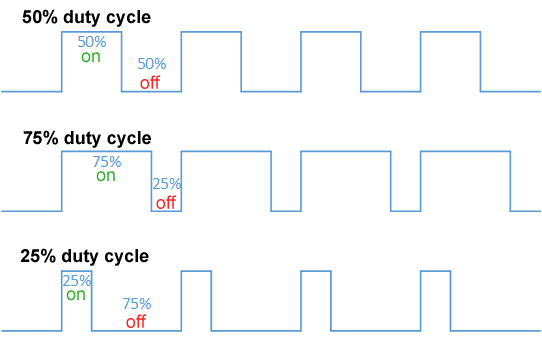
PWM Duty Cycle
PWM duty cycle is the percentage of time the signal is HIGH in one complete cycle. A 100% duty cycle means always HIGH (full on). A 0% duty cycle means always LOW (off).
Example: A 25% duty cycle makes an LED glow at roughly one-quarter brightness.
PWM for Motor Speed
PWM (Pulse-Width Modulation) controls motor speed by rapidly switching the motor's power on and off. The motor's average speed matches the duty cycle percentage.
Example: A 50% duty cycle on a motor driver PWM pin runs the motor at half speed.
PWM for Servo Control
PWM (Pulse-Width Modulation) controls a servo motor's angle by sending pulses of specific widths at 50 Hz. A 1 ms pulse moves the servo to one extreme; a 2 ms pulse moves it to the other.
Example: pwm.duty_u16(4915) sends a ~1.5 ms pulse, which centers most servos at 90°.
PWM Frequency
PWM frequency is how many complete on-off cycles happen per second, measured in hertz. Different applications need different frequencies: audio needs 20 kHz+, servos need 50 Hz.
Example: pwm.freq(50) sets the PWM signal to 50 Hz, which is the correct frequency for controlling servo motors.
PWM Kit Project
A PWM kit project is an educational electronics kit project that demonstrates pulse-width modulation by controlling LED brightness or motor speed through a potentiometer or button inputs.
PWM.duty_u16() Method
PWM.duty_u16(value) sets the duty cycle of a PWM output using a 16-bit value between 0 (always off) and 65535 (always on).
Example: pwm.duty_u16(32768) sets the duty cycle to exactly 50%.
Python Syntax
Python syntax is the set of rules about how Python code must be written so the interpreter can understand it. Breaking syntax rules causes a SyntaxError.
Example: Forgetting a colon at the end of an if statement is a Python syntax error: if x > 0 should be if x > 0:.
QMC5883L Compass Sensor
The QMC5883L is a three-axis magnetic field sensor that is a common replacement for the HMC5883L. It communicates over I2C and measures the Earth's magnetic field for compass applications.
Example: The QMC5883L uses I2C address 0x0D, while the HMC5883L uses 0x1E, so the driver code differs.
Quadrature Encoding
Quadrature encoding is a method used by rotary encoders where two output signals (A and B) are 90 degrees out of phase. Reading both signals reveals both the speed and direction of rotation.
Example: If signal A rises before signal B, the encoder is turning clockwise. If B rises first, it is turning counterclockwise.
Rainbow Pattern
A rainbow pattern on NeoPixels displays the full spectrum of colors distributed across the LEDs, cycling smoothly from red through orange, yellow, green, blue, and violet.
Example: Assigning each LED a hue equal to (index * 255 // num_leds) creates a static rainbow across the strip.
RAM on Pico
RAM (Random Access Memory) is the fast working memory that the Pico uses to store variables and run programs. The Raspberry Pi Pico has 264 KB of RAM, which is shared between the program and its data.
Example: A large Python list or string can quickly use up the Pico's 264 KB of RAM, causing a MemoryError.
Raspberry Pi 500 Keyboard
The Raspberry Pi 500 is a full desktop computer built into a compact keyboard. Unlike the Raspberry Pi Pico, it runs a full Linux operating system and is not a microcontroller.
Raspberry Pi Foundation
The company that builds the Raspberry Pi hardware and provides some software.
Raspberry Pi Pico
A microcontroller designed by the Raspberry Pi foundation for doing real-time control systems.
The Pico was introduced in 2020 with a retail list price of $4. It was a key development because it used a custom chip that had 100 times the RAM of an Arduino Nano.
Raspberry Pi Pico W
The Raspberry Pi Pico W is the wireless version of the Pico. It adds an onboard 2.4 GHz Wi-Fi and Bluetooth module, allowing internet-connected IoT projects.
Example: The Pico W's extra wireless chip lets it connect to a home network and fetch weather data from the internet.
Reading Analog Values
Reading analog values means using the ADC to get a number representing the voltage on a pin. The number is between 0 and 65,535 for a 16-bit ADC.
Example: raw = adc.read_u16(); voltage = raw * 3.3 / 65535 converts a raw ADC value to volts.
README Documentation
A README file is the main documentation file for a software project. It explains what the project does, how to set it up, and how to use it. README files are usually written in Markdown format.
Example: A good README for a MicroPython robot project includes the parts list, wiring diagram, and instructions to copy files to the Pico.
Resistance
Resistance is the opposition to the flow of electric current in a circuit, measured in ohms (Ω). Higher resistance means less current flows for the same voltage.
Example: A 330 Ω resistor in series with an LED on a 3.3 V pin limits the current to about 10 mA.
Resistor Color Code
The resistor color code is a system of colored bands painted on a resistor that indicate its resistance value. Each color represents a digit or multiplier, and a gold or silver band shows the tolerance.
Example: A resistor with bands orange-orange-brown-gold has a value of 330 Ω ± 5%.
Resolution
Resolution is the number of bits an analog-to-digital converter (ADC) uses to represent a measured voltage as a digital number. More bits give finer steps and more precise readings.
Example: The Raspberry Pi Pico's ADC has 16-bit resolution, producing values from 0 to 65,535 — so a 1.65 V input on a 3.3 V reference reads approximately 32,768.
REST API Basics
A REST API (Representational State Transfer Application Programming Interface) is a standard way for programs to request data from web servers using HTTP requests. The server responds with data, usually in JSON format.
Example: Sending an HTTP GET request to https://api.openweathermap.org/... is using a REST API to fetch weather data.
Return Value
A return value is the data that a function sends back to the code that called it. In Python, the return keyword exits a function and passes back a value.
Example: def square(x): return x * x — calling square(4) returns 16.
RFID Card Reading
RFID (Radio Frequency Identification) card reading is detecting and reading the unique ID stored in an RFID card or key fob using a reader module. Each card has a different ID.
Example: Tapping an RFID card to the RC522 reader returns a unique byte string like b'\x3A\x4F\x21\xBC' identifying that card.
RFID RC522 Module
The RFID RC522 is a radio frequency identification module that reads the unique IDs from compatible cards and key fobs operating at 13.56 MHz. It communicates with the microcontroller over SPI.
Example: Using the RC522 with a Pico, you can build a door lock that only unlocks when a registered card is tapped.
RFID RC522 SPI Interface
The RFID RC522 module uses SPI (Serial Peripheral Interface) to transfer data to and from the microcontroller. It needs MOSI, MISO, SCK, CS, and RST pins.
Example: Wiring the RC522's SDA pin to the Pico's GP5 (SPI chip select) and the other SPI lines to their matching pins allows communication.
RGB Color Model
The RGB (Red, Green, Blue) color model creates colors by mixing different amounts of red, green, and blue light. Each channel is usually a number from 0 to 255.
Example: (255, 0, 0) is pure red; (255, 255, 0) is yellow (red + green); (255, 255, 255) is white (all channels at maximum).
Robot Calibration
Robot calibration is the process of adjusting a robot's sensor thresholds, motor speeds, or turn amounts so it behaves correctly in its real environment.
Example: Running a line-follower program and adjusting the sensor threshold value until the robot reliably stays on the line is calibration.
Robot Chassis
A robot chassis is the physical frame or body of a robot that holds the motors, wheels, batteries, and electronics. It provides the structural foundation for the robot.
Example: A two-wheeled plastic chassis with motor mounts is the starting point for most beginner differential-drive robots.
Robot Speed Tuning
Robot speed tuning is adjusting the PWM duty cycle values sent to a robot's motors until it moves at the desired speed and turns accurately.
Example: If a robot always drifts left, increasing the left motor's PWM value slightly in the code corrects it.
Rotary Encoder
A rotary encoder is a knob-shaped sensor that outputs pulses as it is turned. It can detect rotation direction and amount, and is used for volume controls, menu navigation, and position tracking.
Example: Turning a rotary encoder clockwise increases a value; counterclockwise decreases it.
Rotary Encoder CLK and DT Pins
A rotary encoder has two output pins: CLK (clock) and DT (data). By watching which pin changes first, the microcontroller can determine the direction of rotation.
Example: If CLK goes HIGH before DT, the encoder is turning clockwise; if DT goes HIGH first, it is turning counterclockwise.
rotary Module
The rotary module is a MicroPython library that reads the position and direction of a rotary encoder, tracking the count of pulses even when the encoder is turned quickly.
Example: r = Rotary(dt=Pin(2), clk=Pin(3)) creates an encoder object; r.value() returns the current click count.
RP2040 Chip
The RP2040 is the microcontroller chip designed by Raspberry Pi Ltd. It has two ARM Cortex-M0+ processor cores running at up to 133 MHz, 264 KB of RAM, and unique PIO hardware.
Example: The RP2040 is the brain inside the Raspberry Pi Pico and the Cytron Maker Pi RP2040.
RP2040 chip
A custom chip created by the Raspberry Pi Foundation to power the Raspberry Pi Pico.
RP2040 Dual Core
The RP2040 contains two ARM Cortex-M0+ processor cores that can run code simultaneously. MicroPython uses Core 0 by default; Core 1 can be started for additional parallel tasks.
Example: Running a motor control loop on Core 0 and sensor averaging on Core 1 allows both to run at full speed without either waiting for the other.
RP2040 PIO (Programmable I/O)
The RP2040's PIO (Programmable I/O) blocks are special hardware state machines that can run tiny custom programs to generate or receive precise digital signals without using the main CPU.
Example: WS2812B NeoPixels require precise 800 kHz signaling that the PIO handles perfectly, freeing the CPU for other work.
rshell
A MicroPython shell that runs on the host and uses MicroPython's raw-REPL to send python snippets to the pyboard in order to get filesystem information, and to copy files to and from MicroPython's filesystem.
It also has the ability to invoke the regular REPL, so rshell can be used as a terminal emulator as well.
Note: With rshell you can disable USB Mass Storage and still copy files into and out of your pyboard.
rshell Tool
The rshell tool is a command-line program that connects to a MicroPython board over USB and provides a file-manager-like shell for copying files, running scripts, and accessing the REPL.
Example: rshell cp main.py /pyboard/main.py copies main.py from your computer to the Pico using rshell.
RTC (Real-Time Clock)
An RTC (Real-Time Clock) is a dedicated circuit that keeps accurate track of the current date and time, even when the main power is off (using a small backup battery). The RP2040 has a built-in RTC.
Example: rtc = machine.RTC(); rtc.datetime((2025, 6, 15, 0, 12, 30, 0, 0)) sets the Pico's real-time clock.
Scaling ADC Values
Scaling ADC values means converting a raw ADC reading (0–65535) into a useful unit like volts, percentage, or temperature by applying a math formula.
Example: voltage = adc.read_u16() * 3.3 / 65535 scales a raw 16-bit reading to a voltage between 0 and 3.3 V.
Schematic Symbol
A schematic symbol is a standardized drawing that represents an electronic component in a circuit diagram. Each component type has its own unique symbol.
Example: An LED is shown as a triangle pointing to a bar with two small arrows indicating emitted light.
Screen Coordinate System
The screen coordinate system on OLED and TFT displays places the origin (0, 0) at the top-left corner. X increases to the right and Y increases downward.
Example: oled.text("Hi", 0, 0, 1) places text in the top-left corner; oled.text("Bye", 64, 56, 1) places it near the bottom-right.
Script Mode
Script mode is when a MicroPython program is saved in a file and run from start to finish, as opposed to interactive mode where commands are typed one at a time. This is the normal way to run programs.
Example: Saving your LED blink code in main.py and pressing Run in Thonny runs it in script mode.
SD Card Reader
An SD card reader is a module that connects to a microcontroller over SPI and allows reading and writing data to a standard SD memory card. It provides much more storage than the Pico's internal flash.
Example: Using an SD card reader with a Pico lets you log weeks of sensor data to a file instead of just the few kilobytes available in internal flash.
7-Segment Digit Encoding
7-segment digit encoding is the set of which segments (A through G) must be lit to display each digit (0–9) or letter on a 7-segment display. It is stored as a byte where each bit controls one segment.
Example: The digit 0 lights segments A, B, C, D, E, F but not G, encoded as 0b00111111.
7-Segment Display
A 7-segment display is a simple numeric display made of seven LED segments arranged to show digits 0–9 and some letters. Segments are labelled A through G.
Example: A microcontroller sets specific pins HIGH or LOW to light the correct segments for each digit.
Series Circuit
A series circuit has components connected end to end in a single path. The same current flows through every component, and their voltages add up to the supply voltage.
Example: An LED and a current-limiting resistor wired in series share the same current but split the 3.3 V between them.
Servo Angle Control
Servo angle control sets a servo motor to a specific angular position by sending a PWM pulse of the correct width. Most servos rotate between 0° and 180°.
Example: Mapping 0°–180° to pulse widths of 1000–2000 µs and calling pwm.duty_u16() with the calculated value positions the servo.
Servo Min/Max Pulse Width
The servo minimum pulse width (usually ~1000 µs) commands the servo to its 0° position. The maximum pulse width (usually ~2000 µs) commands it to its 180° position.
Example: min_duty = int(1000/20000 * 65535) calculates the 16-bit duty cycle for a 1 ms pulse in a 50 Hz (20 ms) cycle.
Servo Motor
A servo motor is a type of motor that can be commanded to rotate to a specific angle and hold that position. It contains its own feedback circuit and is controlled by a PWM signal.
Example: A 9g hobby servo can move to any angle between 0° and 180° based on the PWM pulse width it receives.
Servo Signal (50Hz PWM)
A servo motor is controlled by a 50 Hz PWM signal (one pulse every 20 ms). The pulse width, typically between 1 and 2 ms, determines the servo's angle.
Example: pwm.freq(50) sets the correct 50 Hz base frequency for servo control on any Pico PWM pin.
SH1106 I2C Interface
The SH1106 OLED controller communicates over I2C in the same way as the SSD1306, using SDA and SCL at address 0x3C or 0x3D. However, the SH1106 has a slightly different internal memory layout.
Example: oled = SH1106_I2C(128, 64, i2c, rotate=180) creates a driver for a 128×64 SH1106 OLED with the image flipped.
sh1106 Module
The sh1106 module is a MicroPython library for driving OLED displays that use the SH1106 controller. It provides the same text(), fill(), and show() methods as the SSD1306 library.
Example: oled = sh1106.SH1106_I2C(128, 64, i2c) creates a display object for a 128×64 OLED with an SH1106 controller.
Shared Memory Between Cores
Shared memory between cores is RAM that both Core 0 and Core 1 of the RP2040 can read and write. Access must be coordinated carefully to prevent one core from reading data while the other is changing it.
Example: A global variable sensor_value updated by Core 1 and read by Core 0 is shared memory. A lock or queue should protect access.
Short Circuit
A short circuit is an unintended direct connection between two points of different voltage (like power and ground) with very low resistance. It causes a large current to flow, which can damage components or start a fire.
Example: Accidentally touching a jumper wire from the 5 V rail to GND creates a short circuit that can blow a fuse or damage a USB port.
socket Module
The socket module in MicroPython provides low-level network communication tools based on the TCP/IP protocol. It is used to create web servers and clients on the Pico W.
Example: import socket is the first step in writing a MicroPython web server.
socket.socket() Class
socket.socket() creates a new network socket object that can connect to a remote server or listen for incoming connections. It is the foundation of network communication in Python and MicroPython.
Example: s = socket.socket(); s.connect(("192.168.1.1", 80)) opens a connection to a web server.
Soft PWM
Soft PWM (software PWM) generates a PWM signal by rapidly toggling a GPIO pin in software code using precise timing, rather than using dedicated hardware PWM circuits. It is less precise but can use any pin.
Example: Using utime.sleep_us() to control pin on/off timing produces a soft PWM signal on any GPIO pin.
Software Debouncing
Software debouncing prevents false multiple reads from a bouncing button by adding a short delay or time check after the first detection, ignoring further signals until the bounce settles.
Example: After detecting a button press, utime.sleep_ms(20) followed by re-reading the button ignores the bounce.
Solderless Assembly
Solderless assembly means building electronic circuits using breadboards and jumper wires instead of permanent soldering. It allows quick changes and reuse of components.
Example: Building a sensor circuit on a breadboard is solderless assembly — you can pull out components and try again if something does not work.
Sound Level Detection
Sound level detection measures how loud the ambient sound is using a microphone and reports a number representing the volume. It can trigger actions above a noise threshold.
Example: Clapping loudly near a microphone connected to a Pico ADC produces a high voltage spike that the program detects as a loud sound.
Sound Parts List
A sound parts list for a MicroPython audio project typically includes a passive or active buzzer (or speaker), a PWM-capable GPIO pin, and optionally an amplifier chip for louder output.
Example: Parts for a simple melody player: Pico, 1× passive buzzer, 1× 100-ohm resistor (optional), 2× jumper wires.
Source Code
Source code is the human-readable text written in a programming language that forms a computer program. It is what programmers write and edit, before (or instead of) the computer running it.
Example: The file main.py containing while True: led.toggle(); sleep(0.5) is the source code for an LED blink program.
Speaker Wiring
Speaker wiring connects a speaker to a microcontroller's audio output, usually through an amplifier chip. The speaker needs enough current and voltage to produce audible sound.
Example: Wiring a small 8-ohm speaker to a PAM8403 amplifier board, which is connected to the Pico's PWM audio pin, produces usable volume.
Spectrum Analyzer Concept
A spectrum analyzer displays the strength of different audio frequencies in real time, usually as a bar chart. It uses FFT to convert audio samples into frequency data.
Example: A Pico reading a microphone and displaying FFT results as vertical bars on an OLED creates a live spectrum analyzer.
Spectrum Analyzer Kit
A spectrum analyzer kit is an educational project package that includes a microphone, display, and MicroPython code to build a real-time audio frequency visualizer.
Example: The kit displays changing bars on an OLED as music plays, showing which frequencies (bass, mid, treble) are loudest.
Speed of Sound Calculation
The speed of sound calculation converts the round-trip echo time from an ultrasonic sensor into a distance. Sound travels at about 343 m/s (34,300 cm/s) in air at room temperature.
Example: distance_cm = duration_us * 0.01715 converts microseconds of echo time to centimeters (343 m/s ÷ 2 = 17,150 cm/s, then ×10⁻⁶ to convert µs to s).
SPI
An interface bus commonly used to send data between microcontrollers and small peripherals such as sensors, displays and SD cards. SPI uses separate clock and data lines, along with a select line to choose the device you wish to talk to.
Also known as: Serial Peripheral Interface See also: I2C
SPI Bus Pins (MOSI MISO SCK CS)
The SPI (Serial Peripheral Interface) bus uses four pins: MOSI (data from controller to device), MISO (data from device to controller), SCK (clock), and CS (chip select, activates one specific device).
Example: On the Pico, GP19 is MOSI, GP16 is MISO, GP18 is SCK, and any GPIO can serve as CS for an SPI device.
SPI Debugging
SPI debugging means finding and fixing problems with SPI communication by checking pin connections, verifying clock polarity and phase settings, and monitoring data with a logic analyzer or oscilloscope.
Example: If an SPI display shows nothing, the first debugging step is checking that the CS pin is connected and being pulled LOW during transfers.
SPI Protocol
SPI (Serial Peripheral Interface) is a four-wire synchronous communication protocol used between microcontrollers and fast peripherals like displays, SD cards, and sensor modules.
Example: A TFT display uses SPI to receive pixel data at millions of bits per second.
SPI SD Card Interface
An SD card connected to a microcontroller over SPI uses four wires (MOSI, MISO, SCK, CS) plus power and ground. The microcontroller reads and writes data blocks to the card using the SPI bus.
Example: A MicroPython SD card library uses machine.SPI to initialize the card and provide standard file read/write operations.
SPI.read() Method
SPI.read(nbytes) receives nbytes bytes from an SPI device and returns them as a bytes object. The clock pulses while reading and the device sends data on the MISO line.
Example: data = spi.read(4) receives 4 bytes from the currently selected SPI peripheral.
SPI.write() Method
SPI.write(buf) sends the bytes in buf to an SPI device. The data is clocked out on the MOSI line while the device uses the clock (SCK) to latch each bit.
Example: spi.write(b'\x01\x02\x03') sends three bytes to the active SPI device.
SSD1306 128x32 Resolution
An SSD1306 OLED at 128×32 resolution has 128 columns and 32 rows of pixels. It is smaller than the 128×64 version and uses half the framebuffer memory (512 bytes).
Example: oled = SSD1306_I2C(128, 32, i2c) creates a driver object for a 128×32 OLED.
SSD1306 128x64 Resolution
An SSD1306 OLED at 128×64 resolution has 128 columns and 64 rows of pixels. It is the most common OLED size used in MicroPython projects.
Example: The 0.96-inch OLED module sold on most electronics sites is a 128×64 SSD1306 display.
SSD1306 I2C Interface
The SSD1306 I2C interface connects the OLED display using the I2C bus (SDA and SCL). Most 0.96-inch OLED modules default to I2C at address 0x3C or 0x3D.
Example: oled = SSD1306_I2C(128, 64, i2c, addr=0x3C) connects to an SSD1306 over I2C.
ssd1306 Module
The ssd1306 module is a MicroPython driver library for SSD1306-based OLED displays. It provides SSD1306_I2C and SSD1306_SPI classes with drawing methods for text, pixels, lines, and rectangles.
Example: from ssd1306 import SSD1306_I2C imports the I2C driver class.
SSD1306 SPI Interface
The SSD1306 SPI interface connects the OLED display using the SPI bus. SPI is faster than I2C and is used when display refresh speed matters.
Example: oled = SSD1306_SPI(128, 64, spi, dc, res, cs) sets up an SSD1306 over SPI with DC, RESET, and CS control pins.
SSD1306_I2C Class
SSD1306_I2C is a MicroPython class from the ssd1306 library that drives an SSD1306 OLED display over I2C. It inherits the standard drawing methods.
Example: from ssd1306 import SSD1306_I2C; oled = SSD1306_I2C(128, 64, i2c).
SSD1306_SPI Class
SSD1306_SPI is a MicroPython class from the ssd1306 library that drives an SSD1306 OLED display over SPI for faster display updates.
Example: oled = SSD1306_SPI(128, 64, spi, Pin(9), Pin(10), Pin(11)) creates an SPI-connected OLED driver.
SSID and Password
An SSID (Service Set Identifier) is the name of a Wi-Fi network. The password (or passphrase) is the secret key needed to join that network. Both are required to connect a Pico W to Wi-Fi.
Example: wlan.connect("HomeNetwork", "MyPassword123") uses the SSID and password to join a Wi-Fi network.
ST7789V Color LCD Driver
The ST7789V is a color LCD controller used in many small TFT displays. It communicates via SPI and supports 16-bit color (RGB565) at up to 240×320 pixels.
Example: Many 1.14-inch and 1.3-inch color LCD modules for the Pico use the ST7789V controller.
ST7789V Resolution
ST7789V displays come in various resolutions, including 135×240, 240×240, and 240×320 pixels. The resolution must be specified correctly in the driver to avoid image distortion.
Example: A 1.3-inch ST7789V display is typically 240×240 pixels; calling the driver with wrong dimensions shifts the image.
ST7789V SPI Interface
The ST7789V color LCD communicates over SPI. In addition to MOSI, SCK, and CS, it needs a DC (data/command) pin and a RESET pin.
Example: display = ST7789(spi, 240, 240, reset=Pin(9), dc=Pin(8), cs=Pin(5)) initializes a 240×240 color display.
Stack Memory
Stack memory is a region of RAM used automatically to store local variables and function call information. Each function call adds a "frame" to the stack, and it is removed when the function returns.
Example: Deeply nested function calls use more stack memory. Calling a function from within itself recursively too many times causes a RuntimeError: maximum recursion depth exceeded.
Stack Trace Viewer
A stack trace viewer shows the sequence of function calls that led to an error. Thonny's stack trace display shows each function's file and line number, making it easier to find where a bug occurred.
Example: Seeing File "sensors.py", line 12, in read_temp in a stack trace tells you exactly which line caused the error.
State Machine
A programming model where a system can be in one of several "states," with rules governing transitions between states.
State machines are particularly useful in MicroPython for managing device behavior and user interactions. Many of our projects have "modes" that govern things like what pattern is being displayed on a NeoPixel Strip.
Stepper Driver (ULN2003)
The ULN2003 is a driver board that connects a 28BYJ-48 stepper motor to a microcontroller. It contains seven high-current Darlington transistor pairs that can switch the motor's coils on and off.
Example: Connecting the ULN2003's four input pins to four Pico GPIO pins lets you step the motor by toggling the pins in the correct sequence.
Stepper Motor
A stepper motor is a motor that rotates in precise fixed steps rather than spinning continuously. Each electrical pulse from the driver moves the motor shaft by one step.
Example: A 28BYJ-48 stepper motor takes 2048 steps to make one full revolution, giving very precise position control.
Stepper Motor Phases
Stepper motor phases are the groups of coils inside the motor. By energizing the phases in a specific order, the motor shaft moves step by step.
Example: A 4-phase stepper motor energizes its four coil groups in the pattern 1-2-3-4-1-2-3-4 to spin continuously.
Stepper Steps Per Revolution
Steps per revolution is the number of individual steps a stepper motor needs to complete one full 360° rotation. It determines the minimum angle per step.
Example: A 28BYJ-48 in full-step mode takes 2048 steps per revolution, so each step is about 0.176°.
String
A string is a data type that stores text. In Python, strings are written inside single quotes ('hello') or double quotes ("hello"). Strings can be joined, sliced, and formatted.
Example: name = "Pico" stores the text "Pico" as a string. print("Hello, " + name) displays "Hello, Pico".
String Formatting
String formatting is the process of inserting variable values into a text string in a controlled way. Python uses f-strings (f"Temp: {temp}°C") or .format() for this.
Example: msg = f"Temp: {temperature:.1f}C" creates a string like "Temp: 23.5C" with one decimal place.
sys Module
The sys module provides information about the MicroPython runtime itself, such as the Python version, platform name, and module search path. It also provides sys.exit() to stop a program.
Example: import sys; print(sys.implementation) shows which version of MicroPython is running.
TCP vs UDP
TCP (Transmission Control Protocol) is a reliable, connection-based network protocol that guarantees data arrives in order. UDP (User Datagram Protocol) is faster but does not guarantee delivery. Web pages use TCP; live audio/video often uses UDP.
Example: A Pico W web server uses TCP sockets so every byte of the web page arrives correctly at the browser.
TFT Display
A TFT (Thin-Film Transistor) display is a type of color LCD screen where each pixel has its own transistor for faster switching and higher contrast. TFT displays are used for color graphics in embedded projects.
Example: A 2.8-inch TFT display with 320×240 pixels can show color images, charts, and text from a Raspberry Pi Pico.
Thonny
A lightweight Python IDE ideal for writing simple Python programs for first time users.
Thonny runs on Mac, Windows and Linux.
Thonny File Manager
The Thonny file manager is a panel inside the Thonny IDE that shows files on both your computer and the connected MicroPython device. You can drag and drop files to transfer them.
Example: Dragging main.py from the local files panel to the device files panel in Thonny copies the file to the Pico.
Thonny IDE
Thonny is a beginner-friendly integrated development environment (IDE) designed for Python and MicroPython. It includes a code editor, a REPL shell, and a file manager for working with microcontroller boards.
Example: Opening Thonny, selecting "MicroPython (Raspberry Pi Pico)" as the interpreter, and clicking Run uploads and runs your script on the Pico.
_thread Module
The _thread module in MicroPython allows launching a second thread (on Core 1 of the RP2040) to run code in parallel with the main program on Core 0.
Example: _thread.start_new_thread(sensor_loop, ()) starts sensor_loop() running on Core 1 while the main program continues on Core 0.
Tilt Detection
Tilt detection uses an accelerometer to determine how much a device is angled away from flat. By reading the X, Y, and Z acceleration values, you can calculate the tilt angle.
Example: tilt_angle = math.degrees(math.atan2(acc_x, acc_z)) calculates the tilt of a board in degrees.
Time-of-Flight Measurement
Time-of-flight measurement calculates distance by measuring how long a pulse of light or sound takes to travel to an object and return. Shorter travel time means the object is closer.
Example: The VL53L0X sensor sends a laser pulse and measures the return time in picoseconds to calculate distances from 2 mm to 200 cm.
Timer Callback
A timer callback is a function that a hardware timer calls automatically each time it fires. The function runs in response to the timer interrupt, not in the normal program flow.
Example: timer.init(freq=10, callback=update_display) calls update_display() ten times per second regardless of what the main loop is doing.
Timer Class
The Timer class in MicroPython creates a hardware timer that can run a callback function at fixed time intervals or after a one-time delay.
Example: t = machine.Timer(); t.init(period=500, mode=machine.Timer.PERIODIC, callback=blink) creates a timer that calls blink every 500 ms.
TM1637 Display Driver
The TM1637 is a driver chip for 4-digit 7-segment LED displays. It communicates with the microcontroller using a simple 2-wire protocol (CLK and DIO pins).
Example: display = TM1637(clk=Pin(0), dio=Pin(1)); display.show("12:34") displays the time "12:34" on a TM1637 module.
Tone Generation
Tone generation is producing a musical note or beep by setting a PWM output to the correct frequency. The buzzer or speaker vibrates at that frequency to produce the sound.
Example: pwm.freq(440); pwm.duty_u16(32768) generates a 440 Hz (note A4) tone at 50% duty cycle through a buzzer.
Tone Generator Kit
A tone generator kit is an educational project that plays notes or sound effects through a buzzer using MicroPython's PWM. It teaches frequency, duty cycle, and music programming concepts.
Example: Building a tone generator that plays a different frequency when each of five buttons is pressed teaches PWM and input handling simultaneously.
Touch Sensor TTP223
The TTP223 is a small capacitive touch sensor module that outputs a digital HIGH signal when a finger touches its sensing pad. It needs no mechanical parts and is very durable.
Example: Mounting a TTP223 sensor behind a non-metallic panel creates an invisible touch button.
Touch.value() Method
Touch.value() (or reading the GPIO pin connected to a touch sensor) returns 1 when the sensor is being touched and 0 when it is not.
Example: if touch_pin.value() == 1: led.toggle() toggles an LED each time the touch sensor is activated.
Traceback Interpretation
Traceback interpretation means reading the error message printed when a MicroPython program crashes. The traceback shows the file names, line numbers, and type of error to help you find and fix the bug.
Example: TypeError: unsupported types for +: 'str', 'int' in a traceback tells you that you tried to add a string and an integer together.
Transistor
A transistor is a three-terminal semiconductor device that can amplify a small signal or act as an electrically controlled switch. Transistors are the building blocks of all digital electronics.
Example: An NPN transistor with its base connected to a Pico GPIO pin can switch a 12 V buzzer on and off using a 3.3 V signal.
Transistor Motor Control
Transistor motor control uses a transistor as a switch to turn a DC motor on or off from a low-power microcontroller signal. A single transistor can only drive the motor in one direction.
Example: An NPN transistor with its base on a GPIO pin, collector to the motor, and emitter to GND allows the Pico to switch a motor on and off.
Try-Except Block
A try-except block in Python contains code that might cause an error (try) and code to run if that error happens (except). It prevents the program from crashing when something goes wrong.
Example: try: data = sensor.read() except OSError: print("Sensor not found") handles a missing sensor gracefully.
Tuple
A tuple is a Python data type similar to a list but it cannot be changed after it is created. Tuples are written with round brackets and are used for fixed collections of values.
Example: RED = (255, 0, 0) stores a color as a tuple that will never change.
UART Protocol
UART (Universal Asynchronous Receiver-Transmitter) is a simple two-wire serial communication protocol that sends data one bit at a time using TX (transmit) and RX (receive) pins. No shared clock is needed.
Example: Connecting a GPS module's TX pin to the Pico's RX pin allows the Pico to read NMEA sentences over UART.
UF2 File
The file that must be uploaded into the Raspberry Pi Pico folder to allow it to be used.
The file name format looks like this:
rp2-pico-20210205-unstable-v1.14-8-g1f800cac3.uf2
ujson Module
The ujson module is MicroPython's lightweight JSON (JavaScript Object Notation) library. It converts between JSON text strings and Python dictionaries and lists.
Example: data = ujson.loads('{"temp": 22.3}') parses a JSON string into a Python dictionary.
Ultrasonic Ranging Formula
The ultrasonic ranging formula converts the round-trip echo time from an HC-SR04 sensor into distance. Distance (cm) = echo time (µs) × speed of sound (0.01715 cm/µs), which divides by 2 for one-way travel.
Example: distance_cm = machine.time_pulse_us(echo, 1) * 0.01715 calculates distance from the measured echo time.
Unicorn
MicroPython on Unicorn is completely open source Micropython emulator
- Github Repo: https://github.com/micropython/micropython-unicorn
See Also
uos Module
The uos module in MicroPython provides file system operations similar to Python's os module. It includes functions for listing, creating, and removing files and directories on the device.
Example: import uos; uos.listdir() lists all files on the Pico's flash storage.
upip Package Manager
upip is MicroPython's built-in package manager (similar to Python's pip). It can download and install additional MicroPython libraries from the internet directly onto the device, if it has a network connection.
Example: import upip; upip.install("micropython-umqtt.simple") installs an MQTT library on a networked Pico W.
urequests Module
The urequests module is a MicroPython library that makes HTTP requests easy. It works similarly to the requests library in regular Python and is used to fetch data from web APIs.
Example: r = urequests.get("http://example.com/data.json"); data = r.json() fetches and parses JSON from a URL.
USB Connection
A USB connection links the Raspberry Pi Pico to a computer using a Micro-USB cable. It provides power to the Pico, allows file transfers, and creates a serial port for the REPL.
Example: Plugging the Pico into a computer with a USB cable powers it and lets Thonny connect to it automatically.
USB Power
USB power provides 5 V at up to 500 mA (USB 2.0) or 900 mA (USB 3.0) from a computer or USB charger. The Pico converts this to 3.3 V for its own circuits using a built-in voltage regulator.
Example: A USB phone charger can power a Pico and a small display indefinitely through the Micro-USB port.
utime Module
The utime module in MicroPython provides functions for measuring time and creating delays. It is the MicroPython version of Python's time module.
Example: utime.sleep_ms(500) pauses the program for 500 milliseconds.
utime.sleep()
utime.sleep(seconds) pauses the MicroPython program for the given number of seconds. It accepts both whole numbers and fractions.
Example: utime.sleep(0.5) waits half a second before the next line runs.
utime.ticks_diff()
utime.ticks_diff(newer, older) calculates the elapsed time between two tick values from ticks_ms() or ticks_us(), handling counter wraparound correctly.
Example: elapsed = utime.ticks_diff(utime.ticks_ms(), start_time) gives the number of milliseconds since start_time was recorded.
utime.ticks_ms()
utime.ticks_ms() returns a monotonically increasing count of milliseconds since the Pico was powered on. It is used to measure time without blocking the program.
Example: start = utime.ticks_ms() records the current time; later utime.ticks_diff(utime.ticks_ms(), start) gives the elapsed time.
3.3V Logic Level
3.3 V logic level means the microcontroller's GPIO pins use 3.3 V to represent a HIGH (1) signal and 0 V for a LOW (0) signal. Many modern sensors and modules are designed for 3.3 V logic.
Example: The Raspberry Pi Pico's GPIO pins are all 3.3 V logic, so connecting them directly to 5 V components can damage the Pico.
5V Logic Level
5 V logic level means older components use 5 V to represent a HIGH signal. Connecting a 5 V output directly to a 3.3 V GPIO input can damage the microcontroller without a level shifter.
Example: The Arduino Uno uses 5 V logic, so connecting it directly to a Pico's GPIO pin requires a resistor divider or level shifter.
Variable
A variable is a named storage location in a program that holds a value. The value can change as the program runs. In Python, you create a variable simply by assigning it a value.
Example: temperature = 23.5 creates a variable called temperature that stores the number 23.5.
VBUS Pin
The VBUS pin on the Raspberry Pi Pico carries the raw 5 V USB bus voltage. It is high when the Pico is powered by USB and can be used to detect if USB power is connected.
Example: adc = machine.ADC(3) reads the VBUS voltage (through an internal divider) to check if USB power is present.
Version Control Basics
Version control is a system that tracks changes to files over time so you can see what changed, when, and why, and undo mistakes. Git is the most common version control system.
Example: After adding a new sensor function to your project, running git commit -m "Add temperature sensor" saves a named snapshot you can return to.
VL53L0X I2C Driver
The VL53L0X I2C driver is a MicroPython library that communicates with the VL53L0X time-of-flight distance sensor over I2C and returns distance measurements in millimeters.
Example: tof = VL53L0X(i2c); print(tof.read()) reads the distance in millimeters from the sensor.
VL53L0X Time-of-Flight Sensor
The VL53L0X is a laser-based time-of-flight distance sensor that measures the distance to objects from 2 mm to 2000 mm using invisible infrared laser light. It communicates over I2C.
Example: Pointing a VL53L0X at a wall and printing tof.read() every second shows the distance in millimeters as you move closer or farther away.
VL53L0X.range Property
VL53L0X.range (or .read() in some libraries) is the property that returns the current distance measured by the VL53L0X sensor in millimeters.
Example: distance_mm = tof.read() stores the latest distance reading in millimeters.
Voltage
Voltage is the electrical pressure that pushes current through a circuit, measured in volts (V). Higher voltage pushes more current through the same resistance.
Example: The Raspberry Pi Pico's GPIO pins output 3.3 V when HIGH and 0 V when LOW.
Voltage Divider Circuit
A voltage divider circuit uses two resistors in series to produce an output voltage that is a fraction of the input voltage. It is used to reduce a voltage to a level safe for an ADC or a microcontroller input pin.
Example: A 10 kΩ and 10 kΩ resistor divider from 3.3 V to GND produces 1.65 V at the midpoint.
VS Code IDE
VS Code (Visual Studio Code) is a popular free code editor from Microsoft. With the appropriate extensions it can be used for MicroPython development with syntax highlighting and file management.
Example: Installing the "MicroPico" extension in VS Code lets you write and upload MicroPython files to the Pico directly from the editor.
VSYS Pin
The VSYS pin on the Raspberry Pi Pico provides the main system supply voltage. It accepts 1.8 V to 5.5 V and can be powered directly from a battery when USB is not connected.
Example: Connecting a 3× AA battery pack (4.5 V) to the VSYS pin powers the Pico without a USB cable.
VSYS Voltage Measurement
VSYS voltage measurement reads the VSYS pin voltage using the Pico's internal ADC on channel 3 to determine the battery level when running on battery power.
Example: adc = machine.ADC(3); vsys_voltage = adc.read_u16() * 3.3 * 3 / 65535 calculates the VSYS voltage (accounting for the internal /3 divider).
Watchdog Timer
A watchdog timer is a hardware timer that resets the microcontroller automatically if the main program stops responding. The program must "pet" the watchdog periodically to prevent the reset.
Example: wdt = WDT(timeout=5000) creates a watchdog that reboots the Pico if wdt.feed() is not called within 5 seconds.
WAV Audio File
A WAV (Waveform Audio File) is an uncompressed audio file format that stores raw audio samples. MicroPython programs can read WAV files from flash or SD card and stream them to an I2S amplifier.
Example: A WAV file recorded at 16 kHz, 16-bit mono is small enough to fit in the Pico's flash memory and play through an I2S speaker.
Waveshare E-Paper Driver
The Waveshare e-paper driver is a MicroPython library provided by Waveshare for their e-paper display modules. It handles the complex SPI communication and display refresh sequence needed by e-ink screens.
Example: After importing the Waveshare driver, calling display.display(image_buffer) updates the e-paper screen with a new image.
Waveshare LCD
Waveshare LCD is a family of color LCD display modules made by Waveshare Electronics that are designed to work with microcontrollers including the Raspberry Pi Pico. They come in many sizes and use SPI.
Example: The Waveshare 1.14-inch LCD module uses an ST7789 driver and connects to the Pico over SPI to display color graphics.
Weather API Integration
Weather API integration is writing MicroPython code to connect to an online weather service, send an HTTP GET request with location parameters, and parse the returned JSON data to display current conditions.
Example: Fetching https://api.open-meteo.com/v1/forecast?latitude=51.5&longitude=-0.1¤t_weather=true returns JSON with current temperature and wind speed for London.
Web Server NeoPixel Control
A web server NeoPixel control project runs a mini HTTP server on a Pico W that lets users change the color of NeoPixel LEDs by visiting a web page in a browser on the same Wi-Fi network.
Example: Clicking a blue button on the web page sends an HTTP request that changes the NeoPixel strip to blue.
Web Server on Pico W
A web server on Pico W is a MicroPython program that listens for incoming HTTP connections and serves web pages or handles commands from browsers on the same Wi-Fi network.
Example: A Pico W web server can show live sensor readings on a web page that refreshes every 5 seconds.
While Loop
A while loop repeats a block of code as long as a condition remains true. If the condition starts out false, the loop body never runs.
Example: while button.value() == 0: led.toggle(); sleep(0.1) blinks an LED as long as the button is held down.
Wi-Fi Basics
Wi-Fi is a wireless networking technology that lets devices connect to the internet or a local network without cables. The Pico W includes a Wi-Fi radio chip that MicroPython can control.
Example: After connecting to Wi-Fi with wlan.connect(), the Pico W can send sensor data to a cloud service.
WiFi Clock Project
A WiFi clock project uses a Pico W to synchronize the current time from an NTP time server over Wi-Fi and display it on a screen or LED display, keeping accurate time automatically.
Example: After connecting to Wi-Fi and calling ntptime.settime(), the Pico's RTC is accurate and a 4-digit display shows the correct time.
1-Wire Protocol
The 1-Wire protocol is a serial communication standard that uses only one data wire (plus ground) to connect a microcontroller to one or more sensors. Each device has a unique 64-bit address.
Example: Multiple DS18B20 temperature sensors can all share a single GPIO pin using the 1-Wire protocol.
Wiring Diagram
A wiring diagram is a drawing that shows exactly how to connect electronic components with wires. It uses simple representations of each part and labeled connections.
Example: A wiring diagram for an OLED display shows which Pico pin connects to SDA, SCL, VCC, and GND on the display module.
Wiring Diagram Creation
Wiring diagram creation is the process of making a clear drawing that shows all connections between components in a circuit. Tools like Fritzing or KiCad are commonly used.
Example: Creating a Fritzing diagram before building a sensor circuit helps spot missing connections before wiring anything.
WLAN.connect() Method
WLAN.connect(ssid, password) instructs the Pico W's Wi-Fi module to connect to the network with the given name and password. Connection takes a few seconds to complete.
Example: wlan.connect("HomeWiFi", "secret123") starts the connection process; you then poll wlan.isconnected() until it returns True.
WLAN.isconnected() Method
WLAN.isconnected() returns True if the Pico W is currently connected to a Wi-Fi network and has received an IP address, or False otherwise.
Example: while not wlan.isconnected(): time.sleep(0.5) waits in a loop until the Wi-Fi connection is established.
WS2812B Protocol
The WS2812B protocol is the specific digital signal format used to send color data to NeoPixel LEDs. Each bit is encoded as a high pulse of a specific length (short pulse = 0, long pulse = 1) at 800 kHz.
Example: The RP2040's PIO state machine generates the WS2812B signal with precise timing because the protocol is very timing-sensitive.
8x8 LED Matrix
An 8×8 LED matrix is a grid of 64 LEDs arranged in 8 rows and 8 columns. A driver chip like the MAX7219 controls all 64 LEDs using just three SPI wires.
Example: Displaying a smiley face on an 8×8 LED matrix requires turning on specific LEDs in the correct pattern.