Cylon Pumpkin
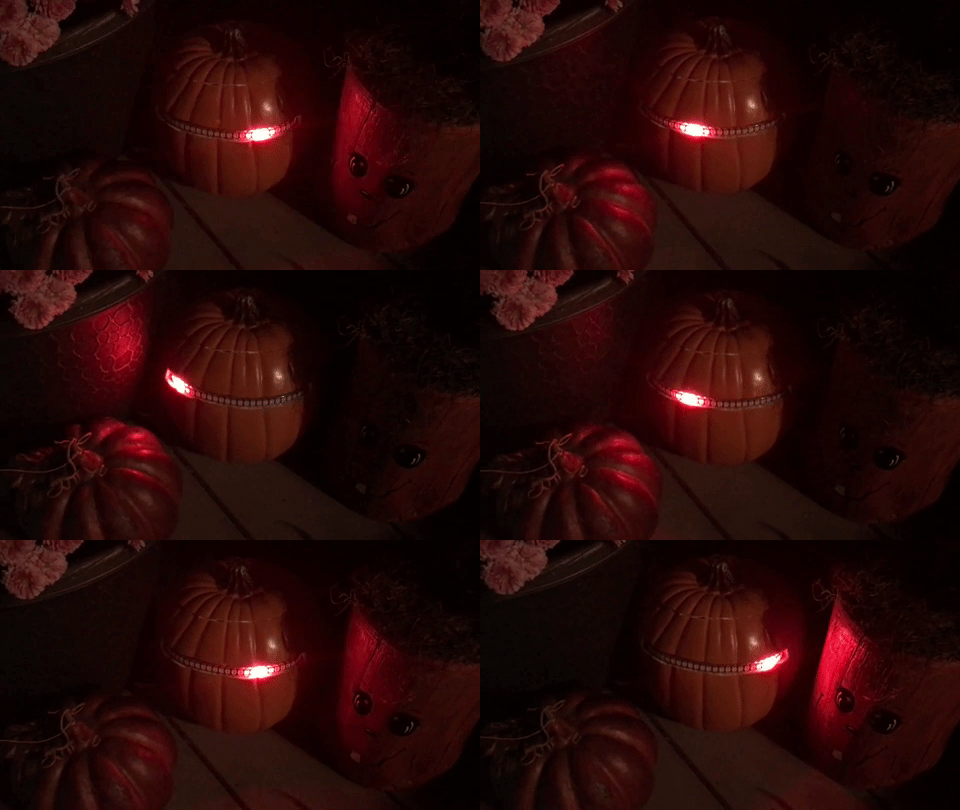
This kit uses a strip of the 144 pixels per meter LED strip. We need the pixels closer together than the 60 pixels per meter to get a finer scroll visualization.
Tools and Parts
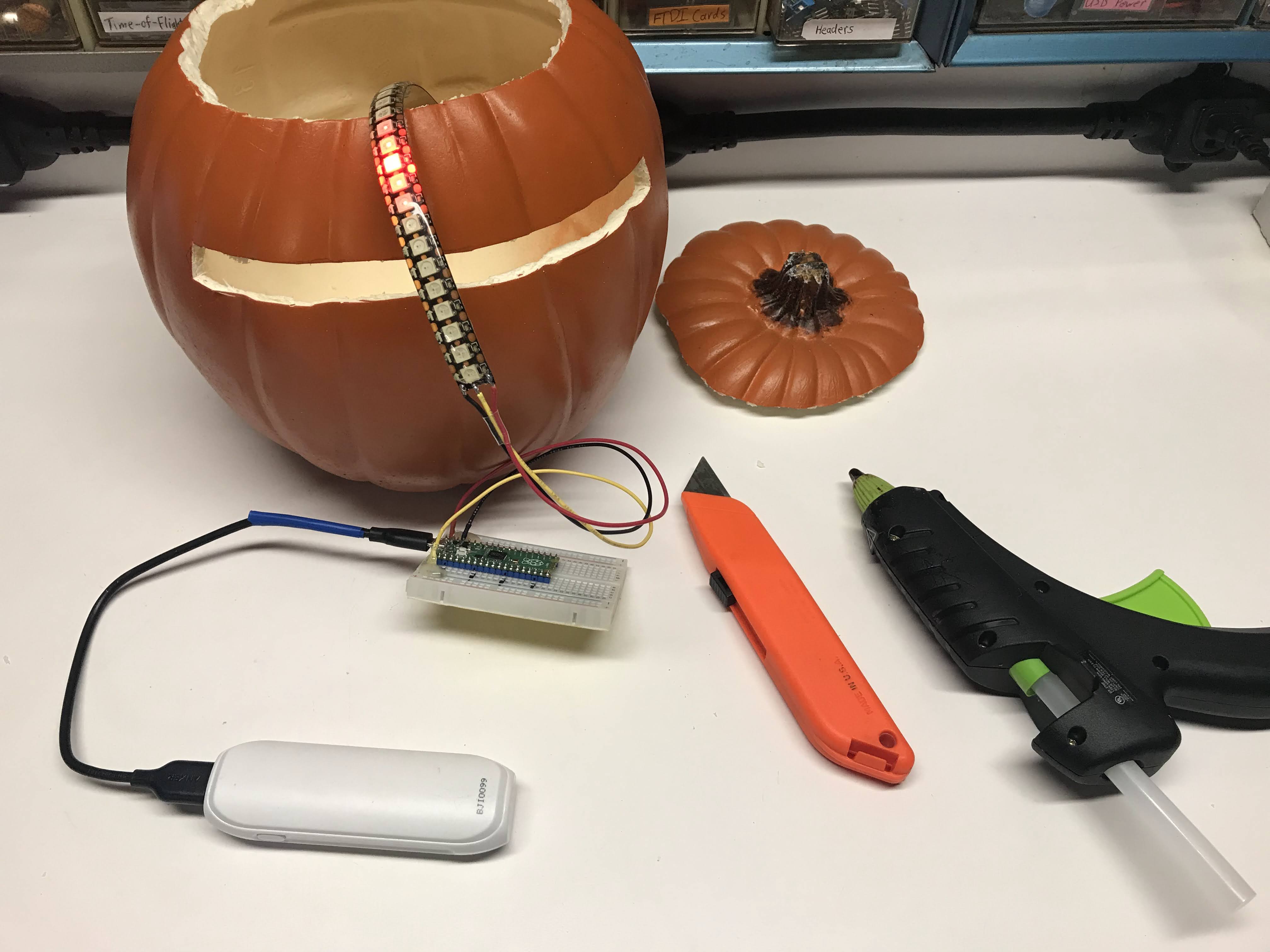 The image above shows the kit parts. We used a plastic craft pumpkin from Michaels and a USB power pack that can be placed inside the craft pumpkins
Tools
- Hot glue gun
- Utility knife (box cutter)
- Soldering iron (if you are not using a solderless breadboard)
We use the following parts:
Parts
 The image above shows the close spacing of the 144 pixels per meter LED strips.
Required Parts
- 9-inch craft foam pumpkin ($10) Examples: Michaels Kit of Five Pumpkins for $11 or Oriental Trading
- 114 Pixel/Meter NeoPixel strip - 25 pixels using the 144 elements per meter 5v type ($10)
- Raspberry Pi Pico - $3.99 at MicroCenter
- 22 Gauge Wire - Soldered connections or a solderless breadboard and wire
- USB cable - for programming and powering the LED strip (USD A to mini-USB connector)
Optional:
- **USB power pack - ideally one that will not shut off with a low power draw
- Sensors for automatically triggering light
- Plexiglass base and screw headers
- An old USB cable for powering from a power pack
- A USB wall plug to power the pumpkin from an wall outlet
Eye Slot Width
The slot you cut in the pumpkin must be wide enough to fit the recommended 25 pixels of the 144 pixels-per-meter strip. Here is how to calculate that width.
Step 1 — pixel pitch (center-to-center spacing)
Step 2 — total strip length for 25 pixels
Each pixel occupies one full pitch, so 25 pixels span:
Step 3 — convert to inches
Result: cut the slot approximately \(6\tfrac{7}{8}\) inches (6.83 in) wide. In practice, add about \(\tfrac{1}{8}\) inch of clearance so the strip seats flat, making the recommended slot cut 7 inches wide.
Steps
- Cut a 25-pixel length of LED from your 1-meter LED strip. Make sure to keep the wires on the DATA IN side (arrow pointing away from the end)
- Cut a horizontal rectangle in your pumpkin the height of the NeoPixel strip and the width of a 25 pixel length
- Hot glue the LED strip from the inside and hook the ends up to the Pico or a breadboard
- Connect the red lead of the LED strip to the +5 rail of the breadboard or VBUS on the Pico board
- Connect the black or white lead of the LED strip to the GND rail of the breadboard or any GND pin of the Pico
- Connect the center wire (green, yellow or white)
- Download the software from https://github.com/dmccreary/moving-rainbow/tree/master/src/kits/cylon-pumpkin
# Simplified Red Larson Scanner (Cylon / KITT eye)
#
# A single bright red dot sweeps back and forth across the strip,
# leaving a fading red tail behind it - just like the eye of a
# Cylon from Battlestar Galactica or KITT from Knight Rider.
#
# Uses the built-in MicroPython "neopixel" library with array index syntax:
#   strip[i] = (r, g, b)   sets the color of pixel i
#   strip.write()          sends the colors out to the strip
from utime import sleep
from machine import Pin
from neopixel import NeoPixel

NUMBER_PIXELS = 25
LED_PIN = 0

# Create the strip on the given pin (built-in library handles GRB order)
strip = NeoPixel(Pin(LED_PIN), NUMBER_PIXELS)

# How long to pause between each step (smaller = faster eye)
delay = 0.05

# How many pixels long the fading tail is
TAIL = 4

def draw_eye(position):
    """Light the eye at 'position' with a fading red tail and clear the rest."""
    for i in range(NUMBER_PIXELS):
        # How far is this pixel from the center of the eye?
        distance = abs(i - position)
        if distance <= TAIL:
            # Halve the brightness for every pixel away from the center
            brightness = int(255 / pow(2, distance))
            strip[i] = (brightness, 0, 0)
        else:
            # Too far from the eye - turn this pixel off
            strip[i] = (0, 0, 0)
    strip.write()
    sleep(delay)


while True:
    # Sweep the eye from the left end to the right end
    for position in range(NUMBER_PIXELS):
        draw_eye(position)
    # Sweep the eye back from the right end to the left end
    for position in range(NUMBER_PIXELS - 2, 0, -1):
        draw_eye(position)
Moving Rainbow
from utime import sleep
# Uses the built-in MicroPython "neopixel" library with array index syntax:
#   strip[i] = (r, g, b)   sets the color of pixel i
#   strip.write()          sends the colors out to the strip
from machine import Pin
from neopixel import NeoPixel

NUMBER_PIXELS = 25
LED_PIN = 0

# Create the strip on the given pin (built-in library handles GRB order)
strip = NeoPixel(Pin(LED_PIN), NUMBER_PIXELS)

# Color RGB values
red = (255, 0, 0)
off = (0, 0, 0)
orange = (255, 60, 0)  # Gamma corrected from G=128 to be less like yellow
yellow = (255, 150, 0)
green = (0, 255, 0)
blue = (0, 0, 255)
cyan = (0, 255, 255)
indigo = (75, 0, 130)  # purple?
violet = (138, 43, 226)  # mostly pink

# How many pixels long the fading tail is behind the eye
TAIL = 6


def draw_eye(position, direction, r, g, b):
    """Draw the eye at 'position' with a fading tail trailing behind it.

    'direction' is +1 when the eye is moving right and -1 when moving left,
    so the tail always trails behind the direction of motion.
    """
    for i in range(NUMBER_PIXELS):
        # How many pixels is this one *behind* the eye along the travel path?
        distance = (position - i) * direction
        if 0 <= distance <= TAIL:
            # Halve the brightness for every pixel back along the tail
            strip[i] = (int(r / pow(2, distance)),
                        int(g / pow(2, distance)),
                        int(b / pow(2, distance)))
        else:
            # Not part of the eye or its tail - turn this pixel off
            strip[i] = off
    strip.write()
    sleep(delay)


def draw_eye_7(r, g, b):
    # Sweep the eye from the left end to the right end
    for position in range(NUMBER_PIXELS):
        draw_eye(position, 1, r, g, b)
    # Sweep the eye back from the right end to the left end
    for position in range(NUMBER_PIXELS - 2, 0, -1):
        draw_eye(position, -1, r, g, b)


def draw_rainbow():
    band = (violet, indigo, blue, green, yellow, orange, red)
    # Slide the rainbow band from the left end to the right end
    for start in range(0, NUMBER_PIXELS - 6):
        for i in range(NUMBER_PIXELS):
            strip[i] = off
        for k in range(7):
            strip[start + k] = band[k]
        strip.write()
        sleep(delay)
    # Slide the rainbow band back from the right end to the left end
    for start in range(NUMBER_PIXELS - 7, -1, -1):
        for i in range(NUMBER_PIXELS):
            strip[i] = off
        for k in range(7):
            strip[start + k] = band[6 - k]
        strip.write()
        sleep(delay)


delay = .06
while True:
    draw_rainbow()
    draw_eye_7(255, 0, 0)
    draw_eye_7(255, 60, 0)
    draw_eye_7(255, 255, 0)
    draw_eye_7(0, 255, 0)
    draw_eye_7(0, 0, 255)
    draw_eye_7(0, 255, 255)
    draw_eye_7(75, 30, 130)
    draw_eye_7(255, 0, 255)
    draw_eye_7(255, 255, 255)
Cycle Colors
This pattern starts with the red sweep and runs it five times. It then cycles through all the colors, five sweeps each. It finally does the rainbow sweep.
Repeat Forever:
    red eye:     ⇄ ⇄ ⇄ ⇄ ⇄   (5 trips)
    orange eye:  ⇄ ⇄ ⇄ ⇄ ⇄   (5 trips)
    yellow eye:  ⇄ ⇄ ⇄ ⇄ ⇄
    green eye:   ⇄ ⇄ ⇄ ⇄ ⇄
    blue eye:    ⇄ ⇄ ⇄ ⇄ ⇄
    cyan eye:    ⇄ ⇄ ⇄ ⇄ ⇄
    indigo eye:  ⇄ ⇄ ⇄ ⇄ ⇄
    magenta eye: ⇄ ⇄ ⇄ ⇄ ⇄
    white eye:   ⇄ ⇄ ⇄ ⇄ ⇄
    rainbow band: ⇄              (1 trip)
# Cylon Eye Scanner - Five Sweeps Per Color
#
# For each color, the eye sweeps back and forth across the strip five times.
# After every color has had its turn, the rainbow band sweeps back and forth
# once, and then the whole show repeats.
#
# Uses the built-in MicroPython "neopixel" library with array index syntax:
#   strip[i] = (r, g, b)   sets the color of pixel i
#   strip.write()          sends the colors out to the strip
from utime import sleep
from machine import Pin
from neopixel import NeoPixel

NUMBER_PIXELS = 25
LED_PIN = 0

# Create the strip on the given pin (built-in library handles GRB order)
strip = NeoPixel(Pin(LED_PIN), NUMBER_PIXELS)

# How long to pause between each step (smaller = faster)
delay = .06

# How many pixels long the fading tail is behind the eye
TAIL = 6

# How many back-and-forth trips the eye makes for each color
SWEEPS = 5

off = (0, 0, 0)

# The colors the eye cycles through, in order
eye_colors = [
    (255, 0, 0),      # red
    (255, 60, 0),     # orange
    (255, 255, 0),    # yellow
    (0, 255, 0),      # green
    (0, 0, 255),      # blue
    (0, 255, 255),    # cyan
    (75, 30, 130),    # indigo
    (255, 0, 255),    # magenta
    (255, 255, 255),  # white
]

# The 7-color band used by the rainbow sweep (left to right)
rainbow_band = (
    (138, 43, 226),   # violet
    (75, 0, 130),     # indigo
    (0, 0, 255),      # blue
    (0, 255, 0),      # green
    (255, 150, 0),    # yellow
    (255, 60, 0),     # orange
    (255, 0, 0),      # red
)


def draw_eye(position, direction, r, g, b):
    """Draw the eye at 'position' with a fading tail trailing behind it.

    'direction' is +1 when the eye is moving right and -1 when moving left,
    so the tail always trails behind the direction of motion.
    """
    for i in range(NUMBER_PIXELS):
        # How many pixels is this one *behind* the eye along the travel path?
        distance = (position - i) * direction
        if 0 <= distance <= TAIL:
            # Halve the brightness for every pixel back along the tail
            strip[i] = (int(r / pow(2, distance)),
                        int(g / pow(2, distance)),
                        int(b / pow(2, distance)))
        else:
            # Not part of the eye or its tail - turn this pixel off
            strip[i] = off
    strip.write()
    sleep(delay)


def sweep_eye(r, g, b):
    """One back-and-forth trip of the eye in the given color."""
    # Sweep the eye from the left end to the right end
    for position in range(NUMBER_PIXELS):
        draw_eye(position, 1, r, g, b)
    # Sweep the eye back from the right end to the left end
    for position in range(NUMBER_PIXELS - 2, 0, -1):
        draw_eye(position, -1, r, g, b)


def sweep_rainbow():
    """One back-and-forth trip of the 7-color rainbow band."""
    # Slide the rainbow band from the left end to the right end
    for start in range(0, NUMBER_PIXELS - 6):
        for i in range(NUMBER_PIXELS):
            strip[i] = off
        for k in range(7):
            strip[start + k] = rainbow_band[k]
        strip.write()
        sleep(delay)
    # Slide the rainbow band back from the right end to the left end
    for start in range(NUMBER_PIXELS - 7, -1, -1):
        for i in range(NUMBER_PIXELS):
            strip[i] = off
        for k in range(7):
            strip[start + k] = rainbow_band[6 - k]
        strip.write()
        sleep(delay)


while True:
    # Each color sweeps back and forth SWEEPS times before the next color
    for color in eye_colors:
        for trip in range(SWEEPS):
            sweep_eye(color[0], color[1], color[2])
    # Then the rainbow band sweeps back and forth once
    sweep_rainbow()