Lab 23: Heartbeat
Pixel says...
 Lub-dub, lub-dub! We're going to make one pixel beat like a heart, with a strong
pulse, a soft pulse, and a rest. Let's light this up!
Lub-dub, lub-dub! We're going to make one pixel beat like a heart, with a strong
pulse, a soft pulse, and a rest. Let's light this up!
Program file: 23-heartbeat.py
What you'll learn
- How to write a function with a parameter, like
pulse(peak) - How calling one function twice with two different numbers makes two different beats
- How
rangecounts up in steps of 10 and back down with a negative step - How
sleeptimes add up to set the heart rate - What a brightness envelope is
What you'll need
- Your base kit: a Pico, a breadboard, and the 30-pixel LED strip, wired as shown in the Kit User's Guide
- The
config.pyfile saved on the Pico (see Getting Code onto the Kit) - Thonny open and connected to your Pico
- A little practice with
rangefrom Lab 04: Dimmer. Its "Going further" section asks you to build a heartbeat, and this lab is the finished version.
The program
This program makes the first pixel beat like a heart: a strong red pulse, a short pause, a softer red pulse, and a longer rest.
# Lab 23: Heartbeat
# Filename: 23-heartbeat.py
# Version: 1.0.0
#
# The first pixel beats like a heart: a strong pulse, a softer pulse,
# and then a rest.

from machine import Pin
from neopixel import NeoPixel
from utime import sleep
import config

# hardware settings from config.py
NEOPIXEL_PIN = config.NEOPIXEL_PIN
NUMBER_PIXELS = config.NUMBER_PIXELS

strip = NeoPixel(Pin(NEOPIXEL_PIN), NUMBER_PIXELS)

STEP = 10           # how much the brightness changes at each step
RAMP_DELAY = 0.01   # seconds between steps: a small number makes a quick pulse

def pulse(peak):
    # brightness rises up to the peak...
    for level in range(0, peak, STEP):
        strip[0] = (level, 0, 0)
        strip.write()
        sleep(RAMP_DELAY)
    # ...and then falls back down to dark
    for level in range(peak, 0, -STEP):
        strip[0] = (level, 0, 0)
        strip.write()
        sleep(RAMP_DELAY)
    strip[0] = (0, 0, 0)
    strip.write()

while True:
    pulse(120)      # "lub": the strong beat
    sleep(0.1)
    pulse(80)       # "dub": the softer beat
    sleep(0.4)      # rest before the next heartbeat
Run it. Pixel number 0 glows and fades twice, first bright and then softer, and then rests. The rest of the strip stays dark.
How it works
The shape of a heartbeat
Each heartbeat makes two sounds, which we write as "lub" and "dub." The first is strong and the second is softer. Then the heart rests before the next beat.
Doctors record a heart's electrical signal on a chart called an EKG. Each beat shows up as a tall spike, with a quiet stretch in between.
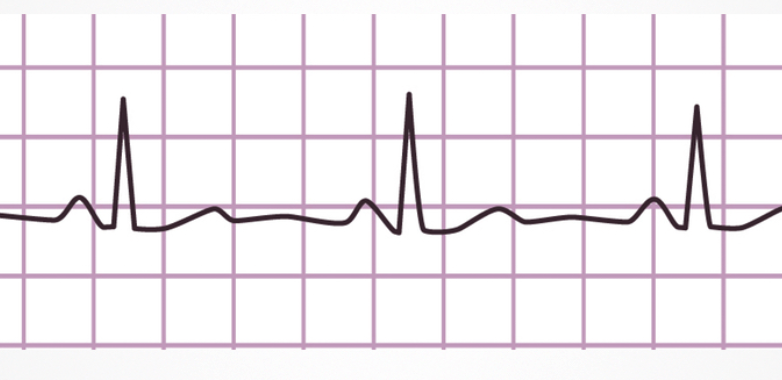
Our light can't draw an EKG, but it can copy the rhythm. The shape that says how bright a light is over time is a brightness envelope. Ours has a big bump, a small bump, and a flat rest. Chapter 14 explains envelopes, and the Brightness Envelopes MicroSim lets you compare a few.
Two settings
STEP = 10           # how much the brightness changes at each step
RAMP_DELAY = 0.01   # seconds between steps: a small number makes a quick pulse
These two names are constants (values we choose once and then leave alone). Capital letters are the hint. STEP is how much the brightness changes at each step. RAMP_DELAY is how many seconds the pulse waits between steps.
A bigger STEP means fewer steps, so the pulse is quicker.
A function with a parameter
The pulse function draws one beat. A function is a named block of code that you can run again and again. A parameter is a named slot for a value you hand to the function. Here the parameter is peak, the brightest level of the beat.
def pulse(peak):
    # brightness rises up to the peak...
    for level in range(0, peak, STEP):
        strip[0] = (level, 0, 0)
        strip.write()
        sleep(RAMP_DELAY)
The def line only defines the function. Nothing happens until the program calls it. When the program calls pulse(120), the name peak holds 120. When it calls pulse(80), peak holds 80. It's the same code with a different size of beat.
Key idea
One function makes two beats. Without a parameter, we would write the whole pulse twice, once for each beat. With peak, we write it once and change only the number.
Count up, then count down
The loop above counts up. For pulse(120), range(0, peak, STEP) makes 0, 10, 20, and so on up to 110. The stop number is not included, so that is 12 steps. Each step sets the red brightness to level, writes it, and waits.
Here is the loop inside pulse that counts back down, plus the two lines that finish the beat.
# ...and then falls back down to dark
for level in range(peak, 0, -STEP):
    strip[0] = (level, 0, 0)
    strip.write()
    sleep(RAMP_DELAY)
strip[0] = (0, 0, 0)
strip.write()
As you saw in Lab 04, range counts down when its step is negative. Here -STEP is -10, so the loop counts 120, 110, 100, and so on down to 10. That is 12 steps again. The brightest moment is 120, the first step of this loop.
The loop stops before 0, so the last two lines turn the pixel fully off.
So the strong beat has 12 steps up and 12 steps down. The softer beat, pulse(80), has 8 steps up and 8 steps down. Every step sleeps 0.01 seconds. The strong beat takes about 0.24 seconds, and the soft beat takes about 0.16 seconds.
Lub, dub, rest
while True:
    pulse(120)      # "lub": the strong beat
    sleep(0.1)
    pulse(80)       # "dub": the softer beat
    sleep(0.4)      # rest before the next heartbeat
The main loop calls pulse(120) for the strong "lub." It waits 0.1 seconds, calls pulse(80) for the softer "dub," and then rests for 0.4 seconds. Then while True: starts the next beat.
Add up the time the program sleeps in one heartbeat:
| Part | Time |
|---|---|
| "lub": 24 steps × 0.01 seconds | 0.24 seconds |
| short pause | 0.10 seconds |
| "dub": 16 steps × 0.01 seconds | 0.16 seconds |
| rest | 0.40 seconds |
| One heartbeat | 0.90 seconds |
There are 60 seconds in a minute, and 60 ÷ 0.9 is about 67. Each strip.write() takes a moment too, so the real heart rate is a bit slower. Expect about 65 beats a minute. That's close to the pace of a calm, resting heart.
Only the first pixel lights, and its red tops out at 120. That is gentle: about 9 milliamps (mA, a small unit of electric current).
Try it yourself
- Change the heart rate. Change the last
sleep(0.4)tosleep(0.8)and watch the beat slow down. Then aim for exactly 120 beats a minute. One beat must last 60 ÷ 120 = 0.5 seconds. The steps already sleep for 0.4 seconds, so the two rests must add up to about 0.1 seconds. Trysleep(0.05)for both, then check with a stopwatch: 30 beats should take 15 seconds. Eachstrip.write()adds a little time, so you may need to trim the rests a bit more. - Make the whole strip beat. Replace the
pulsefunction with the version below. The smallfor i in range(NUMBER_PIXELS)loop sets every pixel instead of only pixel 0.
def pulse(peak):
    for level in range(0, peak, STEP):
        for i in range(NUMBER_PIXELS):     # set every pixel to the same level
            strip[i] = (level, 0, 0)
        strip.write()
        sleep(RAMP_DELAY)
    for level in range(peak, 0, -STEP):
        for i in range(NUMBER_PIXELS):
            strip[i] = (level, 0, 0)
        strip.write()
        sleep(RAMP_DELAY)
    for i in range(NUMBER_PIXELS):
        strip[i] = (0, 0, 0)
    strip.write()
Run it. All 30 pixels pulse together like one big heart. Try removing the last loop to see what it does. The down loop ends at 10, so pixels 1 to 29 would keep a faint red glow during the rest.
With all 30 pixels at red 120, the strip draws about 283 mA. That is under the 500 mA a USB port supplies, so it's safe. Before you raise the peaks, work out the new total with How Bright Can You Go?
The for i in range(NUMBER_PIXELS) loop now appears three times. Can you put it in a small function of its own?
Check your understanding
- In the call
pulse(80), what number doespeakhold? - Which numbers does
range(0, peak, STEP)make whenpeakis 120? How many steps is that? - Why does the second loop use
-STEP? - Add up the sleeps in one heartbeat. How long is it, and about how many beats a minute does that make?
- Why does
pulseend withstrip[0] = (0, 0, 0)?
Lab complete!
 You made a light with a pulse! One function and two different numbers gave you both the lub and the dub.
What's next: In Lab 24: Fading Stars, stars flare up at random places, and a list remembers how bright each pixel is as it fades.