Base STEM Robot
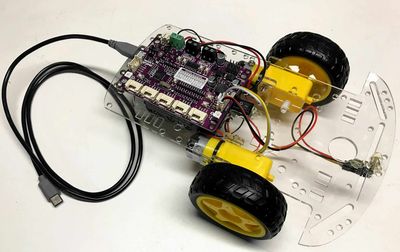
The club's classic low-cost collision-avoidance robot. It uses a Cytron Maker Pi RP2040 board on a two-wheel SmartCar chassis, needs no soldering, and is the first robot recommended for students; Chapter 19 budgets \(18–\)25 per robot kit. An OLED display adds about $13.
Source book: STEM Robots
Kit page: https://dmccreary.github.io/stem-robots/kits/base-bot/
Printable one-pager: base-bot-one-pager.html
Features
- Lab: Testing Motor Connections
- Lab: NeoPixel Blink Test
- Lab: Up Down Motor Speed Lab
- Lab: Motor Drive Connection Test
- Lab: Drive Square Lab
- Lab: Maker Pi RP2040 Servo Lab
Benefits
- Free, open lessons: the STEM Robots textbook has the kit page, wiring, and MicroPython code.
- Ready-made curriculum: 12 additional lab pages walk students through the build step by step.
- Instant feedback: students see their code's results on lights or a display.
- Real-world data: students read sensors and turn measurements into decisions.
- Budget: about $19.
Parts
- Cytron Maker Pi RP2040 ($10) — Controller board (built-in RP2040)
- TT DC Gear Motors — Motor / actuator
- DRV8833 Motor Driver — Motor driver
- HC-SR04 Ultrasonic Sensor — Sensor
- L298N / L293D Motor Driver — Motor driver
- MX1508 Motor Driver — Motor driver
- Piezo Buzzer / Speaker — Sound output
- SG90 Micro Servo — Motor / actuator
- SSD1306 128×64 OLED — Display
- VL53L0X Time-of-Flight Sensor — Sensor
- WS2812B NeoPixels — LEDs
- 830-Point Breadboard ($1.10) — Breadboard
- Micro-USB Data Cable ($2.50) — Power and programming cable