SHT40 Temperature and Humidity
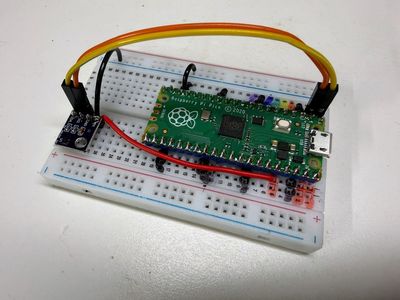
A beginner lab that reads air temperature and humidity from the tiny SHT40 I2C sensor and shows both numbers changing live.
Source book: Learning MicroPython
Kit page: https://dmccreary.github.io/learning-micropython/kits/sht40-temp/
Printable one-pager: sht40-temp-one-pager.html
Features
- Wire an I2C sensor to a Raspberry Pi Pico.
- Use an I2C scanner to prove your wiring works before you write code.
- Read temperature and humidity from an SHT40.
- Explain what a checksum is and why sensors send one.
- Log data as CSV and draw a live graph in Thonny.
Benefits
- Free, open lessons: the Learning MicroPython textbook has the kit page, wiring, and MicroPython code.
- Classroom friendly: built on a solderless breadboard or no-solder connectors.
- Wireless-ready: the Pico W option adds Wi-Fi for time sync and web projects.
- Real-world data: students read sensors and turn measurements into decisions.
- Budget: about $10 (sensor about $1.41 on eBay; Pico $4, breadboard $2, wires $1, USB cable $2).
Parts
- Raspberry Pi Pico ($4) — Microcontroller
- BME280 — Sensor
- DHT11 — Sensor
- DHT22 — Sensor
- DS18B20 — Sensor
- SHT40 — Sensor
- WS2812B NeoPixels — LEDs
- 830-Point Breadboard ($1.10) — Breadboard
- Micro-USB Data Cable ($2.50) — Power and programming cable