About This Interactive Intelligent Textbook
Hi again — I'm Pixel!
 I'm the round-face robot who shows up whenever there's something worth
noticing in this book. My whole body is a display, so every eye, eyebrow,
and mouth you learn to draw here is a part I'm made of too. Stick around —
every pixel tells a story!
I'm the round-face robot who shows up whenever there's something worth
noticing in this book. My whole body is a display, so every eye, eyebrow,
and mouth you learn to draw here is a part I'm made of too. Stick around —
every pixel tells a story!
Where This Book Came From
This book started as a distraction.
Dan McCreary has spent years teaching robotics in coding clubs, where students build small three wheeled STEM robots using a Raspberry Pi Microcontroller, a handful of sensors, and a breadboard. The lesson plans were about motors, distance sensors, and navigation. But something kept happening: the moment a student got a tiny OLED display working, everything else stopped. Kids would spend hours — not minutes, hours — nudging pixels around to get an eyebrow to sit just right, or arguing about whether a mouth curve read as "happy" or "smug."
They weren't off task. They were doing the hardest and most rewarding work in the room. Getting a face to communicate a feeling means decomposing a problem, choosing an abstraction, tuning parameters, testing against a real audience, and iterating — the entire computational thinking cycle, driven by a student's own curiosity instead of a worksheet.
Even a one-inch OLED display can hold a genuinely good face. When the robot kits were upgraded to the larger, brighter 2.42-inch OLED displays, the faces got better, the students got more ambitious, and the "distraction" clearly needed a book of its own. So this one was pulled out of the general robotics curriculum and given its own home — an intelligent textbook dedicated entirely to robot faces.
Dan sincerely loves teaching this material to students around the world. It pairs some of the lowest-cost hardware in all of STEM education with real depth of programming, and that combination is rare. A complete robot face kit costs under $30. What students learn building it is worth considerably more.
Why This Intelligent Textbook
Robots that show emotion connect with people more easily, and a small screen where a face should be is the cheapest way to give a machine a personality. That one idea sits at an unusual intersection: it is inexpensive enough for any classroom, visual enough to hook a student in the first five minutes, and deep enough to carry a full course in abstraction, decomposition, and modularity.
In the United States:
- Code.org's 2025 State of AI + Computer Science Education report found that 60% of U.S. public high schools now offer a foundational computer science course — which means roughly four in ten still do not1
- National participation in CS courses stayed essentially flat year over year, even as access slowly expanded — offering a course and filling it are two different problems1
- The clearest gains came from the 12 states with CS graduation requirements, which saw an 18% increase in access and a 5.1% increase in participation1
Worldwide:
- Nearly 20 million service robots for consumer use were sold in 2024, an 11% increase over the prior year, according to the International Federation of Robotics' World Robotics 2025 report2
- The Raspberry Pi Foundation counts 7,494 active Code Clubs across 102 countries, plus more than 600 active CoderDojos, most of them run by volunteers working with donated or shoestring budgets3
Those flat participation numbers are the ones that matter here. Access is not the whole problem — students also have to want to walk into the room. A robot that looks back at you is a very good reason to walk into the room.
This book takes a different approach than a traditional programming text. It is built on a learning graph of 293 interconnected concepts organized into 13 categories and 509 prerequisite relationships, so concepts are introduced only after the ideas they depend on are already in place. Throughout the chapters you'll find 48 interactive MicroSims — browser-based simulations that let you drag an eyebrow angle, step through a draw order, or pack an RGB565 color bit by bit, and see the result immediately. Every drawing technique targets real hardware you can hold: a $20 monochrome OLED and a $10 color round display, both driven by a Raspberry Pi Pico. And the whole textbook is open source and free — no paywalls, no access codes, no annual editions.
How to Use This Book
This textbook is designed for self-paced study and for classroom or coding-club use. Each chapter builds on the ones before it, so reading in order is recommended. The book includes:
- 16 Chapters covering hardware and wiring, MicroPython fundamentals, coordinate systems and frame buffers, drawing primitives, ellipses and polygons, facial anatomy and layout, emotion psychology, expression design and human-robot interaction, animation and timing, interactive controls, color display porting, and a computational thinking capstone
- 20 Lessons — short, focused walkthroughs of a single drawing or interaction skill, each with rendered sample output so you can check your work
- 48 Interactive MicroSims embedded throughout the chapters
- 16 Chapter Quizzes containing 160 questions across Bloom's Taxonomy levels
- A Learning Graph visualizing all 293 concepts and how they connect
- Stories about the commercial robots that pioneered screen-based faces
- A Glossary, a References list, and a Parts List with current sourcing and prices
- Search, available from any page
Start with Getting Started to order parts and set up Thonny, then move to Chapter 1: Hardware & Electronics Foundations. If you'd rather explore non-linearly or check the prerequisites for a specific topic, begin at the Learning Graph.
Teachers and club mentors: the Parts List includes bulk
sourcing notes for building a class set of ten kits, and every MicroSim can be
embedded in an external LMS page with a plain <iframe>.
About the Author

Dan McCreary is a semi-retired AI researcher, solution architect, and educator who has spent more than three decades helping Fortune 100 organizations reason over massive datasets. At Optum he founded the Generative AI Center of Excellence and led the team that built one of the world's largest healthcare knowledge graphs — spanning over 25 billion vertices — to unify member, provider, and patient insights. Dan's deep background in knowledge representation and systems thinking underpins the precise learning graphs and intelligent textbook workflows used throughout this course.
He is the co-author of Making Sense of NoSQL (Manning Publications), the founding chair of the NoSQL Now! conference, and a frequent keynote speaker on semantic search, ontology strategy, and AI hardware. Beyond industry, Dan has mentored students as a STEM volunteer since 2014, teaching robotics and microcontroller programming in CoderDojo-style coding clubs — which is exactly where this book began. You can visit the Intelligent Textbooks Case Studies to see over 87 textbooks that Dan has created or co-created with other authors.
Selected Credentials
- B.A. in Physics and Computer Science from Carleton College
- M.S.E.E. from the University of Minnesota
- MBA coursework at the University of St. Thomas
- Patent holder in semantic search and ontology management techniques
- Advocate for large-scale Enterprise Knowledge Graph adoption across healthcare and education
- Long-time promoter of accessible, low-cost AI-powered learning experiences
How to Cite This Book
If you reference this textbook in academic work, curriculum proposals, lesson plans, or other publications, please use one of the following citation formats.
APA (7th edition)
McCreary, D. (2026). Robot Faces: Drawing Expressive Displays for STEM Robots. https://dmccreary.github.io/robot-faces/
Chicago (17th edition)
McCreary, Dan. 2026. Robot Faces: Drawing Expressive Displays for STEM Robots. https://dmccreary.github.io/robot-faces/.
MLA (9th edition)
McCreary, Dan. Robot Faces: Drawing Expressive Displays for STEM Robots. 2026, dmccreary.github.io/robot-faces/.
BibTeX
1 2 3 4 5 6 7 | |
To cite a specific chapter, append the chapter number and title — for example:
McCreary, D. (2026). Chapter 1: Hardware & Electronics Foundations. In Robot Faces: Drawing Expressive Displays for STEM Robots. https://dmccreary.github.io/robot-faces/chapters/01-hardware-electronics-foundations/
License
This work is released under the Creative Commons Attribution-NonCommercial-ShareAlike 4.0 International License (CC BY-NC-SA 4.0). You are free to share and adapt the material for non-commercial purposes as long as you give appropriate credit and share your adaptations under the same license.
Teachers, coding clubs, and after-school programs are explicitly welcome to fork the GitHub repository, swap in their own hardware or branding, and redistribute the result under the same terms.
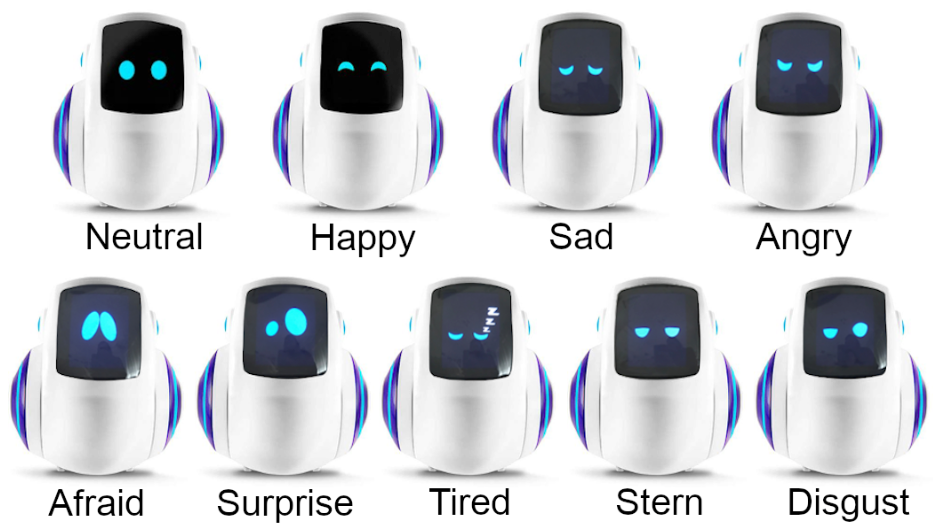
Sample Faces
Sample faces from the Miko social robot — a commercial companion robot that uses screen-based eyes as its primary emotional interface, and one of the four robots studied in Chapter 2.
References
-
Code.org Advocacy Coalition, CSTA, and ECEP Alliance. (2025). 2025 State of AI + Computer Science Education Report. https://advocacy.code.org/stateofcs/ ↩↩↩
-
International Federation of Robotics. (2025). World Robotics 2025 — Service Robots. https://ifr.org/ifr-press-releases/news/service-robots-see-global-growth-boom ↩
-
Raspberry Pi Foundation. (2025). Code Club Annual Survey Report 2025. https://static.raspberrypi.org/files/about/Code_Club_annual_survey_report_2025.pdf ↩