Study Buddy Kit
Status: design specification
This section describes a kit that is not built yet. Nothing here has been run on hardware. Statements marked (verify) are things we believe from the datasheets or the MicroPython docs and still need to be checked on the bench. Pages are written as specs: what the thing must do, and the decisions behind it.
The Study Buddy is the GC9B72 Smartwatch Kit with a speaker added and a new set of modes aimed at studying. Press MODE to step through the modes, as on the watch. New modes and new quiz decks can be downloaded over WiFi.
What It Does
| Feature | One-line description |
|---|---|
| Next Quiz | Shows a countdown to your next quiz or test, and chimes at the right moments, whatever mode is showing. |
| Flash Quiz | Multiple-choice drills built from simple decks, such as US state capitals. It brings back the ones you miss. |
| Daily Quote | An encouraging quote about learning, new each day. |
| Study Timer | A 25-minute focus timer with a 5-minute break and real chimes. |
| Math Facts | Times-table drills generated on the Pico. No deck needed. |
| Library | Browse and install new modes and decks from a teacher-controlled web address. |
The clock modes from the smartwatch kit (digital, analog, weather) still work. Study Buddy is the same program with more modes.
Design Goals
- Same hardware, one new part. Everything in the smartwatch kit is reused. The only addition is an I2S amplifier and a small speaker.
- Three buttons. No keyboard, no touch, no microphone. Every feature must work with MODE, UP, and DOWN.
- Students and teachers both use the Library. A student can add or remove decks and modes without a computer, from what the teacher has published. A quiz deck is just data, so any student can write one and hand it in. A mode is code, so only a teacher publishes those.
- Reuse the mode contract. A new mode is a module with the same four functions as in Lab 12.
- Works plugged in. The Pico has no clock battery, so the Study Buddy sets its clock over WiFi at power-up. It is a desk device, not a wearable.
Parts
Everything in the GC9B72 kit, plus:
| Part | Notes |
|---|---|
| MAX98357A I2S amplifier board | Takes digital audio from the Pico and drives a speaker directly. |
| Mini speaker, square, ultra-thin, "3525/2535" size | The kit's speaker, bought on AliExpress as "3W 4 Ohm / 2W 8 Ohm Mini Speaker ... 89dB 20KHz" (listing screenshot: img/speaker-on-aliexpress.png). It was $2.80 for the 1-piece option shown, and the listing also sells 5, 10, and 20 packs. See About the speaker. |
| (optional) 16 MB flash board | A Pico-sized board with 16 MB of flash and PSRAM, such as the Pimoroni Pico Plus 2 W (verify MicroPython support). Only needed for lots of recorded speech. See Audio. |
The kit already runs on a Pico 2 W (RP2350, 520 KB RAM, 4 MB flash). RAM is not the limit for any feature in this spec. Flash space for recorded audio is.
About the speaker
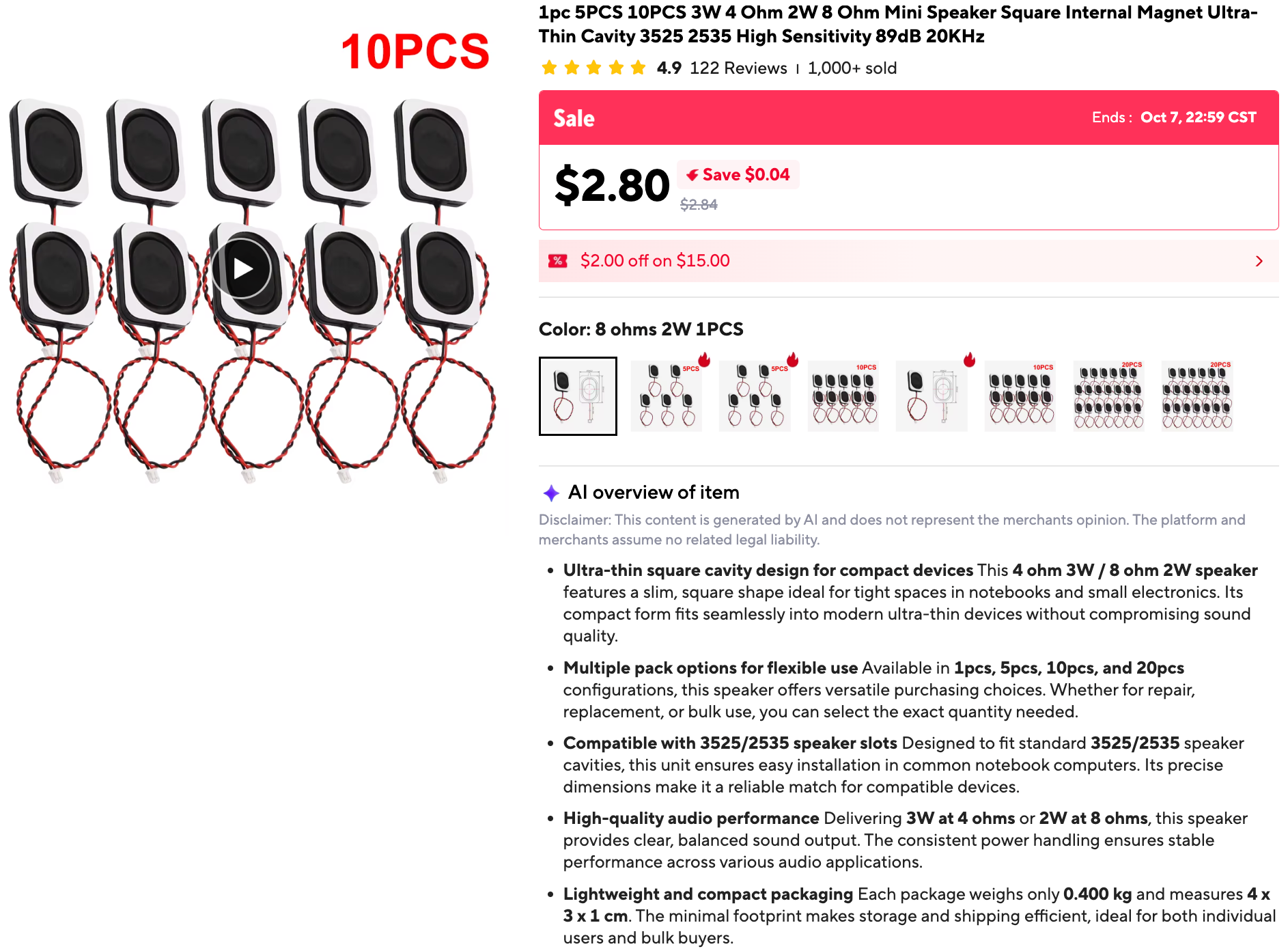
What the listing says: a square, ultra-thin, internal-magnet speaker for the "3525/2535" slots found in notebook computers, rated 3 W at 4 ohms or 2 W at 8 ohms, with a sensitivity of 89 dB and "20KHz" in the title. (The listing's "4 x 3 x 1 cm" is the packed size. A 2535 part is usually about 25 × 35 mm, which is my reading of the model number, not something the listing states.)
What that means for the labs:
- It is a small, clear speaker, not a full-range one. A speaker this size is usually good from the low hundreds of hertz up into the high treble. It cannot make much true deep bass, because moving that much air takes a big cone or a big box. Down low it mostly buzzes and distorts, and the extra higher notes that distortion adds are easy to hear. The "20KHz" is the top of what the speaker is listed for, and is not a promise that it is loud or even there. Lab 04 has you find out where this speaker starts and stops, by ear. See the first results.
- Power is not the limit. The MAX98357A makes about 3 W into 4 ohms at 5 V, and less at 3.3 V or into 8 ohms. At the default volume of 40 the speaker is nowhere near its 2 W rating.
- It is the 8 ohm, 2 W version. The same listing sells a 4 ohm 3 W speaker and an 8 ohm 2 W one, and the speaker has no markings. Dan measured its DC resistance with a multimeter at 7.4 ohms. A 4 ohm speaker reads about 3 to 3.5, and an 8 ohm one about 6 to 7.5, so this is the 8 ohm one. Into 8 ohms the amplifier is a little quieter than into 4, and the most it can deliver at 5 V is, as I remember the datasheet, a bit under the speaker's 2 W rating. At the default volume of 40 it is nowhere near.
Wiring Added
The display and buttons keep their wiring from the smartwatch kit. The amplifier adds four signal wires on four neighboring pins, plus power and ground:
| Amplifier pin | Pico pin | Notes |
|---|---|---|
| LRC | GP21 | Word select. Must be the pin right after BCLK. |
| BCLK | GP20 | Bit clock |
| DIN | GP19 | Audio data |
| GAIN | GP18 | Loudness setting. See below. |
| VIN | VBUS (5 V) or 3V3 | 5 V is louder. (verify) that the WiFi stays stable at full volume, and add a 100 µF capacitor across VIN and GND near the amplifier. |
| GND | GND |
Leave the amplifier's SD pin unconnected.
The I2S pin rule
MicroPython's I2S on the Pico needs the word-select pin (LRC) to be
one higher than the bit-clock pin (BCLK). The MicroPython docs say
"The ws pin number must be one greater than the sck pin number",
where ws is LRC and sck is BCLK. Here BCLK is GP20 and LRC is GP21,
so it works. Swap the two wires and I2S() raises an error. Lab 02
checks this rule and says so if it is broken.
GAIN on a GPIO pin. The MAX98357A sets its loudness from what its GAIN pin is wired to. Because GAIN is on GP18, software can choose, using the values on Adafruit's breakout page:
GAIN_DB |
The GAIN pin is | GP18 is set to |
|---|---|---|
| 6 | tied to the amplifier's VIN | output, high |
| 9 | left floating | input (disconnected) |
| 12 | tied to GND | output, low |
The default is 9 dB, the same as an unwired GAIN pin. The 6 dB setting assumes VIN is 3.3 V, the same as a Pico pin's high level. With VIN on 5 V, use 9 or 12.
These pins avoid GP2 to GP7 (display), GP13 to GP15 (buttons), and GP23, GP24, GP25, and GP29, which belong to the Pico's wireless chip.
The kit's config.py has the matching entries:
1 2 3 4 5 6 | |
Pages in This Spec
| Page | What it covers |
|---|---|
| Architecture | How downloadable modes and decks fit the existing mode system, and the changes the main template needs. |
| Features | Each feature: screens, buttons, behavior, and edge cases. |
| Pack Formats | The file formats for decks, quotes, events, the manifest, and saved progress. |
| Audio | The sound module, how the buddy "speaks", and the flash budget. |
| Multicore Guide | How the two cores, the PIO, DMA, and the I2S bus share the work so the display, WiFi, and sound run smoothly together. Every measurement so far, what MicroPython's source says, and what is still unproven. |
| Roadmap and Risks | Labs 01 to 10 in build order (01 and 02 are done), known risks, and open questions. |