Lab 07: Get the Time
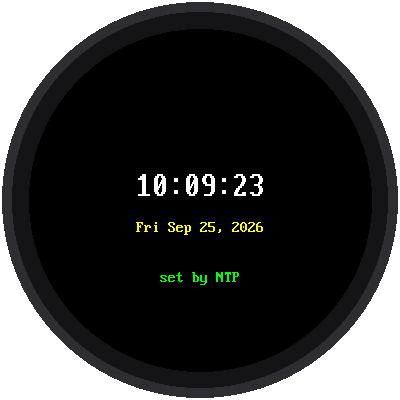
This lab asks a time server on the internet for the exact time, sets the Pico's clock with it, and shows the time on the screen and in the shell every second.
Welcome to Lab 07
 This is the moment the kit becomes a real clock. Somewhere out there,
servers keep time to a tiny fraction of a second, and you're about to
borrow it. Every second counts! Let's make time tick!
What You Will Learn
- why the Pico W doesn't know the time when it starts
- how NTP sets the clock
- why time servers send UTC, and how the time zone fixes it
Run It
Open 07-get-time.py and click Run. The screen says "Getting time",
shows each step, and then the time:
1 2 3 4 5 6 7 8 9 | |
Why Ask the Internet?
The Pico W has a clock inside, but no battery to keep it running. Every
time it powers up, its clock starts over at a date in the past. So the
kit's wifi_time.sync_time() does four things:
- joins the network in
secrets.py - asks
pool.ntp.orgfor the time - adds your time zone, plus an hour in summer if
USE_US_DSTisTrue - sets the Pico's clock and turns WiFi off again
After that, time.localtime() gives the right local time with no network
at all.
One time for the whole world
 A time server talks to devices in every time zone, so it can't send
your time. It sends UTC, the time at zero degrees longitude, and
every device adds its own offset. That's what
TIMEZONE_HOURS is for.
Redraw Without Flicker
The loop only redraws when the second changes, and it always writes text of the same width, so each new time exactly covers the last one. Nothing is erased first, so nothing flickers.
1 2 | |
{:02d} means "at least two digits, with a leading zero", so 9 becomes
09 and the width never changes.
Try This
- Set
TIMEZONE_HOURSinconfig.pyto0. Now the clock shows UTC, the time the server really sent. - Make a 12-hour clock: use
(hour % 12 or 12)instead ofhour, and add"AM"ifhour < 12, otherwise"PM".
If It Doesn't Work
- "NOT synced" in red. The clock couldn't reach the time server. Run Lab 06 to find out why.
- The time is off by exactly an hour. Check
USE_US_DSTinconfig.py. - Off by several hours. Check
TIMEZONE_HOURS.
Right on Time!
 Your clock set itself from the internet, turned UTC into your local
time, and updates every second without flicker. All seven parts of
the kit are tested, so now it's time to build the real clock.
Next: Lab 08: The Big Clock