Lab 11: Winking Face
Pixel says...
 Our smiley has been staring at us for two labs. Let's make them blink! Show a few pictures
one after another, and a still face comes alive. Let's light this up!
Our smiley has been staring at us for two labs. Let's make them blink! Show a few pictures
one after another, and a still face comes alive. Let's light this up!
Program file: 11-winking-face.py
What you'll learn
- What an animation is, and what a frame is
- How a list of pairs can hold a picture and a time
- How a
forloop plays the frames in order - How the time on each frame changes the feeling of the motion
- How to make an animation of your own
What you'll need
- Your kit, with the matrix wired as shown in the Kit Guide
config.pysaved on the Pico- Thonny open and connected to your Pico
- The
drawfunction from Lab 9
The program
This program makes the smiley face blink both eyes, and then wink one eye, over and over.
# Lab 11: Winking Face
# Filename: 11-winking-face.py
# Version: 1.0.0
#
# An animation: the smiley face blinks, then winks at you. An animation is
# a list of pictures, called frames, shown one after another. Each frame
# has a picture and the number of seconds it stays on the matrix.

from machine import Pin
from neopixel import NeoPixel
from utime import sleep
import config

print("Lab 11: Winking Face (version 1.0.0)")

# hardware settings from config.py
NEOPIXEL_PIN = config.NEOPIXEL_PIN
NUMBER_PIXELS = config.NUMBER_PIXELS
MATRIX_WIDTH = config.MATRIX_WIDTH
MATRIX_HEIGHT = config.MATRIX_HEIGHT
SERPENTINE = config.SERPENTINE

strip = NeoPixel(Pin(NEOPIXEL_PIN), NUMBER_PIXELS)

# the color key: which color each letter stands for
COLORS = {
    ".": (0, 0, 0),         # off
    "Y": (28, 22, 0),       # yellow
    "B": (0, 0, 32),        # blue
    "R": (32, 0, 0),        # red
}

# three pictures of the same face. Only row 2, the eyes, is different.
FACE = [
    "..YYYY..",
    ".YYYYYY.",
    "YYBYYBYY",
    "YYYYYYYY",
    "YRYYYYRY",
    "YYRRRRYY",
    ".YYYYYY.",
    "..YYYY..",
]

BLINK = [
    "..YYYY..",
    ".YYYYYY.",
    "Y..YY..Y",
    "YYYYYYYY",
    "YRYYYYRY",
    "YYRRRRYY",
    ".YYYYYY.",
    "..YYYY..",
]

WINK = [
    "..YYYY..",
    ".YYYYYY.",
    "YYBYY..Y",
    "YYYYYYYY",
    "YRYYYYRY",
    "YYRRRRYY",
    ".YYYYYY.",
    "..YYYY..",
]

# the animation: (picture, seconds to show it)
FRAMES = [
    (FACE, 2.0),
    (BLINK, 0.15),
    (FACE, 1.5),
    (WINK, 0.5),
]

def xy(x, y):
    if SERPENTINE and y % 2 == 1:
        return y * MATRIX_WIDTH + (MATRIX_WIDTH - 1 - x)
    return y * MATRIX_WIDTH + x

def draw(picture):
    # look at every letter and give the pixel in the same spot its color
    for y in range(MATRIX_HEIGHT):
        for x in range(MATRIX_WIDTH):
            letter = picture[y][x]
            strip[xy(x, y)] = COLORS[letter]
    strip.write()

while True:
    for picture, seconds in FRAMES:
        draw(picture)
        sleep(seconds)
Run it. The face looks at you for two seconds. It blinks very quickly. It looks at you again, and then it gives you a slow wink.
Lab 11: Winking Face (version 1.0.0)
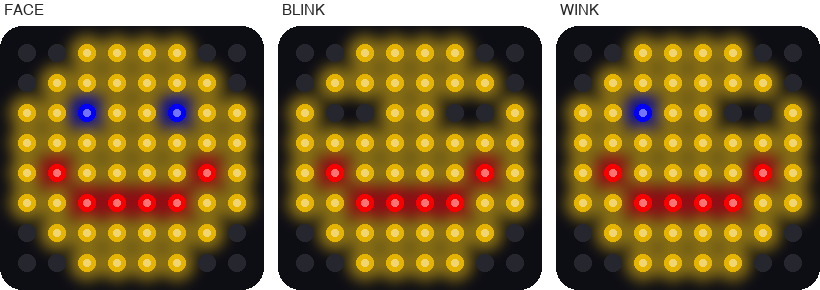
This picture was drawn by a computer simulator, so your real matrix may look a little different.
How it works
Three pictures that are almost the same
An animation is a set of pictures shown one after another, fast enough that they seem to move. Each picture is called a frame. Cartoons work this way too.
This program has three pictures: FACE, BLINK, and WINK. Look closely and you will find that only row 2 is different.
| Picture | Row 2 | What the eyes do |
|---|---|---|
FACE |
"YYBYYBYY" |
Both eyes are open (two blue pixels) |
BLINK |
"Y..YY..Y" |
Both eyes are closed (two short dark lines) |
WINK |
"YYBYY..Y" |
The left eye is open and the right eye is closed |
A closed eye is drawn with two dots. Dots are dark pixels, so the eye becomes a little dark line.
A list of frames
FRAMES = [
    (FACE, 2.0),
    (BLINK, 0.15),
    (FACE, 1.5),
    (WINK, 0.5),
]
FRAMES is a list of pairs. Each pair has a picture and a number of seconds. Read it like a script for a play. Show the face for 2 seconds, blink for 0.15 seconds, and so on.
Notice that FACE is in the list twice. A picture can be used as many times as you like.
Play the frames
while True:
    for picture, seconds in FRAMES:
        draw(picture)
        sleep(seconds)
The for loop takes one pair at a time. The words picture, seconds give the two halves their own names. The loop draws the picture and then waits. When the list runs out, while True starts it again from the top.
How long is one trip through the list? Add up the times: 2.0 + 0.15 + 1.5 + 0.5 = 4.15 seconds.
Time is part of the picture
A real blink is fast, so the BLINK frame lasts only 0.15 seconds. A wink is slow and on purpose, so the WINK frame lasts half a second. Change those two numbers and the same pictures tell a different story.
Key idea
An animation is pictures plus time. The pictures say what you see, and the times say how it feels.
Try it yourself
- Make a sleepy face. Change the
BLINKtime from0.15to1.0. How does the face seem now? - Wink the other eye. Change row 2 of
WINKto"Y..YYBYY". Which eye closes? -
Add a surprise. Add this picture below
WINK, then add the line(SURPRISE, 0.8),at the end ofFRAMES.SURPRISE = [ "..YYYY..", ".YYYYYY.", "YYBYYBYY", "YYYYYYYY", "YYYRRYYY", "YYYRRYYY", ".YYYYYY.", "..YYYY..", ] -
Make a beating heart. Replace the three pictures and
FRAMESwith the code below. The small heart and the big heart take turns.BIG = [ ".RR..RR.", "RRRRRRRR", "RRRRRRRR", "RRRRRRRR", ".RRRRRR.", "..RRRR..", "...RR...", "........", ] SMALL = [ "........", "..R..R..", ".RRRRRR.", ".RRRRRR.", "..RRRR..", "...RR...", "........", "........", ] FRAMES = [ (BIG, 0.15), (SMALL, 0.15), (BIG, 0.15), (SMALL, 0.7), ]
Check your understanding
- What is a frame?
- Which row is different in the three face pictures?
- How long does one full trip through
FRAMEStake? Show your math. - What two things does each item in
FRAMEShold? - What would the face look like if every frame lasted 0.05 seconds?
Lab complete!
 You made a picture move! Cartoons, video games, and movies are all frames shown in a row.
What's next: In Lab 12: Scrolling Message, your own words will slide across the matrix.