Lab 12: Scrolling Message
Pixel says...
 Eight pixels is too narrow for a whole word. So we'll slide the word past, one column at a time,
like a sign in a shop window. Then you can make it say anything! Let's light this up!
Eight pixels is too narrow for a whole word. So we'll slide the word past, one column at a time,
like a sign in a shop window. Then you can make it say anything! Let's light this up!
Program files: 12-scrolling-message.py and font.py
What you'll learn
- How every letter is a tiny picture, kept in a font
- How to join many small pictures into one long strip
- How a sliding window shows part of something bigger
- How to change the message, the color, and the speed
What you'll need
- Your kit, with the matrix wired as shown in the Kit Guide
- These files saved on the Pico:
config.py,font.py, and12-scrolling-message.py - Thonny open and connected to your Pico
- The animation idea from Lab 11
The program
This program scrolls the words HELLO WORLD! across the matrix from right to left.
# Lab 12: Scrolling Message
# Filename: 12-scrolling-message.py
# Version: 1.0.0
#
# Scrolls a message across the matrix, like a sign in a shop window.
# The matrix is only 8 pixels wide, so the program builds one long strip
# of columns and shows 8 of them at a time, sliding along one column per step.
# The letter shapes come from font.py. Save font.py on the Pico before you
# run this. Change MESSAGE to your own words.

from machine import Pin
from neopixel import NeoPixel
from utime import sleep
import config
import font

print("Lab 12: Scrolling Message (version 1.0.0)")

# hardware settings from config.py
NEOPIXEL_PIN = config.NEOPIXEL_PIN
NUMBER_PIXELS = config.NUMBER_PIXELS
MATRIX_WIDTH = config.MATRIX_WIDTH
MATRIX_HEIGHT = config.MATRIX_HEIGHT
SERPENTINE = config.SERPENTINE

MESSAGE = "HELLO WORLD!"    # change me!
COLOR = (0, 30, 30)         # the color of the letters
SCROLL_DELAY = 0.12         # seconds between steps: a smaller number is faster
LETTER_HEIGHT = 5           # every letter in font.py is 5 pixels tall
TOP_ROW = 1                 # the letters sit in rows 1 to 5
EMPTY_COLUMN = "....."

strip = NeoPixel(Pin(NEOPIXEL_PIN), NUMBER_PIXELS)

def xy(x, y):
    if SERPENTINE and y % 2 == 1:
        return y * MATRIX_WIDTH + (MATRIX_WIDTH - 1 - x)
    return y * MATRIX_WIDTH + x

def build_columns(message):
    # Turn the message into one long list of columns. A column is 5 letters,
    # read from top to bottom: "X" is a lit pixel and "." is a dark one.
    columns = [EMPTY_COLUMN] * MATRIX_WIDTH         # start with an empty matrix
    for letter in message.upper():
        rows = font.LETTERS.get(letter, font.LETTERS["?"])
        for col in range(len(rows[0])):
            column = ""
            for row in range(LETTER_HEIGHT):
                column = column + rows[row][col]
            columns.append(column)
        columns.append(EMPTY_COLUMN)                # a gap between letters
    columns = columns + [EMPTY_COLUMN] * MATRIX_WIDTH   # end with an empty matrix
    return columns

def draw_window(columns, start):
    # show 8 columns of the long strip, beginning at column number start
    for x in range(MATRIX_WIDTH):
        column = columns[start + x]
        for row in range(LETTER_HEIGHT):
            if column[row] == "X":
                strip[xy(x, TOP_ROW + row)] = COLOR
            else:
                strip[xy(x, TOP_ROW + row)] = (0, 0, 0)
    strip.write()

columns = build_columns(MESSAGE)
print("The message is", len(columns), "columns long")

while True:
    # slide the 8-column window along the strip, one column at a time
    for start in range(len(columns) - MATRIX_WIDTH + 1):
        draw_window(columns, start)
        sleep(SCROLL_DELAY)
Run it. The matrix starts dark. Blue-green letters slide in from the right, cross the matrix, and leave on the left. Then the message starts again. One trip takes about seven seconds.
Lab 12: Scrolling Message (version 1.0.0)
The message is 63 columns long
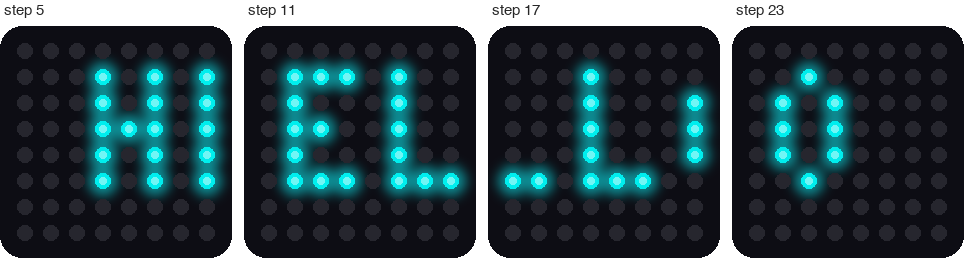
This picture was drawn by a computer simulator, so your real matrix may look a little different.
How it works
A letter is a tiny picture
A font is a set of pictures, one for each letter. Ours lives in the module font.py. Every letter is 5 pixels tall. An X is a lit pixel and a dot is a dark one. Here are H and I.
    "H": ("X.X", "X.X", "XXX", "X.X", "X.X"),
    "I": ("XXX", ".X.", ".X.", ".X.", "XXX"),
Each letter holds five short strings, one for each row. Stack the five strings for H and you can see it:
X . X
X . X
X X X
X . X
X . X
Most letters are 3 pixels wide. The letter M needs 5, because it has more bumps.
Build one long strip
The matrix shows columns, so the program turns each letter on its side. It reads down each column of the letter and makes a string of 5 letters.
| Column of H | Read from top to bottom | String |
|---|---|---|
| Left | X, X, X, X, X | "XXXXX" |
| Middle | dot, dot, X, dot, dot | "..X.." |
| Right | X, X, X, X, X | "XXXXX" |
The function build_columns does this for every letter in the message. It adds one empty column after each letter, so the letters do not touch. It also puts 8 empty columns at the start and 8 at the end. Those let the message slide in from a dark matrix and slide all the way out.
Two small helpers make the function friendly. message.upper() turns small letters into capitals, because the font only has capitals. And font.LETTERS.get(letter, font.LETTERS["?"]) looks up a letter. If the font does not have it, you get a question mark.
Slide a window along the strip
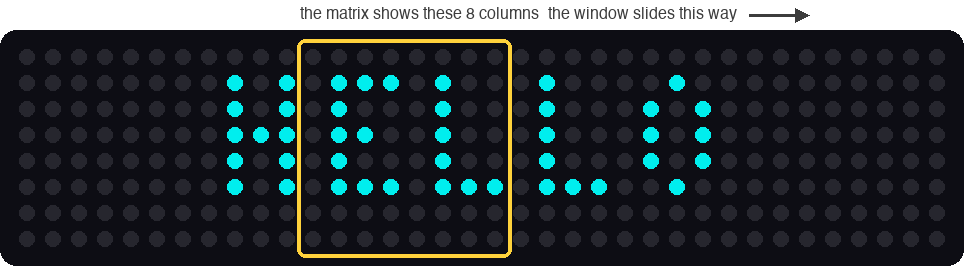
This picture was drawn by a computer simulator. It shows the strip for the shorter message HELLO.
Here is the trick. The letters never move! The whole message is one long strip. The matrix is a window that shows 8 columns of it. Each step, the window moves one column to the right. To your eyes, the letters slide to the left.
for start in range(len(columns) - MATRIX_WIDTH + 1):
    draw_window(columns, start)
    sleep(SCROLL_DELAY)
The variable start is the first column in the window. The strip for HELLO WORLD! has 63 columns, and the window is 8 wide. So start goes from 0 to 55, which is 56 steps: 63 - 8 + 1 = 56.
Each step waits 0.12 seconds. So one trip takes 56 × 0.12 = 6.72 seconds.
Key idea
A small screen can show something much bigger than itself. It shows one window at a time and slides the window along. Your phone does this every time you scroll.
Try it yourself
- Say something new. Change
MESSAGE = "HELLO WORLD!"to your own name. The font has capital letters, numbers, a space, and!,?,.and-. - Change the speed. Set
SCROLL_DELAY = 0.05, thenSCROLL_DELAY = 0.3. Which one is easier to read? - Change the color. Set
COLOR = (30, 0, 20). Keep the numbers small. - Try a letter the font does not have. Put
@in your message. What shows up, and why? -
Make rainbow letters. Add this list below the
COLORline.RAINBOW = [(30, 0, 0), (30, 10, 0), (24, 20, 0), (0, 30, 0), (0, 0, 30), (16, 0, 28)]Then, inside
draw_window, change the line that ends with= COLORto this line. Each column of the strip keeps its own color as it slides.strip[xy(x, TOP_ROW + row)] = RAINBOW[(start + x) % len(RAINBOW)]
Check your understanding
- How tall is every letter in the font? How wide are most letters?
- Why does the program add empty columns at the start and the end of the strip?
- What does
message.upper()do, and why does the program need it? - A strip is 40 columns long. How many steps does one trip take? Show your math.
- Do the letters move, or does the window move?
Lab complete!
 Your matrix can talk now! You fit a long message onto a tiny screen with one sliding window.
What's next: In Lab 13: Accelerometer Print, you will read the tilt sensor and watch the numbers change.