Lab 7: X-Y Corners
Pixel says...
 Counting from 0 to 255 is fine for a walk. To draw a picture, you want to say column 3, row 2.
Let's write a helper that does that math. Let's light this up!
Counting from 0 to 255 is fine for a walk. To draw a picture, you want to say column 3, row 2.
Let's write a helper that does that math. Let's light this up!
Program file: 07-xy-corners.py
What you'll learn
- How a column (x) and a row (y) name a spot on the matrix
- How to write your own function with
def - How to turn x and y into a pixel number
- How the
%sign finds odd and even rows
What you'll need
- Your kit, with the matrix wired as shown in the Kit Guide
config.pysaved on the Pico- Thonny open and connected to your Pico
- The pixel numbers picture from Lab 6: Walk the Pixels
The program
This program draws one pixel in each corner of the matrix. It uses a function named xy to turn a column and a row into a pixel number.
# Test 07: X-Y Corners
# Filename: 07-xy-corners.py
# Version: 1.0.0
#
# Tests the xy() function that turns a column and row into a pixel number.
# Red is (0, 0), green is the far end of row 0, blue is the far end of
# column 0, and white is the opposite corner. If the corners are not in
# the right places, change SERPENTINE in config.py.
# Not yet tested on hardware.

from machine import Pin
from neopixel import NeoPixel
from utime import sleep
import config

print("Test 07: X-Y Corners (version 1.0.0)")

# hardware settings from config.py
NEOPIXEL_PIN = config.NEOPIXEL_PIN
NUMBER_PIXELS = config.NUMBER_PIXELS
MATRIX_WIDTH = config.MATRIX_WIDTH
MATRIX_HEIGHT = config.MATRIX_HEIGHT
SERPENTINE = config.SERPENTINE

strip = NeoPixel(Pin(NEOPIXEL_PIN), NUMBER_PIXELS)

def xy(x, y):
    # row y starts at pixel y * width; odd rows run backwards on a zig-zag panel
    if SERPENTINE and y % 2 == 1:
        return y * MATRIX_WIDTH + (MATRIX_WIDTH - 1 - x)
    return y * MATRIX_WIDTH + x

last_x = MATRIX_WIDTH - 1
last_y = MATRIX_HEIGHT - 1

strip[xy(0, 0)] = (60, 0, 0)
strip[xy(last_x, 0)] = (0, 60, 0)
strip[xy(0, last_y)] = (0, 0, 60)
strip[xy(last_x, last_y)] = (40, 40, 40)
strip.write()
print("red = (0,0)  green = (%d,0)  blue = (0,%d)  white = (%d,%d)" % (last_x, last_y, last_x, last_y))

while True:
    sleep(1)
Run it. Four pixels light up, one in each corner:
- Red is in the upper-left corner.
- Green is in the upper-right corner.
- Blue is in the lower-left corner.
- White is in the lower-right corner.
Test 07: X-Y Corners (version 1.0.0)
red = (0,0)  green = (15,0)  blue = (0,15)  white = (15,15)
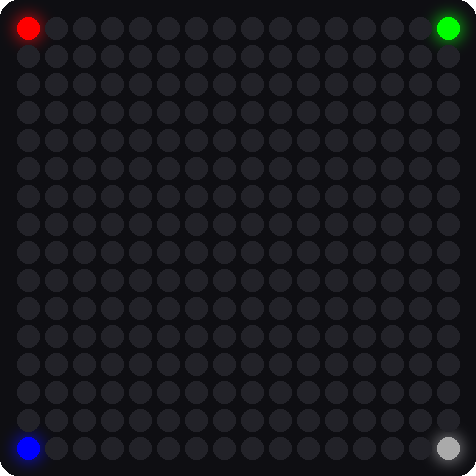
This picture was drawn by a computer simulator, so your real matrix may look a little different.
How it works
Two numbers name a spot
Think of the matrix like a map. The x number says which column, counting from the left. The y number says which row, counting from the top. Both start at 0. So (0, 0) is the upper-left corner, and (15, 15) is the lower-right corner.
Key idea
In a computer picture, y counts down from the top. That is the opposite of the graphs you draw in math class, where y counts up.
Write a function
def xy(x, y):
    # row y starts at pixel y * width; odd rows run backwards on a zig-zag panel
    if SERPENTINE and y % 2 == 1:
        return y * MATRIX_WIDTH + (MATRIX_WIDTH - 1 - x)
    return y * MATRIX_WIDTH + x
A function is a named recipe. The word def starts the recipe. The words in parentheses, x and y, are the parameters, which are the ingredients you hand to the recipe. The word return hands back the answer.
On this kit, SERPENTINE is False, so Python skips the if and runs the last line: y * MATRIX_WIDTH + x. That means row number times 16, plus column number.
Here are some worked examples:
| Call | Math | Pixel number |
|---|---|---|
xy(0, 0) |
0 × 16 + 0 | 0 |
xy(15, 0) |
0 × 16 + 15 | 15 |
xy(3, 2) |
2 × 16 + 3 | 35 |
xy(0, 15) |
15 × 16 + 0 | 240 |
xy(15, 15) |
15 × 16 + 15 | 255 |
Check these against the pixel numbers picture in Lab 6. Pixel 35 is in row 2, column 3.
What does % do?
The % sign gives the remainder after dividing. y % 2 is the remainder when you divide the row number by 2. That is 0 for even rows and 1 for odd rows. So y % 2 == 1 is a test for an odd row. A zig-zag panel runs its odd rows backwards, so the function flips x for those rows with MATRIX_WIDTH - 1 - x.
Use the function
strip[xy(0, 0)] = (60, 0, 0)
strip[xy(last_x, 0)] = (0, 60, 0)
The variable last_x holds 15, the number of the last column. Calling xy(last_x, 0) hands back 15, and strip[15] is the upper-right corner. Notice how you never write the pixel number yourself. The function does it.
Try it yourself
- Draw the center. Add the line
strip[xy(8, 8)] = (60, 60, 0)beforestrip.write(). First work out the pixel number with the table above as a guide. The answer is 8 × 16 + 8 = 136. -
Draw a diagonal line. Add these lines before
strip.write(). What shape do you see?for i in range(16): strip[xy(i, i)] = (0, 40, 40) -
Predict, then test. Change
SERPENTINE = FalsetoTrueinconfig.pyand save it on the Pico. Which corners move? Change it back when you are done.
Check your understanding
- In
(x, y), which number is the column and which is the row? - What pixel number does
xy(2, 3)give? Show your math. - What does the word
returndo in a function? - What does
y % 2 == 1ask?
Lab complete!
 You wrote your own function! Now you can draw anywhere with just two numbers.
What's next: In Lab 8: Row and Column Sweep, you will use xy in loops to draw lines of light.