Lab 8: Row and Column Sweep
Pixel says...
 One loop draws a line. Two loops draw a whole picture! Let's sweep a stripe of light across the matrix.
Let's light this up!
One loop draws a line. Two loops draw a whole picture! Let's sweep a stripe of light across the matrix.
Let's light this up!
Program file: 08-row-column-sweep.py
What you'll learn
- How a loop inside another loop (a nested loop) draws a line
- How to write a small helper function called
clear - How
xy(x, y)and loops work together - How to check that your rows and columns are straight
What you'll need
- Your kit, with the matrix wired as shown in the Kit Guide
config.pysaved on the Pico- Thonny open and connected to your Pico
- The
xyfunction from Lab 7: X-Y Corners
The program
This program sweeps a green bar down the rows, one row at a time. Then it sweeps a blue bar across the columns.
# Test 08: Row and Column Sweep
# Filename: 08-row-column-sweep.py
# Version: 1.0.0
#
# A bar of light sweeps down the rows and then across the columns.
# Both sweeps should look like straight lines.
# Not yet tested on hardware.

from machine import Pin
from neopixel import NeoPixel
from utime import sleep
import config

print("Test 08: Row and Column Sweep (version 1.0.0)")

# hardware settings from config.py
NEOPIXEL_PIN = config.NEOPIXEL_PIN
NUMBER_PIXELS = config.NUMBER_PIXELS
MATRIX_WIDTH = config.MATRIX_WIDTH
MATRIX_HEIGHT = config.MATRIX_HEIGHT
SERPENTINE = config.SERPENTINE
LEVEL = config.LEVEL

strip = NeoPixel(Pin(NEOPIXEL_PIN), NUMBER_PIXELS)

def xy(x, y):
    if SERPENTINE and y % 2 == 1:
        return y * MATRIX_WIDTH + (MATRIX_WIDTH - 1 - x)
    return y * MATRIX_WIDTH + x

def clear():
    for i in range(NUMBER_PIXELS):
        strip[i] = (0, 0, 0)

while True:
    for y in range(MATRIX_HEIGHT):
        clear()
        for x in range(MATRIX_WIDTH):
            strip[xy(x, y)] = (0, LEVEL, 0)
        strip.write()
        sleep(0.12)
    for x in range(MATRIX_WIDTH):
        clear()
        for y in range(MATRIX_HEIGHT):
            strip[xy(x, y)] = (0, 0, LEVEL)
        strip.write()
        sleep(0.12)
Run it. A green line moves from the top of the matrix to the bottom. Then a blue line moves from left to right. Both lines should look perfectly straight. If a line looks bent or broken, check the SERPENTINE setting from Lab 6.
Test 08: Row and Column Sweep (version 1.0.0)
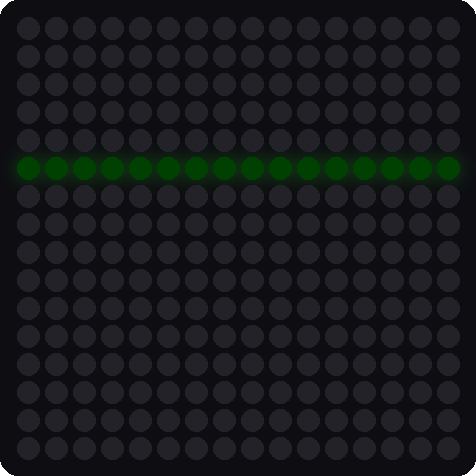

These pictures were drawn by a computer simulator, so your real matrix may look a little different.
How it works
A helper that clears the matrix
def clear():
    for i in range(NUMBER_PIXELS):
        strip[i] = (0, 0, 0)
The clear function sets every pixel to off in memory. We use it at the start of every step, so the old line disappears before the new line is drawn.
A nested loop draws a row
for y in range(MATRIX_HEIGHT):
    clear()
    for x in range(MATRIX_WIDTH):
        strip[xy(x, y)] = (0, LEVEL, 0)
    strip.write()
    sleep(0.12)
There are two loops here. The outer loop picks a row: y goes 0, 1, 2, up to 15. For each row, the inner loop runs all the way through the columns: x goes 0 to 15. That draws 16 green pixels in a straight line. After the inner loop finishes, strip.write() shows the row and sleep(0.12) holds it for a moment.
Think of reading a book. The outer loop is the page number, and the inner loop is every word on the page.
Swap the loops to draw a column
for x in range(MATRIX_WIDTH):
    clear()
    for y in range(MATRIX_HEIGHT):
        strip[xy(x, y)] = (0, 0, LEVEL)
To draw a column, switch the roles. The outer loop now picks the column x, and the inner loop goes down all the rows y. The picture is the same idea turned sideways.
Key idea
Nested loops are how computers draw pictures. Any time you want to touch every spot in a grid, put one loop inside another.
How long does a sweep take?
There are 16 rows and each one stays for 0.12 seconds: 16 × 0.12 = 1.92 seconds. The columns take the same time. So one full pass is about 3.8 seconds.
Try it yourself
- Change the colors. Make the row sweep red by changing
(0, LEVEL, 0)to(LEVEL, 0, 0). - Sweep upward. Change the outer loop to
for y in range(MATRIX_HEIGHT - 1, -1, -1):. Which row does the bar start on now? -
Draw a diagonal sweep. Replace the whole
while True:block with the block below. A diagonal holds all the pixels wherex + yis the same number. Can you explain how it works?while True: for d in range(MATRIX_WIDTH + MATRIX_HEIGHT - 1): clear() for x in range(MATRIX_WIDTH): y = d - x if 0 <= y < MATRIX_HEIGHT: strip[xy(x, y)] = (LEVEL, 0, LEVEL) strip.write() sleep(0.05)
Check your understanding
- In the row sweep, which loop is the outer loop? Which is the inner loop?
- How many pixels does one row hold? How do you know?
- What does the
clear()function do, and why does the program call it at the start of every step? - About how long does one full sweep of the rows take? Show your math.
Lab complete!
 Your rows and columns are straight, and you used a loop inside a loop. Next, we give the kit a sense of feel!
What's next: In Lab 9: Accelerometer Print, you will read the tilt sensor and watch the numbers change.