Lab 16: Countdown Timer
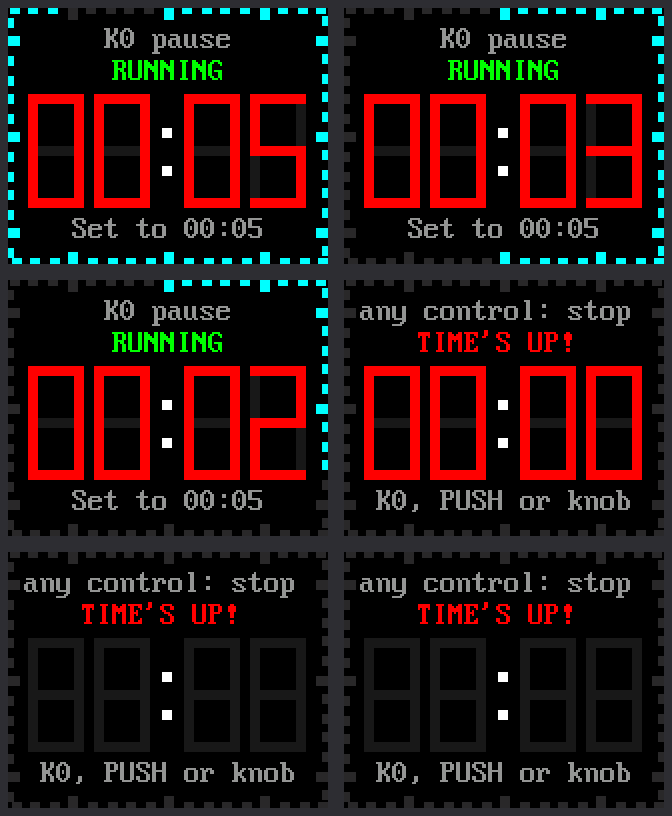
A countdown timer runs down to zero, then sets off an alarm. Use it for a homework break, a board game turn, or brushing your teeth. You set the minutes and seconds with the knob. While it runs, the ticks around the edge go out one by one.
| Control | What it does |
|---|---|
| K0 | Start and pause |
| Press the knob | Set the time: minutes, then seconds, then done. While paused: reset. |
| Turn the knob | While setting: change the yellow number |
Welcome to Lab 16
 By the end of this lab, one button will start, pause and quiet your
timer without ever getting mixed up. The idea behind it runs every
video game you have played. Let's make time tick!
By the end of this lab, one button will start, pause and quiet your
timer without ever getting mixed up. The idea behind it runs every
video game you have played. Let's make time tick!
What You Will Learn
- how one control can do different jobs at different times
- how to set a number by turning the knob
- how a timer knows how much time is left
- how a program flashes an alarm
Run It
The timer starts at 05:00. Try a short one first.
- Open
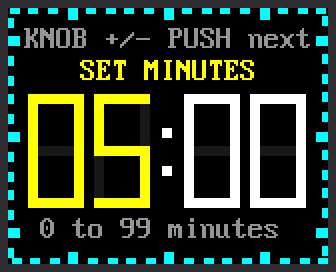
16-countdown-timer.pyin Thonny and click Run. The screen saysREADY. - Press the knob. The minutes turn yellow.
- Turn the knob until the minutes read
00. Clockwise adds, and counter-clockwise takes away. - Press the knob. Now the seconds are yellow. Turn them to
15. - Press the knob once more. The screen says
READYagain. - Press K0 to start. Watch the digits turn red for the last 10 seconds.
- At zero, press K0, press the knob, or turn the knob to stop the alarm.
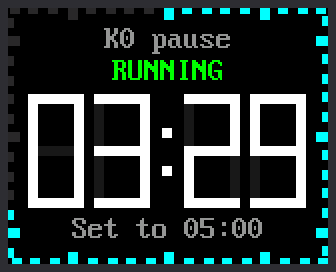
| Setting the minutes | Counting down |
|---|---|
 |
 |
One Control, Many Jobs
What does K0 do? It depends. When the timer is ready, K0 starts it. While it runs, K0 pauses it.
The timer is always in exactly one state, such as ready, running or paused. The state decides what each control does. A program built this way is called a state machine. Video games work like this too: the jump button does nothing while your character is already in the air.
This timer has six states. The screen shows the state's name above the digits:
| State | K0 | Press the knob | Turn the knob |
|---|---|---|---|
READY |
start | set the time | nothing |
SET MINUTES |
nothing | go on to the seconds | change the minutes |
SET SECONDS |
nothing | done | change the seconds |
RUNNING |
pause | nothing | nothing |
PAUSED |
go on | reset | nothing |
TIME'S UP! |
stop the alarm | stop the alarm | stop the alarm |
The program keeps the state in one variable, state. On every pass of
the loop it asks "what state are we in?" before it looks at the controls.
The code calls the last state DONE.
1 2 3 4 5 6 7 8 9 10 11 12 13 | |
- In
READY, K0 changes the state toRUNNING, but only if the time is more than zero. - In
RUNNING, the very same K0 changes the state toPAUSED. - When no time is left, the timer moves itself to
DONE.
States Are All Around You
 Look for states in the gadgets around you. A microwave, a traffic
light and a game controller all act differently in different states.
When a button surprises you, ask which state the gadget was in.
Look for states in the gadgets around you. A microwave, a traffic
light and a game controller all act differently in different states.
When a button surprises you, ask which state the gadget was in.
Know When It Will End
Like the stopwatch in lab 15, the timer never counts. It reads the same counter of milliseconds, or thousandths of a second. The stopwatch remembered when it started. The timer works out when it will end. Two lines in the code above do it:
time.ticks_add(now, remaining_ms)adds the time left tonow, the counter's reading. The answer,end_ticks, is the moment the timer will reach zero.time.ticks_diff(end_ticks, now)asks how far away that moment is. The loop asks again on every pass.
Say you start a 5-minute timer when the counter reads 40,000. Five
minutes is 300,000 milliseconds, so end_ticks is 340,000. Later the
counter reads 131,000. The time left is 340,000 − 131,000 = 209,000
milliseconds. That is 3 minutes and 29 seconds, as in the picture above.
Whole Seconds and a Red Warning
Three lines decide what the digits show:
1 2 3 | |
- The first line turns milliseconds into whole seconds, rounding up.
The
//sign divides and drops the remainder. With 300 milliseconds left, (300 + 999) // 1000 is 1, so the screen still says00:01. WARNING_MSis 10,000. Sowarnis true for the last 10 seconds of a running timer.- The last line picks red when
warnis true, and white the rest of the time.
The Alarm
At zero the state becomes DONE, and this code runs:
1 2 3 4 5 6 | |
done_atis the moment the timer reached zero.FLASH_MSis 500, so the first line counts the half seconds since then.flashisTrueon even counts andFalseon odd ones.- When
flashchanges, each digit shows a red 0 or goes blank. alarm_outputs(flash)switches the Pico's onboard LED (light-emitting diode) on and off in step. That is the light you blinked in lab 01.
The kit has no buzzer, so the alarm is silent.
Want a beep?
You can add a piezo buzzer, a tiny speaker that beeps. Wire its + leg
to a free pin, such as GP15. Wire its − leg to a ground pin (GND).
Then change BUZZER_PIN = None in config.py to BUZZER_PIN = 15.
Nobody has tried this on a real kit yet, so you would be the first.
Try This
- While you set the minutes, turn the knob back past
00. What number comes next? Find% 100in the program to see why. - Change
START_MINUTES = 5to the number of minutes you use most. - Change
WARNING_MS = 10_000to30_000. When do the digits turn red now? (1,000 milliseconds is one second.) - Change
FLASH_MS = 500to150. How does the alarm feel now?
If It Doesn't Work
- K0 won't start the timer. A timer set to
00:00can't start. K0 also does nothing while a number is yellow. Press the knob until the screen saysREADY. - Turning the knob does nothing. The knob only changes a yellow number. Press the knob first.
Six States, One Alarm!
 You built a state machine with six states and a countdown that knows
when it will end. Next comes the big finish: all five clock faces in
one program.
You built a state machine with six states and a countdown that knows
when it will end. Next comes the big finish: all five clock faces in
one program.