Code That Runs, Code That Is Right
Open the interactive poster full screen
Use Explore mode to hover over or click a panel and read what it shows about trusting code an agent wrote. Use Quiz mode to read a clue and click the panel it describes. The left half is the trusting version, where the code ran and the number was believed. The right half is the checked version, where the same script was tested against an independent answer.
The seven regions are:
- Run Finished, No Error — The script completes with no exception and no warning.
- A Plausible Number — A clean, reasonable-looking result that happens to be wrong.
- The Silent Error — The hidden defect, and the test that shares the code's misreading.
- Hand Calculation — An expected value worked out independently of the script.
- The Numbers Disagree — The script's number and the hand number do not match, so the script is tagged.
- Seeded Bug — A bug planted on purpose to show whether a test can catch it.
- Test Case Added — A new known-answer test whose range comes from the hand calculation.
Static Poster
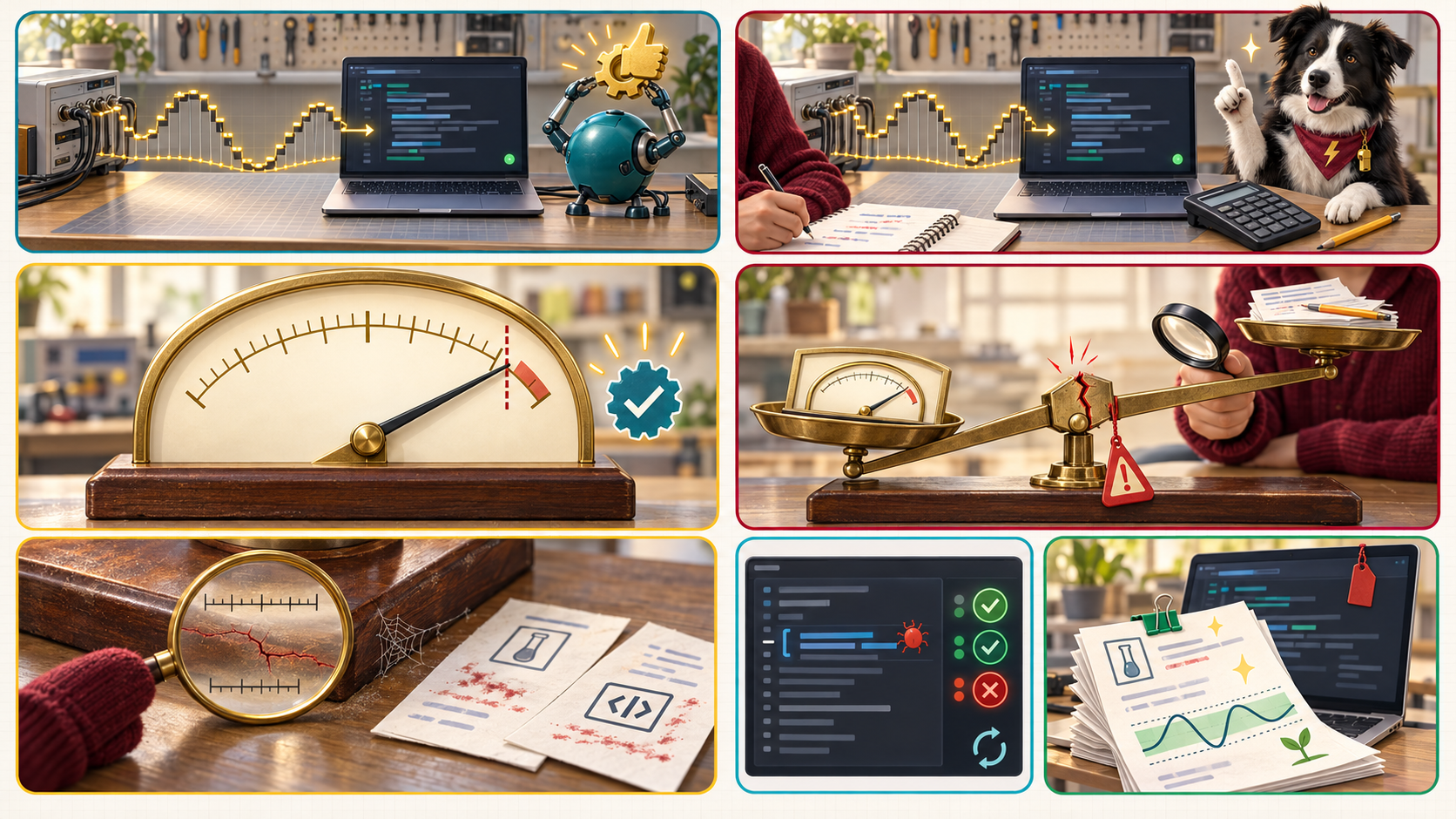
The full-size poster above is a static copy of the interactive version, handy for printing, sharing, or viewing without JavaScript.
Why This Matters
An agent's code almost always runs. The danger is code that runs and returns a plausible, wrong number, because research code usually has no known answer to flag a mistake. The book's worked example uses the voltage formula on a power ratio. The script prints a clean figure that makes a 10-bit converter look like an 18-bit one, and only someone who knows a converter cannot exceed its resolution would notice. The remedy is to compare every result with something outside the code that produced it: a known answer, a physical limit, or a hand calculation (Chapter 13).
The checks have limits. A sanity check can show that a number is wrong, but it cannot prove that a number is right. A passing test only shows that the cases it covers pass. The numbers in the worked example are the book's own, and the code in them is a teaching case, not a statement about any particular tool. Chapter 17 explains why the check must be independent: a check that shares the failure causes of the thing it checks proves little.
Connects to
- Chapter 13: Simulation, Testing, and Reproducible Code
- Chapter 4: Context Engineering and Advanced Prompting
- Chapter 16: MicroSims and Research Communication
- Chapter 17: Verification and Reproducibility
Source
- Chapter 13 supplies the dB worked example, the unit tests, the five kinds of numerical sanity check, the RC filter hand calculation, and the seeded-bug exercise.
- Chapter 4 supplies the ENOB relation used in the worked example.
- Chapter 16 supplies the formula that reproduces the 7.19-bit figure.
- Chapter 17 supplies the independent check and the three-check ENOB example.
Teachers and editors can open calibration mode to adjust zone positions after the artwork is generated. Copy only the x1, y1, x2, and y2 numbers back into data.json, because the calibration export omits showLabels and palette.