A Figure You Read, a Simulation You Explore
Open the interactive poster full screen
Use Explore mode to hover over or click a panel and read how the printed figure and the simulation differ and how they relate. Use Quiz mode to read a clue and click the panel it describes. The left half is the page, which shows one case. The right half is the screen, where a reader can change the parameter. The bottom row shows how both come from one source and how an agent helps build the simulation.
The seven regions are:
- A Figure on a Page — One plot at the parameter values the author chose.
- The Reader's Question — A reader wonders what happens at a different value.
- A MicroSim With Sliders — The same plot with built-in controls the reader can move.
- Moving the Parameter — The ENOB falls from about 10 bits to about 7.2 as added noise rises to 2 LSB.
- One Source, Two Outputs — The page and the screen come from one data file and one script.
- Specification to MicroSim — An agent builds the sim from a specification, and a person verifies and approves it.
- Embedded Anywhere — The same sim in a lab website and a paper's supplementary material.
Static Poster
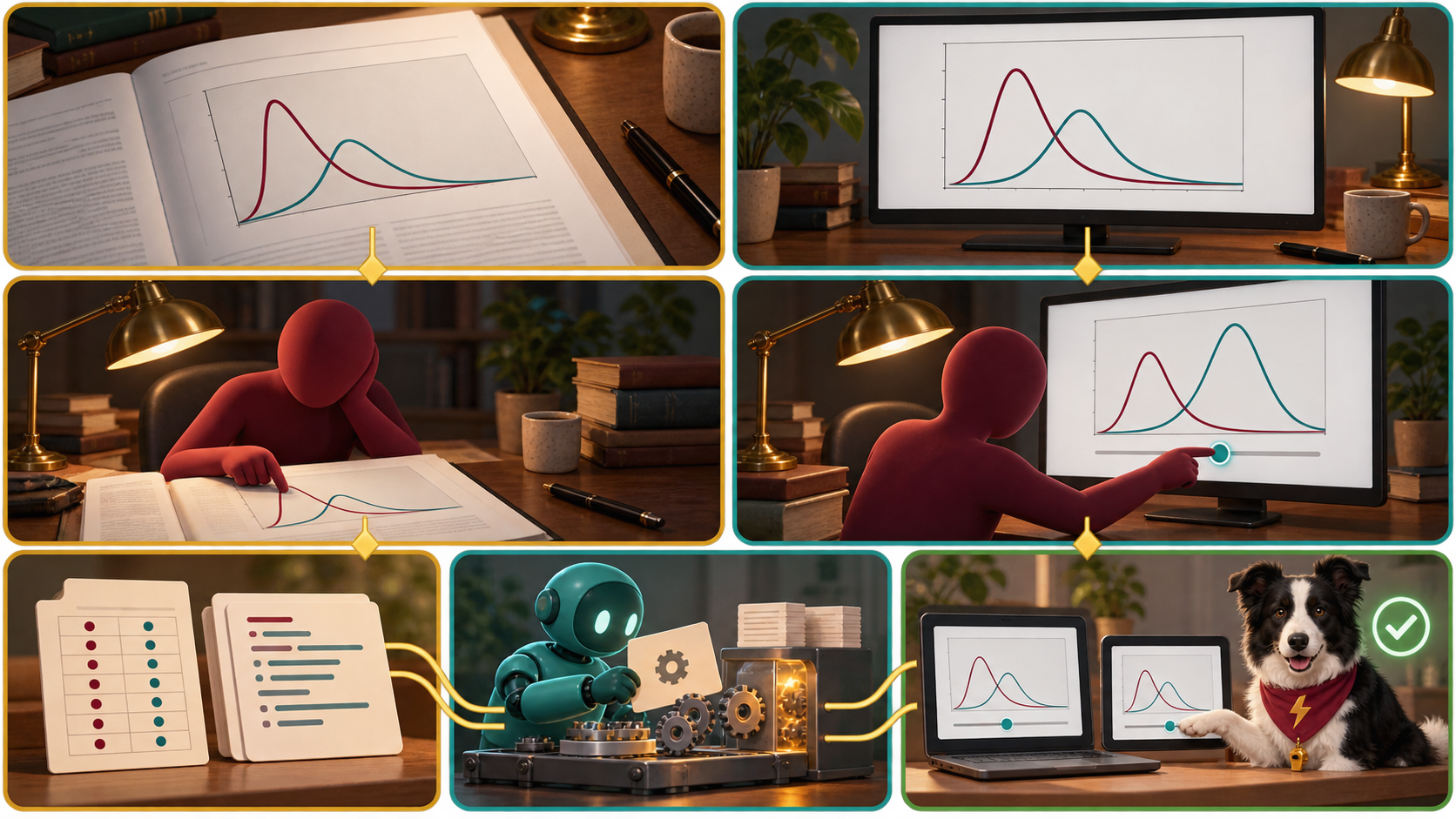
The full-size poster above is a static copy of the interactive version, handy for printing, sharing, or viewing without JavaScript.
Why This Matters
A static figure shows a result at the settings the author chose. A reader who can move the slider understands the whole relationship. A MicroSim suits a result whose point is a dependence, such as how ENOB falls as noise rises. It does not suit a fact with no parameter, such as a die photograph or an author list (Chapter 16). Because an agent can build a small sim from a precise specification, a result can be given a form that others can handle and not only read.
The poster has limits. Interactivity is not always better, and a sim that looks right but computes a slightly wrong number is worse than no sim, so its formulas and boundary cases must be checked as in Chapter 13. The gold thread shows the ideal, where figure and sim come from one script and one data file. It does not mean a MicroSim is generated automatically from a paper. In the MicroSims paper of Chapter 20, claims about effect still have to be labeled measured, cited, or expected.
Connects to
- Chapter 16: MicroSims and Research Communication
- Chapter 13: Simulation, Testing, and Reproducible Code
- Chapter 15: AI-Assisted Manuscript Preparation
- Chapter 20: Case Studies and Capstone Project
Source
- Chapter 16 supplies the MicroSim definition, the ENOB sketch and its formula, the specification-first workflow, the status values, and embedding.
- Chapter 13 supplies the known-answer check and the run manifest.
- Chapter 15 supplies figure and caption practice.
- Chapter 20 supplies the MicroSims paper case.
Teachers and editors can open calibration mode to adjust zone positions after the artwork is generated. Copy only the x1, y1, x2, and y2 numbers back into data.json, because the calibration export omits showLabels and palette.