Inside an Agent Skill
Open the interactive poster full screen
Use Explore mode to hover over a numbered marker or its label and read what that part of the skill does. Use Quiz mode to read a clue in the prompt, then click the marker it describes. The marker numbers are hidden, so you must find the matching part of the picture.
The nine callouts are:
- A Task Request — The request the agent compares with each skill's description.
- Layer 1: The Front Door — The name and description, always in context.
- The Context Scale — Why keeping the rest out keeps the always-loaded cost small.
- Layer 2: The Instruction Sheet — The body of SKILL.md, loaded when the skill triggers.
- The Trigger Tests — Requests that should load the skill.
- The Overstuffed Binder — A skill that tries to do everything.
- Layer 3: The Supporting Files — Scripts, references, and templates opened only when pointed to.
- The Skill Folder — The directory built around SKILL.md.
- The Near-Miss Tests — Requests that share vocabulary but should not load the skill.
Static Poster
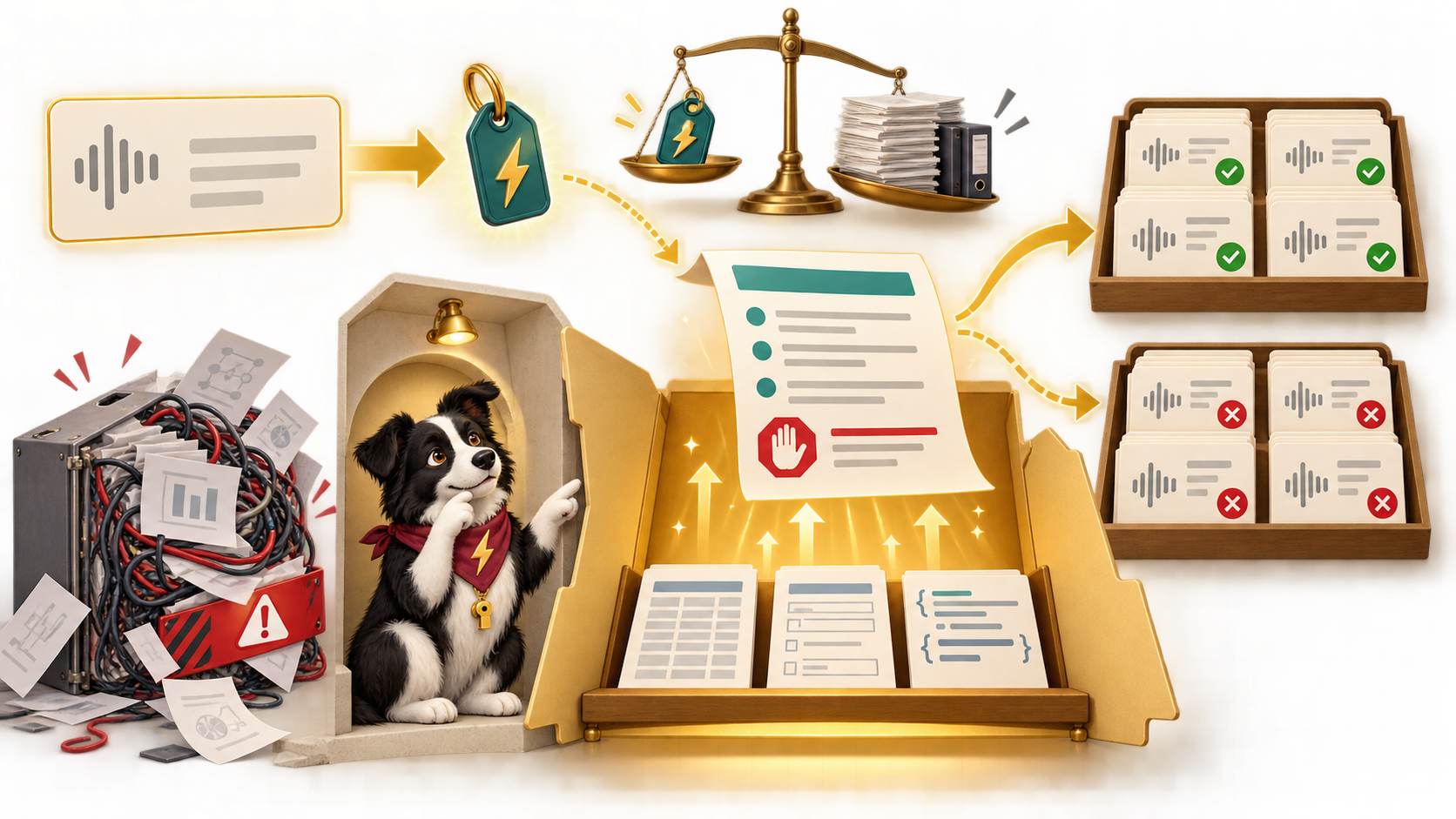
The full-size poster above is a static copy of the interactive version, handy for printing, sharing, or viewing without JavaScript.
Why This Matters
An agent keeps only the names and descriptions of its skills in context. It reads the full instructions when it decides a skill applies, and it opens a supporting file only when the instructions point to it. This is progressive disclosure. It is why the description is the most important line in the file, and why a vague one means the skill is skipped or fires on the wrong request.
A skill also needs tests in two directions. Trigger tests check that it loads when it should. Near-miss tests check that it stays quiet when it should. The poster teaches the structure and the testing habit. It does not claim that a well-structured skill is correct: you still run behavior tests with known answers. The enob-report skill used here is an illustrative example from the chapters.
Connects to
- Chapter 6: Knowledge Bases, Personal Knowledge Graphs, and the Anatomy of an Agent Skill
- Chapter 7: Designing, Testing, and Sharing Agent Skills
Source
The linked chapters of this book. The skill, its files, and the example requests are illustrative and come from the enob-report example in Chapter 6 and the trigger-testing section of Chapter 7.
Teachers and editors can open calibration mode to drag the markers and copy updated coordinates. Copy only the x and y numbers back into data.json.