Four Personal Agents, Side by Side
Open the interactive poster full screen
Use Explore mode to hover over or click a column and read what that agent does, how it is kept in check, and what it costs. Use Quiz mode to read a clue and click the agent it describes.
The four columns are:
- Grok Bot (SpaceXAI) — A hosted agent whose bots share one cloud computer and one set of logins.
- Dots (OpenAI) — A personal agent inside ChatGPT with its own cloud computer, read-only background access, and approval rules you can write.
- Muse (Meta) — A consumer agent in a dedicated cloud VM, with a Sentinel permission layer and approval for each purchase.
- Claude Cowork (Anthropic) — A tab in Claude Desktop that works in a local sandbox and is the least always-on of the four.
Static Poster
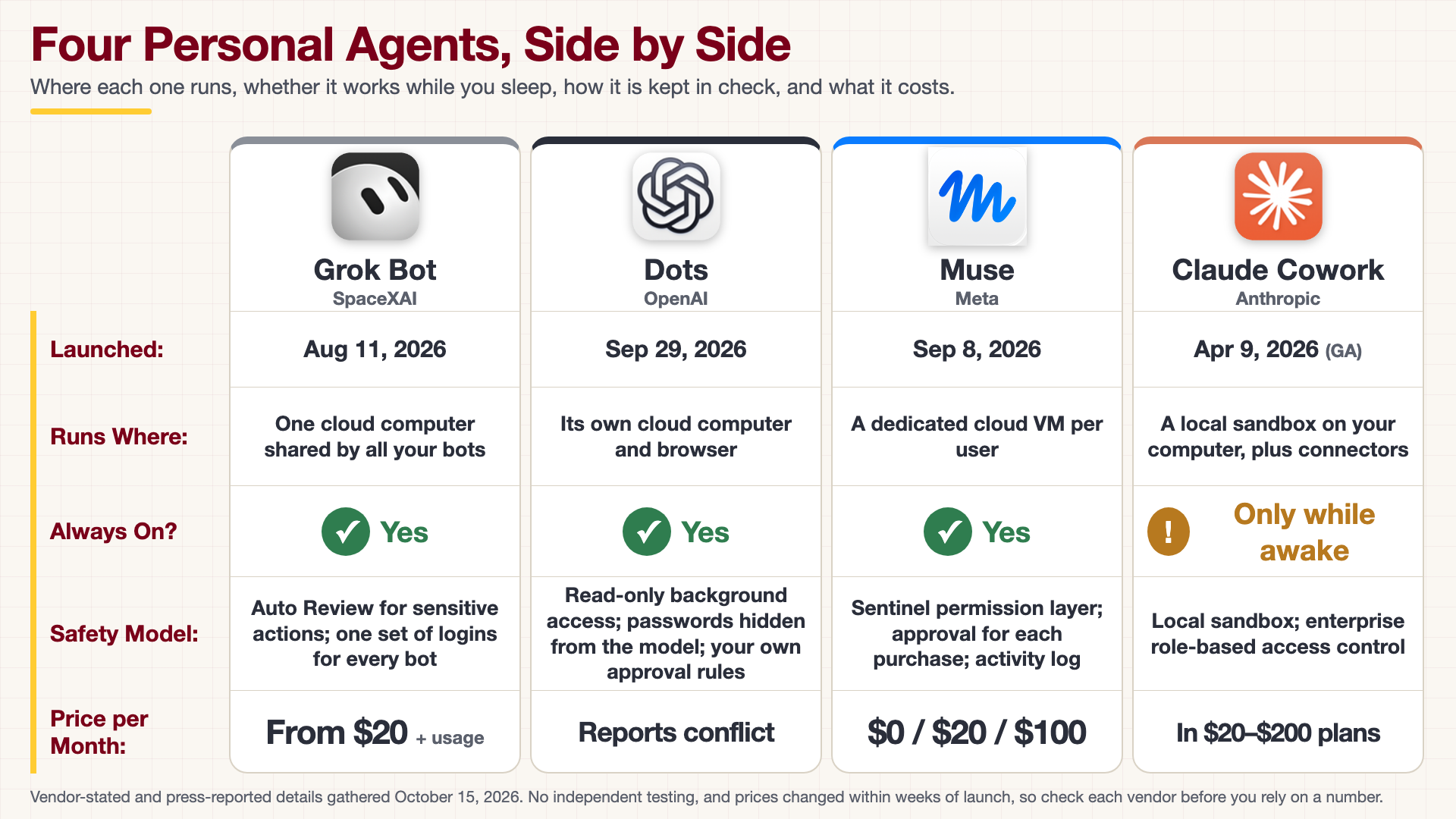
The full-size poster above is a static copy of the interactive version, handy for printing, sharing, or viewing without JavaScript.
Why This Matters
All four products arrived within a few months of each other in 2026, and they make the same promise: an agent that carries out multi-step work while you do something else. They differ in where the agent runs, who can see its logins, and how much it can do without asking. For a research group, those differences decide whether an agent can be trusted near unpublished data or a licensed tool chain. Read the Safety Model row before the Price row.
Where the Numbers Come From
Every value on this poster comes from the Personal Agent Software appendix, which is built from vendor announcements and press coverage gathered on October 15, 2026. We found no independent benchmarks or controlled tests of any of these products. Prices and tiers changed several times within weeks of launch, and the Dots price is reported two different ways, so confirm each number with the vendor. Open-source alternatives OpenClaw and Hermes Agent are covered in the appendix but are not on the poster. The logos belong to their owners; the appendix lists where each one came from.
Connects to
Source
The poster is rendered from poster.html, not from an image model, because it prints real names, dates, prices, and logos. To change a value, edit that file, render it again, and update the matching text in data.json.
Teachers and editors can open calibration mode to adjust zone positions. Copy only the x1, y1, x2, and y2 numbers back into data.json, because the calibration export omits showLabels and palette.