OLED Ping (Distance Sensor Display)
Welcome to OLED Ping
 In this lab, you will connect an ultrasonic distance sensor to your OLED display. Press a button to take a measurement and see the distance on screen! Let's build something amazing!
An ultrasonic sensor (like the HC-SR04) measures distance by sending out a sound pulse and waiting for the echo to return. The longer the echo takes to come back, the farther away the object is.
In this lab, you will press a button to turn measuring on and off. The distance will show on the OLED display.
Circuit
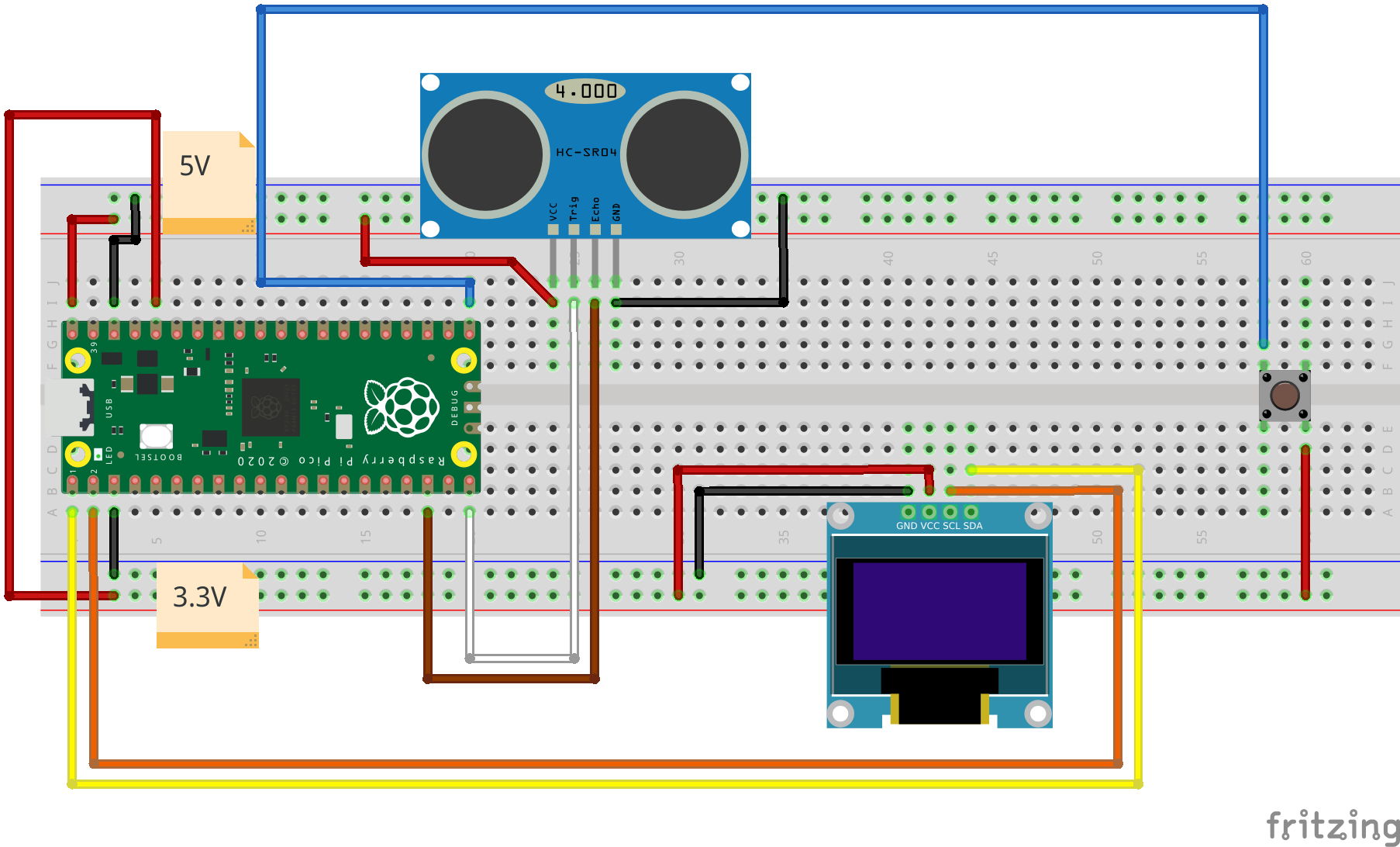
Wiring Steps
- Connect the OLED GND to Pico GND.
- Connect the OLED VCC to Pico 3.3V.
- Connect the OLED SDA to Pico GP0.
- Connect the OLED SCL to Pico GP1.
- Connect the HC-SR04 trigger pin to Pico GP14.
- Connect the HC-SR04 echo pin to Pico GP13.
- Connect the HC-SR04 VCC to Pico 5V (VBUS) and GND to Pico GND.
- Connect one leg of the button to Pico GP16 and the other to Pico GND.
Key Idea
 The button uses a debounce timer. When you press a button, it can "bounce" and register many presses in one touch. A timer waits 200 milliseconds before acting — long enough for the bounce to settle.
Code
1 2 3 4 5 6 7 8 9 10 11 12 13 14 15 16 17 18 19 20 21 22 23 24 25 26 27 28 29 30 31 32 33 34 35 36 37 38 39 40 41 42 43 44 45 46 47 48 49 50 51 52 53 54 55 56 57 58 | |
What each section does:
measure_on = False— starts with measuring turned off. The button toggles this.debounce(pin)— called when the button is pressed. It starts a 200-millisecond timer instead of acting immediately.on_pressed(timer)— called when the timer fires. It flipsmeasure_onbetween True and False.button.irq(debounce, Pin.IRQ_RISING)— tells MicroPython to calldebounce()every time GP16 goes from low to high (button pressed).measure_distance()— sends a sound pulse, times the echo, and converts the time to centimeters.(time_elapsed * 0.0343) / 2— the speed of sound is about 343 meters per second (0.0343 cm per microsecond). Dividing by 2 accounts for the pulse travelling to the object and back.if measure_on— only displays the distance if the button has turned measuring on.
Monty's Tip
 If the distance reading seems wrong, make sure your sensor is powered from VBUS (5V), not 3.3V. The HC-SR04 needs 5V to work correctly.
Watch Out!
 Keep objects at least 2 cm away from the sensor. Very close objects can confuse the timing and give wrong readings.
Great Work!
 You connected a real sensor to your display and used a button to control the program! Next, you will build a two-player Pong game on the same display.