Lab 01: Hello, Display
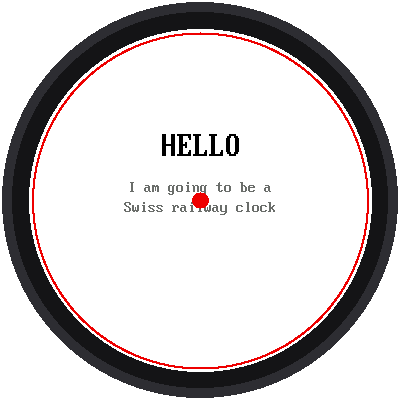
Time to wake up the round screen. This lab paints it white, the color of a railway clock's dial, writes a few words, and draws two red shapes: a dot at the exact center and a ring at the very edge of the glass.
Welcome to Lab 01
 This is the first time your own words appear on a screen you wired by
hand. By the end of the kit, this same screen will glide a red hand
around a Swiss station clock. Let's make time tick!
What You Will Learn
- how a program imports the helper files that come with the kit
- how the screen's coordinates work: x goes right, y goes down
- how to paint with colors and put text on the screen
Run It
Open 01-hello-display.py in Thonny and click Run. If the screen is
dark, check the wiring in How It Is Wired first.
You should see:
- a white screen with HELLO in big black letters
- two lines of small gray text under it
- a red dot in the middle, and a red ring right at the edge of the glass
The Code
The program starts by borrowing two helper files:
1 2 | |
config.py knows which pins the display is wired to and gives the colors
names. shapes.py knows how to draw circles and rings. Then one line
wakes up the display:
1 | |
From then on, display is how the program talks to the screen. Painting
the whole screen white is one more line:
1 | |
Where Is Everything? Coordinates
Every spot on the screen has two numbers, x and y. The strange part is that y counts from the top:
| Spot | x | y |
|---|---|---|
| Top-left corner | 0 | 0 |
| Center of the screen | 180 | 180 |
| Bottom-right corner | 359 | 359 |
So bigger y means lower on the screen, the opposite of a graph in math
class. Keep that in mind for the next lab. config.CENTER_X and
config.CENTER_Y are both 180, and the red dot is drawn right there.
Words on a White Screen
config.centered_text() writes a line of text in the middle of the screen
from left to right. You choose the font, the words, the row, the letter
color, and the background color:
1 2 | |
There are two fonts: BIG_FONT (16 × 32 pixels) and SMALL_FONT
(8 × 16 pixels). The last two numbers matter on a white screen. The
default is white letters on black, which would vanish here.
Is Your Ring Cut Off?
 The screen's metal rim covers the outermost pixels, so a ring drawn
too far out is clipped. If part of the red ring is missing on your kit,
make
SAFE_RADIUS in config.py smaller, 160 for example, and run it
again until the whole ring shows.
The red ring is drawn at config.SAFE_RADIUS, the largest circle that
you can still see all of. The clock face you build in the next labs puts
its outer bars just inside it.
Try This
- Change
config.RAIL_REDtoconfig.BLUEfor the dot and the ring. - Change the text. How many letters fit on one line in the big font? (The screen is 360 pixels wide, and each big letter is 16 wide.)
- Move the text up by making its row number smaller.
Hello, Round Screen!
 You imported helper files, painted a screen, wrote text in two fonts,
and learned that y counts down. Next, you'll use that to put twelve
dots around a circle.