Lab 07: Show the Real Time
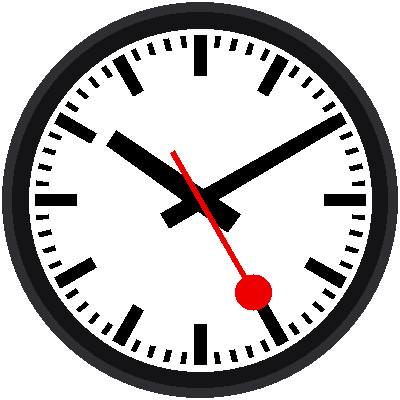
So far the time was typed into the program. Now the program asks the Pico what time it is, and points the hands there. It draws the face once, so it's a photograph, not yet a moving clock.
Welcome to Lab 07
 This is the first lab where your clock shows the actual time. You'll
also meet the finished face as a ready-made part, so every lab from
here on can be short. Let's make time tick!
What You Will Learn
- how to read the Pico's clock with
time.localtime() - what a tuple is, and how to unpack it
- how to use a module you built,
mondaine
Run It
Open 07-read-the-time.py in Thonny and click Run. If Thonny started
the program, Thonny has already set the Pico's clock to your computer's
time, and the face shows it. The shell prints it too:
1 | |
Why Is It Midnight?
 The Pico forgets the time when it loses power. If you run this lab from
a battery or a wall plug, it starts at midnight on January 1. Don't
worry, because lab 08 teaches the Pico to ask the internet for the
right time.
A Tuple of Time
time.localtime() gives back eight numbers at once, grouped in a tuple:
1 2 | |
Python can unpack a tuple into separate variables in one line:
1 | |
The names line up with the numbers, one for one. Then the angles come from lab 05 and lab 06's rules:
1 2 3 | |
The Finished Face as a Module
Labs 02 to 06 drew the face piece by piece. The kit's file lib/mondaine.py
packages all those pieces. Three lines now draw the whole clock:
1 2 3 | |
The shape of the hands, the bars, and the draw order are all in the module.
You can open mondaine.py and read it any time. Its top comments explain
how it works.
Try This
- Run it twice, a few seconds apart. Does the red hand move?
- Print
weekdayas well. Monday is 0. What number is today? - Try
face.show(0, 0, 0)instead. What time does it say?
A Clock That Reads the Time!
 You read a tuple, unpacked it into variables, and put the real time on
your face. Next, you'll make the Pico's time correct by asking the
internet.