Lab 02: Twelve Dots in a Circle
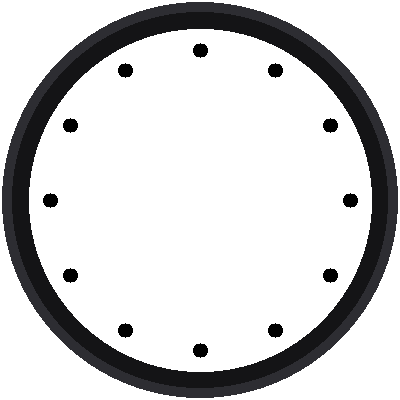
A clock face is a circle with things placed around it at equal steps. This lab places twelve black dots, one for each hour. It's a small program, but it hides the most useful trick in the whole kit: turning an angle into a spot on the screen.
Welcome to Lab 02
 After this lab you can place anything at any angle around a circle.
That's how every hand, every bar, and every dot on this clock gets
where it's going. Let's make time tick!
What You Will Learn
- what a variable is
- how a for loop repeats work
- how sine and cosine turn an angle into x and y
Run It
Open 02-dial-dots.py in Thonny and click Run. Twelve dots appear
around the screen, and Thonny's shell prints a line for each one:
1 2 3 | |
The first dot is at the top, at x = 180 and y = 30. Then the dots march clockwise.
Variables: Names for Numbers
The program gives a few numbers names, so the rest of the code can use the names:
1 2 | |
If you want the dots farther out, you change one number in one place. That is why programmers use variables.
The For Loop
1 2 3 | |
range(12) counts 0, 1, 2, ... 11, twelve numbers. The loop runs the
indented lines once for each number, and the variable hour holds the
current one. A full circle is 360 degrees, and 360 ÷ 12 = 30, so each hour
is 30 degrees farther around than the one before.
From an Angle to a Spot
A clock measures angles from 12 o'clock, going clockwise. Two math tools turn an angle into a position:
1 2 | |
Why the minus sign on y? Remember from lab 01 that y grows downward. The minus flips it, so angle 0 points up at the 12.
Sine and Cosine in One Sentence
 Think of standing at the center and walking
DISTANCE steps toward a
direction. Sine tells you how far you ended up across, and cosine
tells you how far up, as fractions of your steps.
One more detail: sin() and cos() want the angle in radians, not
degrees, so math.radians() converts it first. round() turns the result
into a whole number of pixels, since there's no such thing as half a
pixel.
Strange-Looking Math?
 Most people don't meet sine and cosine until high school, so if they
feel strange, that's normal. You already placed things by x and y in
lab 01, and these two tools just turn an angle into an x and a y.
Try This
- Change
range(12)torange(60)andhour * 30tohour * 6. Now there's a dot for every minute. - Change
DISTANCEto100. Where do the dots go? - Make every third dot red. (Hint:
if hour % 3 == 0:. You'll meet%in lab 04.)
A Circle of Dots!
 You used a for loop, sine, and cosine to place twelve dots at exact
angles. Next, you'll turn those dots into the bold bars of a Swiss
railway clock.
Next: Lab 03: Twelve Bars