Lab 06: The Red Second Hand
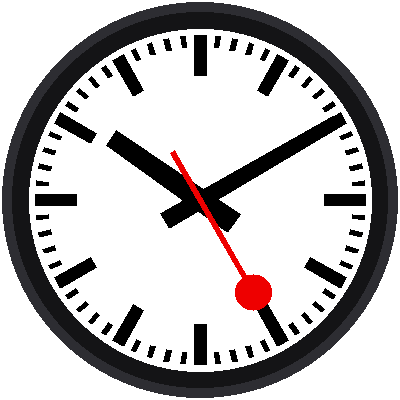
The most famous part of a Swiss station clock is its red second hand: a thin rod that ends in a round disc, like the signal paddle a train dispatcher used to hold up. This lab adds it, and your face is done, frozen at 10:10:25.
Welcome to Lab 06
 This is the finished picture, the face you'll animate for the rest of
the kit. Only one idea is new here, and it decides what lies on top of
what. Let's make time tick!
What You Will Learn
- why drawing order matters
- how a hand can be built from two shapes
- how the red disc is sized so it just touches the bars
Run It
Open 06-red-second-hand.py in Thonny and click Run. The dial and
black hands appear, and the red hand arrives last, lying on top of the
black ones where they cross near the center.
Two Shapes Make One Hand
The second hand is a thin stem and a disc:
| Part | Size in a |
|---|---|
| Stem width | 1.4 |
| Stem reaches back (the tail) | 16.5 behind the center pin |
| Disc diameter | 10.5 |
| Disc center | 31.25 out from the center |
1 2 3 4 | |
The stem is a bar() from lab 03, with a negative start so it reaches
behind the center. The disc is a filled circle at the point 31.25 a along
the hand.
A Tidy Detail
The disc's outer edge is 31.25 + 5.25 = 36.5 a from the center. That is exactly where the heavy five-minute bars begin. So when the red hand points straight at an hour, the disc just touches the bar, as if the clock had been designed so that the two fit like puzzle pieces. They were.
Draw Order
The program draws things in this order, and the order is the whole point:
- the dial and its 60 bars
- the black hour and minute hands
- the red second hand
1 2 3 | |
Whatever is drawn last lies on top, like laying paper cutouts on a table. If you drew the red hand first, the black hands would cover it near the center. A display with no memory of what is under each shape, like this one, has no way to fix that afterward.
The Red Hand Disappeared!
 If the red hand vanishes under the black ones, you moved its drawing
to before the hour and minute hands. Each new shape paints over
whatever came before, so put
second_hand(...) back at the bottom of
the file.
Try This
- Change
second = 25tosecond = 45. Where does the disc land? - Move the
second_hand(...)line above the black hands. What changes near the center? - Set
second = 0, thensecond = 15. Notice the disc just touching a big bar each time.
The Face Is Finished!
 You built a Swiss-railway face from design units, loops, functions, and
draw order. Next, you'll stop typing the time into the program and read
it from the Pico instead.