Lab 03: Twelve Bars
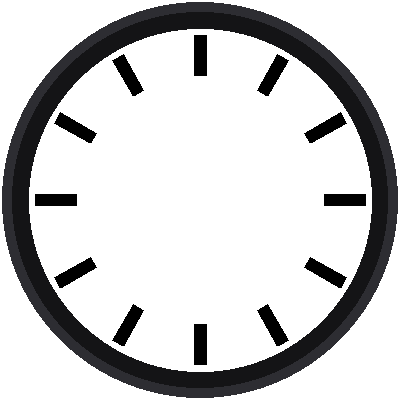
A Swiss railway clock has no numbers. Its twelve hours are marked by heavy black bars, easy to read from across a train platform. This lab draws them. To do it, you write your first functions.
Welcome to Lab 03
 Last lab you drew dots. Now you'll draw rectangles that point at the
center from any direction, which is the shape of every bar and every
hand on this clock. Let's make time tick!
What You Will Learn
- how to write your own function with
def - how a design unit lets a whole drawing grow or shrink at once
- how to draw a filled shape from its corners
Run It
Open 03-hour-markers.py in Thonny and click Run. Twelve black bars
appear around the dial, each one pointing at the center.
One Unit to Measure Everything
The railway clock was designed so that every size is a multiple of one small unit, called a. One a is 1/100 of the dial's width. The program says how many pixels that is:
1 | |
Now a five-minute bar is described like this:
| Part of the bar | Size in a | Pixels (A = 3.4) |
|---|---|---|
| Starts this far from the center | 36.5 | about 124 |
| Ends this far from the center | 48.5 | about 165 |
| Half of its width | 1.75 | about 6 |
Change One Number, Change Everything
 Because every size is a multiple of a, the whole face is one
picture that you can scale. Try
A = 3.0 and the face shrinks. The
bars keep their proportions, and the design stays the same.
Your First Functions
A function is a named set of instructions you can use again and again.
This program has two. The first, point(), is lab 02's sine-and-cosine
math in a box:
1 2 3 4 5 | |
You give it an angle, how far along that direction to walk, and (optionally) how far to step across, sideways. It gives back the screen position. The sideways step is new: it's what lets us find a rectangle's corners.
The second function, bar(), finds all four corners and fills them in:
1 2 3 4 5 6 7 | |
Each corner is a step along the bar's direction, then a step to the left
(a negative across) or right. The shapes.poly() helper fills the
four-cornered shape with color.
With the functions written, drawing all twelve bars takes three lines:
1 2 | |
Name Things for the Next Reader
 A function name like
bar() tells you what it does without reading
it. When your code is full of descriptive names, you can come back to
it a month later and still understand it.
Try This
- Change
A = 3.4toA = 2.5. What happens to the bars? - Make the bars red by changing
config.BLACKtoconfig.RAIL_RED. - Change
1.75 * Ato3 * Ato make the bars fat.
Twelve Bars Done!
 You wrote two functions and used them to draw twelve rotated
rectangles from one design unit. Next, you'll add the 48 small bars
between them.
Next: Lab 04: Sixty Bars