Lab 09: Tick Tock
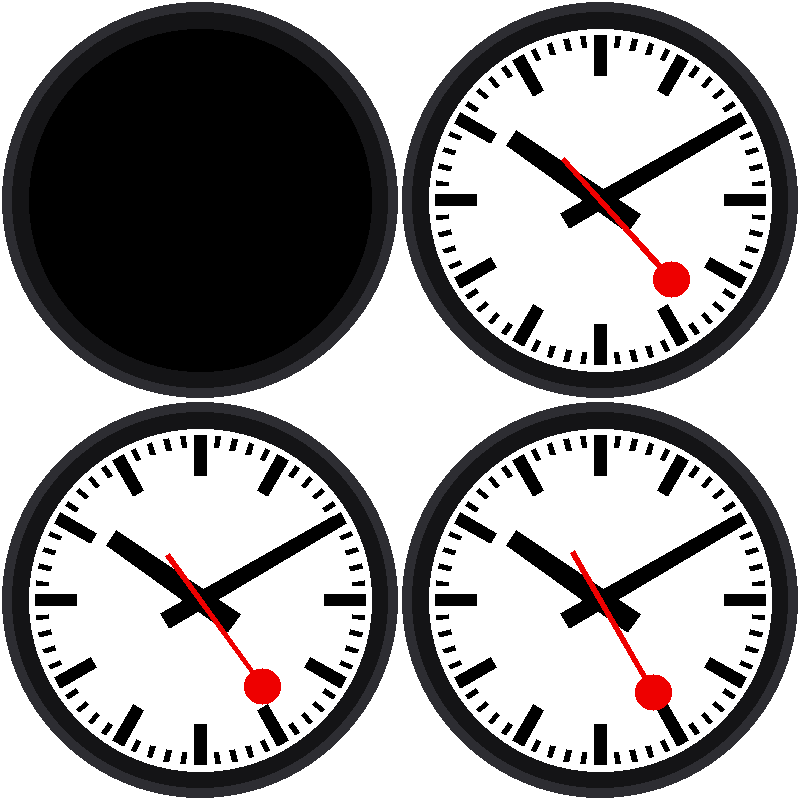
At last, the clock runs. Once a second the red hand jumps ahead six degrees, like an ordinary quartz clock, and the black hands follow along as the minutes pass.
Welcome to Lab 09
 Your face has been a picture until now. In this lab it comes alive, and
you'll learn the oldest trick in animation. Let's make time tick!
What You Will Learn
- how a while loop keeps a program running forever
- how to do work only when something changed
- why drawing on this display costs real time
Run It
Open 09-tick-tock.py in Thonny and click Run. The red hand ticks
once a second. Watch the minute hand at the top of a minute: it jumps a
whole 6° in the same instant the red hand starts its next lap. That's a
little abrupt, and the next three labs fix it.
The Loop
The heart of the program is short:
1 2 3 4 5 6 7 8 9 10 11 | |
while True: repeats forever. Each time around, the program asks the Pico
for the time. Then comes the key question: is this a different second
than last time? (!= means "is not equal to.") The loop goes around about
50 times a second, but the answer is "yes" only once a second.
Remember What You Showed
 The variable
last_second is the program's memory of what is already
on the screen. When the new value matches it, there is nothing to do,
and doing nothing is the fastest thing a program can do.
Why Not Just Redraw Everything?
This display has no memory of its own for the picture. Each pixel has to be sent down a wire, and the whole face is 129,600 of them. On a Pico 2 W that takes about a tenth of a second, so redrawing the whole face over and over would make the screen flash.
face.show() is careful instead. It works out which rows of pixels the
moving hand covers, and repaints only those. You'll find out how in the
Notes for Teachers.
Try This
- Change
time.sleep_ms(20)totime.sleep_ms(1000). What goes wrong, and why? (Hint: the loop can now miss a second.) - Add
print(second)inside theif. How often does it print? - Change
second * 6tosecond * 12. What does the clock do now?
The Clock Runs!
 You wrote a loop that keeps time and only redraws when the second
changes. Next, you'll make the red hand glide instead of jump.
Next: Lab 10: A Smooth Sweep