Lab 01: Give the Kit a Checkup
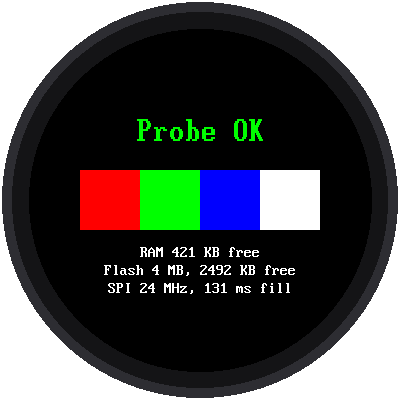
When you visit a doctor for a checkup, they test your heart, your breathing, and your reflexes. This program does the same thing for your kit. It tests everything a program can test:
- the Pico and its version of MicroPython
- how much memory (RAM) and storage (flash) it has
- whether all the kit's files are on the Pico
- whether it can see your WiFi network
- whether the three buttons are wired correctly
- whether the display is working
Run this lab whenever something isn't working. It usually tells you exactly what's wrong.
Welcome to Lab 01
 I like checkups. They're how a robot like me finds a loose wire before
it turns into a mystery. After this lab, you'll have a tool that finds
most kit problems for you. Let's make time tick!
I like checkups. They're how a robot like me finds a loose wire before
it turns into a mystery. After this lab, you'll have a tool that finds
most kit problems for you. Let's make time tick!
What You Will Learn
- the difference between RAM and flash memory
- how a program can check its own hardware
- why some checks still need your eyes
Run It
Open 01-probe.py in Thonny and click Run. It prints a long report
in Thonny's shell, the text area at the bottom of the window. At the end
it draws on the screen:
- four color bars: red, green, blue, and white, from left to right
- "Probe OK" in green if every check passed, or "Probe: 2 warn" in yellow, with the problems listed underneath
Here's part of the report, from a real kit:
1 2 3 4 5 6 7 8 9 10 11 12 13 14 15 16 17 18 19 20 21 22 23 24 25 26 27 28 | |
RAM and Flash: Two Kinds of Memory
The Pico has two kinds of memory, and they do different jobs:
| RAM | Flash | |
|---|---|---|
| Like... | a whiteboard | a notebook |
| Holds | what the program is working on right now | your program files |
| How much | 520 KB | 4 MB (4,000 KB) |
| When you unplug the Pico | erased | kept |
A KB (kilobyte) is about 1,000 bytes, and one byte can hold one letter. So the Pico's RAM could hold about half a million letters.
A clever trick for measuring flash
MicroPython won't tell you how big the flash chip is. So the probe uses a trick. Imagine a street where the house numbers only go up to 99. If you ask for house number 105, you end up at house number 5, because the numbers wrap around. The flash chip works the same way: reading 4 MB past the start gives you the same bytes as the start. The smallest jump that "wraps around" tells you the chip's size.
Why the Color Bars?
A program can check that the display is plugged in, but not whether it looks right, because the display can't send pictures back to the Pico. So the probe draws something only your eyes can check. If you see red, green, blue, and white in that order, the colors are right. If red and blue are swapped, the display needs a different color setting.
Try This
- Hold down one of the buttons while you run the probe. What does section 8, Buttons, say?
- Find the line
heap freein the report. That's how much RAM is left over for your programs. Is it more or less than 400 KB?
If It Doesn't Work
- The report says
MISSING lib/gc9b72.py. The kit's files aren't on the Pico yet. Copy them over (see Before You Start on the kit's main page). - It says your network was not found. Check the spelling of the
network name in
secrets.py. Also, the Pico only works with 2.4 GHz WiFi, not 5 GHz.
Checkup Complete!
 You can now read a hardware report and explain the difference between
RAM and flash. Next, you'll put your first words on the round screen.
You can now read a hardware report and explain the difference between
RAM and flash. Next, you'll put your first words on the round screen.
Next: Lab 02: Hello, World!