Lab 10: A Stopwatch with Lap Times
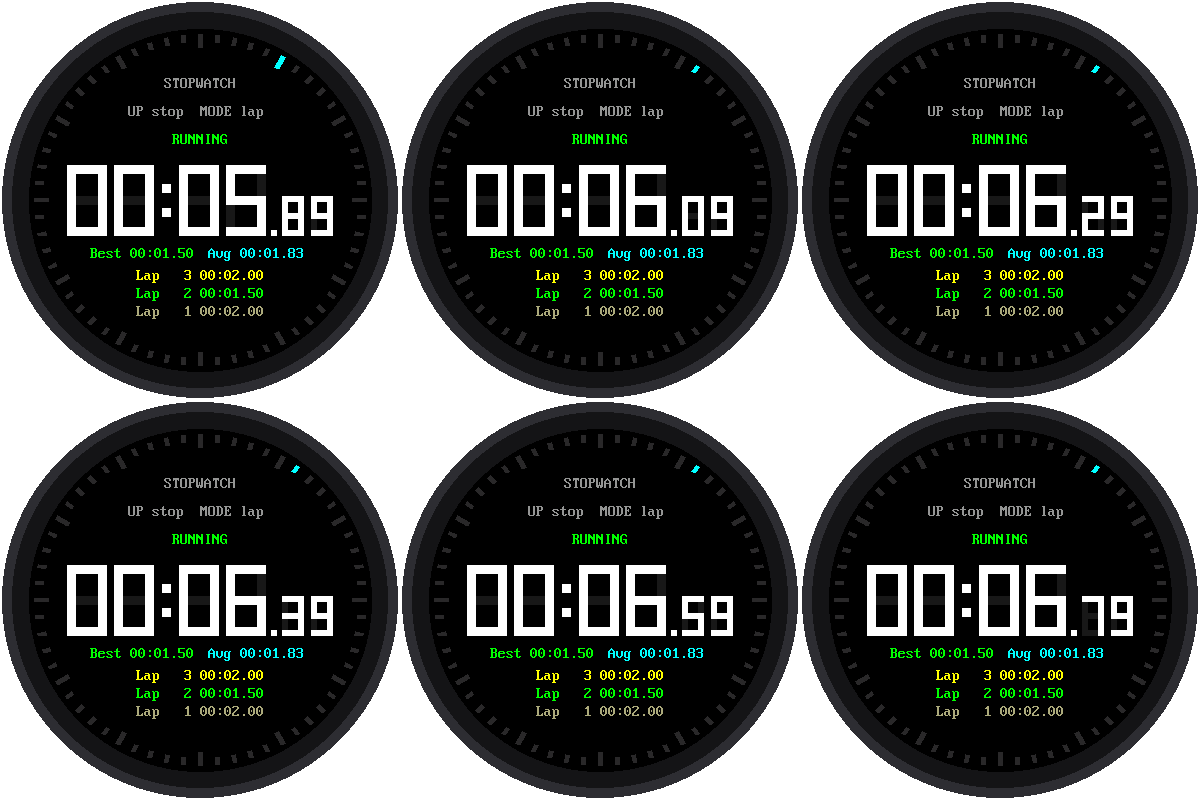
Time a race, see how long you can hold your breath, or time each lap around the track. This stopwatch shows minutes, seconds, and hundredths of a second. It also keeps lap times: press a button each time you pass the starting line, and it tells you how long each lap took.
Welcome to Lab 10
 Ready, set, go! This stopwatch keeps lap times the way a coach's
stopwatch does, and it hides a clever timing trick that real
stopwatches use. Let's make time tick!
Ready, set, go! This stopwatch keeps lap times the way a coach's
stopwatch does, and it hides a clever timing trick that real
stopwatches use. Let's make time tick!
What You Will Learn
- how a stopwatch keeps time (it's not what you'd guess)
- how to find the fastest lap and the average lap
Run It
Open 10-stopwatch.py in Thonny and click Run.
| Button | What it does |
|---|---|
| UP | Start and stop |
| MODE | Record a lap, while the stopwatch is running |
| DOWN | Reset to zero, only while stopped |
A line near the top of the screen always tells you what the buttons do
right now, like UP stop MODE lap.
Why can't DOWN reset a running stopwatch?
Imagine timing a friend's mile run and bumping the reset button by accident at the last lap. To keep that from happening, you have to stop the stopwatch before you can reset it.
How a Stopwatch Keeps Time
You might guess that a stopwatch adds a little bit of time, over and over. It doesn't, because that would drift. Each time around the loop takes a slightly different amount of time, especially when the screen is busy drawing, and all those tiny errors would add up.
Instead, the stopwatch writes down when it started. The Pico has a millisecond counter that's always running, like a clock on the wall. Whenever the stopwatch needs to know the time, it asks: how long ago did I start?
1 | |
It's like writing down "the race started at 3:15" instead of counting
"one Mississippi, two Mississippi..." the whole way. The banked_ms part
holds time from before you stopped it, so starting again picks up where
you left off.
Remember a Moment
 This idea works far beyond stopwatches. Whenever a program needs to
measure time, ask yourself: which moment should I remember? In the next
lab, the countdown timer remembers the moment it will end.
This idea works far beyond stopwatches. Whenever a program needs to
measure time, ask yourself: which moment should I remember? In the next
lab, the countdown timer remembers the moment it will end.
Fastest and Average Laps
The newest lap shows on top in yellow. Once you have two laps or more, the watch finds:
- the fastest lap, which it shows in green. (Python's
min()finds the smallest number in a list.) - the average lap: add up all the laps, then divide by how many there are.
In the picture, the laps were 2.00, 1.50, and 2.00 seconds. The fastest is 1.50. The average is (2.00 + 1.50 + 2.00) ÷ 3 = 5.50 ÷ 3, which is about 1.83.
Try This
- Time yourself saying the alphabet. Then try again and see if you can beat your time.
- Record five laps. Then look at the "Best" line. It still shows the fastest lap, even after that lap has scrolled off the list.
- The list shows 3 laps. Find
LAP_ROWSnear the top of the program. What happens if you change it to 2?
Lap Times Unlocked!
 You built a stopwatch that doesn't drift, and you used
 min() and an
average to find the best lap. Next, you'll flip it around and count
down to an alarm.