Lab 04: Ask the Internet What Time It Is
The Pico forgets the time whenever it loses power. Real smartwatches never seem to have this problem. They ask the internet for the correct time. In this lab, your watch will do the same.
Welcome to Lab 04
 This is the lab where your watch goes online. After this, it can set
its own clock anywhere there's WiFi, the same way a phone does.
Let's make time tick!
This is the lab where your watch goes online. After this, it can set
its own clock anywhere there's WiFi, the same way a phone does.
Let's make time tick!
What You Will Learn
- how the Pico joins a WiFi network
- what a time server is
- what time zones and daylight saving time are
- how to keep a password out of your code
Before You Run It
The Pico needs the name and password of your WiFi network. They go in a
special file called secrets.py:
- Find the file
secrets-template.pyin the kit folder. - Copy it, and name the copy
secrets.py. - Type in your network's name and password:
1 2 | |
- Save
secrets.pyto the Pico.
Keep secrets secret
 Never put a password right inside a program, because programs get
shared. Keeping it in its own file,
Never put a password right inside a program, because programs get
shared. Keeping it in its own file, secrets.py, means you can share
all your programs without sharing your password. This kit's
secrets.py is set up so it never gets uploaded to the internet.
Run It
Open 04-wifi-sync-time.py in Thonny and click Run. The screen tells
you what's happening, one step at a time:
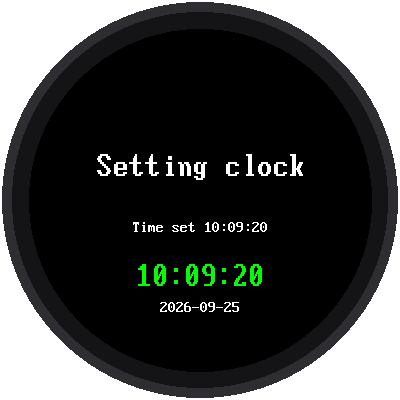
Joining your-network-nameIP 10.0.0.22, which means your Pico is on the networkAsking pool.ntp.org, which means it's asking a time serverTime set 10:09:20, and the time appears in big green numbers
How It Works
Special computers on the internet called time servers do nothing but tell other computers the exact time. They follow a set of rules called NTP, the Network Time Protocol. The Pico asks one, and in a fraction of a second it gets the answer.
All of that happens in one line of the program:
1 | |
sync_time() lives in the kit's file wifi_time.py. It joins your WiFi,
asks a time server, fixes the time zone, sets the Pico's clock, and then
turns the WiFi off again to save power.
Time zones
A time server answers in UTC, the time in London, England (in
winter). When it's noon there, it's still early morning in Minnesota. So
the program adds the number of hours in TIMEZONE_HOURS from config.py:
| Time zone | TIMEZONE_HOURS | When it's noon UTC, it's... |
|---|---|---|
| Eastern | -5 | 7 AM |
| Central | -6 | 6 AM |
| Mountain | -7 | 5 AM |
| Pacific | -8 | 4 AM |
Daylight saving time
In most of the United States, clocks "spring forward" one hour in March
and "fall back" one hour in November. The program works out whether
today is in daylight saving time and adds the extra hour when it is. (If
you live in Arizona or Hawaii, where clocks don't change, set
USE_US_DST = False in config.py.)
Try This
- Change
TIMEZONE_HOURSto -8 and run the program again. What time does it say now? Where in the country would that be right? - After this lab finishes, run Lab 03. The time is still right, because the Pico's clock keeps going until the power is unplugged.
If It Doesn't Work
No secrets.py on the Pico. You forgot step 4: savesecrets.pyto the Pico.WiFi failed. Check the spelling of the network name and password. Capital letters matter! Also, the Pico only connects to 2.4 GHz networks.- The time is off by exactly one hour. Check
TIMEZONE_HOURSandUSE_US_DSTinconfig.py.
Your Watch Is Online!
 You joined a WiFi network, asked a time server for the exact time, and
kept your password out of your code. Next, you'll put that time on a
watch face with real moving hands.
You joined a WiFi network, asked a time server for the exact time, and
kept your password out of your code. Next, you'll put that time on a
watch face with real moving hands.