Lab 07: Set the Time with the Buttons
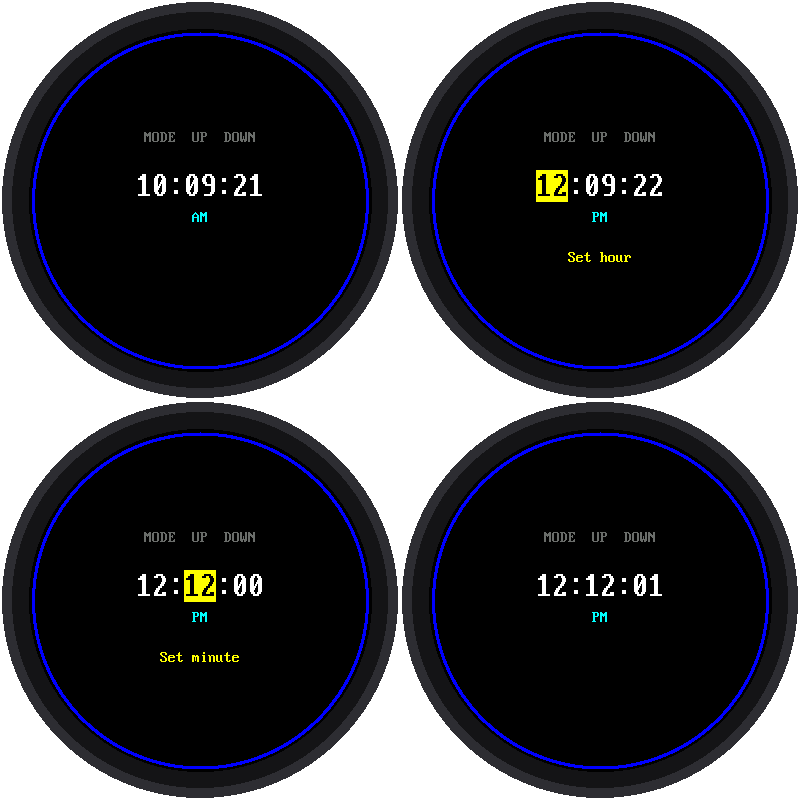
What if there's no WiFi? A real watch lets you set the time with its buttons. This lab does too:
| Button | What it does |
|---|---|
| MODE | Steps through: run → set hour → set minute → run |
| UP | Adds one to the highlighted number |
| DOWN | Takes one away from it |
The part you're changing is highlighted in yellow. Hold UP or DOWN and the number keeps changing by itself, so you don't have to press 45 times to get to 45 minutes.
Welcome to Lab 07
 After this lab, your watch can be set anywhere, even with no WiFi, just
like a store-bought watch. You'll also fix a sneaky problem hiding
inside every button. Let's make time tick!
After this lab, your watch can be set anywhere, even with no WiFi, just
like a store-bought watch. You'll also fix a sneaky problem hiding
inside every button. Let's make time tick!
What You Will Learn
- why a single press can count as three (and how to fix it)
- how "hold to repeat" works
- how to set the Pico's clock from a program
Run It
Open 07-set-time.py in Thonny and click Run. Then:
- Press MODE. The hour turns yellow.
- Press UP or DOWN to change it.
- Press MODE again. Now the minutes are yellow.
- Change them, then press MODE once more to get back to running.
Each time UP or DOWN changes the minutes, the seconds go back to zero. That way you can match another clock exactly. Set the minutes to what that clock shows now, one press short of its next minute. Then press UP one last time right when that clock gets there.
Problem 1: Bouncing Buttons
Inside a button, two bits of metal touch when you press it. But they don't touch just once. They bounce, like a basketball, touching and letting go several times in a few thousandths of a second. The Pico is so fast that it sees every bounce as a separate press, so one push could move the hour three places!
The fix is called debouncing: after the button changes, ignore it for the next 40 thousandths of a second (40 milliseconds, or ms). By then, the bouncing has stopped.
1 | |
Problem 2: Hold to Repeat
Pressing a button 45 times would be miserable. So if a button is held for half a second, it starts "pressing itself" about 8 times a second until you let go:
1 2 | |
Both of these fixes live inside a class called Button. A class is a
blueprint: the program makes one Button from it for each real button,
and each one keeps track of its own bouncing and holding.
Setting the Pico's Clock
Once you change a number, the program writes the new time into the Pico's clock, the RTC:
1 | |
That means lab 03 and lab 05 will show your new time, too, as long as the Pico stays plugged in.
Try This
- Change
DEBOUNCE_MSto0. Can you get one press to count twice? - Change
REPEAT_MSto40. Now how fast does it count? - Make the highlight color green instead of yellow. Look for
HIGHLIGHT_BGnear the top of the program.
Set It Yourself!
 You tamed bouncing buttons, made them repeat when held, and wrote a new
time into the Pico's clock. Next, you'll build a digital watch face with
giant numbers.
You tamed bouncing buttons, made them repeat when held, and wrote a new
time into the Pico's clock. Next, you'll build a digital watch face with
giant numbers.