Lab 03: A Digital Clock
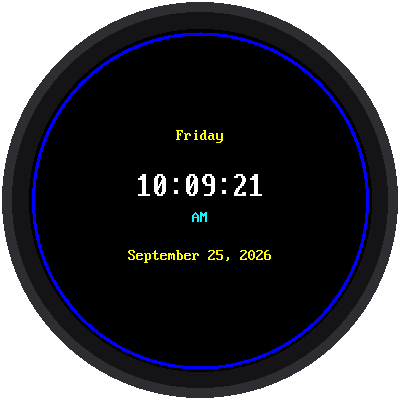
Now the kit becomes a real clock. This program shows the time (hours, minutes, and seconds), the day of the week, and the date, and it updates every second.
Welcome to Lab 03
 This is the lab where your kit stops being a gadget and becomes a clock.
You'll also learn the trick that keeps a screen from flickering, and
you'll use it in every lab after this one. Let's make time tick!
This is the lab where your kit stops being a gadget and becomes a clock.
You'll also learn the trick that keeps a screen from flickering, and
you'll use it in every lab after this one. Let's make time tick!
What You Will Learn
- where the Pico gets the time from
- how to turn 13:00 into 1 PM
- how to add a leading zero, so 9 seconds shows as
09 - why good programs only redraw what changed
Run It
Open 03-digital-clock.py in Thonny and click Run. The time should
match the clock on your computer.
Where Does the Time Come From?
The Pico has a built-in clock called the RTC, short for real-time
clock. Your program asks it for the time with time.localtime(), which
answers with eight numbers at once:
1 | |
When Thonny connects to the Pico, it quietly sets the Pico's clock from your computer's clock. That's why the time is right.
The Pico forgets the time
 The Pico has no battery for its clock. If you unplug it and plug it
into a wall charger instead of your computer, the clock starts over
from a date in the past. Lab 04 fixes this by
asking the internet for the time.
The Pico has no battery for its clock. If you unplug it and plug it
into a wall charger instead of your computer, the clock starts over
from a date in the past. Lab 04 fixes this by
asking the internet for the time.
Making the Time Look Right
The Pico counts hours from 0 to 23, but most watches show 1 to 12 with AM or PM. One line of code does the conversion:
1 | |
The % sign means "the remainder after dividing." For example, 13 ÷ 12 is
1 with a remainder of 1, so 13:00 becomes 1 o'clock. But 12 ÷ 12 has a
remainder of 0, and there's no "0 o'clock," so or 12 turns a 0 into 12.
Then this line builds the text of the time:
1 | |
Each %d is a spot for a number. %02d means "use 2 digits, and fill in
with a zero if needed," so 7 seconds shows as 07. The time text is
always exactly 8 characters long, which matters for the next part.
Only Redraw What Changed
The program checks the time many times a second, but it only draws when the second has actually changed:
1 2 3 | |
And it doesn't clear the screen first. Each new letter is drawn right on top of the old one, and a letter paints its own black background, so the old letter disappears underneath. Clearing the whole screen every second would make it flicker: blink black for a moment each time.
Try This
- Change
"AM" if hour < 12 else "PM"so it shows"morning"and"afternoon"instead. (Hint: the line might need to be wider.) - Take out the
%02dand use%dinstead. What happens at 10:05:03? - Change the ring's color from
config.BLUEto your favorite color.
It's a Real Clock!
 You turned 24-hour time into AM and PM, padded numbers with zeros, and
learned to redraw only what changed. Next, you'll teach your clock to
ask the internet for the time, so it can set itself.
You turned 24-hour time into AM and PM, padded numbers with zeros, and
learned to redraw only what changed. Next, you'll teach your clock to
ask the internet for the time, so it can set itself.