A History of MicroPython's FrameBuf Drawing Support
Summary
Now that students can use ellipse() and poly(), this chapter explains where those methods came from: MicroPython's framebuf module supported only basic shapes and blit() through v1.19.1, gained ellipse() and poly() in an August 2022 development-branch merge, shipped them in an official stable release for the first time in v1.20.0 (April 2023), and later received an ellipse() bug fix in v1.24.1. After completing this chapter, students will be able to explain why some older MicroPython code and tutorials cannot use ellipse() or poly(), and how open-source contributions reach a stable release.
Concepts Covered
This chapter covers the following 12 concepts from the learning graph:
- FrameBuf Version Timeline
- Blit Cross-Format Support V1.17
- Framebuf Method Set Before V1.20
- Ellipse Poly Dev Branch Merge
- Nightly Build Firmware
- MicroPython V1.20.0 Release
- Ellipse Bug Fix V1.24.1
- Pre-2023 Curve Workaround
- MicroPython Release Versioning
- MicroPython Firmware Update
- Open Source Contribution Model
- MicroPython GitHub Repository
Prerequisites
This chapter builds on concepts from:
- Chapter 4: MicroPython Fundamentals II: Functions & the FrameBuf Module
- Chapter 6: Basic Drawing Primitives
- Chapter 7: Ellipse & Polygon Drawing
Where Did ellipse() and poly() Actually Come From?
One Question Before We Move On
 In Chapter 7, you called
 ellipse() and poly() like they had always been there. They hadn't. This chapter is a quick, true story about how those two functions got added to MicroPython — and why knowing that story makes you a sharper programmer, not just a more curious one.
Every function you have used so far in this book — pixel(), line(), rect(), blit(), ellipse(), poly() — lives inside a piece of software called MicroPython, a compact version of the Python programming language built to run on small microcontrollers like the one you wired up in Chapter 1. MicroPython did not arrive complete. It grew, one contributed change at a time, over more than a decade, and the drawing tools you now take for granted are a perfect case study in how that growth actually happens.
This chapter follows one small, specific feature — the ability to draw ellipses and polygons — from "does not exist" to "ships in every download" to "gets quietly improved two years later." Understanding that path will change how you read documentation, choose which MicroPython version to install, and troubleshoot old tutorials that mysteriously will not run.
MicroPython Lives on GitHub, in the Open
MicroPython is open source software: its complete source code is published publicly, anyone can read it, and anyone can propose a change to it. That code lives in the MicroPython GitHub repository, a public project page hosted on GitHub where every file, every past change, and every discussion about a new feature is stored and visible to anyone with an internet connection — no special account or company access required.
That openness is not just a legal detail. It means the exact conversation that led to ellipse() and poly() being added to framebuf is still sitting online today, with real dates, real usernames, and real back-and-forth about how the code should behave. Nothing in this chapter is secondhand — it is the visible, permanent record of how one feature you already use came to exist.
Public by Design
 Compare this to a product like a game console's operating system, where the source code stays locked inside one company. With MicroPython, the entire history of every function is public. That transparency is exactly why this chapter can tell such a precise, dated story.
How an Idea Becomes Code: The Open Source Contribution Model
Anyone can imagine a new feature, but typing code into a copy of the MicroPython repository does not ship it to your Pico automatically. Open source projects like MicroPython follow the open source contribution model: a contributor writes and proposes a code change, called a pull request, and one or more maintainers — experienced project members trusted to protect the project's quality — review that change before deciding whether to merge it in.
A pull request is a formal request that says, in effect, "here is a specific, complete set of code changes; please review them and add them to the project if you agree they belong." Maintainers read the proposed code line by line, test it, ask the contributor to fix problems, and only merge it once they are satisfied. This review step is exactly what happened with ellipse() and poly(): a contributor wrote code to draw ellipses and polygons inside the framebuf module, opened a pull request, and MicroPython's maintainers reviewed and refined it before it became part of the project.
That process protects every MicroPython user, including you. A function that ships to millions of microcontrollers needs to work correctly, use memory efficiently, and fit the style of the rest of the module — a maintainer's review step is what makes that outcome likely instead of accidental.
Open source contribution follows a predictable path from idea to your device:
- A contributor identifies a gap — in this case, no way to draw circles or many-sided shapes in
framebuf. - The contributor writes code and opens a pull request against the MicroPython GitHub repository.
- Maintainers review the pull request, suggest changes, and the contributor revises it.
- Once approved, the maintainers merge the pull request into the project's development branch.
- The change eventually ships inside an official, numbered MicroPython release.
What framebuf Could Draw Before v1.20
Before this story's ending — the version most of this book assumes — it helps to know exactly what you would have been missing. Through MicroPython version 1.19.1, the framebuf method set before v1.20 included only nine drawing methods, and neither ellipse() nor poly() was one of them.
Here is the complete list a MicroPython programmer had to work with before v1.20:
fill()— fill the entire frame buffer with one colorpixel()— set or read a single pixelhline()— draw a horizontal linevline()— draw a vertical lineline()— draw a line between any two pointsrect()— draw a rectangle, outlined or filledscroll()— shift existing pixel content in any directionblit()— copy one frame buffer's contents onto anothertext()— draw simple built-in bitmap text
That is a genuinely useful toolkit — it is everything Chapter 6 covered — but notice what is missing. No circles, no ellipses, no triangles, no five-sided badges. Anything curved or many-sided had to be built by hand out of straight lines and rectangles.
Faking Curves With Straight Lines
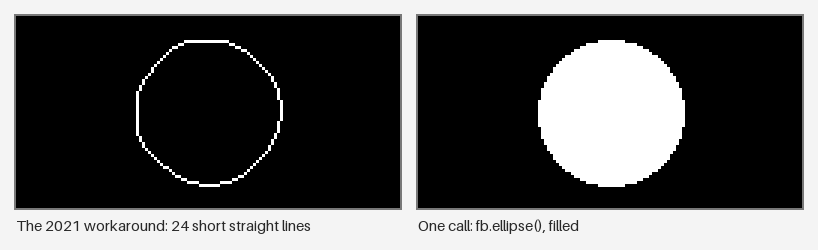
Chapter 7 introduced the idea of approximating a curve with many short line segments. That is not a teaching simplification invented for this book — it is exactly what real MicroPython projects had to do before ellipse() existed. The pre-2023 curve workaround was a common pattern: loop through a full circle in small angle steps, calculate an (x, y) point on the circle's edge at each step using trigonometry, and connect consecutive points with line().
Here is roughly what that workaround looked like in code a programmer might have written in 2021 or 2022, before ellipse() shipped in any stable release:
1 2 3 4 5 6 7 8 9 10 11 | |
That function works, and it is a reasonable piece of code — but look at what it costs: a math import, an angle calculation, a loop, and careful bookkeeping of the previous point, just to draw one circle. Now compare it to the one line of code that same circle takes once ellipse() exists:
1 | |
Here are both circles, drawn by the code above. The workaround traces an outline in short straight segments, while ellipse() fills the whole shape in one call:
Always Check Your Version First
 If you ever see MicroPython code online that draws circles with a loop full of trigonometry, it is not wrong — it is probably just older than v1.20.0, or written for a device stuck on an older firmware. Always check
 sys.implementation.version before assuming a function like ellipse() is available.
One line, no import, no loop, no angle math — and it fills the shape too. That difference between eleven lines of trigonometry and one short function call is the entire reason this chapter's story matters: it is the visible payoff of an open source contribution landing in a stable release.
Now that you can see exactly what changed, it helps to compare both approaches side by side and toggle between them.
Diagram: Old Workaround vs. New ellipse() Call
Old Workaround vs. New ellipse() Call
Type: infographic
sim-id: ellipse-workaround-before-after-toggle
Library: HTML/CSS/JS
Status: Specified
Bloom Taxonomy Level: Analyze (L4) Bloom Taxonomy Verb: contrast, differentiate
Learning objective: Contrast the pre-2023 line-loop workaround for drawing a circle with the one-line ellipse() call available since v1.20.0, and differentiate what each approach requires in terms of code, memory, and mental effort.
Purpose and main message: Make the practical cost of a missing feature versus a shipped feature visible and concrete, reinforcing why open source contributions like ellipse() and poly() matter to an everyday programmer.
Layout: A two-panel view with a toggle switch at the top labeled "Old Workaround" / "New ellipse() Call". The left panel always shows a rendered circle on a simulated small display; the right panel always shows the exact code that produced it. Only one toggle state is visible at a time.
Data to display: - Old Workaround state: the full line-loop code (import math, for-loop, angle calculation, line() calls) with a line counter reading "11 lines of code" and a small badge reading "Needs: math import, loop, trigonometry" - New ellipse() Call state: the single ellipse() line with a line counter reading "1 line of code" and a badge reading "Needs: nothing extra — built into framebuf since v1.20.0" - Both states render a visually identical filled circle on the simulated display, to emphasize that the output did not change, only the effort required to produce it
Interactive elements: - Toggle switch at the top instantly swaps both panels between the two states - Hovering the code panel highlights the specific line responsible for drawing the circle's edge - A small "Lines of Code" counter animates between 11 and 1 as the learner toggles, reinforcing the size difference - Clicking a "Why does this matter?" button reveals a short caption: "Both circles look identical. One took an import, a loop, and trigonometry. The other took one line — because a contributor's pull request became part of MicroPython."
Color coding: old workaround panel uses a muted amber accent to suggest legacy code; new ellipse() panel uses the book's teal accent to suggest the current, recommended approach
Responsive design: panels stack vertically below 700 pixels wide, with the toggle switch remaining fixed at the top; code text wraps rather than scrolling horizontally
Instructional Rationale: The Analyze-level objective asks learners to differentiate two approaches to the same problem, so a direct toggle between matched panels showing the same visual output but different code cost lets a learner isolate exactly what changed, without being distracted by unrelated visual differences.
Implementation: HTML/CSS for the two-panel layout and toggle switch; vanilla JavaScript swaps panel content and animates the line-count badge; the rendered circle can be a static SVG since only the code panel needs to change between states.
blit() Learns to Cross Formats (v1.17, 2021)
Not every framebuf improvement added a brand-new method — some improvements made an existing method more capable. Chapter 6 introduced blit() for copying one frame buffer's contents onto another, and mentioned that blit() can map between different color palettes. That capability is not as old as blit() itself.
Blit cross-format support v1.17 refers to an improvement released in MicroPython version 1.17 in 2021: before that release, blit() could only copy between frame buffers that used the exact same color format. Starting in v1.17, blit() gained the ability to copy between frame buffers using different color formats — for example, blitting a monochrome sprite onto a full-color RGB565 display, with MicroPython handling the color conversion using a palette you provide.
That change matters for the same reason ellipse() and poly() matter: it is another example of a real, dated contribution that expanded what framebuf could do, years before this book's assumed version. It also proves this story is not a single event — framebuf has been improving steadily, one pull request at a time, for years.
The Merge That Changed Everything (August 2022)
Every open source project keeps its most current, work-in-progress code in a development branch — a version of the codebase where approved changes land first, before they are bundled into an official, tested release that ordinary users download. The ellipse poly dev branch merge is the moment this chapter has been building toward: in August 2022, the pull request adding ellipse() and poly() to framebuf was reviewed, approved, and merged into MicroPython's development branch.
That is a critical distinction to hold onto: merged into the development branch is not the same as shipped in a release. In August 2022, the code for ellipse() and poly() existed and worked, but no official, downloadable MicroPython release included it yet. Anyone who wanted those two functions had exactly one option, and it was not one this book recommends for most students.
Nightly Build Firmware: Getting a Feature Early (and Why You Probably Shouldn't)
Between a development-branch merge and the next official release, some projects — including MicroPython — automatically build fresh firmware from the latest development code every day or so. This is called nightly build firmware: an unofficial, automatically generated build that includes the very latest merged changes, but has not gone through the full testing and stabilization process of an official release.
During the gap between the August 2022 merge and MicroPython's next stable release, an adventurous programmer could flash a nightly build to a Pico and start using ellipse() and poly() months before anyone else. That sounds appealing, but nightly builds trade stability for speed:
- They can contain bugs that have not been found or fixed yet, because they skip most of a release's testing period.
- They change daily, so a tutorial or your own notes written against one nightly build might not match a nightly build from even a week later.
- They are not the version this book, or most published tutorials, test against — troubleshooting help becomes much harder to find.
For that reason, this book — and most MicroPython documentation — recommends sticking with official, numbered releases unless you have a specific, advanced reason to do otherwise. The wait between a dev-branch merge and a stable release exists on purpose, to let real-world testing catch problems before millions of devices run the code.
Understanding Version Numbers: Major, Minor, Patch
To talk precisely about "which release," MicroPython uses MicroPython release versioning: a three-part major.minor.patch numbering scheme, where each part signals a different kind of change. Version 1.20.0 breaks down as major version 1, minor version 20, and patch version 0.
Here is what each part of that number tells you:
| Version part | Example | What a change here usually means |
|---|---|---|
| Major | the first 1 in v1.20.0 |
A large, foundational change to the whole project; rare |
| Minor | the 20 in v1.20.0 |
New features added, like ellipse() and poly() joining framebuf |
| Patch | the final 0 in v1.20.0, or the 1 in v1.24.1 |
Bug fixes only, no new features |
That pattern tells you what to expect before you even read the release notes: a minor version bump, from v1.19 to v1.20, is where you should look for new drawing methods, while a patch bump, from v1.24.0 to v1.24.1, is where you should look for a fix to something that already existed.
v1.20.0: The Release This Book Assumes (April 2023)
The wait ended in April 2023, when MicroPython shipped version 1.20.0 — the MicroPython v1.20.0 release milestone, and the first official, stable release to include ellipse() and poly() inside framebuf. Roughly eight months passed between the August 2022 development-branch merge and this stable release: time spent testing, refining, and making sure the feature was solid enough for every MicroPython user, not just the adventurous ones running nightly builds.
This is the exact version this book assumes you are running. Every ellipse() and poly() call in Chapter 7, and every quadrant-fill and point-array technique built on top of them, depends on v1.20.0 or newer being installed on your board.
You Timed This Perfectly
 You never had to wait eight months, flash a risky nightly build, or write a single line of trigonometry to get
 ellipse() working. Someone else already did that waiting for you. That is one of the quiet gifts of open source software: stand on a stable release, and years of other people's careful work are simply included.
Even Shipped Features Keep Improving: The v1.24.1 Bug Fix
Shipping in a stable release is not the end of a feature's story. The ellipse bug fix v1.24.1 milestone shows that even a feature that has been stable and widely used for a year can still be refined: in 2024, MicroPython's patch release v1.24.1 fixed a specific bug in how ellipse() handled certain edge cases in its drawing logic.
Notice the version number pattern from the table above doing exactly what it promised: v1.24.1 is a patch release, not a minor release, so this was a bug fix to existing behavior rather than a new feature. ellipse() itself did not change what it could draw — it just got more correct at drawing it. That is a healthy, ordinary part of any actively maintained open source project, and it is one more reason to keep your own MicroPython firmware reasonably current rather than freezing it the day it first works.
Updating Your Own Pico's Firmware
Knowing that MicroPython keeps shipping fixes and features is only useful if you know how to receive them. A MicroPython firmware update is the practical process of replacing the MicroPython software installed on your board with a newer official release.
On a Raspberry Pi Pico, that process is refreshingly simple:
- Download the latest official
.uf2firmware file for your board from the MicroPython downloads page. - Hold the Pico's BOOTSEL button while plugging it into your computer over USB; it will appear as a small removable drive.
- Drag and drop the downloaded
.uf2file onto that drive. - The Pico automatically reboots a few seconds later, running the new MicroPython version.
That drag-and-drop simplicity is a direct benefit of the version numbering and release process described earlier in this chapter — you are not choosing between risky nightly builds and being stuck on old code forever. You are simply picking the current official release, confident it has already been tested by the wider MicroPython community.
The Whole Story, on One Timeline
Every milestone in this chapter fits into a single, continuous FrameBuf version timeline: a feature that did not exist, then existed unofficially, then shipped officially, then got quietly better. The table below lines up each milestone with its approximate date before you explore the full interactive timeline.
| Milestone | Approximate Date | What Changed |
|---|---|---|
| Pre-v1.17 framebuf | before 2021 | Only fill, pixel, hline, vline, line, rect, scroll, blit, and text — same-format blitting only |
| Blit cross-format support | 2021 (v1.17) | blit() gains the ability to blit between different color formats and palettes |
| Ellipse/poly dev branch merge | August 2022 | ellipse() and poly() code merged into the development branch; not yet in any stable release |
| Nightly build availability | Aug 2022 - Apr 2023 | Adventurous users could flash unstable nightly firmware to get early access |
| MicroPython v1.20.0 | April 2023 | First stable release including ellipse() and poly() — the version this book assumes |
| Ellipse bug fix | 2024 (v1.24.1) | Patch release fixes a specific ellipse() edge-case bug |
Now explore the same story as an interactive timeline. Click any milestone to see exactly what changed and why it mattered to programmers writing MicroPython code at the time.
Diagram: FrameBuf Version Timeline
FrameBuf Version Timeline
Type: timeline
sim-id: framebuf-version-timeline-explorer
Library: vis-timeline
Status: Specified
Bloom Taxonomy Level: Understand (L2) Bloom Taxonomy Verb: summarize, interpret
Learning objective: Interpret the sequence of framebuf drawing-support milestones from before v1.17 through v1.24.1, and summarize why the gap between the development-branch merge and the stable release matters to a programmer choosing which MicroPython version to install.
Time period: 2017-2024, with an emphasis band on 2021-2024
Orientation: Horizontal, left to right
Events: - Before 2021: framebuf ships with only fill, pixel, hline, vline, line, rect, scroll, blit, and text — no ellipse() or poly(), and blit() only works between matching color formats - 2021 (v1.17): blit() gains cross-format support, able to blit between frame buffers using different color formats and palettes - August 2022: the pull request adding ellipse() and poly() is merged into MicroPython's development branch, not yet part of any stable release - Aug 2022-Apr 2023: adventurous users can flash unofficial nightly build firmware to use ellipse() and poly() early, at the cost of stability and support - April 2023 (v1.20.0): first official stable release to include ellipse() and poly() in framebuf — the version this book assumes - 2024 (v1.24.1): a patch release fixes a specific ellipse() edge-case bug, refining the feature after a year of real-world use
Visual style: horizontal timeline with color-coded event dots grouped by milestone type (method availability, dev-branch activity, stable releases)
Detail level per event: each event shows a one-sentence description on hover, and a two-to-three-sentence expanded description with a "why it matters" note on click
Color coding: gray for the pre-v1.17 baseline, teal for stable releases (v1.17, v1.20.0, v1.24.1), amber for development-branch and nightly-build activity that had not yet reached a stable release
Interactive features: - Hover over any event dot to preview its one-sentence description in a tooltip - Click an event dot to open a detail panel below the timeline with the full description and a "why it matters" note - A toggle labeled "Show only stable releases" hides the dev-branch-merge and nightly-build events, letting a learner compare the official release story against the full story - Learner can zoom and pan the timeline horizontally with a scroll or drag gesture
Instructional Rationale: The Understand-level objective calls for interpreting the sequence and summarizing why timing matters, so the "Show only stable releases" toggle directly supports comparing the simplified release history against the full history including the dev-branch merge and nightly builds, making the eight-month gap concrete rather than abstract.
Responsive design: timeline compresses to a scrollable horizontal strip on narrow screens, with the detail panel stacking below rather than beside the timeline.
Implementation: vis-timeline JavaScript library for the timeline rendering; a JSON array of event objects (date, milestone type, title, short description, long description) drives both the timeline and the detail panel.
Chapter Summary
A single feature's journey — from missing, to merged, to shipped, to refined — is a compact lesson in how all open source software grows.
- MicroPython is open source software developed publicly in the MicroPython GitHub repository, where every past change is visible to anyone.
- New features like ellipse() and poly() arrive through the open source contribution model: a contributor proposes a pull request, and maintainers review it before merging.
- Before v1.20, framebuf offered only nine methods — fill, pixel, hline, vline, line, rect, scroll, blit, and text — with no way to draw ellipses or polygons.
- Programmers who needed curves before ellipse() existed approximated them with many short line() calls in a loop, exactly the technique introduced in Chapter 7.
- blit() gained the ability to blit between different color formats in v1.17 (2021), a separate but related framebuf improvement.
- The ellipse()/poly() pull request merged into MicroPython's development branch in August 2022, months before any stable release included it.
- MicroPython v1.20.0, released in April 2023, was the first stable release to include ellipse() and poly() — the version this book assumes throughout.
- A 2024 patch release, v1.24.1, fixed a specific ellipse() bug, proving that shipped features keep getting refined even after they ship.
- Updating a Pico's firmware is a simple drag-and-drop process using an official .uf2 file — no need to gamble on unstable nightly builds.
Now You Know the Whole Story
 Every
Every ellipse() and poly() call you write from here on carries this history with it: a pull request, a review, a merge, a wait, and a stable release. Every pixel really does tell a story — sometimes that story is a whole software timeline. Onward to the next chapter!
Self-Check: Why couldn't a MicroPython tutorial from early 2022 use ellipse()? — Click to reveal
In early 2022, ellipse() and poly() did not exist in any MicroPython release yet — the pull request adding them was not merged into the development branch until August 2022, and it did not reach a stable, official release until v1.20.0 in April 2023. Before that, framebuf only had fill(), pixel(), hline(), vline(), line(), rect(), scroll(), blit(), and text(), so a 2022 tutorial drawing a circle would have had to approximate it with many short line() calls in a loop, the same pre-2023 curve workaround described in this chapter.