Expression Design, Readability & Human-Robot Interaction
Summary
This chapter covers the design concerns that separate a clear robot face from a confusing one: expression intensity and ambiguity, how each facial feature signals emotion on its own, readability at classroom viewing distance and under normal lighting, cross-cultural recognition, and the human-robot-interaction ideas of anthropomorphism, the uncanny valley, and affective computing. After completing this chapter, students will be able to critique a robot face design against a rubric and justify design changes that improve its emotional clarity.
Concepts Covered
This chapter covers the following 15 concepts from the learning graph:
- Expression Intensity
- Expression Ambiguity
- Eyebrow Emotion Signaling
- Mouth Emotion Signaling
- Eye Emotion Signaling
- Cross-Cultural Recognition
- Human-Robot Interaction
- Emotional Design Rubric
- Viewing Distance Readability
- Classroom Lighting Consideration
- Valence Arousal Model
- Uncanny Valley Effect
- Anthropomorphism
- Affective Computing
- Multimodal Emotion Cues
Prerequisites
This chapter builds on concepts from:
- Chapter 2: A History of Screen-Based Robot Faces
- Chapter 5: Display & Coordinate Systems
- Chapter 9: Facial Anatomy & Layout Design
- Chapter 10: Emotion Theory & the Core Expression Set
From "Can It Draw an Emotion?" to "Does It Actually Work?"
Time to Put On Your Critic Hat
 Chapters 9 and 10 taught you how to build an expression — a parameterized face and a thirteen-recipe expression set. This chapter asks the harder question that comes right after: how do you know, for certain, that a face you built actually reads the way you meant it to?
Building a smile is a coding problem. Judging whether that smile is actually clear, honest, and readable from across a room is a design problem, and design problems need criteria, not just correct syntax. Everything in this chapter is aimed at giving you those criteria: how individual features signal emotion on their own, how intensity and ambiguity work, why some expressions get confused with each other, and what practical constraints — distance, lighting, culture — a face has to survive outside a laptop screen. By the end, you will have a rubric you can point at your own face design, or a classmate's, and back up your opinion with specifics.
The Feature That Talks the Loudest: Eyebrow Emotion Signaling
Cover a robot's mouth and eyes with your hand and look only at its eyebrows — chances are you can still guess the emotion. Eyebrow Emotion Signaling is the emotional information carried by eyebrow position and angle alone, independent of whatever the eyes and mouth are doing. It turns out to be surprisingly powerful on its own.
Several studies on both real faces and simple animated ones have found that eyebrows are often the single strongest individual signal of emotion a face has — in some studies, a stronger signal than the mouth, which most people assume is the "main" emotional feature. A sharp downward angle toward the center reads as anger or concentration almost instantly; a raised outer edge reads as surprise or alarm just as fast. Chapter 9's single eyebrow_angle parameter is doing more emotional work per number than almost anything else in the face_state dictionary. If your robot's hardware budget only allows one feature to move smoothly, this research is a good reason to spend that budget on the eyebrows.
A Close Second, Not a Distant One: Mouth Emotion Signaling
Mouth Emotion Signaling is the emotional information a mouth's shape and curvature carry by itself, using nothing but Chapter 9's mouth_curvature parameter and the open/closed distinction Chapter 10 added for expressions like surprised and excited. Where eyebrows are quick to signal which emotion, a mouth is especially good at signaling how positive or negative that emotion is — an upward curve almost universally reads as pleasant, a downward curve as unpleasant, with very little training needed to read either one correctly.
Mouths are not perfect on their own, though. An open, rounded mouth alone cannot easily distinguish afraid from surprised or even excited — the shape overlaps across all three, and it takes the eyebrows and eyes joining in to pull those expressions apart. A mouth is a strong, fast valence signal and a weaker, less specific identity signal when it is working completely alone.
Windows, Not Just Openings: Eye Emotion Signaling
Eye Emotion Signaling is the emotional information carried by eye size, openness, and eyelid coverage, separate from what the pupils are doing — pupil position mostly signals gaze direction, a topic Chapter 12 covers, not emotion by itself. Widened eyes signal high energy and alertness — surprise, fear, and excitement all widen the eyes; narrowed eyes and lowered eyelids signal the opposite — calm, tiredness, sleepiness, or a narrowed, intense stare in anger.
On their own, eyes are the most ambiguous of the three features for identifying exactly which emotion is present — wide eyes alone could mean afraid, surprised, or excited, and a viewer genuinely cannot tell which without help from the eyebrows or mouth. What eyes are excellent at, working alone, is signaling how aroused or calm a face is, a distinction the valence-arousal model later in this chapter makes precise.
Put the three features side by side and a pattern emerges worth remembering as you design:
- Eyebrows are the fastest, most specific single signal of which emotion is present.
- Mouths are a strong, fast signal of valence — positive or negative — but weaker at specifying which emotion exactly.
- Eyes are the most ambiguous feature alone for identity, but the clearest single signal of arousal — how energetic or calm a face reads.
No single feature is disposable — Chapter 10's thirteen-expression set relies on all three working together — but knowing each feature's individual strength tells you exactly where to look first when an expression on your own robot is not reading clearly.
Not a Light Switch: Expression Intensity
Chapter 9 built eyebrow_angle and mouth_curvature as plain numbers, not as an on/off switch, and this is exactly where that choice pays off. Expression Intensity is the idea that the same named expression can be subtle or extreme depending on how far its parameters are pushed from neutral — "happy" is not one fixed face, it is a whole range of faces sharing the same direction of change.
A bridge sentence before the code: these two dictionaries are both recognizably "happy," built from the exact same two parameters, differing only in how far each value is pushed from Chapter 9's neutral defaults.
1 2 3 4 5 6 7 8 9 | |
Here are the neutral face and both happy faces. They are the same expression at two strengths:
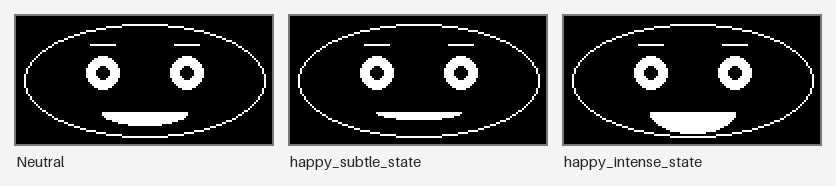
Both dictionaries produce a smiling face. happy_subtle_state reads as quietly pleased — appropriate for a robot acknowledging a correct answer during a quiet classroom activity. happy_intense_state reads as delighted, even a little giddy — appropriate for a robot celebrating a big win, but overkill, even slightly strange, for a small everyday moment. Choosing an intensity is a real design decision, not an afterthought, and it belongs in your rubric right alongside choosing which expression to use at all.
When One Face Could Mean Two Feelings: Expression Ambiguity
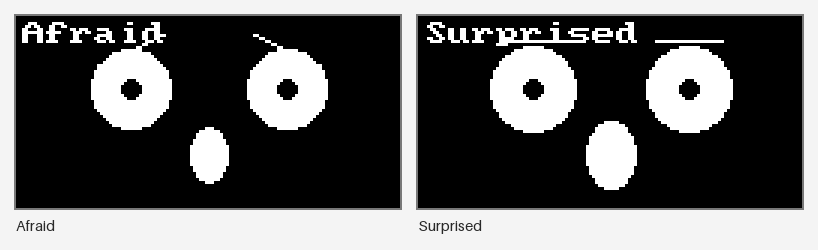
Expression Ambiguity happens when a parameter combination reads as more than one plausible emotion, or as no clear emotion at all — a face stuck between two named expressions instead of clearly landing on one. Chapter 10 already flagged this problem directly: its Emotion Recognition Accuracy discussion noted that afraid, surprised, and disgusted get confused with each other far more often than happy or sad do, because their underlying eyebrow, eye, and mouth combinations genuinely overlap.
Afraid and surprised are the clearest example. Both raise the eyebrows, both widen the eyes, and both often open the mouth — three features moving the same direction for two different named emotions. What usually separates them is subtle: surprised pushes every value further toward its extreme, and afraid's mouth often pulls slightly rather than opening symmetrically. On a small, low-resolution display, that difference can vanish entirely, leaving viewers to guess.
Here are the OLED kit's afraid and surprised faces side by side. Cover the labels and try telling them apart:
A Second Way to Map a Feeling: Valence Arousal Model
Two Numbers Instead of Seven Names
 Ekman's approach from Chapter 10 sorts emotion into named boxes — happy, sad, afraid, and so on. Here's a completely different way to describe the exact same feelings: instead of a name, give every emotion just two numbers.
The Valence Arousal Model describes emotion along two continuous dimensions instead of Ekman's discrete named categories: valence, how positive or negative a feeling is, and arousal, how energetic or calm it is. Plot any emotion on a simple grid — valence on the horizontal axis, arousal on the vertical axis — and it lands somewhere in one of four quadrants: pleasant-and-energetic, pleasant-and-calm, unpleasant-and-energetic, or unpleasant-and-calm.
This model is not a replacement for Ekman's categories — it is a complementary framework, useful for a reason Ekman's naming alone cannot give you: it explains why certain expressions get confused. Afraid and surprised sit in almost the same spot on a valence-arousal grid — both high arousal, both close to neutral or mildly negative in valence — which is exactly why their eyebrow-and-eye combinations overlap so much. Two emotions that occupy nearly the same coordinates on this grid are always going to be harder to tell apart on a simple face than two emotions sitting in opposite quadrants.
Here is a rough map of where several of Chapter 10's expressions sit on this grid:
| Quadrant | Valence | Arousal | Example Expressions |
|---|---|---|---|
| Pleasant, energetic | Positive | High | Excited, Surprised (mildly positive readings) |
| Pleasant, calm | Positive | Low | Happy (mild), Neutral leaning positive |
| Unpleasant, energetic | Negative | High | Afraid, Angry, Disgusted |
| Unpleasant, calm | Negative | Low | Sad, Tired, Sleepy |
Notice how afraid and angry both land in the same "unpleasant, energetic" quadrant, alongside disgusted — three different Ekman categories, sharing one region of this simpler two-number map. That overlap is not a coincidence; it is the valence-arousal model making visible exactly the kind of confusability Chapter 10's recognition-accuracy research already measured.
Placing your own expressions on this same grid, instead of just reading about where they land, is the fastest way to feel why some pairs are so much easier to confuse than others.
Diagram: Valence-Arousal Quadrant Plotter
Valence-Arousal Quadrant Plotter
Type: diagram
sim-id: valence-arousal-quadrant-plotter
Library: p5.js
Status: Specified
Bloom Taxonomy Level: Apply (L3) Bloom Taxonomy Verb: classify, apply, demonstrate
Learning objective: Apply the valence-arousal model by placing a point on a two-axis valence/arousal grid and classifying which quadrant it falls into, demonstrating why expressions that land near each other on the grid — such as afraid and surprised, both high-arousal — are more likely to be visually confused.
Canvas layout: - Left 65% (responsive, roughly 420x420 at default width): a square grid with valence on the horizontal axis (labeled "Unpleasant" to "Pleasant") and arousal on the vertical axis (labeled "Calm" to "Energetic"), divided into four lightly shaded quadrants - Right 35%: a mode toggle, an infobox showing the selected or hovered point's coordinates and quadrant name, and a "Reset My Points" button
Visual elements: - Four labeled quadrants: "Pleasant/Energetic," "Pleasant/Calm," "Unpleasant/Energetic," "Unpleasant/Calm" - Thirteen small preset markers, one per Chapter 10 expression, placed at approximate valence/arousal coordinates and labeled with the expression name on hover - User-placed markers shown in a distinct color from the preset expression markers - An infobox listing the active point's numeric valence and arousal values, its quadrant name, and the names of any preset expressions within a defined distance ("nearby, and therefore easy to confuse with this point")
Interactive controls: - Click anywhere on the grid to drop a new labeled point at that valence/arousal coordinate - Hover any preset expression marker to preview its name and one-line placement justification without adding a new point - Toggle: "Show all 13 expressions" (default on) - "Reset My Points" button clears only user-placed markers, leaving the 13 preset expressions visible
Default parameters: all 13 preset expression markers visible, no user-placed point yet, toggle on
Behavior: clicking the grid immediately places a marker and updates the infobox with the quadrant name and a list of nearby preset expressions computed from grid distance; hovering an existing marker shows the same information as a lightweight preview without placing a new point; toggling expression visibility off isolates the grid for a blank practice attempt.
Instructional Rationale: An Apply-level objective requiring the learner to use a newly introduced two-axis framework on concrete cases is best served by direct point-placement with immediate quadrant classification, rather than a pre-filled static grid, so the learner practices applying the model instead of only viewing an already-completed example.
Responsive design: mode toggle and infobox move below the canvas on viewports narrower than 600 pixels; the grid scales to fill its container's width while remaining square.
Implementation: p5.js for grid rendering and click handling; the 13 preset expression coordinates are stored as a local array matching Chapter 10's named expression set; "nearby" is computed as Euclidean distance on the valence/arousal grid below a fixed threshold.
Reading about the afraid/surprised overlap is one thing — now try spotting a genuinely ambiguous face yourself and naming exactly which features are doing the confusing.
Diagram: Ambiguous Expression Confusability Sorter
Ambiguous Expression Confusability Sorter
Type: microsim
sim-id: ambiguous-expression-confusability-sorter
Library: p5.js
Status: Specified
Bloom Taxonomy Level: Evaluate (L5) Bloom Taxonomy Verb: judge, critique, justify
Learning objective: Given a rendered face built from a deliberately ambiguous parameter set, judge which two named emotions it could plausibly be read as, and justify that judgment by citing the specific overlapping eyebrow, eye, and mouth features responsible.
Canvas layout: - Left 55% (responsive, roughly 380x320 at default width): a rendered face built from one of several preset ambiguous parameter sets - Right 45%: a bank of expression-name chips (all 13 named expressions plus "No clear emotion"), a two-slot answer zone, a "Submit" button, and a feedback panel
Visual elements: - A rendered robot face using the same draw_face-style rendering as earlier chapter sims, built from an ambiguous face_state - A chip bank of 14 labeled options (13 expressions plus "No clear emotion") - A two-slot answer zone for the learner's chosen pair - A feedback panel that reveals the reference answer pair and a one-sentence parameter-level justification after submission
Interactive controls: - Click (or drag) up to two chips into the answer zone; clicking a placed chip returns it to the bank - "Submit" button locks in the current answer and reveals feedback - "New Ambiguous Face" button loads the next preset ambiguous case and clears the answer zone - Preset case bank includes at least five ambiguous parameter sets drawn from confusable pairs discussed in the chapter: afraid/surprised, disgusted/angry, sad/tired, stern/angry, and contempt/neutral
Default parameters: first case loaded is the afraid/surprised overlap face; answer zone empty
Behavior: selecting chips highlights them in the answer zone; Submit compares the learner's pair, order-independent, against the reference pair and marks the attempt as a full match, partial match, or miss, but always reveals the parameter-level justification (for example, "Both share very raised eyebrows and wide eyes — arousal is high for both — but the mouth's slight downward pull nudges this toward afraid rather than surprised") regardless of whether the guess was correct, since the reasoning is the actual target of the exercise; "New Ambiguous Face" advances to the next preset case.
Instructional Rationale: An Evaluate-level objective asking the learner to judge and justify which emotions a face could be confused for is best served by a Classification Sorter pattern with mandatory justification feedback rather than a single-right-answer quiz, because the chapter's point is that some faces legitimately support more than one reading, and a good designer must be able to name exactly why.
Responsive design: the chip bank wraps to a scrollable row below the face rendering on viewports narrower than 600 pixels.
Implementation: p5.js for face rendering, reusing draw_face()-equivalent logic from earlier chapter sims; a local array of at least five preset ambiguous face_state dictionaries, each carrying a reference answer pair and justification string.
Sound, Motion, and Voice This Book Leaves Out: Multimodal Emotion Cues
A full robot rarely has to rely on its face alone. Multimodal Emotion Cues are the additional channels — voice tone, body or arm motion, sound effects, even light color — that a complete robot can use alongside its face to signal emotion. A drooping posture, a sad little musical sting, and a downturned mouth all pointing the same direction communicate "sad" far more redundantly, and more forgivingly, than any single channel working alone.
This course, on purpose, focuses entirely on the face — the course description's own list of topics not covered leaves voice synthesis, motor-driven body language, and sound design to other courses. That focus is not a limitation to apologize for; it is exactly why this chapter matters as much as it does. A screen-only face carries the entire emotional communication burden by itself, with no tone of voice or slumped posture to lean on if the expression is unclear. Understanding that multimodal cues exist, even without building them, is part of understanding why a robot face has to work extra hard to be clear on its own.
Two Very Different Screens, Two Very Different Rooms: Viewing Distance Readability and Classroom Lighting Consideration
Designed at Arm's Length, Tested from Across the Room
 It is easy to design and test an expression sitting six inches from your laptop screen, decide it looks great, and stop there. A robot rarely gets to live at six inches — a classroom robot might need to read clearly from the back row.
Viewing Distance Readability is how clearly an expression communicates depending on how far away the viewer is standing, and it is a genuinely different design constraint than "does this look right up close." A subtle contempt expression's tiny one-sided mouth raise, perfectly visible on a code editor's zoomed-in preview, can vanish completely at classroom distance on Chapter 1's small 128x64 OLED. The much larger, brighter 240x240 color display gives an expression more raw pixels to work with, which helps readability at distance, but even a bigger screen cannot rescue a design that relies on a one- or two-pixel difference to make its point.
Classroom Lighting Consideration is the related constraint of how ambient light affects readability — the same face that looks crisp in a dim room can wash out under harsh fluorescent classroom lighting, especially on a display with less contrast or more glare-prone glass. Testing an expression only in ideal lighting, at ideal distance, is testing it in the one condition it is least likely to actually be viewed under.
Two practical habits fix most of this:
- Step back from your screen — or better, view a photo of it from across a room — before deciding an expression is "done."
- Test under whatever light the robot will actually live in, not just the light on your desk.
The Expression That Traveled Best: Cross-Cultural Recognition
Chapter 10 introduced Ekman's claim that a handful of emotions are recognized universally, across dramatically different cultures — but "universal" deserves a closer look before you lean on it too hard. Cross-Cultural Recognition describes how consistently an expression is correctly identified by viewers from different cultural backgrounds, and the honest answer is: it depends heavily on which expression.
Happiness is recognized with remarkable consistency almost everywhere it has been studied — an upward-curved smile reads as positive nearly universally. Fear, disgust, and especially contempt show noticeably more cross-cultural variation, with recognition rates that drop, and sometimes shift toward different labels entirely, depending on the culture being studied. A simple robot face, built directly on this same psychology research, inherits that same unevenness — do not expect every one of Chapter 10's thirteen expressions to travel equally well to every audience your robot might meet.
Why a Screen Ever Feels Like "Someone": Anthropomorphism
None of this chapter's careful parameter tuning would matter at all if humans simply refused to see emotion in a screen. Anthropomorphism is the tendency to attribute human characteristics, including emotions, to a non-human object — and it is the basic psychological phenomenon that makes an entire screen-face robot possible in the first place.
People anthropomorphize readily, often without meaning to. Chapter 2's four commercial robots — Cozmo, Vector, Miko, and Buddy — all lean directly on this tendency: none of them has a real face made of skin and muscle, yet owners routinely describe them as curious, moody, or affectionate, based on nothing more than a screen displaying two eyes and some motion. Anthropomorphism is not a bug in human perception that clever robot design exploits unfairly — it is simply how people are wired to read intention and feeling into anything that moves and reacts, and this entire course exists because that wiring is real.
The Dip Your Simple Face Skips: Uncanny Valley Effect
A Graph Worth Knowing By Shape
Picture a graph: how comfortable people feel around a robot, plotted against how human-like that robot looks. You would expect that line to just climb steadily upward. It does not.
The Uncanny Valley Effect describes a well-documented dip in that comfort curve: as a robot or character becomes more human-like, people's warmth toward it rises — until it gets almost, but not quite, fully human-realistic, at which point comfort drops sharply into unsettling, even eerie territory, before recovering only once the robot looks essentially indistinguishable from a real person. Nearly-real is worse than obviously-fake.
Here is the genuinely good news for this course: the deliberately simple, abstract, non-photorealistic faces you have been building since Chapter 9 — flat colors, ellipse eyes, triangle eyebrows, no skin texture or realistic proportions — sit comfortably on the safe, rising side of that curve, nowhere near the valley at all. A face that never attempts photorealism in the first place cannot fall into the gap reserved for faces that almost achieve it. This is a real design advantage worth calling out on purpose: staying simple is not a limitation this course is working around, it is a choice that sidesteps one of the hardest, least-solved problems in robot design entirely.
The Field This Whole Course Lives Inside: Affective Computing
Zoom out from any single robot face and there is an entire academic and industry field built around the questions this chapter has been asking. Affective Computing is the broader field concerned with systems that can recognize, interpret, or simulate human emotion — everything from software that detects frustration in a user's voice, to wearables that track stress from heart rate, to the parameterized face this course teaches you to draw.
This course is a small, hands-on slice of that much larger field — one narrow but genuinely useful corner: how to simulate recognizable emotion through a simple visual display. Affective computing researchers also study emotion recognition (can a system tell how a person feels) and emotion response (how a system should react once it knows), both larger topics than this book takes on, but both built on the same foundational question this chapter keeps circling: what actually makes an emotional signal readable and honest.
People and Machines, Studied Together: Human-Robot Interaction
Human-Robot Interaction, usually abbreviated HRI, is the broader field studying how people and robots interact — trust, communication, safety, collaboration, and yes, emotional expression, all as separate but related research threads. Expression design, the whole subject of this chapter, is one HRI research area among several, sitting alongside topics like how close a robot should stand to a person, how a robot should signal its intentions before moving, or how people build, and lose, trust in an autonomous machine over time.
Situating expression design inside this larger field matters for a simple reason: a robot face is never really working in isolation. Every design choice this chapter has covered — intensity, ambiguity, readability, cultural nuance — is one piece of the much bigger question HRI researchers study professionally: how do we make machines and people understand each other well enough to work, learn, or simply share a room together comfortably?
Judging Your Own Work Like a Designer Would: Emotional Design Rubric
Critiquing Feels Harder Than Building — That's Normal
 Writing a
 draw_face() call has a clear finish line: the code runs, or it does not. Judging whether an expression is good has no compiler to check your answer. That discomfort is completely normal — it just means you need criteria instead of a gut feeling, which is exactly what the rubric below gives you.
Being able to look at any face design — yours or a classmate's — and say precisely why it will or will not land with a real person is a robot designer's superpower: the same one this book keeps returning to, now placed fully in your hands as a skill of judgment, not just a skill of code. The Emotional Design Rubric below turns everything this chapter has covered into a concrete checklist you can run against any expression.
| Criterion | Guiding Question | What a Pass Looks Like |
|---|---|---|
| Immediate identifiability | Is the primary emotion identifiable within about 2 seconds? | A viewer names the intended emotion almost instantly, without hesitating or guessing |
| Confusable-neighbor distance | Is the expression distinguishable from its most likely confusable neighbor (see the valence-arousal model)? | The expression sits clearly apart from its nearest neighbor on the valence-arousal grid, or uses an extra feature to break the tie |
| Classroom-distance readability | Does it read clearly at classroom viewing distance, not just close up? | The expression is still identifiable in a photo taken several meters away |
| Lighting robustness | Does it still read under normal classroom lighting, not only in ideal conditions? | Contrast and shape stay clear under bright, flat fluorescent light |
| Appropriate intensity | Does the intensity match the situation, rather than defaulting to maximum every time? | A subtle moment gets a subtle expression; a big moment gets a big one |
| Deliberate symmetry | If the expression is asymmetric, was that a deliberate choice rather than an accident? | Any asymmetry (confused, disgusted, contempt) is clearly intentional, not a coding slip |
| Face-only clarity | Does the expression work without relying on voice, motion, or sound the robot does not actually have? | The face alone, with no other modality, still communicates the intended emotion |
Run this table against any face_state dictionary — your own or a classmate's — and you have a structured critique instead of a vague "it looks fine" or "something feels off." That is exactly the Evaluate-level skill this course has been building toward since Chapter 9's first ellipse() call.
Rating a real design against every one of these criteria, with a required reason for each rating, is the deliberate practice version of the rubric above — try it before assuming you have internalized the checklist.
Diagram: Rubric Rater — Score This Expression
Rubric Rater — Score This Expression
Type: microsim
sim-id: expression-rubric-rater
Library: p5.js
Status: Specified
Bloom Taxonomy Level: Evaluate (L5) Bloom Taxonomy Verb: judge, assess, rate, justify
Learning objective: Given a rendered face and its underlying face_state parameters, assess it against each criterion of the Emotional Design Rubric, assigning a rating per criterion with a written justification and an overall recommendation — directly rehearsing the course's Evaluate-level outcome of critiquing a classmate's design.
Canvas layout: - Left 55% (responsive, roughly 420x340 at default width): a close-up rendering of the loaded sample face, alongside a shrunk, reduced-contrast thumbnail simulating classroom-distance and classroom-lighting viewing, plus a visible face_state parameter readout below both - Right 45%: the seven rubric criteria listed as rows, each with a three-point rating control (Fails / Borderline / Passes) and a required short justification text box, a "Load Sample Design" dropdown, and "Submit Assessment" / "Compare to Reference Rating" buttons
Visual elements: - Two renderings of the same face_state: full-size close-up, and a smaller, lower-contrast version approximating classroom distance and lighting - A plain-text face_state parameter readout beneath the renderings - Seven rubric rows matching the Emotional Design Rubric table, each with a rating control and justification field - A feedback panel that appears after submission, showing the reference rating and justification for each criterion side by side with the learner's own
Interactive controls: - Dropdown: "Load Sample Design" offering 5-6 pre-authored face_state examples of varying quality, including at least one deliberately weak design (for example, a "happy" mouth curvature too subtle to survive the classroom-distance thumbnail) and one strong design - Three-point rating buttons per rubric row (Fails / Borderline / Passes) - Short-text justification field per rubric row, required before submission is enabled - "Submit Assessment" button, enabled only once every row has both a rating and a justification - "Compare to Reference Rating" button, revealed after submission, showing the chapter's own reference ratings and justifications alongside the learner's for self-checking
Default parameters: first sample design loaded is a deliberately flawed one (subtle happy mouth curvature that fails at classroom-distance thumbnail size); no ratings entered yet
Behavior: loading a sample design renders both face views and the parameter readout; the learner rates and justifies every row before Submit Assessment activates; submitting locks in the assessment and reveals the "Compare to Reference Rating" option, which displays the reference rating and justification for every criterion next to the learner's own, letting them see precisely where their judgment agreed or diverged and why; choosing a new sample design from the dropdown resets all ratings and justifications.
Instructional Rationale: A Rubric Rater is the canonical Evaluate-level pattern for this objective — scoring concrete examples against defined criteria with a required justification forces the learner past a vague "looks fine" impression and into the specific, defensible judgments a real design critique requires, directly matching the course's stated outcome of critiquing a classmate's face design.
Responsive design: rubric rows and controls move below the face renderings on viewports narrower than 640 pixels; the close-up and thumbnail renderings stack vertically below 480 pixels.
Implementation: p5.js for face rendering, with the thumbnail rendered at reduced scale and reduced contrast to approximate classroom-distance and classroom-lighting viewing; rubric criteria, sample designs, and reference ratings stored as local data arrays, keyed so the comparison feature can look up the matching reference for whichever sample is currently loaded.
Chapter Summary
You now know how to judge a robot face, not just build one — reading individual features, weighing intensity and ambiguity, connecting expression design to the wider fields that study it, and applying a concrete rubric to any design.
- Eyebrow Emotion Signaling is often the single strongest individual emotion signal a simple face has, sometimes stronger than the mouth; Mouth Emotion Signaling is a fast, strong valence signal but weaker at pinning down which emotion exactly; Eye Emotion Signaling is the most ambiguous feature alone for identity, but the clearest signal of arousal.
- Expression Intensity treats parameters like
eyebrow_angleandmouth_curvatureas a continuous range, not a switch — the same named expression can be subtle or extreme depending on how far those values move from neutral. - Expression Ambiguity happens when a parameter combination plausibly reads as more than one emotion, echoing Chapter 10's recognition-accuracy research on commonly confused pairs like afraid, surprised, and disgusted.
- The Valence Arousal Model describes emotion with two numbers — valence (positive/negative) and arousal (energetic/calm) — instead of Ekman's named categories, and explains why confusable expressions like afraid and surprised sit near each other on that same grid.
- Multimodal Emotion Cues — voice, motion, sound — support emotion in a full robot, but this course deliberately focuses on the face alone, which means the face has to work extra hard without them.
- Viewing Distance Readability and Classroom Lighting Consideration are practical constraints grounded in Chapter 1's displays: a design that reads well close-up on a laptop, or under ideal light, may not survive classroom distance or fluorescent lighting.
- Cross-Cultural Recognition shows Ekman's universality claim holds more strongly for some expressions (happiness) than others (fear, disgust, contempt), and a simple robot face inherits that same unevenness.
- Anthropomorphism — attributing human traits and emotions to a non-human object — is the basic phenomenon that makes a screen-face robot like Chapter 2's Cozmo, Vector, Miko, or Buddy work at all.
- The Uncanny Valley Effect is the sharp dip in comfort that appears when a robot looks almost, but not quite, human — a trap this course's deliberately simple, abstract faces largely sidestep by never attempting photorealism in the first place.
- Affective Computing is the broader field of systems that recognize, interpret, or simulate emotion, and Human-Robot Interaction (HRI) is the broader field studying how people and robots interact overall — expression design is one HRI research thread, and this course is a small, hands-on slice of affective computing.
- The Emotional Design Rubric ties every idea in this chapter into one practical checklist — identifiability, confusable-neighbor distance, classroom-distance and lighting readability, appropriate intensity, deliberate symmetry, and face-only clarity — ready to run against your own or a classmate's design.
You Can Now Judge a Face, Not Just Build One
 Look at everything you can do now that you could not do at the start of this chapter: name why an expression works, predict which ones will get confused, check a design against classroom distance and lighting before it ever leaves your laptop, and back up every opinion with a specific rubric criterion instead of a shrug. That is real design judgment, and it is yours now.
Self-Check: A classmate shows you their 'afraid' face design, and you notice it looks a lot like their 'surprised' face. Using at least two ideas from this chapter, explain why that mix-up happened and what you would check first to fix it. — Click to reveal
Afraid and surprised sit very close together on the valence-arousal grid — both are high-arousal expressions, which is exactly why their eyebrow and eye combinations overlap so much: both raise the eyebrows, widen the eyes, and often open the mouth. This is a textbook case of Expression Ambiguity, and it matches Chapter 10's own recognition-accuracy research flagging afraid and surprised as commonly confused. To fix it, check the Emotional Design Rubric's "confusable-neighbor distance" criterion first: look at whether surprised's parameters are pushed further toward their extreme (very raised eyebrows, very wide eyes) than afraid's, and whether afraid's mouth is doing something distinct — like pulling rather than opening symmetrically — instead of just being a milder copy of the same recipe. If the two still look too similar at classroom distance, the fix is to widen the parameter gap between them, not just to redraw one of the two faces from scratch.