A Face With a Memory
The emotion menu had no memory. Press A and you get the next emotion, over and over, and the face reacts to your finger exactly the same way no matter what happened ten seconds ago.
Real creatures are not like that. Poke someone who is already annoyed and you get a different answer than poking someone who is asleep. Giving your robot that difference takes one idea, and it is one of the most useful ideas in all of computing.
Poke me and find out
 After this lesson I'll remember what mood I was in when you pressed the button — and my answer will depend on it. That's the difference between a menu and a personality.
What a State Machine Is
A state machine is a way of describing behavior with two lists:
- States — the situations the thing can be in, one at a time and never two at once
- Transitions — which state each event moves you to, from each state
That second list is where the memory lives. The same event leads somewhere different depending on where you already are.
You have used state machines all your life without the name. A traffic light is one: green, yellow, red, with a timer moving it along. So is a vending machine, a turnstile, a game character deciding whether to chase or flee, and every network protocol on the internet.
| System | States | Events that cause transitions |
|---|---|---|
| Traffic light | Green, yellow, red | A timer expiring |
| Vending machine | Idle, coins inserted, dispensing | Coin, selection, item released |
| Game enemy | Patrol, chase, attack, flee | Player spotted, health low |
| This robot face | Idle, curious, happy, annoyed, asleep | Button A, button B, waiting too long |
Two Tables Instead of a Pile of Ifs
The first table says what each state looks like, using the same column format as the emotion table:
1 2 3 4 5 6 7 8 | |
The second table says what each state does, which is a completely different question. Read a row like a sentence: from Idle, A leads to Curious, B leads to Annoyed, and after 8000 milliseconds of nobody touching anything, we fall Asleep.
1 2 3 4 5 6 7 8 | |
Notice the third kind of event. Buttons are things you do, but a timeout is something the robot does to itself, and it is what makes the face feel alive when nobody is touching it. Leave it alone long enough and it gets bored, then falls asleep, entirely on its own.
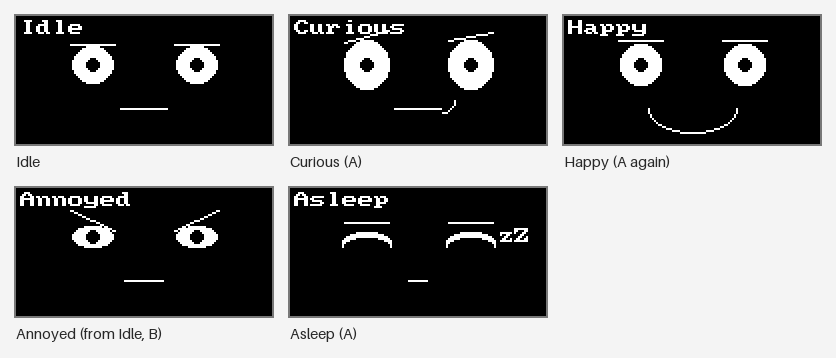
Here are five of the faces the two tables produce. You reach them by pressing A to go from Idle to Curious and then Happy, and by pressing B from Idle to get Annoyed. Press A once more in Annoyed and the robot falls asleep.
Splitting Looks From Behavior
 Two tables, two questions. A designer can retune every pose in
 POSES without touching behavior, and a programmer can rewire TRANSITIONS without touching a single pixel. That split is why teams can work in parallel.
The Loop Gets Smaller, Not Bigger
Here is the surprising part. Adding memory to the face made the main loop shorter:
1 2 3 4 5 6 7 8 9 10 11 12 13 14 15 16 17 | |
Read that loop and notice what it does not contain: the word "Happy", the word "Asleep", or any knowledge of what a poke means. All of that lives in the tables. The loop just looks up what happens next and does it.
Every state change funnels through one function, which is deliberate:
1 2 3 4 5 6 | |
Because go_to() is the only place in the program that changes state, there is exactly one line
to watch when the face ends up somewhere you did not expect. The print() gives you a running
history of the robot's mood in the Thonny shell — the tracing technique from an earlier lesson,
aimed at behavior instead of speed.
Check for Traps and Dead Ends
 Look at the Happy row: button A leads back to Happy, forever. Is that a bug or a personality? Every state machine needs this check — can you reach every state, and can you get back out of every state?
Draw It Before You Code It
Engineers almost never write a state machine straight into an editor. They draw it first: a circle for each state, an arrow for each transition, and a label on each arrow saying what causes it.
Try it on paper for the tables above. You will end up with five circles and fourteen arrows, and that drawing is the two tables — same information, different notation. Drawing it first is where you catch the trap in the Happy row, the state nobody can reach, and the mood the robot can never escape.
Things to Try
- Draw the machine on paper before you change anything. Five circles, fourteen arrows, labelled A, B, or timeout.
- Add a Startled state: eyes wide, brows way up, mouth open, with a 700 ms timeout back to Curious. Then make Asleep plus A lead to Startled — waking a sleeping robot should surprise it. Two rows of data, no new logic.
- Fix the Happy trap. Change Happy's A transition to Annoyed and see whether a robot that gets tired of being poked feels more alive.
- Watch the shell while you play. Every transition prints, giving you a written history of the robot's mood.
- Imagine the alternative. Sketch what these five states would look like as nested
ifstatements. That gap is why state machines are worth knowing.
That's a personality
 Your robot now has moods, a memory of which one it's in, and opinions about being poked — and the whole personality is two tables anyone on your team can read.
References
- The Emotion Table — the column format
POSESreuses - Keyframes — animating the transitions between these states
- Emotion Types — the expression set these states are built from
- Trace and Watch — the
print()tracing habitgo_to()applies to behavior - MicroPython utime Documentation — the timers that let a state change on its own