Sleeping Faces
A robot that is charging, waiting, or just powered down for the night still has something to say — and drawing it to sleep is one of the friendliest ways to say it. Two closed eyes, a pair of relaxed eyebrows, a soft round mouth, and a trio of drifting Z characters turn a blank screen into a face that clearly needs a moment. No motors, no sensors, just pixels doing the work.
Let's draw a nap
 A sleeping face tells everyone nearby "give me a second" without a single word. Every pixel tells a story!
Building on the Wink Trick
The Winking with a Smile lesson introduced a closed eye as an arc — the top half of an ellipse(), drawn with the quadrant mask TOP_HALF (a value of 3) instead of a full circle. A sleeping face reuses that exact trick, with one difference: both eyes close instead of just one.
1 | |
One Eye or Two Changes Everything
 The Emotion Types lesson mentioned that tired and sleepy feelings belong on a robot face too. One closed eye reads as a wink; two closed eyes at the same time reads as asleep. Same arc, completely different meaning, just from how many eyes use it.
Drooping Eyebrows
Eyebrows on a wide-awake face are usually level or lifted. On a sleeping face, gravity wins: the outer corner of each eyebrow sags down while the nose-side corner stays put, the same way real eyebrows relax when someone's muscles stop working to hold them up.
1 2 3 | |
1 2 3 | |
Flat Is Calm, Drooping Is Sleepy
 The Basic Face Layouts lesson showed that flat eyebrows read as calm. A small droop — just 2 pixels here — nudges that same calm face over the line into sleepy without looking sad or worried.
A Small, Relaxed Mouth
A wide-awake mouth in this book is usually a BOTTOM_HALF arc for a smile. A sleeping mouth is calmer still: a small unfilled circle, like a quiet breath in and out, with none of the curve a smile or frown would add.
1 2 3 4 | |
Drawing the Zzz
The Drawing Text lesson explained that every character in the built-in font is a fixed 8 by 8 pixels — there's no text_size() command to make one Z bigger than another. Instead of fighting that limit, this lesson works with it: three Z characters, stair-stepped up and to the right, mimic the way sleep marks float away from a sleeping face in cartoons.
1 2 3 4 5 6 7 8 9 | |
The bob parameter shifts all three letters up or down together by the same amount — that's what makes the whole group drift gently instead of jumping around independently.
Sample Program Code
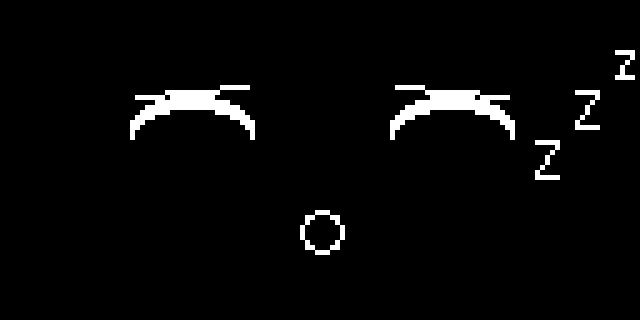
This program draws closed eyes, drooping eyebrows, a relaxed mouth, and a floating Zzz — everything a sleeping face needs in one draw_face() call.
1 2 3 4 5 6 7 8 9 10 11 12 13 14 15 16 17 18 19 20 21 22 23 24 25 26 27 28 29 30 31 32 33 34 35 36 37 38 39 40 41 42 43 44 45 46 47 48 49 50 51 52 53 54 55 56 57 58 59 60 61 62 63 64 65 66 67 68 69 70 71 72 73 74 75 76 77 78 79 80 81 82 83 84 85 86 87 | |
Here's what that program draws on the display:
Animating a Gentle Drift
A single frame of Zzz is a nice touch, but a sleeping face that never moves can start to look more broken than restful. The Eye Scanner lesson swept a pupil back and forth by looping range() up and then back down — this lesson uses that exact pattern, just on the bob value instead of an eye position.
1 2 3 4 5 6 7 | |
bob climbs from -3 to 3 and back again, so the whole Zzz group rises a few pixels, sinks back down, and repeats — a slow, steady drift instead of a static sticker glued to the corner of the screen.
Keep It Slow
 A
A sleep(0.15) step is deliberately gentle. Speed this loop up and the calm drift turns into a jittery shake — the opposite of what a sleeping face is supposed to feel like.
Things to Try
- Change
SLEEP_RADIUS_Yfrom 6 to 3. A flatter arc reads as an even deeper, heavier sleep. - Set
EYEBROW_DROOPto 0. Flat, level eyebrows on closed eyes read as calm rest rather than a heavy, sleepy sag — compare the two side by side. - Add a fourth, smaller
zfurther up and to the right of the existing three, and see how much farther the drift can travel before it starts to feel cluttered. - Wake the robot up by wiring a button, as in the Blinking lesson, so pressing it swaps
draw_face()for the wide-awake face from Basic Face Layouts. - Combine sleepy eyebrows with an open eye from the Ellipse lesson to build a "fighting to stay awake" expression, where one eye keeps drooping shut.
You just built a whole mood
 Closed eyes, drooping brows, a quiet mouth, and a drifting
 Zzz — four small tricks, and your robot can now tell a room to keep it down. Great expression!
References
- MicroPython Framebuf Documentation — the full signatures for
ellipse(),line(), andtext(), including the quadrant mask parameter - Winking with a Smile — where the closed-eye arc and its quadrant mask were first introduced
- Drawing Text — the fixed 8 by 8 character grid that shapes how the
Zzzis laid out - Eye Scanner — the back-and-forth
range()loop this lesson's drift animation reuses - Emotion Types — where tired and sleepy are named alongside the seven core emotions