Skip to content

Lab 31: How Fast Is a Face?

The OLED kit's version of this lab compared a hand-written ellipse against framebuf's compiled built-in, and the built-in won by roughly the gap between interpreted and compiled code. This driver has no built-in ellipse at all to compare against — so the question changes into a better one.

Sample Program Code

The same face, drawn two ways: one pixel at a time with display.pixel(), and once with shapes.ellipse()'s row-at-a-time runs — both are ordinary MicroPython:

  1
  2
  3
  4
  5
  6
  7
  8
  9
 10
 11
 12
 13
 14
 15
 16
 17
 18
 19
 20
 21
 22
 23
 24
 25
 26
 27
 28
 29
 30
 31
 32
 33
 34
 35
 36
 37
 38
 39
 40
 41
 42
 43
 44
 45
 46
 47
 48
 49
 50
 51
 52
 53
 54
 55
 56
 57
 58
 59
 60
 61
 62
 63
 64
 65
 66
 67
 68
 69
 70
 71
 72
 73
 74
 75
 76
 77
 78
 79
 80
 81
 82
 83
 84
 85
 86
 87
 88
 89
 90
 91
 92
 93
 94
 95
 96
 97
 98
 99
100
101
102
103
104
105
106
107
108
109
110
111
112
113
114
115
116
117
118
119
120
121
122
123
124
125
126
127
128
129
130
131
132
133
134
135
136
137
138
139
140
141
142
143
144
145
146
147
148
149
150
151
152
153
154
155
156
157
158
159
160
161
162
163
164
165
166
167
168
169
170
171
172
173
174
175
176
177
178
179
180
181
182
183
184
185
186
187
188
189
190
191
192
193
194
195
196
197
198
199
200
201
202
203
204
205
206
207
208
209
210
211
212
213
214
215
216
217
218
219
220
221
222
223
224
225
226
227
228
229
230
231
232
233
234
235
236
237
238
239
240
241
242
243
244
245
246
247
248
249
250
251
252
253
254
255
256
257
258
259
260
261
262
263
264
265
266
267
268
269
270
# Lab 31: How Fast Is a Face? -- Benchmarking Two Ways to Draw
#
# The OLED kit ran this lab to compare a hand-written ellipse against
# framebuf's built-in one, and the built-in won by a mile because it was
# compiled into the firmware and the hand-written one was not.
#
# You cannot run that comparison here, because THIS DISPLAY HAS NO
# BUILT-IN ELLIPSE. shapes.ellipse() is MicroPython, written in a file
# you can open. So the question changes into a better one:
#
#   Both versions are MicroPython. Both walk the same math. One of them
#   is roughly ten times faster anyway. Why?
#
# The answer is not about the language. It is about how many separate
# conversations each one has with the display:
#
#   DOTS   an ellipse drawn with display.pixel(), one call per pixel.
#          Each call sets a drawing window (a command plus four bytes of
#          coordinates) and then sends two bytes of color.
#   RUNS   shapes.ellipse(), which works out each row's span and sends it
#          with a single display.hline() -- one window, then all the
#          pixels for that row in one go.
#
# Press button B to flip between the two faces. They are near-identical:
# an eyelash of difference here and there, because two correct ways of
# rounding a curve onto a grid of whole pixels can disagree by one. What
# is NOT small is the difference in how long they take.
#
# Button A runs the benchmark again. Button B switches between the report
# and the two faces, so you can confirm you are comparing like with like.

import config
import face
import shapes
from utime import ticks_us, ticks_diff, sleep_ms
from math import sqrt

button_a, button_b = config.init_buttons()

display = face.display
WHITE = face.WHITE
BLACK = face.BLACK
FILL = face.FILL
NO_FILL = face.NO_FILL

REPEATS = 3   # how many faces to time, so one slow run cannot fool us


# --- the pixel-at-a-time ellipse --------------------------------------
#
# The ellipse equation says a point is inside when
#
#     (dx * dx) / (rx * rx)  +  (dy * dy) / (ry * ry)  <=  1
#
# Division is slow and inexact, so multiply both sides out first. The
# same test becomes whole-number arithmetic with no division at all:
#
#     dx*dx * ry*ry  +  dy*dy * rx*rx  <=  rx*rx * ry*ry
#
# That trick is worth remembering on its own. Everything below is just
# that one test, run on every pixel in the shape's bounding box, with one
# display.pixel() call for every pixel that passes.

def dot_ellipse(cx, cy, rx, ry, colour, fill, bottom_half=False):
    rx2 = rx * rx
    ry2 = ry * ry
    limit = rx2 * ry2

    # For an outline we keep the pixels that are inside the shape but NOT
    # inside a shape one pixel smaller. What is left over is the edge.
    inner_rx2 = (rx - 1) * (rx - 1)
    inner_ry2 = (ry - 1) * (ry - 1)
    inner_limit = inner_rx2 * inner_ry2
    has_inner = inner_rx2 > 0 and inner_ry2 > 0

    for dy in range(-ry, ry + 1):
        if bottom_half and dy < 0:
            continue
        dy2_rx2 = dy * dy * rx2
        for dx in range(-rx, rx + 1):
            if dx * dx * ry2 + dy2_rx2 > limit:
                continue                      # outside the ellipse
            if not fill and has_inner:
                if dx * dx * inner_ry2 + dy * dy * inner_rx2 <= inner_limit:
                    continue                  # inside the edge, so skip it
            display.pixel(cx + dx, cy + dy, colour)


# --- the same face, drawn two ways ------------------------------------
#
# Two filled eyes, two pupils, one curved mouth. Every shape is an
# ellipse, so nothing but the ellipse code differs between these.

EYE_R = 24
PUPIL_R = 8
MOUTH_RX = 50
MOUTH_RY = 24


def draw_face_by_dots():
    face.clear()
    dot_ellipse(face.LEFT_EYE_X, face.EYE_Y, EYE_R, EYE_R, WHITE, True)
    dot_ellipse(face.RIGHT_EYE_X, face.EYE_Y, EYE_R, EYE_R, WHITE, True)
    dot_ellipse(face.LEFT_EYE_X, face.EYE_Y, PUPIL_R, PUPIL_R, BLACK, True)
    dot_ellipse(face.RIGHT_EYE_X, face.EYE_Y, PUPIL_R, PUPIL_R, BLACK, True)
    dot_ellipse(face.HALF_WIDTH, face.MOUTH_Y, MOUTH_RX, MOUTH_RY,
                WHITE, False, bottom_half=True)


def draw_face_by_runs():
    face.clear()
    shapes.ellipse(display, face.LEFT_EYE_X, face.EYE_Y, EYE_R, EYE_R,
                   WHITE, FILL)
    shapes.ellipse(display, face.RIGHT_EYE_X, face.EYE_Y, EYE_R, EYE_R,
                   WHITE, FILL)
    shapes.ellipse(display, face.LEFT_EYE_X, face.EYE_Y, PUPIL_R, PUPIL_R,
                   BLACK, FILL)
    shapes.ellipse(display, face.RIGHT_EYE_X, face.EYE_Y, PUPIL_R, PUPIL_R,
                   BLACK, FILL)
    shapes.ellipse(display, face.HALF_WIDTH, face.MOUTH_Y, MOUTH_RX, MOUTH_RY,
                   WHITE, NO_FILL, face.BOTTOM_HALF)


# --- the benchmark ----------------------------------------------------

def time_drawing(draw, repeats):
    """Return the average microseconds one call to draw() takes.

    Two rules make a benchmark trustworthy, and both are here:

      1. Run it once first and throw that result away. The first call has
         to allocate things the later ones reuse, so it is never typical.
      2. Time several runs and average them. One reading of anything this
         fast is mostly noise; an average is a measurement.
    """
    draw()                                    # warm-up, not counted

    started = ticks_us()
    for _ in range(repeats):
        draw()
    return ticks_diff(ticks_us(), started) // repeats


def time_clear():
    """Time the full-screen wipe on its own. Both faces pay it, so
    leaving it inside the comparison would hide the difference we are
    actually looking for."""
    face.clear()                              # warm-up
    started = ticks_us()
    for _ in range(REPEATS):
        face.clear()
    return ticks_diff(ticks_us(), started) // REPEATS


dots_us = 0
runs_us = 0
clear_us = 0


def run_benchmark():
    global dots_us, runs_us, clear_us

    print("timing", REPEATS, "faces each way...")
    dots_us = time_drawing(draw_face_by_dots, REPEATS)
    runs_us = time_drawing(draw_face_by_runs, REPEATS)
    clear_us = time_clear()

    ratio = dots_us // runs_us if runs_us > 0 else 0
    print("one pixel at a time :", dots_us, "us")
    print("row runs            :", runs_us, "us")
    print("runs are", ratio, "times faster")
    print("face.clear()        :", clear_us, "us")


def draw_report():
    ratio = dots_us // runs_us if runs_us > 0 else 0
    face.clear()
    face.centered_text("DRAW TIME (us)", 46)
    face.centered_text("dots :" + str(dots_us), 82)
    face.centered_text("runs :" + str(runs_us), 106)
    face.centered_text("runs are " + str(ratio) + "x", 130)
    face.centered_text("clear:" + str(clear_us), 154)
    face.centered_text("A=run B=look", 190)


# --- the main loop ----------------------------------------------------

REPORT = 0
LOOK_DOTS = 1
LOOK_RUNS = 2

run_benchmark()
view = REPORT
draw_report()

while True:
    if face.pressed(button_a):
        face.wait_for_release(button_a)
        run_benchmark()
        view = REPORT
        draw_report()

    if face.pressed(button_b):
        face.wait_for_release(button_b)
        view = (view + 1) % 3
        if view == REPORT:
            draw_report()
        elif view == LOOK_DOTS:
            draw_face_by_dots()
            face.label("one pixel at a time")
        else:
            draw_face_by_runs()
            face.label("row runs")

    sleep_ms(10)


# ---------------------------------------------------------------------
# WHY ARE RUNS SO MUCH FASTER?
#
# Both versions are interpreted MicroPython. Both do about the same
# amount of arithmetic. The difference is almost entirely in what they
# say to the display.
#
# 1. FEWER CONVERSATIONS.
#    Setting a drawing window costs two commands and eight bytes, and it
#    happens on EVERY display.pixel() call. A filled eye 24 pixels across
#    is roughly 1,800 pixels, so the dots version pays that overhead
#    1,800 times to send 3,600 bytes of actual color. The runs version
#    pays it 49 times -- once per row -- and sends exactly the same 3,600
#    bytes of color.
#
# 2. FEWER PYTHON FUNCTION CALLS.
#    A MicroPython method call is not free. 1,800 calls to pixel() versus
#    49 calls to hline() is a real saving on its own, before a single
#    byte reaches the wire.
#
# Reason 1 is the big one, and it is worth generalizing: on any device
# you talk to over a bus -- a display, an SD card, a sensor, a network --
# batching your requests usually beats optimizing the work inside them.
#
# THERE IS A THIRD TIER, and this kit does not use it. russhughes also
# publishes gc9a01_mpy, the same driver written in C and compiled into a
# custom MicroPython firmware, with pre-built images for the Waveshare
# RP2040-LCD-1.28. It has a real ellipse(), and it is roughly the jump
# the OLED kit measured between hand-written and built-in code. Reach for
# it when you have already batched your drawing and still need more.
#
# Things to try:
#
# 1. Predict the ratio before you run it. Write your guess down. Almost
#    nobody guesses high enough.
#
# 2. Compare both drawing times to face.clear(). Which dominates a frame
#    for the dots face? Which for the runs face? The answer flips, and
#    that flip is exactly why lab 29's optimization mattered so much.
#
# 3. Make the eyes bigger -- change EYE_R from 24 to 40 -- and run again.
#    The dots time grows with the AREA of the eye. The runs time grows
#    with its HEIGHT, because that is how many hline() calls it makes.
#    Growth rate matters more than any single measurement.
#
# 4. Open shapes.py and change the fill branch of ellipse() to use
#    display.pixel() in a loop. You have just turned the fast version into
#    the slow one by editing three lines, which tells you exactly where
#    the speed was living.
#
# 5. Time the other calls the same way. How long does one fill_rect()
#    take compared to drawing the same block with hline() per row? You now
#    own a method that answers questions like that in two minutes.

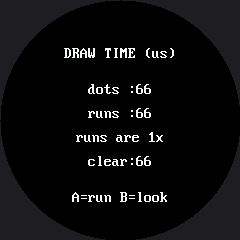
Here's the timing report after a run:

Simulated output of 31-draw-speed-timing.py

Fewer Conversations, Not Faster Math

Both versions here do essentially the same amount of arithmetic — the difference lives almost entirely in what they say to the display. Setting a drawing window costs a command and several bytes of coordinates, and a pixel-at-a-time ellipse pays that overhead on every single pixel. The row-based version pays it once per row instead, sending exactly the same bytes of color either way. For a filled eye roughly 24 pixels across, that's the difference between a few thousand device conversations and a few dozen.

That's a lesson worth generalizing past this one lab: on any device you talk to over a bus — a display, an SD card, a sensor — batching your requests usually beats making the work inside each one cleverer. Lab 33's color wheel measures the exact same principle again, at a scale where it's worth eight and a third times the difference.