Keyframes
The emotion table turned seven expressions into seven rows of data. This lesson does the same trick to something that feels much harder to write down: motion.
Every animation you have built so far was hand-written. A blink was some drawing, then a sleep, then some more drawing. Change the timing and you edit code. But an animation is really just a list of poses and how long each one holds — and a list of things is a table.
Poses on a timeline
 Animators have called these poses keyframes for a hundred years. The idea works exactly as well on a four-dollar microcontroller as it does in a cartoon studio.
What a Keyframe Is
A keyframe is a single important pose in a motion, along with how long to sit on it. In hand drawn animation, the lead artist draws only the keyframes — the poses that define the movement — and the in-between drawings follow from those.
On this display you skip the in-betweens entirely and just snap from pose to pose, which at blink speed looks completely convincing.
Each frame here is three numbers:
| Value | What it means |
|---|---|
eye_height |
How tall the eyes are — 10 is wide open, 1 is shut |
eyebrow_lift |
How far the brows rise above their resting position |
hold_ms |
How long to sit on this pose before moving to the next |
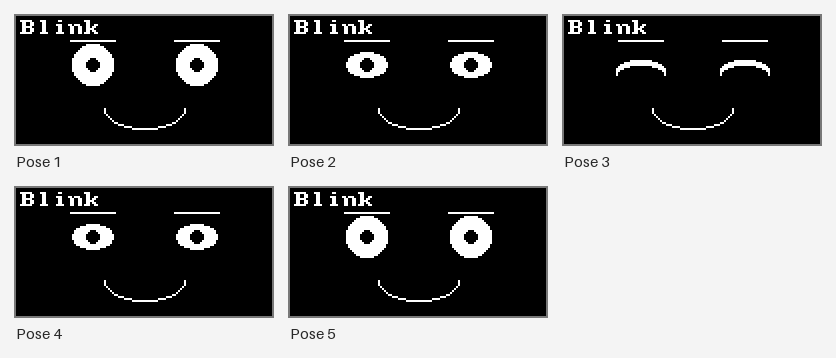
And a whole blink is five of them:
1 2 3 4 5 6 7 8 | |
Read it top to bottom and you can see the blink: open, half shut, closed for 70 milliseconds, half open, open again. The closed pose holds longest because that is what makes a blink read as a blink instead of a flicker.
Played back, those five poses look like this:
More Animations, Same Format
Once the format exists, new animations cost nothing but numbers:
1 2 3 4 5 6 7 8 9 10 11 12 13 14 | |
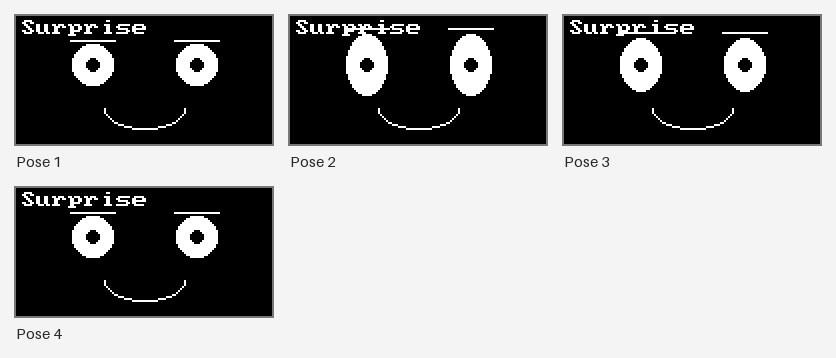
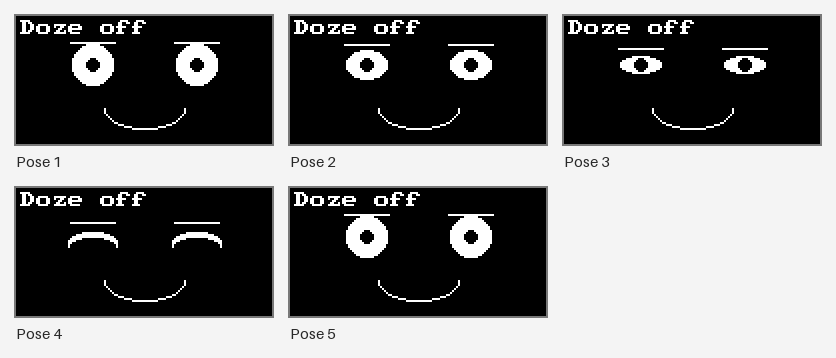
SURPRISE snaps the eyes wide and the brows up, holds half a second, then settles. DOZE_OFF
closes the eyes in four slow stages with the brows sinking the whole way. Neither one required a
single new line of drawing code.
Here are the four poses of SURPRISE. The eyes jump wide and the brows leap up, and the second
pose is the one that holds for half a second:
And here are the five poses of DOZE_OFF, with the eyes closing and the brows sinking until
the last pose wakes the face back up:
And because animations are now ordinary Python tuples, you can build new ones out of old ones:
1 | |
That line trims the last frame off a blink and glues a second blink onto the end. Data you can slice and join is data you can compose — something that is simply not possible when your animation is buried inside a function.
The Player Doesn't Know What a Blink Is
 That's the whole point. A player that knows nothing about blinking can play a blink, a doze, and every animation you invent next year — because all it knows how to do is walk a list in time.
The Player
The player has four variables of memory and two functions. start() begins an animation;
update() advances it if the current pose has held long enough.
1 2 3 4 5 6 7 8 9 10 11 12 13 14 15 16 17 18 19 20 21 22 23 24 25 26 27 28 29 30 31 32 33 34 | |
The critical detail is that update() returns instantly when there is nothing to do. It
never sleeps and never waits. That is the non-blocking timer idea from an earlier lesson, applied
to something far more interesting than a single blink — and it is what keeps the buttons alive
while an animation runs.
1 2 3 4 5 6 7 8 9 10 11 12 13 | |
Press A halfway through DOZE_OFF and it restarts immediately. Try doing that with an animation
built from sleep() calls — you cannot, because the program is not listening.
Closing an Eye by Shrinking It
 An eye squeezed down to one pixel tall isn't a thin eye — it's a shut one.
 face.eye() notices when the height drops to 2 or less and draws the closed-eye arc instead, so an animation can close an eye just by shrinking it.
Why This Matters Beyond Robot Faces
Separating a player from the thing it plays is one of the most reusable structures in software. You have met it before without noticing:
| Player | What it plays |
|---|---|
| A music app | A playlist |
| A game engine's animation system | A set of keyframed poses |
| A CNC machine or 3D printer | A list of moves and speeds |
This lesson's update() |
A tuple of eye heights and hold times |
In every case the player is written once and is boring on purpose, and all the creativity lives in the data. That is a good sign you have decomposed a problem well.
Things to Try
- Make the blink heavy. Change the 70 in the middle of
BLINKto 400. A snappy reflex becomes a tired droop, and you never touched the player. - Build a triple blink in one line, using the same slicing trick as
DOUBLE_BLINK. - Add a fourth number to every frame — a mouth width — so the mouth animates too. You will
change
draw_frame()once and every animation gains a moving mouth at the same time. - Play one backward by reversing the list. Does
DOZE_OFFreversed read as waking up? Some motions reverse convincingly and some do not, and noticing which is a real design question. - Interrupt an animation on purpose. Press A halfway through a doze and watch it restart cleanly — proof the player never blocks.
Motion is data now
 You can now describe a new movement in three lines of numbers, hand it to a teammate who has never read your player, and have it just work.
References
- The Emotion Table — the same data-instead-of-code move, applied to still expressions
- Blinking — the hand-written blink this lesson generalizes
- Sleeping Faces — the drooping, closing motion
DOZE_OFFreproduces as data - MicroPython utime Documentation —
ticks_ms()andticks_diff(), the player's entire sense of time