The Emotion Table
Go back and look hard at the emotion menu program. It has seven functions — draw_happy,
draw_sad, draw_angry, and four more — and every single one has the same three lines in the
same order: set the eyes, set the eyebrows, set the mouth.
Only the numbers change.
Once you see that, you cannot unsee it, and that moment has a name.
Spot the repeat
 Seven functions that differ only in their numbers are not really seven functions. Let's find out what they actually are.
Pattern Recognition
Pattern recognition means noticing that several things share a structure, so you can handle them all with one piece of code instead of one piece each. It is the thinking skill that turns a long program into a short one.
Here are three of those seven functions, stripped to their essentials. Read down the columns instead of across the lines:
1 2 3 4 5 6 7 8 9 10 11 12 13 14 15 16 | |
The structure is identical every time. The def line, the three calls, the order — all the
same. What differs is nine numbers and a mouth style.
So the numbers are the real content, and the function around them is just packaging. If that is true, then the honest thing to do is put the numbers in a table, write the packaging once, and let one function draw all seven.
Data and Code Are Different Things
 Ten numbers describing a feeling are data. The instructions for turning numbers into pixels are code. Keeping them in separate places is one of the oldest good ideas in programming.
Seven Emotions, Eight Lines
Each emotion becomes one row. Read the columns straight across, and the whole emotional range of the robot fits on one screen:
1 2 3 4 5 6 7 8 9 10 | |
Before you can read that table you need to know what each column controls. Every one of these is a knob you already turned by hand in an earlier lesson:
| Column | What it controls | What changing it does |
|---|---|---|
eye_rx, eye_ry |
The eye's width and height | A tall eye reads alert; a squashed one reads angry or bored |
brow_L, brow_R |
Each eyebrow's tilt | Positive angles the inner end down into an angry V |
lift |
How high both brows sit | A big lift is the fastest way to say "surprised" |
mouth style |
Which shape the mouth takes | SMILE, FROWN, FLAT, OPEN, SMIRK, or SNEER |
size_x, size_y |
The mouth's width and curve depth | A wide shallow curve reads friendlier than a deep one |
One Function Draws All of Them
Here is the entire drawing half of the program. There is no draw_happy, no draw_angry, and
no if statement asking which emotion this is.
1 2 3 4 5 6 7 8 9 10 11 12 | |
That first line does the work. Tuple unpacking takes the nine values in the row and hands each one its own name, in order, in a single statement. From there, the function does not know or care which emotion it is drawing.
The print() at the end sends the same row to the Thonny shell, so you can compare the numbers
against the picture they produced. That habit becomes a real tool two lessons from now.
The Columns Must Line Up
 Unpacking matches by position, not by name. Put the mouth style where the lift belongs and MicroPython will happily try to draw an eyebrow lifted by the word "smile" — so count your columns when you add a row.
Stepping Through the Menu
The button-handling half is unchanged from the earlier menu, because the modulo trick already worked and there was no reason to touch it:
1 2 3 4 5 6 7 8 9 10 11 12 13 | |
Note that pressed() and wait_for_release() now come from face.py as well. Debouncing a
button is another thing you had written correctly several times, so it moved into the shared
module along with the drawing.
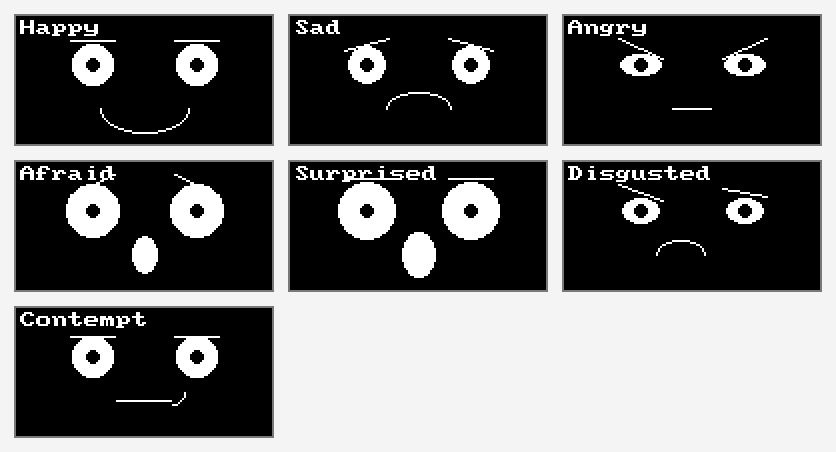
Press button A and the menu steps through the table one row at a time. Here are all seven faces, in table order:
The Real Payoff
Adding an eighth emotion to the old program meant writing a new function, then adding it to the menu tuple, then hoping you matched the style of the other seven. Adding one here costs a single line, and there is no new code to get wrong:
1 | |
That is the difference this lesson is really about. When you separate data from code, changing what your program knows stops requiring you to change what your program does.
| Task | Seven functions | One table |
|---|---|---|
| Add an emotion | Write a function, register it | Add one row |
| Reorder the menu | Reorder a tuple of function names | Reorder rows |
| Make every mouth wider | Edit seven functions | Edit one column |
| Store the set on disk or send it over a network | Not possible — code is not data | Straightforward — rows are just numbers |
That last row is worth a second look. Because your emotions are now plain numbers, a robot could download a new personality the way it downloads a file.
Things to Try
- Add the "Bored" row above. You just extended the menu without writing one line of drawing code. Now invent a row of your own.
- Make "Sad" sadder by editing only its numbers — try an
eye_ryof 7 and a brow tilt of -5. You are tuning a face the way a designer would, by changing values instead of rewriting code. - Give one emotion a lopsided brow. Set
brow_Lto 5 andbrow_Rto -3 on Contempt, and see how much a single mismatched eyebrow changes the meaning. - Sort the table so the emotions run from most positive to most negative. Because they are data, sorting the menu is just reordering lines.
- Count the columns you never change. If one is always the same, it does not belong in the
table — move it into
face.pyas a constant instead.
Seven feelings, one function
 You just replaced forty lines of near-identical code with eight rows of numbers, and gained the ability to add a feeling in one line. Let's draw some feelings!
References
- The Face Module — the
face.mouth()style names that make a row of data able to pick a shape - Emotion Types — the seven hand-written functions this lesson replaces, and where the numbers came from
- Eyebrows — why the brow tilt column carries so much of the meaning
- MicroPython Framebuf Documentation — the drawing commands underneath
face.py