Skip to content

Lab 32: Color and Bits — What a Number Has to Give Up

On the OLED kit a pixel was one bit — on or off, nothing to ask about it. Here a pixel is a 16-bit number, and there's a great deal to ask: color565(red, green, blue) takes three ordinary 0-255 values and packs them into 5 bits of red, 6 of green, and 5 of blue. Sixteen million colors go in; 65,536 come out.

This is the one lab in the kit that couldn't have existed on a monochrome display, because the question it asks — what does a number have to throw away to fit in a fixed number of bits — has no answer when there's only one bit to begin with.

Sample Program Code

Five views, stepped through with button A; button B prints the numbers behind whichever one is on screen:

  1
  2
  3
  4
  5
  6
  7
  8
  9
 10
 11
 12
 13
 14
 15
 16
 17
 18
 19
 20
 21
 22
 23
 24
 25
 26
 27
 28
 29
 30
 31
 32
 33
 34
 35
 36
 37
 38
 39
 40
 41
 42
 43
 44
 45
 46
 47
 48
 49
 50
 51
 52
 53
 54
 55
 56
 57
 58
 59
 60
 61
 62
 63
 64
 65
 66
 67
 68
 69
 70
 71
 72
 73
 74
 75
 76
 77
 78
 79
 80
 81
 82
 83
 84
 85
 86
 87
 88
 89
 90
 91
 92
 93
 94
 95
 96
 97
 98
 99
100
101
102
103
104
105
106
107
108
109
110
111
112
113
114
115
116
117
118
119
120
121
122
123
124
125
126
127
128
129
130
131
132
133
134
135
136
137
138
139
140
141
142
143
144
145
146
147
148
149
150
151
152
153
154
155
156
157
158
159
160
161
162
163
164
165
166
167
168
169
170
171
172
173
174
175
176
177
178
179
180
181
182
183
184
185
186
187
188
189
190
191
192
193
194
195
196
197
198
199
200
201
202
203
204
205
206
207
208
209
210
211
212
213
214
215
216
217
218
219
220
221
222
223
224
225
226
227
228
229
230
231
232
233
234
235
236
237
238
239
240
241
242
243
244
245
246
247
248
249
250
251
252
253
254
255
# Lab 32: Color and Bits -- What a Number Has to Give Up
#
# On the OLED kit a pixel was one bit. On or off. There was nothing to
# ask about it, and no lab could have been written on the subject.
#
# Here a pixel is a 16-bit number, and there is a great deal to ask. This
# is the one lab in the kit that the mono display could not have taught,
# and what it teaches is REPRESENTATION -- how a real thing gets squeezed
# into a fixed number of bits, and what falls out along the way. That
# question is not about displays. It is the same question behind MP3s,
# JPEGs, floating point, and every file format you will ever open.
#
# Here is the whole encoding, from lib/gc9a01.py:
#
#     def color565(red, green, blue):
#         return (red & 0xf8) << 8 | (green & 0xfc) << 3 | blue >> 3
#
# Three 0-255 numbers go in. One 16-bit number comes out:
#
#     bit  15 14 13 12 11 | 10 9 8 7 6 5 | 4 3 2 1 0
#          R  R  R  R  R  | G  G G G G G | B B B B B
#             5 bits      |    6 bits    |   5 bits
#
# 5 + 6 + 5 = 16. Count what that costs: you handed over 8 bits per
# channel and got back 5, 6, and 5. Sixteen million colors went in;
# 65,536 came out.
#
# Two questions worth answering before you press a button:
#
#   WHY DOES GREEN GET THE EXTRA BIT? Your eye is not an equal-opportunity
#   detector. Most of your sense of brightness comes from green light,
#   some from red, and very little from blue. Spending the one spare bit
#   on green puts it where you are most likely to notice.
#
#   WHY NOT JUST STORE ALL 24 BITS? Do the arithmetic:
#       240 x 240 x 2 bytes = 115,200   (what this display uses)
#       240 x 240 x 3 bytes = 172,800   (what 24-bit color would need)
#   An RP2040 has 264 KB of RAM total, and MicroPython is already using
#   most of it. That is the same arithmetic that explains why this driver
#   has no frame buffer and why there is no show() in this kit.
#
# Button A steps through the views. Button B prints the numbers behind
# whichever one you are looking at to the Thonny shell.

import config
from utime import sleep_ms

display = config.init_display()
button_a, button_b = config.init_buttons()

WHITE = config.WHITE
BLACK = config.BLACK
FONT = config.SMALL_FONT
HALF = config.WIDTH // 2

# The ramps live in a band across the middle of the circle, where the
# glass is widest. Each is 200 pixels of screen showing 256 input levels.
RAMP_X = 20
RAMP_W = 200
RAMP_H = 34


def centered(string, y, color=WHITE):
    x = HALF - (len(string) * FONT.WIDTH) // 2
    display.text(FONT, string, x, y, color, BLACK)


def ramp(y, channel):
    """Draw a smooth 0-255 sweep of one channel and let the encoding
    break it into bands.

    Nothing here is quantizing on purpose. We ask for all 256 levels,
    one per column-ish, and color565() throws away the low bits on the
    way past. The stripes you see ARE the bits that did not fit."""
    for i in range(RAMP_W):
        level = (i * 255) // (RAMP_W - 1)
        if channel == 'r':
            color = config.color565(level, 0, 0)
        elif channel == 'g':
            color = config.color565(0, level, 0)
        elif channel == 'b':
            color = config.color565(0, 0, level)
        else:
            color = config.color565(level, level, level)
        display.vline(RAMP_X + i, y, RAMP_H, color)


def view_layout():
    """Where the sixteen bits go."""
    display.fill(BLACK)
    centered("RGB565", 40)
    centered("16 bits per pixel", 62)

    # A bar showing the three fields at their true relative widths:
    # 5, 6 and 5 of 16 bits across 160 pixels = 50, 60, 50.
    bar_x = 40
    display.fill_rect(bar_x, 96, 50, 26, config.color565(255, 60, 60))
    display.fill_rect(bar_x + 50, 96, 60, 26, config.color565(60, 255, 60))
    display.fill_rect(bar_x + 110, 96, 50, 26, config.color565(90, 90, 255))

    centered("R:5  G:6  B:5", 132)
    centered("green gets the", 158)
    centered("spare bit", 176)


def view_ramps():
    """Red and green side by side -- the whole 5-vs-6 bit lesson."""
    display.fill(BLACK)
    centered("count the bands", 30)

    display.text(FONT, "R: 32 steps", RAMP_X, 60, WHITE, BLACK)
    ramp(78, 'r')

    display.text(FONT, "G: 64 steps", RAMP_X, 124, WHITE, BLACK)
    ramp(142, 'g')

    centered("green is smoother", 190)


def view_blue():
    """Blue, alone, so its dimness is impossible to miss."""
    display.fill(BLACK)
    centered("blue: 32 steps", 40)
    ramp(70, 'b')
    centered("...and dim", 120)
    centered("your eye takes", 146)
    centered("little brightness", 164)
    centered("from blue light", 182)


def view_gray():
    """All three channels together. The bands nearly vanish, because a
    step in one channel is hidden by the other two moving with it."""
    display.fill(BLACK)
    centered("all three at once", 40)
    ramp(70, 'w')
    centered("bands almost gone", 120)
    centered("errors in R, G and B", 146)
    centered("do not line up", 164)


def view_memory():
    """The arithmetic that explains the whole kit."""
    display.fill(BLACK)
    centered("240 x 240 pixels", 44)
    centered("x2 bytes = 115200", 68)
    centered("RP2040 RAM: 264 KB", 100, config.YELLOW)
    centered("...minus what", 124)
    centered("MicroPython uses", 142)
    centered("no frame buffer", 174, config.CYAN)
    centered("and no show()", 192, config.CYAN)


VIEWS = (
    ("bit layout", view_layout),
    ("red vs green", view_ramps),
    ("blue", view_blue),
    ("all channels", view_gray),
    ("memory", view_memory),
)


def report(index):
    """Print the numbers behind the current view."""
    name = VIEWS[index][0]
    print("--- view:", name)

    if index == 0 or index == 4:
        for r, g, b in ((255, 0, 0), (0, 255, 0), (0, 0, 255),
                        (255, 255, 255), (255, 200, 90)):
            packed = config.color565(r, g, b)
            print("  color565(%3d,%3d,%3d) = 0x%04X = %s"
                  % (r, g, b, packed, bin(packed)))
    else:
        # How many DISTINCT values a channel can actually take, counted
        # rather than asserted. Ask for all 256 and see what survives.
        for channel, shift, mask in (("red", 11, 0x1f),
                                     ("green", 5, 0x3f),
                                     ("blue", 0, 0x1f)):
            seen = set()
            for level in range(256):
                if channel == "red":
                    packed = config.color565(level, 0, 0)
                elif channel == "green":
                    packed = config.color565(0, level, 0)
                else:
                    packed = config.color565(0, 0, level)
                seen.add((packed >> shift) & mask)
            print("  %-5s 256 levels in -> %d distinct out"
                  % (channel, len(seen)))


def pressed(button):
    if button.value() == 1:
        return False
    sleep_ms(20)              # debounce: let the contacts settle
    return button.value() == 0


def wait_for_release(button):
    while button.value() == 0:
        sleep_ms(10)


index = 0
VIEWS[index][1]()
report(index)

while True:
    if pressed(button_a):
        wait_for_release(button_a)
        index = (index + 1) % len(VIEWS)
        VIEWS[index][1]()

    if pressed(button_b):
        wait_for_release(button_b)
        report(index)

    sleep_ms(10)


# ---------------------------------------------------------------------
# Things to try:
#
# 1. Count the bands in the red ramp before you count the green ones.
#    Getting 32 and 64 by eye, off a screen, is a genuinely satisfying
#    way to read a number out of hardware.
#
# 2. Press B on the ramp view. It asks for all 256 levels of each channel
#    and counts how many survive the encoding. The answer is not asserted
#    anywhere in that code -- it is measured, the same habit labs 26, 29
#    and 31 have been building.
#
# 3. Work out on paper what color565(255, 0, 0) should be, then press B
#    and check. Hint: 255 & 0xf8 = 248, and 248 << 8 = 0xF800.
#
# 4. What does color565(7, 3, 7) give you? Predict first. All three
#    values are small enough to be thrown away entirely, so the answer is
#    pure black -- which is worth seeing, because it means there are 8 x 4
#    x 8 = 256 different "colors" your code can name that this display
#    cannot tell apart from black.
#
# 5. Change the masks in the ramp: use `level & 0xf0` before passing it
#    in, and the bands get twice as wide. You have just built a worse
#    encoding on purpose, which is a fast way to understand a real one.
#
# 6. Look up RGB332, which packs a pixel into ONE byte -- 3 bits red, 3
#    green, 2 blue, for 256 colors total. Sketch what the red ramp would
#    look like. Then look up 24-bit color and ask why your phone can
#    afford it and this board cannot. The answer is in view 5.
#
# 7. Back in lab 24, every emotion's color is a config.color565() call.
#    Go and read those three numbers for each emotion, and predict which
#    one will look dimmest. Then look. You now know why every color in
#    that table has green in it.

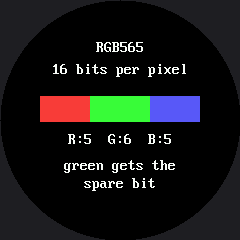
Here's the opening view, showing where the sixteen bits go:

Simulated output of 32-color-bits.py

Why Green Gets the Extra Bit

Your eye is not an equal-opportunity light detector. Most of your sense of brightness comes from green light, some from red, and comparatively little from blue — so RGB565 spends its one spare bit on green, where a human is most likely to notice the difference. Count the bands in the red ramp against the green one in the second view: 32 steps against 64, a number you can read directly off the screen instead of taking on faith.

The other question — why not just store all 24 bits, the way a phone screen does — comes down to the same arithmetic this kit keeps returning to: 240 x 240 x 2 bytes is 115,200; at 3 bytes per pixel it would be 172,800, against an RP2040's 264 KB of total RAM, most of which MicroPython is already using. That's the same constraint that explains why this driver has no frame buffer and no show() — this lab just puts a number on it.