The Expression Menu
Here is the payoff for everything so far. The mode-switching pattern, applied to all seven Ekman emotions — the expressions psychologist Paul Ekman found people recognize across every culture he tested. Button A steps forward, button B steps back, and the name of the emotion sits at the top of the circle so you always know what the robot thinks it is doing.
Seven feelings, one robot
 This is the whole superpower in one program. Press a button and a machine tells a stranger how it feels — and the stranger understands, without a word. Let's draw some feelings!
The Seven Expressions
Every one of these is built from three decisions: how the eyes are shaped, how the eyebrows sit, and which mouth shape gets drawn. Nothing else.
| Emotion | Eyes | Eyebrows | Mouth |
|---|---|---|---|
| Happy | Round, (36, 36) |
Flat, lifted 8 | Wide upward curve |
| Sad | Round, slightly smaller | Inner ends up, tilt −11 | Downward curve |
| Angry | Squashed, (36, 18) |
Inner ends down, tilt 18, lowered | Flat bar |
| Afraid | Wide, (47, 47) |
Tilted up hard, lifted 11 | Tall open oval |
| Surprised | Widest, (48, 48) |
Flat, lifted 21 | Wide open oval |
| Disgusted | Narrow, uneven | Lopsided — one at 15, one at −8 | Off-center raised lip |
| Contempt | Round, relaxed | Flat, no lift | Flat with one corner curled |
Read down the eyebrow column. Six of the seven are distinguished more by their brows than by anything else, which is why the eyebrows lab said what it said.
Five Mouth Functions
The mouth is the one part that needs more than a change of numbers, so this lab defines five separate shapes for it:
1 2 3 4 | |
Notice that a smile and a frown are the same function with a different quadrant mask. That is the ellipse lab paying you back.
The Name Needs a Bigger Font
Every position and radius above is the 1.2" kit's number times 1.5 — eyes, eyebrows, mouths, all of
it. The one thing that isn't is the emotion name at the top: bitmap glyphs are fixed 8×16 and 16×32
shapes, so an 8×16 label that covered 3.3% of the 1.2" kit's width would cover only 2.2% of this
one. This lab draws the name in the 16×32 font instead — the same promotion face.label() makes —
and "Surprised," the longest of the seven names, comes out to 144 px, comfortably inside the
roughly 199 px the visible circle gives you up there.
That promotion has a real cost, though. text() paints a solid background behind every glyph, so a
label isn't just letters — it's a black band as tall as the font. Doubling the font from 8×16 to
16×32 doubled that band from 16 rows to 32. At the naively scaled label position (the 1.2" kit's 30,
times 1.5, which is 45), that 32-row band would cover rows 45 through 76 — and Afraid's eyebrow,
the tallest one in the kit at lift 11, reaches row 64. Drawing the label after the face, which is
what show_emotion() does below, would slice the top off of it. LABEL_Y is 32 here instead, which
clears row 64 by exactly one pixel.
A Bigger Screen Didn't Mean Bigger Text
 Every eye and eyebrow on this kit got 50% bigger for free. The font didn't — it took a real fix, and that fix cost eyebrow clearance and character budget. Nothing about a bigger panel is automatic.
Sample Program Code
The seven drawing functions are the interesting part; the button loop underneath is the same one from Mode Switching, unchanged.
1 2 3 4 5 6 7 8 9 10 11 12 13 14 15 16 17 18 19 20 21 22 23 24 25 26 27 28 29 30 31 32 33 34 35 36 37 38 39 40 41 42 43 44 45 46 47 48 49 50 51 52 53 54 55 56 57 58 59 60 61 62 | |
The full program is 19-emotion-modes.py in the kit.
Here's the first emotion in the list, which is what the program draws before you press anything:
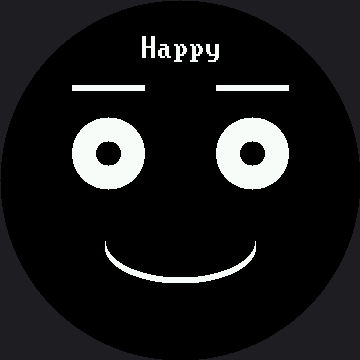
The menu shows one emotion at a time, so a single picture can only ever show you one of the seven. Press button A to walk the rest.
Look How Much Repeats
Read those seven functions again, top to bottom. Every one has the same three lines in the same order: set the eyes, set the eyebrows, set the mouth. Only the numbers change.
Hold on to that observation. It is the entire subject of the emotion table lab, and noticing it yourself here is worth more than being told about it later.
Test It on a Real Person
 Step through all seven without saying the names out loud and ask a friend to guess each one. The ones they get instantly are working. The ones they hesitate on are your homework — and hesitation is data.
Things to Try
- Run the guessing test above with three people. Write down every word they say, including the wrong ones. A wrong word tells you which feature is misleading them.
- Replace
display.fill(BLACK)with erase boxes over just the eyes, eyebrows, mouth, and label. The label box is the one that catches people out: it has to clear 32 rows, because that's how tall a 16×32 glyph is. Clear only 16 and the bottom half of every letter from the previous emotion stays on the glass. - Find the confusable pair. Afraid and Surprised use nearly the same eye size. What is the smallest change that reliably separates them?
- Make Sad sadder by editing only its numbers — try an eye radius of 26 and a brow tilt of −18 (the 1.2" kit's suggested 17 and −12, scaled up).
References
- Mode Switching — the button loop this lab reuses without changes
- The Emotion Table — where these seven functions collapse into seven rows of data
- Eyebrows — the feature doing most of the work in six of the seven faces
- The Expression Menu on the 1.2" kit — the same seven emotions, drawn where the label still fits in the small font