Emotion Theory & the Core Expression Set
Summary
This chapter grounds facial expression design in research — Paul Ekman's universal emotion theory, facial action coding, and minimal-feature robotic face studies — and then applies that theory to build the book's full named expression set: neutral, happy, sad, angry, afraid, surprised, disgusted, contempt, tired, stern, sleepy, confused, and excited. After completing this chapter, students will be able to explain the minimal-feature research behind simple robot faces and design the eyebrow/eye/mouth combination for any of these expressions.
Concepts Covered
This chapter covers the following 18 concepts from the learning graph:
- Ekman Universal Emotions
- Basic Emotion Theory
- Facial Action Coding
- Minimal Feature Robot Research
- Emotion Recognition Accuracy
- Neutral Expression
- Happy Expression
- Sad Expression
- Angry Expression
- Afraid Expression
- Surprised Expression
- Disgusted Expression
- Contempt Expression
- Tired Expression
- Stern Expression
- Sleepy Expression
- Confused Expression
- Excited Expression
Prerequisites
This chapter builds on concepts from:
From Parameters to Meaning
Time to Meet the Research Behind the Face
 Chapter 9 gave you a complete, parameterized face — eye size, eye spacing, eyebrow angle, pupil offset, and mouth curvature, all bundled into one dictionary. This chapter answers the question that face design raises next: which numbers actually mean "happy," and how do we know?
Everything you build for the rest of this book rests on a testable claim: a handful of movements on a human face carry specific, recognizable emotional meaning, and psychologists have spent decades studying exactly which movements mean what. This chapter grounds your robot's expressions in that research, then hands you thirteen named expressions, each written as a recipe of the exact parameters draw_face() already understands.
Some Feelings Are Considered Basic: Basic Emotion Theory
Not every emotion a person feels is equally simple. Jealousy, nostalgia, and pride are real feelings, but they build on other, simpler emotions layered together over time. Basic Emotion Theory is the idea that a small set of emotions are psychologically "basic" — universal across people, distinct from one another, and expressed through a characteristic facial signature — as opposed to complex or blended emotional states built from combinations of those basics.
This distinction matters directly for a robot face with only a handful of moving parts. Complex emotions like nostalgia or embarrassment involve subtle combinations of expression, posture, and context that even a full human face struggles to show clearly. Basic emotions, by contrast, are exactly the kind of signal a simplified robot face has a real chance of communicating — a small, high-contrast target instead of an impossibly nuanced one.
A Short List, Recognized Everywhere: Ekman Universal Emotions
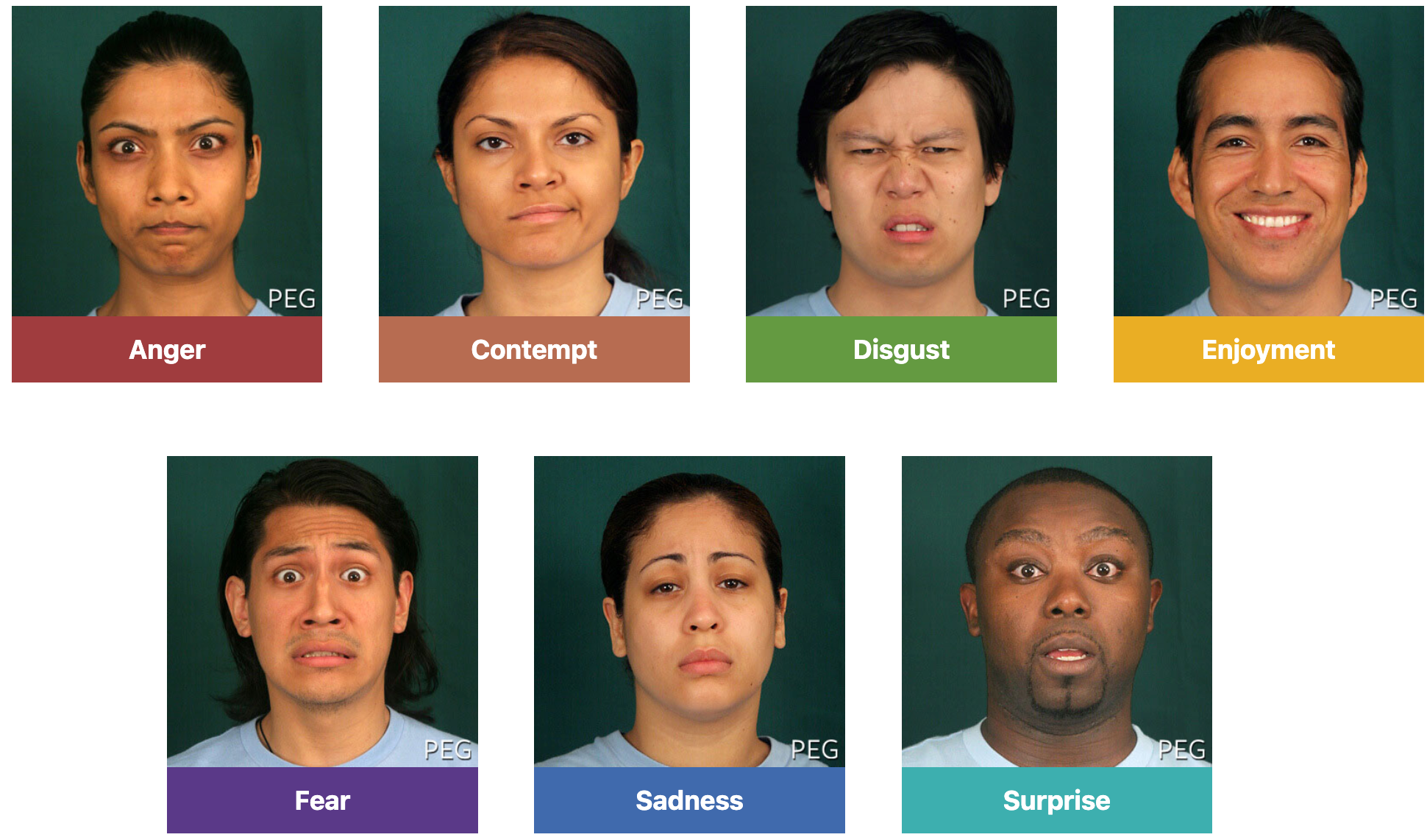
Psychologist Paul Ekman ran cross-cultural studies in the 1960s and 1970s, showing photographs of facial expressions to people in dramatically different cultures, including some with little exposure to Western media. The results pointed to a consistent pattern: Ekman Universal Emotions are a small set of basic emotions that Ekman's research found people recognize across cultures, typically cited as happiness, sadness, anger, fear, surprise, and disgust, with contempt sometimes added as a seventh, more debated category.
This research is the theoretical foundation for the entire expression set this book teaches. It is why "happy," "sad," "angry," "afraid," "surprised," and "disgusted" are not an arbitrary list some robot designer made up — they are the specific emotions decades of psychology research suggest have consistent, learnable facial signatures.
Understanding which eyebrow, eye, and mouth movements map onto which emotion is not just psychology trivia — it is a robot designer's superpower, the same one this whole book is built around: the real ability to make a machine feel alive to the person looking at it.
Ekman's most frequently cited universal emotions are:
- Happiness
- Sadness
- Anger
- Fear
- Surprise
- Disgust
- Contempt (Ekman's later, more debated addition)
Here are photographs of seven of these expressions, each labeled with its emotion:
Research, Not a Law of Nature
 Ekman's universal emotions are influential, well-studied, and a genuinely useful design foundation — but they are not settled fact beyond dispute. Some psychologists question how universal certain expressions really are across every culture, and how much context changes what a face communicates. Treat this chapter's expression set as a strong, research-backed starting point, not the final word on human emotion.
Breaking a Face into Measurable Moves: Facial Action Coding
Ekman did not stop at naming universal emotions — he also needed a precise way to describe exactly what a face does to produce each one. Facial Action Coding refers to Ekman and Friesen's Facial Action Coding System, or FACS, a method that breaks a facial expression down into individual, measurable muscle movements called action units.
FACS action units are extremely specific — far more detailed than anything a simple robot face needs, but conceptually familiar territory by now. A few examples:
- Inner Brow Raiser
- Outer Brow Raiser
- Brow Lowerer
- Lid Tightener
- Lip Corner Puller
- Lip Corner Depressor
Notice how close that list already sounds to Chapter 9's parameters. FACS breaks a real face into dozens of independent, combinable muscle movements; this book's robot face breaks an expression into a handful of independent, combinable parameters — eyebrow_angle, eye_size, mouth_curvature, and a few others. A robot face's few parameters are a huge simplification of full FACS, collapsing dozens of action units into a handful of sliders, but the underlying idea is the same one Chapter 9 already taught: independent, parameterized features that combine to produce a whole expression.
How Few Features Are Enough? Minimal Feature Robot Research
The Research That Justifies This Whole Book
 Here is a question worth sitting with for a second: does a robot face really need dozens of FACS-style muscle movements to communicate an emotion, or could a handful of moving parts be enough?
Minimal Feature Robot Research refers to studies on simple, minimalist robot faces, which have repeatedly found that a small number of moving features — often just eyebrows and a mouth — are enough for people to correctly read an intended emotion. Researchers testing robots and screen-based characters with only two or three animatable features found recognition rates well above chance, even without a nose, cheeks, forehead wrinkles, or any of the dozens of subtler action units full FACS describes.
This finding directly justifies the entire design approach this course teaches. It is real evidence, not just a convenient assumption, that a robot face built from draw_face(), a face state dictionary, and a handful of parameters can genuinely communicate emotion to a human being standing nearby — exactly the claim this book has been making since Chapter 1.
Not Every Expression Is Equally Easy to Read: Emotion Recognition Accuracy
Knowing that a few features are enough to communicate emotion does not mean every emotion is equally easy to communicate. Emotion Recognition Accuracy describes how reliably viewers correctly identify an intended expression, and research consistently shows that accuracy is not the same for every emotion.
Happy and surprised expressions tend to be recognized very accurately, even on simple faces with only a few moving parts — an upward-curved mouth and very wide eyes are hard to mistake for anything else. Afraid and disgusted expressions fare much worse: viewers frequently confuse them with each other, or with surprised and angry, because the eyebrow and eye shapes involved overlap more than the "textbook" description suggests.
This uneven accuracy is not a flaw to fix inside this chapter — it is a design constraint Chapter 11 builds an entire readability strategy around. For now, keep it in mind as you learn each expression's recipe: some of these thirteen faces will read instantly and unmistakably, and a couple of them will need real design care to avoid being confused with a neighbor.
Seeing exactly which Ekman emotions map onto which robot-face features, side by side, makes the whole theory-to-design connection click before the thirteen-expression walkthrough begins.
Diagram: Ekman Emotion Feature Map
Ekman Emotion Feature Map
Type: infographic
sim-id: ekman-emotion-feature-map
Library: p5.js
Status: Specified
Bloom Taxonomy Level: Understand (L2) Bloom Taxonomy Verb: explain, interpret
Learning objective: Explain how each of Ekman's universal emotions (happiness, sadness, anger, fear, surprise, disgust, contempt) maps onto a characteristic eyebrow, eye, and mouth feature combination, by clicking each emotion and interpreting the resulting infobox.
Purpose: Bridge Ekman's psychology research to this book's robot-face parameters before the chapter's full thirteen-expression walkthrough begins, showing that the seven Ekman emotions are the theoretical core the larger design set builds outward from.
Layout: A horizontal row of seven labeled emotion icons (simple robot-face thumbnails) across the top: Happiness, Sadness, Anger, Fear, Surprise, Disgust, Contempt. Below the row, a large detail panel.
Interactive elements: - Clicking any emotion icon highlights it and populates the detail panel below with: the emotion's name, a one-sentence description of its characteristic eyebrow/eye/mouth combination in plain language, and which FACS action units (by plain-language name, not code) are most associated with it - Hovering (without clicking) shows a lightweight tooltip preview of just the eyebrow/eye/mouth summary - A "Recognition accuracy" badge on each icon, color-coded green (high accuracy, e.g., Happiness, Surprise) to amber (lower accuracy, more often confused, e.g., Fear, Disgust), sourced from the Emotion Recognition Accuracy discussion in this chapter - Clicking "Compare Fear vs. Disgust" (a highlighted button) selects both icons at once and shows their detail panels side by side, calling out the overlapping features that make them easy to confuse
Data to display: for each of the 7 emotions — name, characteristic eyebrow/eye/mouth summary, 2-3 associated FACS action-unit names, recognition-accuracy badge
Color coding: green/amber recognition-accuracy badges as described above; a neutral gray-blue palette for the icon row and detail panel otherwise, keeping the accuracy badges as the only strong color signal
Responsive behavior: the icon row wraps to two rows of icons below 600 pixels wide; the detail panel always renders full-width beneath the icon row
Implementation: HTML/CSS/JavaScript with simple SVG or canvas icons for each emotion; click and hover state managed in JavaScript, detail content stored as a small local data object keyed by emotion name
The Core Expression Set: From Recipe to Face
Every expression from here forward is described using the same four-part vocabulary: eyebrow angle (the eyebrow_angle parameter from Chapter 9, positive raising the outer edge, negative dropping it), eye size (the eye_size parameter, plus eyelid coverage for half-closed looks), pupil position (the gaze_offset_x parameter, usually left centered), and mouth curvature (the mouth_curvature parameter, positive for a smile, negative for a frown). Thirteen expressions, one shared vocabulary.
Here is the roadmap for the walkthrough ahead:
- Neutral
- Happy
- Sad
- Angry
- Afraid
- Surprised
- Disgusted
- Contempt
- Tired
- Stern
- Sleepy
- Confused
- Excited
Neutral Expression
The Neutral Expression is the default, rest-state face — the exact expression Chapter 9's default_face_state() already builds. Eyebrows sit level at eyebrow_angle = 0. Eyes are a medium eye_size with pupils centered (gaze_offset_x = 0). The mouth is nearly flat, with mouth_curvature close to zero. Every other expression in this chapter is a deliberate departure from these defaults, one or two parameters at a time.
Happy Expression
The Happy Expression is built almost entirely from one parameter change: a strongly positive mouth_curvature, producing the clear upward-curved smile Chapter 9's draw_mouth() already knows how to draw. Eyebrows stay relaxed, at or slightly above level, and eyes remain a normal, comfortable eye_size — happiness does not need extreme eyebrows or eyes to read clearly, which is part of why it scores so well on recognition accuracy.
A bridge sentence before the code: this face-state dictionary builds on Chapter 9's default values, changing only eyebrow_angle and mouth_curvature to produce a clear, friendly smile.
1 2 3 4 5 6 7 | |
Sad Expression
The Sad Expression reverses the mouth entirely, using a negative mouth_curvature for a downward-curved frown. Eyebrows angle mildly negative — up at the inner corners nearest the nose, down at the outer corners — the same "dropped outer edge" tilt Chapter 9's draw_eyebrow() produces with a negative angle, just kept gentle rather than extreme. Eyes often get a light eyelid overlay for a slumped, low-energy look, without going as far as a fully lowered lid.
A bridge sentence before the code: this face-state dictionary flips the sign of both eyebrow_angle and mouth_curvature from the happy recipe above, producing a visibly opposite expression from the same two parameters.
1 2 3 4 5 6 7 | |
Here are the neutral, happy, and sad faces drawn by Chapter 9's draw_face(), so you can see what a flipped mouth_curvature does:
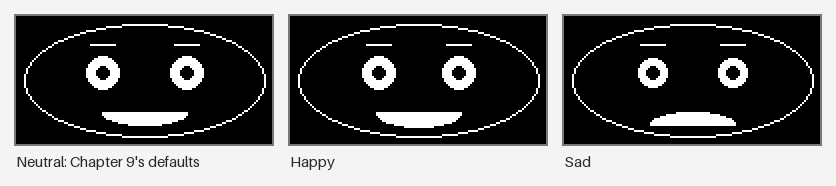
Compare these two dictionaries directly: eyebrow_angle and mouth_curvature are the only two values that changed, and both simply flipped sign. That is the entire distance, in code, between "happy" and "sad."
Two Sign Flips, One Completely Different Face
Look back at neutral, happy, and sad together for a moment. Neutral sits at zero on both eyebrow_angle and mouth_curvature. Happy pushes both positive. Sad pushes both negative. Three expressions, one shared pair of numbers, moving in opposite directions — this is parameterized face design from Chapter 9, working exactly as intended.
Angry Expression
The Angry Expression shares sad's negative eyebrow direction but pushes it much further — a sharp, steep eyebrow_angle angled hard toward the center, reading as furrowed rather than merely drooping. Eyes narrow, using a reduced eye_size instead of an eyelid overlay, giving a tighter, more intense stare than sad's soft, lowered look. The mouth stays flat or only slightly downward — a tight line rather than a deep frown, since anger reads through the eyebrows and eyes more than through the mouth.
Afraid Expression
The Afraid Expression raises the eyebrows instead of lowering them, paired with wide eyes at an increased eye_size — alarm shows up as a face opening up, not closing down. The mouth often needs an open, rounded shape rather than a simple curved line, which means drawing the full mouth ellipse instead of just its top or bottom half. Despite this open, wide-eyed combination looking dramatic, afraid is one of the expressions Emotion Recognition Accuracy research flags as frequently confused with surprised or disgusted.
Surprised Expression
The Surprised Expression takes afraid's raised-eyebrows, wide-eyes combination and pushes every value to its extreme: very raised eyebrows, very wide eyes, and a fully open mouth. This is often the most reliably recognized expression in minimal-feature robot studies, precisely because every single feature moves in the same dramatic direction at once, leaving little room for a viewer to read it as anything else.
A bridge sentence before the code: these two dictionaries sit at opposite ends of the same design space — surprised pushes every parameter to an extreme, while stern (introduced two sections ahead) keeps every parameter close to neutral.
1 2 3 4 5 6 7 8 9 10 11 12 13 14 15 16 17 | |
Notice the new mouth_open key. Chapter 9's dictionary never needed it, because a neutral face's mouth is always a closed curve — but an alarmed or delighted open mouth needs draw_mouth() to choose between a curved line and a small filled circle, an extension worth keeping in mind as you design your own expressions.
Disgusted Expression
The Disgusted Expression is the first one in this chapter that deliberately breaks facial symmetry. Features scrunch asymmetrically: eyes narrow with a reduced eye_size, and the mouth pulls toward one side or curls upward on just one edge, rather than curving evenly around the centerline the way Chapter 9's mirrored mouth_curvature normally does. This asymmetric mouth position is exactly the kind of deliberate override Chapter 9 flagged as breaking symmetry on purpose — the same technique confused and contempt lean on later in this chapter.
Contempt Expression
The Contempt Expression is Ekman's more debated addition to the universal emotion list, and it looks almost nothing like the other twelve. Rather than a full facial change, contempt is a single subtle, asymmetric one-sided mouth raise — one corner lifts slightly while the rest of the face stays close to neutral. It is distinct enough from every other expression in this set to be worth knowing, but subtle enough that it works best as an advanced or optional addition to a robot's expression library rather than a first attempt.
Save Contempt for Later
 If you are building your first full expression set, it is completely fine to skip contempt until the other twelve feel solid. A one-sided mouth raise this subtle is easy to lose entirely on a small display, and Chapter 11's readability tools will help you judge whether it is even worth including on your specific hardware.
Tired Expression
The Tired Expression reuses Chapter 9's eyelid representation directly: covering roughly the top third to half of each eye with the background color, using the same quadrant-fill technique draw_eyelid() already implements. The mouth stays flat or drifts slightly downward, and eyebrows remain close to level — tired is mostly an eye story, not an eyebrow or mouth one.
Stern Expression
The Stern Expression keeps eyebrows level but slightly lowered — a small negative eyebrow_angle, far short of angry's sharp furrow — paired with a flat, tight mouth at mouth_curvature near zero. Eyes stay a normal, unnarrowed size, which is exactly what separates stern from angry: same general eyebrow direction, much smaller magnitude, and none of anger's narrowed eyes. Stern is a useful "listening" or serious-attention state for a robot, distinct from being upset about anything.
Sleepy Expression
The Sleepy Expression takes tired's eyelid technique further, covering nearly the entire eye rather than just the top portion, leaving only a thin sliver visible. Eyebrows and mouth relax even further than tired's, approaching the loosest, most minimal-effort values in this entire expression set. Where tired suggests a robot that is still functioning but low on energy, sleepy suggests one on the verge of powering down entirely.
Confused Expression
The Confused Expression is this chapter's clearest example of using asymmetry deliberately, echoing Chapter 9's reminder that symmetry is a default to override on purpose, not a rule to break by accident. One eyebrow raises while the other stays level or drops slightly — two different eyebrow_angle values instead of one shared, mirrored value. The mouth stays close to flat, sometimes with a slight tilt, since confusion reads almost entirely through the mismatched eyebrows.
A bridge sentence before the code: this snippet extends the face-state dictionary with separate left and right eyebrow angles, previewing the more flexible asymmetric eyebrow handling Chapter 11 builds out in full.
1 2 3 4 5 6 7 8 | |
Excited Expression
The Excited Expression is happy turned up to its maximum: wide eyes at an increased eye_size, raised eyebrows at a strongly positive eyebrow_angle, and a big, open, smiling mouth combining a large positive mouth_curvature with mouth_open = True. It sits close to surprised in parameter space — both push eyes and eyebrows to an extreme — but excited's strongly upward, open mouth keeps it reading as delighted rather than alarmed.
Turning a written recipe into an instant guess, or an expression into an instant recipe, is exactly the kind of quick recall this walkthrough sets up — try it before moving to the summary table below.
Diagram: Expression Recipe Flashcard Gallery
Expression Recipe Flashcard Gallery
Type: microsim
sim-id: expression-recipe-flashcard-gallery
Library: p5.js
Status: Specified
Bloom Taxonomy Level: Understand (L2) Bloom Taxonomy Verb: predict, infer
Learning objective: Given a parameter recipe (eyebrow angle, eye size, pupil position, mouth curvature), predict which of the thirteen named expressions it produces, and given a named expression, infer its parameter recipe — reinforcing the vocabulary just taught in the chapter walkthrough.
Canvas layout: - Left 60% (responsive, roughly 420x320 at default width): a single flashcard showing either a rendered robot face or a parameter recipe, centered - Right 40%: mode toggle, answer input controls, score tracker, and a "Reveal" button
Visual elements: - A flashcard that either renders a face (using the same draw_face-style rendering as Chapter 9's slider playground) or displays a text recipe such as "eyebrow_angle: -8, eye_size: 7, mouth_curvature: -6" - A row of 13 labeled buttons, one per expression name, used to submit a guess - A score tracker showing correct guesses out of cards seen this session - A flip animation revealing the correct answer and a one-sentence explanation after each guess
Interactive controls: - Mode toggle: "Face to Name" (see a rendered face, guess the expression) / "Recipe to Name" (see parameter values, guess the expression) - 13 expression-name buttons used to submit a guess for the current card - "Reveal" button shows the correct answer and explanation without guessing, for review - "Next Card" button draws a new random card, avoiding immediate repeats - "Reset Score" button clears the session tracker
Default parameters: Mode set to "Face to Name," score at 0/0, first card chosen at random from all 13 expressions
Behavior: clicking an expression-name button immediately flips the card, highlighting the button green if correct or red if incorrect, then shows the correct recipe or face alongside a one-sentence explanation of the key parameter(s) that define it; the score tracker updates after every guess; switching modes resets the current card to a new random draw in the new mode.
Instructional Rationale: An Understand-level "predict the output" objective is best served by concrete worked examples with immediate right/wrong feedback rather than continuous animation, letting the learner form a specific prediction from real parameter values before the card confirms or corrects it, exactly the data-visibility pattern this level calls for.
Responsive design: the 13 answer buttons wrap into a grid of 3-4 columns below 600 pixels wide; the flashcard and controls stack vertically on narrow viewports.
Implementation: p5.js for face rendering, reusing the draw_face()-equivalent rendering logic from Chapter 9's face-parameter-slider-playground; a local array of 13 recipe objects (name, eyebrow_angle, eye_size, gaze_offset_x, mouth_curvature, mouth_open, one-sentence explanation) drives both modes.
Recipe Reference: All Thirteen Expressions at a Glance
With every expression's design story told in prose above, the table below collects all thirteen recipes side by side, using the same eyebrow angle, eye size, pupil position, and mouth curvature vocabulary established throughout this chapter.
| Expression | Eyebrow Angle | Eye Size / Openness | Pupil Position | Mouth Curvature | Notes |
|---|---|---|---|---|---|
| Neutral | Level (0°) | Medium, fully open | Centered | Flat (~0) | Default rest state |
| Happy | Relaxed, slightly raised | Normal | Centered | Strong upward curve | High recognition accuracy |
| Sad | Mild negative (outer down) | Normal, light eyelid | Centered | Downward curve | Slumped, low-energy look |
| Angry | Sharp negative, toward center | Narrowed | Centered | Flat or slight downward | Intensity via eyes, not mouth |
| Afraid | Raised | Wide | Centered | Open, rounded | Often confused with surprised |
| Surprised | Very raised | Very wide | Centered | Wide open | Most reliably recognized |
| Disgusted | Asymmetric, scrunched | Narrowed | Centered | Pulled to one side, curled | Deliberate asymmetry override |
| Contempt | Level | Normal | Centered | Subtle one-sided raise | Debated, advanced/optional |
| Tired | Level | Half-closed eyelid | Centered | Flat, slight down | Reuses eyelid representation |
| Stern | Slightly lowered, level | Normal | Centered | Flat, tight | Serious, not extreme |
| Sleepy | Very relaxed, near level | Nearly closed eyelid | Centered | Near flat | Drowsier than tired |
| Confused | Asymmetric (one up, one down) | Normal | Centered | Slightly tilted or flat | Independent left/right angles |
| Excited | Strongly raised | Wide | Centered | Big open smile | Happy pushed to its maximum |
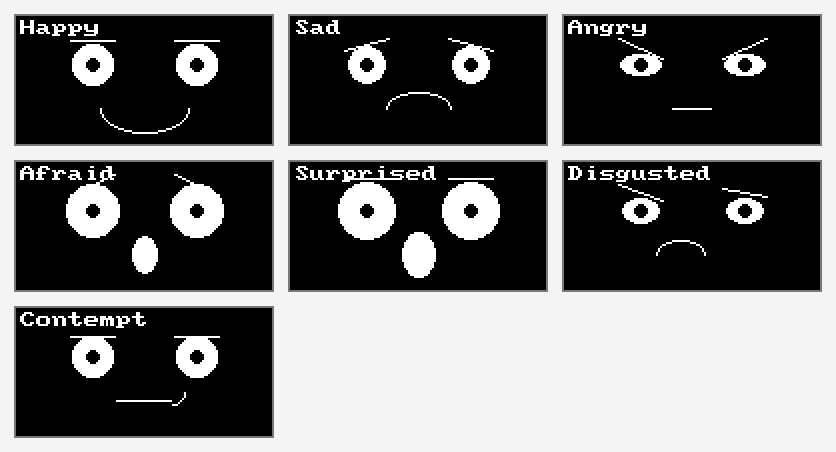
The recipes above are the design. The OLED kit's expression menu is one way to build them. Here are its seven Ekman expressions, one frame per press of button A:
Predicting a parameter recipe was one thing — now try assembling one yourself and checking it against Chapter 9's live-rendering face, the same exercise a real robot designer runs before shipping a new expression.
Diagram: Build This Expression Challenge
Build This Expression Challenge
Type: microsim
sim-id: expression-parameter-matching-challenge
Library: p5.js
Status: Specified
Bloom Taxonomy Level: Apply (L3) Bloom Taxonomy Verb: demonstrate, construct
Learning objective: Given a target named expression from this chapter's core set, demonstrate mastery of its parameter recipe by constructing it with sliders — adjusting eyebrow angle, eye size, pupil position, and mouth curvature until the rendered face matches the target's defining features.
Canvas layout: - Left 60% (responsive, roughly 420x320 at default width): a live-rendered face controlled by the learner's sliders, using the same rendering approach as Chapter 9's face-parameter-slider-playground - Right 40%: a target expression name and one-line description, sliders for each parameter, a match-quality meter, and "Check My Build" and "New Challenge" buttons
Visual elements: - A target banner naming the challenge expression, e.g., "Build: Angry" with its one-sentence description from this chapter - A live-rendered robot face reflecting the learner's current slider values - A match-quality meter (0-100%) comparing current slider values to an acceptable range for the target expression - A small reference thumbnail of a reasonable "solution" face, hidden until "Check My Build" is pressed
Interactive controls: - Slider: eyebrow angle (-30 to 30 degrees) - Slider: eye size (4-16) - Slider: pupil position / gaze offset (-10 to 10) - Slider: mouth curvature (-10 to 10) - Toggle: mouth open (on/off), enabled only for challenges where it matters - "Check My Build" button reveals the match-quality meter and a reference thumbnail - "New Challenge" button selects a new random target expression from the 13-expression set
Default parameters: target expression chosen at random on load; all sliders start at Chapter 9's neutral default_face_state() values
Behavior: moving any slider immediately redraws the face; pressing "Check My Build" scores the current slider values against a stored acceptable range for the target expression and displays both a percentage match and which specific parameter is furthest from the target range, so the learner knows exactly what to adjust next; "New Challenge" resets sliders to neutral defaults and picks a new target.
Instructional Rationale: An Apply-level objective calling for hands-on construction is best served by parameter-exploration sliders with concrete, immediate scoring feedback rather than passive viewing, letting the learner test a hypothesis about which parameters matter for a given expression and revise it based on specific, actionable feedback.
Responsive design: control panel and match-quality meter move below the canvas on viewports narrower than 600 pixels; the face view scales to fill its container's width while preserving the OLED's 2:1 aspect ratio.
Implementation: p5.js reusing the draw_face()-equivalent rendering logic from Chapter 9's face-parameter-slider-playground; each of the 13 target expressions stores an acceptable parameter range (min/max per parameter) used for scoring rather than a single exact value, since multiple reasonable slider combinations should count as a correct build.
Chapter Summary
You now know the psychology research behind facial expression design, and you have a full, thirteen-expression core set described entirely in Chapter 9's parameter vocabulary.
- Basic Emotion Theory distinguishes simple, universal, distinctly-signaled emotions from complex or blended emotional states — and simple emotions are exactly what a minimal robot face can realistically communicate.
- Ekman Universal Emotions — commonly happiness, sadness, anger, fear, surprise, disgust, and the more debated contempt — are the research-backed foundation this book's whole expression set draws from, though some aspects of universality remain genuinely debated in psychology.
- Facial Action Coding (FACS) breaks a real expression into individual measurable action units; a robot face's few parameters are a huge simplification of that system, but built on the same idea of independent, combinable features.
- Minimal Feature Robot Research shows that a small number of moving features — often just eyebrows and a mouth — are enough for people to correctly read an intended emotion, real evidence behind this course's entire design approach.
- Emotion Recognition Accuracy is uneven: happy and surprised read very reliably even on simple faces, while afraid and disgusted are frequently confused with each other or with surprised and angry, setting up Chapter 11's readability focus.
- Neutral, happy, and sad share one parameter pair — eyebrow_angle and mouth_curvature — moving from zero, to positive, to negative.
- Angry shares sad's negative eyebrow direction but pushes it sharper, adds narrowed eyes, and keeps the mouth flat rather than deeply frowning.
- Afraid and surprised share raised eyebrows, wide eyes, and an open mouth, with surprised pushing every value to its extreme and reading far more reliably as a result.
- Disgusted, contempt, and confused each deliberately break facial symmetry — a scrunched, one-sided mouth; a subtle one-sided mouth raise; or two independent eyebrow angles instead of one shared, mirrored value.
- Tired and sleepy both reuse eyelid representation, covering progressively more of the eye; stern keeps every parameter close to neutral except a mildly lowered eyebrow and a tight, flat mouth.
- Excited is happy pushed to its maximum across eyes, eyebrows, and an open smiling mouth, sitting close to surprised in parameter space while still reading as delighted rather than alarmed.
Thirteen Faces, One Shared Vocabulary
 Every expression in this chapter, from a calm neutral face to a wide-eyed surprised one, came from the exact same four parameters you already knew from Chapter 9. That is real psychology research — Ekman's, FACS's, and decades of minimal-feature robot studies — translated directly into numbers you can put in a dictionary and hand to
 draw_face(). Chapter 11 takes this recipe set and asks the next question: how do you make sure every one of these expressions stays readable on a small, real display?
Self-Check: Your robot needs to clearly show 'sad' in one demo and 'angry' in another, but both expressions use a negative eyebrow_angle. Which other parameters would you change to keep the two visibly distinct, and why? — Click to reveal
Sad and angry do share the same negative eyebrow direction — outer edges tilted down — but they differ in magnitude and in two other parameters. Sad uses a milder eyebrow_angle, a normal eye_size with a light eyelid overlay for a slumped look, and a clearly negative mouth_curvature for a visible frown. Angry uses a much sharper, steeper eyebrow_angle, a reduced eye_size for a narrowed, intense stare, and keeps mouth_curvature close to flat rather than deeply frowning, since anger reads mainly through the eyebrows and eyes. Changing eye_size and mouth_curvature together, not just the eyebrow angle, is what keeps the two expressions from reading as the same face.