Skip to content

Lab 33: The Color Wheel

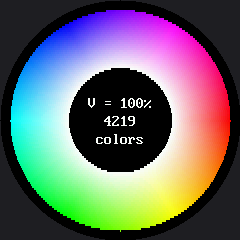
Every color this display can make, arranged in one ring — hue as the angle around it, saturation as the distance outward, and button A stepping through three brightness levels. This is the one program in the kit whose shape and the screen's shape are the same shape: hue is an angle, and a color wheel is a circle, which is why red sits at both "ends" of a rainbow.

It's a demo more than a fill-in-the-blanks exercise, but it earns its lab number — it's smoke-tested with the rest, and it turned into the kit's best worked example of measuring before you optimize.

Sample Program Code

hsv_to_rgb() converts hue/saturation/value into the red, green, and blue the display actually wants, and a FAST flag switches between a readable drawing function and a quick one — both produce the same wheel:

  1
  2
  3
  4
  5
  6
  7
  8
  9
 10
 11
 12
 13
 14
 15
 16
 17
 18
 19
 20
 21
 22
 23
 24
 25
 26
 27
 28
 29
 30
 31
 32
 33
 34
 35
 36
 37
 38
 39
 40
 41
 42
 43
 44
 45
 46
 47
 48
 49
 50
 51
 52
 53
 54
 55
 56
 57
 58
 59
 60
 61
 62
 63
 64
 65
 66
 67
 68
 69
 70
 71
 72
 73
 74
 75
 76
 77
 78
 79
 80
 81
 82
 83
 84
 85
 86
 87
 88
 89
 90
 91
 92
 93
 94
 95
 96
 97
 98
 99
100
101
102
103
104
105
106
107
108
109
110
111
112
113
114
115
116
117
118
119
120
121
122
123
124
125
126
127
128
129
130
131
132
133
134
135
136
137
138
139
140
141
142
143
144
145
146
147
148
149
150
151
152
153
154
155
156
157
158
159
160
161
162
163
164
165
166
167
168
169
170
171
172
173
174
175
176
177
178
179
180
181
182
183
184
185
186
187
188
189
190
191
192
193
194
195
196
197
198
199
200
201
202
203
204
205
206
207
208
209
210
211
212
213
214
215
216
217
218
219
220
221
222
223
224
225
226
227
228
229
230
231
232
233
234
235
236
237
238
239
240
241
242
243
244
245
246
247
248
249
250
251
252
253
254
255
256
257
258
259
260
261
262
263
264
265
266
267
268
269
270
271
272
273
274
275
276
277
278
279
280
281
282
283
284
285
286
287
288
289
290
291
292
293
294
295
296
297
298
299
300
301
302
303
304
305
306
307
308
309
310
311
312
313
314
315
316
317
318
319
320
321
322
323
324
325
326
327
328
329
330
331
332
333
334
335
336
337
338
339
340
341
342
343
344
345
346
347
348
349
350
351
352
353
354
355
356
357
358
359
360
361
362
363
364
365
366
367
368
369
370
371
372
373
374
375
376
377
378
379
380
381
382
383
384
385
386
387
388
389
390
391
392
393
394
395
396
397
398
399
400
401
402
403
404
405
406
407
408
409
410
411
412
413
414
415
416
417
418
419
420
421
422
423
424
425
426
427
428
429
430
431
432
433
434
435
436
437
438
439
440
441
442
443
444
445
446
447
448
449
450
451
452
453
454
455
456
457
458
459
460
461
462
463
464
465
466
467
468
469
470
471
472
473
474
475
476
477
478
479
480
481
482
483
484
485
486
487
488
489
490
491
492
493
494
495
496
497
498
499
500
501
502
503
504
505
506
507
508
509
510
511
512
513
514
515
516
517
518
519
520
521
522
523
524
525
526
527
528
529
530
531
532
533
534
535
536
537
538
539
540
541
542
543
544
545
546
547
548
549
550
551
552
553
554
555
556
557
558
559
560
561
562
563
564
565
566
567
568
569
570
571
572
573
574
575
576
577
578
579
580
581
582
583
584
585
586
587
588
589
590
591
592
593
594
595
596
597
598
599
600
601
602
# Lab 33: The Color Wheel -- every color this display can make, in one circle.
#
# This is a demo more than an exercise -- there is nothing to fill in -- but
# it earns its lab number, because it is the kit's best worked example of
# measuring before you optimize. Run it, look at it, then read the two
# surprises hiding in it.
#
# This is the one program in the kit whose shape and the screen's shape
# are the same shape. A color wheel IS a circle: hue is an ANGLE, and an
# angle has no beginning or end, which is exactly why red appears at both
# "ends" of a rainbow. On the OLED kit this demo could not have existed
# at all -- not for want of color, but because a 128x64 rectangle is the
# wrong container for the idea.
#
# HOW A COLOR GETS ITS PLACE
#
#   ANGLE around the ring  ->  HUE         which color it is
#   DISTANCE from center   ->  SATURATION  how much of that color
#   button A               ->  VALUE       how bright, in three steps
#
# Those three axes are called HSV, and they are how people describe color.
# The display does not think that way at all -- it wants red, green and
# blue amounts. hsv_to_rgb() below is the translator between the two, and
# writing that translator is most of what this program does.
#
# SURPRISE ONE: this wheel is a SLICE, not the whole space.
# Color here has three dimensions, and a screen has two. Every wheel you
# see is one flat cut through a solid at a single brightness. Press A to
# move the cut and watch a whole new sheet of colors appear.
#
# SURPRISE TWO: you cannot show all 65,536 colors at once. Not "it would
# be hard" -- you cannot. The visible circle is 240 pixels across, so it
# holds about 45,239 pixels. There are more colors than there are places
# to put them, and no arrangement fixes that. When the wheel finishes, it
# counts how many DISTINCT colors actually landed on the glass and prints
# the number to the shell. Guess before you look.
#
# WHERE THE TIME GOES
#
# This demo takes about two and a half seconds, and it reports exactly
# where they went: a start timestamp, an end timestamp, and a breakdown,
# all printed to the Thonny shell. Watch that report, because it says
# something you would probably guess wrong.
#
# It took EIGHTEEN seconds before anybody measured it. What that first
# measurement bought, and how the eighteen became two, is written up
# beside the FAST flag below.
#
# The drawing is NOT done pixel by pixel. Each row of the ring is packed
# into a buffer and sent in a single blit_buffer() call -- roughly 480
# trips to the display instead of 30,000. What DOES run thirty thousand
# times is the arithmetic: an atan2, a sqrt, and an HSV-to-RGB
# conversion for every single pixel.
#
# So on this one program the SPI wire is not the bottleneck. The math is.
# That is the reverse of nearly every other program in this kit, where
# talking to the display dominates and the arithmetic is free by
# comparison. Two programs, same hardware, opposite bottlenecks -- and
# the only reason you can tell them apart is that both of them measured
# themselves instead of assuming.

import config
import shapes
from math import atan2, sqrt, pi
from utime import ticks_ms, ticks_diff, sleep_ms

display = config.init_display()
button_a, button_b = config.init_buttons()

WHITE = config.WHITE
BLACK = config.BLACK
FONT = config.SMALL_FONT

CX = config.CENTER_X
CY = config.CENTER_Y

# A ring rather than a disc. The hole in the middle is where saturation
# would be near zero and every hue collapses into the same gray anyway,
# so nothing is lost by leaving it out -- and it gives us a clean black
# panel to print in.
INNER_R = 52
OUTER_R = 110

# The three brightness levels button A steps through.
VALUES = (1.0, 0.66, 0.33)

# Which of the two drawing functions to use. Both are below, and both
# produce the same wheel; one is written to be read and one is written to
# be quick. Flip this, run it again, and compare the two timing reports
# in the shell -- that comparison is the point of having both, and it is
# a more honest lesson than either version alone.
#
# Both of these are measured on a real Pico, not estimated:
#
#     FAST = False    18.3 seconds    616 microseconds per pixel
#     FAST = True      2.2 seconds     74 microseconds per pixel
#
# Eight and a third times faster. Two changes did it, and they come
# apart cleanly because one of them is a known factor of four:
#
#   about 4.0x  computing one color per 2x2 block instead of per pixel.
#               A quarter as many atan2 and sqrt calls. Expected.
#
#   about 2.1x  everything else: inlining two function calls and binding
#               globals to local names. No change at all to WHAT gets
#               computed -- only to how the interpreter reaches it.
#
# That second number is the one worth carrying away. Roughly half the
# cost of the original loop was never arithmetic. It was MicroPython's
# overhead for calling a function and looking up a global, paid 30,000
# times over. The next time a loop is too slow, find out how much of it
# is not the math before you make the math cleverer.
#
# One more note, since this file is about measuring rather than
# guessing. The prediction written here before the change was "around 3
# to 5 seconds". The answer was 2.2. Being wrong by a factor of about
# two, in either direction, is completely normal for an estimate built
# from counting operations -- which is exactly why you run it.
FAST = True

DEGREES_PER_RADIAN = 180.0 / pi

# One bit for every color the display can make: 65,536 bits = 8,192
# bytes. That is how this program counts distinct colors without keeping
# a list of 30,000 numbers, which would not fit in RAM. A bitmap like
# this is the standard trick for "have I seen this before?" when the
# universe of possible answers is known and finite.
SEEN_BYTES = 8192

# How many bits are set in each of the 256 possible byte values, worked
# out once, here, so that counting the bitmap later is 8,192 table
# lookups instead of 65,536 shift-and-test steps. Precomputing a small
# table to avoid repeating a small calculation is one of the oldest moves
# in programming, and this is about as clear an example as you will find.
BIT_COUNTS = bytearray(256)
for _n in range(256):
    BIT_COUNTS[_n] = bin(_n).count("1")


def hsv_to_rgb(hue, sat, val):
    """Convert HSV to three 0-255 channel values.

    hue is 0-360 degrees around the wheel, sat and val are 0.0-1.0.

    The six branches are the six edges of the color hexagon: red to
    yellow, yellow to green, green to cyan, cyan to blue, blue to
    magenta, magenta back to red. In each one, a channel is either fully
    on, fully off, or partway through a ramp between them."""
    sector = int(hue / 60.0) % 6
    ramp = (hue / 60.0) - int(hue / 60.0)

    low = val * (1.0 - sat)
    falling = val * (1.0 - ramp * sat)
    rising = val * (1.0 - (1.0 - ramp) * sat)

    if sector == 0:                       # red    -> yellow
        r, g, b = val, rising, low
    elif sector == 1:                     # yellow -> green
        r, g, b = falling, val, low
    elif sector == 2:                     # green  -> cyan
        r, g, b = low, val, rising
    elif sector == 3:                     # cyan   -> blue
        r, g, b = low, falling, val
    elif sector == 4:                     # blue   -> magenta
        r, g, b = rising, low, val
    else:                                 # magenta -> red
        r, g, b = val, low, falling

    return int(r * 255), int(g * 255), int(b * 255)


def draw_wheel(value):
    """Draw the wheel whichever way FAST is set to."""
    if FAST:
        return draw_wheel_fast(value)
    return draw_wheel_clear(value)


def draw_wheel_clear(value):
    """Paint the ring, one screen row at a time. THE READABLE VERSION.

    This is the one to read first. Every step is a separate named thing:
    work out the row's span, walk it pixel by pixel, ask hsv_to_rgb()
    what color belongs there, ask color565() to pack it, put two bytes in
    a buffer. Then hand the whole row to the display in ONE
    blit_buffer() call -- 480 conversations with the display instead of
    30,000, the same move lab 09 teaches and lab 31 measures.

    That last optimization was the right instinct and it fixed the wrong
    problem. Measured on a real Pico this takes 18.3 SECONDS, and almost
    none of it is the wire. See the note above draw_wheel_fast()."""
    started = ticks_ms()
    seen = bytearray(SEEN_BYTES)
    painted = 0

    for dy in range(-OUTER_R, OUTER_R + 1):
        row = CY + dy

        # How far the ring reaches sideways on this row. Outside INNER_R
        # the row crosses the ring in one span; inside it, the hole
        # splits that span in two.
        outer_span = int(sqrt(OUTER_R * OUTER_R - dy * dy))
        if abs(dy) < INNER_R:
            inner_span = int(sqrt(INNER_R * INNER_R - dy * dy))
            spans = ((-outer_span, -inner_span), (inner_span, outer_span))
        else:
            spans = ((-outer_span, outer_span),)

        for start_dx, end_dx in spans:
            width = end_dx - start_dx + 1
            if width <= 0:
                continue

            line = bytearray(width * 2)
            offset = 0

            for dx in range(start_dx, end_dx + 1):
                radius = sqrt(dx * dx + dy * dy)
                hue = atan2(dy, dx) * DEGREES_PER_RADIAN
                if hue < 0:
                    hue += 360.0

                # Saturation climbs from nothing at the inner edge to
                # full at the rim.
                sat = (radius - INNER_R) / float(OUTER_R - INNER_R)
                if sat < 0.0:
                    sat = 0.0
                elif sat > 1.0:
                    sat = 1.0

                r, g, b = hsv_to_rgb(hue, sat, value)
                color = config.color565(r, g, b)

                line[offset] = (color >> 8) & 0xFF
                line[offset + 1] = color & 0xFF
                offset += 2

                seen[color >> 3] |= 1 << (color & 7)
                painted += 1

            display.blit_buffer(line, CX + start_dx, row, width, 1)

    return painted, seen, ticks_diff(ticks_ms(), started)


# ---------------------------------------------------------------------
# THE FAST VERSION
#
# The slow version above measured itself at 18.3 seconds and 616
# microseconds per pixel. That same code runs about 380 times faster on
# a laptop, and the size of that gap is the clue: it is far worse than
# MicroPython's usual penalty, so something specific is wrong.
#
# It is this. THE RP2040 HAS NO FLOATING-POINT UNIT. It is a Cortex-M0+,
# and every atan2, sqrt, multiply and divide in that inner loop is
# emulated in software, one instruction at a time. Nearly every other
# program in this kit is limited by how fast it can talk to the display.
# This one is limited by arithmetic -- the only program here that is --
# and no amount of clever blitting was ever going to help it.
#
# Once you know that, the fixes follow from it. Three of them, in the
# order they were worth doing:
#
#   1. DO THE MATH FEWER TIMES. One color per BLOCK x BLOCK square
#      instead of per pixel. At BLOCK = 2 that is a quarter of the
#      atan2 and sqrt calls, for a softening you have to hunt for.
#      This is the big one, and it is the only one that costs anything.
#
#   2. STOP CALLING FUNCTIONS. hsv_to_rgb() and color565() ran 30,000
#      times each, and every call in MicroPython means argument packing,
#      a frame, and a tuple built for the return. Both are written
#      inline below. The code is uglier; that is the trade.
#
#   3. LOOK THINGS UP ONCE. `sqrt` and `atan2` are global lookups that
#      walk a module dictionary on EVERY use. Bound to local names
#      before the loop, they become a slot index instead. Cheap to do,
#      and worth real time in a loop this hot.
#
# AND ONE THING THAT DID NOT WORK, which is worth more than the three
# that did. The first attempt flushed runs of same-colored blocks as
# single fill_rect() calls, on the reasoning that 24,706 of the 29,692
# pixels repeat a color already on screen -- a real number, measured by
# this very program. It seemed obvious.
#
# It made the drawing call the display 6,359 times instead of 324. The
# repeated colors are real, but they are scattered all over the wheel
# rather than sitting next to each other, because hue slides
# continuously along a row and almost every neighbor differs by a little.
# A true fact about the data, an obvious-looking inference, and a
# nineteen-fold step backwards. Measure the change, not the reasoning.
#
# So the fast version keeps the row-and-buffer structure the readable one
# uses, and only samples the math more coarsely: one color per block,
# written BLOCK times across the buffer, and that one row of bytes then
# sent to each of the BLOCK screen rows the strip covers. Same number of
# display calls as the readable version -- but a quarter of the math.
#
# The two versions do not produce a pixel-identical picture, and the
# report will tell you so: sampling one color per square means the fast
# one finds fewer distinct colors, and its rim is a little blockier.
# Whether that trade is worth it is a judgement call, which is why FAST
# is a flag you can flip rather than a decision made for you.

BLOCK = 2                     # sample one color per BLOCK x BLOCK square
INNER_R2 = INNER_R * INNER_R
OUTER_R2 = OUTER_R * OUTER_R
SAT_SCALE = 1.0 / (OUTER_R - INNER_R)


def draw_wheel_fast(value):
    """The same wheel, with the arithmetic attacked instead of the wire."""
    started = ticks_ms()
    seen = bytearray(SEEN_BYTES)
    painted = 0

    # Optimization 3: pull every global this loop touches into a local.
    # A global name costs a dictionary lookup every single time it is
    # used; a local is a slot number the compiler already worked out.
    _sqrt = sqrt
    _atan2 = atan2
    _int = int
    _blit = display.blit_buffer
    _deg = DEGREES_PER_RADIAN
    _inner = INNER_R
    _scale = SAT_SCALE
    v255 = value * 255.0

    for dy in range(-OUTER_R, OUTER_R + 1, BLOCK):
        # One strip of BLOCK rows shares a single set of colors, so it
        # also has to share a single span. Take it from whichever row in
        # the strip sits closest to the equator: that gives the widest
        # ring and the widest hole, so the strip never paints over the
        # hole, and any overhang at the rim is at most BLOCK-1 pixels.
        last = dy + BLOCK - 1
        near = dy if abs(dy) < abs(last) else last

        near2 = near * near
        if near2 > OUTER_R2:
            continue
        outer_span = _int(_sqrt(OUTER_R2 - near2))
        if near2 < INNER_R2:
            inner_span = _int(_sqrt(INNER_R2 - near2))
            spans = ((-outer_span, -inner_span), (inner_span, outer_span))
        else:
            spans = ((-outer_span, outer_span),)

        for start_dx, end_dx in spans:
            width = end_dx - start_dx + 1
            if width <= 0:
                continue

            line = bytearray(width * 2)
            offset = 0
            dx = start_dx
            color = 0
            countdown = 0

            while dx <= end_dx:
                # Optimization 1: the expensive part runs once per BLOCK
                # columns, not once per column. A countdown rather than
                # a modulo -- this test runs 30,000 times, so even an
                # integer division is worth not doing.
                if countdown == 0:
                    countdown = BLOCK
                    radius2 = dx * dx + near2
                    hue = _atan2(near, dx) * _deg
                    if hue < 0:
                        hue += 360.0

                    sat = (_sqrt(radius2) - _inner) * _scale
                    if sat < 0.0:
                        sat = 0.0
                    elif sat > 1.0:
                        sat = 1.0

                    # Optimization 2: hsv_to_rgb() and color565(),
                    # inlined. Scaling by 255 up front means r, g and b
                    # leave the branch already in 0-255 range, saving
                    # three multiplies each time.
                    sixth = hue * (1.0 / 60.0)
                    whole = _int(sixth)
                    ramp = sixth - whole
                    sector = whole % 6

                    low = v255 * (1.0 - sat)
                    falling = v255 * (1.0 - ramp * sat)
                    rising = v255 * (1.0 - (1.0 - ramp) * sat)

                    if sector == 0:
                        r, g, b = v255, rising, low
                    elif sector == 1:
                        r, g, b = falling, v255, low
                    elif sector == 2:
                        r, g, b = low, v255, rising
                    elif sector == 3:
                        r, g, b = low, falling, v255
                    elif sector == 4:
                        r, g, b = rising, low, v255
                    else:
                        r, g, b = v255, low, falling

                    color = ((_int(r) & 0xF8) << 8
                             | (_int(g) & 0xFC) << 3
                             | _int(b) >> 3)

                    seen[color >> 3] |= 1 << (color & 7)

                line[offset] = color >> 8
                line[offset + 1] = color & 0xFF
                offset += 2
                dx += 1
                countdown -= 1

            # Send that one row of bytes to each of the BLOCK screen rows
            # the strip covers. The colors were computed once; only the
            # sending repeats, and sending is the cheap half here.
            #
            # The obvious version of this was `_blit(line * BLOCK, ...)`,
            # building all BLOCK rows as one buffer and sending them in a
            # single call. It works perfectly in CPython and dies on the
            # board with:
            #
            #     TypeError: unsupported types for __mul__:
            #                'bytearray', 'int'
            #
            # MicroPython lets you repeat a `bytes` with `*`, but not a
            # `bytearray`. That is not a bug in either language, just a
            # corner CPython fills in and MicroPython does not -- and it
            # is exactly the kind of difference src/utils/check-labs.py
            # warns it cannot catch, because that harness runs on
            # CPython. Test on the board. Always.
            height = BLOCK
            if CY + dy + height > config.HEIGHT:
                height = config.HEIGHT - (CY + dy)

            for strip_row in range(height):
                _blit(line, CX + start_dx, CY + dy + strip_row, width, 1)
            painted += width * height

    return painted, seen, ticks_diff(ticks_ms(), started)


def count_seen(seen):
    """Count the set bits in the bitmap -- how many distinct RGB565
    values actually reached the glass."""
    total = 0
    for byte in seen:
        total += BIT_COUNTS[byte]
    return total


def draw_panel(value, distinct):
    """Three short lines in the hole. Eleven characters is all that fits
    -- the hole is a circle too, and it narrows as you leave its middle.

    The wipe is a filled CIRCLE, not a rectangle, and that is not fussiness.
    The biggest square that fits inside a circle of radius 52 has sides of
    only 73 pixels; a 96-pixel square centered on the same point pokes its
    four corners 16 pixels out past the rim. Erase with the wrong shape
    and you punch black notches into the wheel."""
    shapes.circle(display, CX, CY, INNER_R - 1, BLACK, config.FILL)

    def line(text, y):
        x = CX - (len(text) * FONT.WIDTH) // 2
        display.text(FONT, text, x, y, WHITE, BLACK)

    line("V = " + str(int(value * 100)) + "%", 96)
    line(str(distinct), 114)
    line("colors", 132)


def show(index):
    """Draw one wheel and report, in the shell, exactly where the time went.

    A NOTE ON ticks_ms(). The numbers printed as "start" and "end" are
    not a clock. ticks_ms() counts milliseconds since the board powered
    up, and it WRAPS back to zero after a while, so subtracting one
    reading from another can hand you a large negative number for no
    reason. That is why every elapsed time here goes through
    ticks_diff(), which knows about the wrap. Lab 15 relies on the same
    rule to pace an animation."""
    value = VALUES[index]

    started = ticks_ms()
    print()
    print("--- color wheel at V =", str(int(value * 100)) + "%")
    print("  start          :", started, "ms since power-up")

    # Say so on the glass as well as in the shell. Thirty thousand pixels
    # of atan2 and sqrt takes several seconds in MicroPython, and a demo
    # that sits silently for that long looks broken rather than busy.
    # Telling the user what is happening is not decoration, it is the
    # difference between "slow" and "crashed".
    shapes.circle(display, CX, CY, INNER_R - 1, BLACK, config.FILL)
    x = CX - (len("drawing") * FONT.WIDTH) // 2
    display.text(FONT, "drawing", x, 114, WHITE, BLACK)

    painted, seen, draw_ms = draw_wheel(value)

    count_started = ticks_ms()
    distinct = count_seen(seen)
    count_ms = ticks_diff(ticks_ms(), count_started)

    draw_panel(value, distinct)

    finished = ticks_ms()
    total_ms = ticks_diff(finished, started)

    print("  end            :", finished, "ms since power-up")
    print("  drawing        :", draw_ms, "ms")
    print("  counting colors:", count_ms, "ms")
    print("  TOTAL          :", total_ms, "ms  =", total_ms / 1000.0, "seconds")
    print("  pixels painted :", painted)
    if draw_ms > 0:
        print("  rate           :", painted * 1000 // draw_ms, "pixels/second")
        print("  per pixel      :", draw_ms * 1000 // painted, "microseconds")
    print("  distinct colors:", distinct, "of 65536 the display can make")
    print("  so", painted - distinct, "pixels repeated a color already on screen")


def pressed(button):
    if button.value() == 1:
        return False
    sleep_ms(20)              # debounce: let the contacts settle
    return button.value() == 0


def wait_for_release(button):
    while button.value() == 0:
        sleep_ms(10)


index = 0
display.fill(BLACK)
show(index)

while True:
    if pressed(button_a):
        wait_for_release(button_a)
        index = (index + 1) % len(VALUES)
        show(index)

    if pressed(button_b):
        wait_for_release(button_b)
        # Same wheel, redrawn. The count comes out identical every time,
        # which is worth confirming rather than assuming -- a measurement
        # that changes when nothing changed is a measurement you cannot
        # trust.
        show(index)

    sleep_ms(10)


# ---------------------------------------------------------------------
# Things to try:
#
# 1. Guess the distinct-color count before your first run. Most people
#    guess far too high. The ring holds about 30,000 pixels, and many of
#    them land on a color a neighbor already used, because RGB565 has
#    nowhere finer to put them.
#
# 2. Press A through all three brightness levels and watch the count.
#    Dimmer wheels find FEWER distinct colors, and the reason is exact:
#    at V = 0.33 every channel value is scaled down before the encoder
#    throws away its low bits, so more of them collapse onto the same
#    number. Dim colors are coarser colors. That is not a display
#    defect -- it is what "5 bits" means.
#
# 3. Find the gray at the inner edge and the pure hue at the rim on the
#    same spoke. Those are the same hue at different saturations, which
#    is what the radial axis is for.
#
# 4. Look for BANDING -- rings or wedges where the color steps instead of
#    sliding. Every band edge is a place where a channel's low bits got
#    truncated. Lab 32 measures those steps directly.
#
# 5. Make it a full disc: set INNER_R to 0 and put the panel text
#    somewhere else. You will see every hue converge on white at the
#    center, which is why the hole costs you nothing.
#
# 6. Note the "per pixel" figure the program prints. Then swap the
#    blit_buffer() call for a loop of display.pixel() and run it again.
#    Same picture, same arithmetic, same number of pixels -- and a wait
#    long enough to get a snack. That gap is lab 31's whole lesson, on a
#    program with 30,000 pixels instead of a few thousand.
#
# 6b. Now attack the OTHER half. Comment out the atan2 call and use a
#    fixed hue, leaving everything else alone. The drawing time should
#    fall sharply, which tells you how much of the wait was arithmetic
#    rather than wire -- the question exercise 6 cannot answer on its
#    own. Two experiments, one variable changed in each: that is how you
#    find a bottleneck instead of guessing at one.
#
# 6c. The color counting is timed separately from the drawing, and it is
#    much faster than it looks -- 65,536 bits get counted with only 8,192
#    table lookups, because BIT_COUNTS was worked out once at the top of
#    the file. Replace it with the obvious shift-and-test loop and time
#    it again to see what the table bought you.
#
# 7. Turn it into a face: pick a color off the wheel by eye, read its
#    hue, and use hsv_to_rgb() to build that exact color for one of lab
#    24's emotions. You just used a color picker you wrote yourself.

Here's the wheel at one of its three brightness levels:

Simulated output of 33-color-wheel.py

8.3x Faster, and Two Dead Ends Kept in the File

Measured on a real Pico, the readable version takes 18.3 seconds and 616 microseconds per pixel. The fast version takes 2.2 seconds and 74 microseconds per pixel. About 4x of that comes from computing one color per 2x2 block instead of per pixel — a quarter as many atan2 and sqrt calls, which is exactly what you'd expect. The other roughly 2.1x comes from inlining two function calls and binding globals to local names — no change at all to what gets computed, only to how the interpreter reaches it. That second number is the real finding: roughly half the original loop's cost was never arithmetic in the first place.

The root cause is worth knowing before you meet it anywhere else: the RP2040 has no floating-point hardware, so every atan2, sqrt, and float multiply here runs in emulated software. This is the one program in the kit limited by arithmetic rather than by the SPI wire, which is exactly why the usual "batch your drawing calls" instinct — the whole lesson of Lab 31 — did nothing for it on its own.

Two ideas that didn't work are kept in the source next to the ones that did, because a documented dead end teaches more than a quiet deletion. One reasoned correctly from a true measurement (pixels really do repeat colors) and still made things 19x worse. The other worked perfectly on a laptop and raised TypeError on the board, because MicroPython allows bytes * int but not bytearray * int — a divergence no amount of testing on a computer, including everything this documentation site was built with, could ever have caught.

Nice Work

Pixel Every color this screen can make, in one picture — and proof, measured twice, that guessing how fast code runs is no substitute for timing it.

References

russhughes/gc9a01_mpy — the compiled driver