Drawing Circles
A circle is just an ellipse whose horizontal and vertical radii are equal, so shapes.circle() is
a two-line wrapper around shapes.ellipse(). Circles can be drawn as an
outline or filled, in either color, which lets you put a dark shape on a light background or a
light shape on a dark one.
1 2 | |
That second one is new, and it is the shape a round display was made for.
Sample Program Code
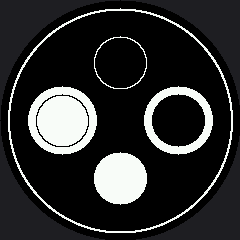
This program draws all four combinations of background and fill so you can compare them at once — and it lays them out in a diamond rather than a 2 by 2 grid, because the four corners of a grid on a round screen are exactly the four places you cannot see.
1 2 3 4 5 6 7 8 9 10 11 12 13 14 15 16 17 18 19 20 21 22 23 24 25 26 27 28 29 30 31 32 33 34 | |
Here's what that program draws on the display:
The Four Combinations
The whole display starts out black, so the top and bottom circles need no background at all. To put a white background behind a black circle, draw a slightly larger filled white circle first and then draw the black one on top of it.
| Position | Background | Circle color | Fill |
|---|---|---|---|
| Top | Black | White | Outline |
| Bottom | Black | White | Filled |
| Left | White patch | Black | Outline |
| Right | White patch | Black | Filled |
A Diamond, Not a Grid
 Four shapes in a 2 by 2 grid would put one in each corner — and my screen has no corners. Rotate the whole arrangement 45 degrees and every shape lands where there is glass. Round screens want radial layouts.
The Ring Around the Rim
That thin outer circle is shapes.ring() drawn at config.SAFE_RADIUS, and it is the one shape in
this kit that could not have existed on a rectangular display. It follows the bezel exactly, which
makes it useful as more than decoration: anything that crosses it is in danger, and anything well
inside it is safe.
Do the Arithmetic Before You Move Anything
 A circle at
 OFFSET with radius RADIUS reaches OFFSET + RADIUS pixels from the center. Compare that sum to config.SAFE_RADIUS — 112 — before you run it, and you will stop being surprised by disappearing shapes.
Things to Try
- Push
OFFSETfrom 58 up to 80 and run it again. The circles start crossing the rim, and each one loses its outer edge first. - Work out the largest safe radius a circle at
OFFSET = 58can have. (Add the two numbers and compare withconfig.SAFE_RADIUS.) Then check your answer on the glass. - Make the ring thicker. Change the last argument from 2 to 8 and see how much the face inside it seems to shrink. A heavy bezel changes the feel of everything it surrounds.
- Build an eye. A filled white circle with a smaller black circle on top of it is an eye — you have already drawn one twice in this lab without calling it that.
References
- Drawing Ellipses — the general case, and where the quadrant codes come from
- Your First Face — the first lab that turns two circles into a pair of eyes
- Screen Coordinates — where
SAFE_RADIUScomes from