Skip to content

Lab 29: Only Redraw What Changed

Ask the decomposition question that matters most on this hardware: which pixels actually change? This lab animates a mouth two ways — wiping and rebuilding the whole face every frame, or erasing and redrawing only the mouth's box — and reports the timing difference in microseconds, live, on screen.

Sample Program Code

Button A toggles full versus partial redraw; button B toggles a debug color onto every erase box so you can see which pixels get touched:

  1
  2
  3
  4
  5
  6
  7
  8
  9
 10
 11
 12
 13
 14
 15
 16
 17
 18
 19
 20
 21
 22
 23
 24
 25
 26
 27
 28
 29
 30
 31
 32
 33
 34
 35
 36
 37
 38
 39
 40
 41
 42
 43
 44
 45
 46
 47
 48
 49
 50
 51
 52
 53
 54
 55
 56
 57
 58
 59
 60
 61
 62
 63
 64
 65
 66
 67
 68
 69
 70
 71
 72
 73
 74
 75
 76
 77
 78
 79
 80
 81
 82
 83
 84
 85
 86
 87
 88
 89
 90
 91
 92
 93
 94
 95
 96
 97
 98
 99
100
101
102
103
104
105
106
107
108
109
110
111
112
113
114
115
116
117
118
119
120
121
122
123
124
125
126
127
128
129
130
131
132
133
134
135
136
137
138
139
140
141
142
143
144
145
146
147
148
149
150
151
152
153
154
155
156
157
158
159
160
161
162
163
164
165
166
167
168
169
170
171
172
173
174
175
176
177
178
179
180
181
182
183
184
185
186
187
188
189
190
191
192
193
194
195
196
197
198
199
200
201
202
203
204
205
206
207
208
209
210
211
212
213
214
215
216
217
218
219
220
221
222
223
# Lab 29: Only Redraw What Changed -- Decomposition, Then Measurement
#
# Every animation in this kit so far has been careful about this, and now
# you find out why. Wiping the whole screen and rebuilding the whole face
# to move ONE curve means sending 115,200 bytes to erase, plus every
# pixel of every eye, eyebrow, and mouth, over and over -- to change a
# few hundred pixels that actually differ.
#
# Ask the decomposition question -- WHICH PIXELS ACTUALLY CHANGE? -- and
# you can erase a small rectangle instead of the whole screen. That is
# how every video codec, every game engine, and every windowing system on
# earth stays fast.
#
# Then ask the second question, the one that separates a guess from
# engineering: DID IT HELP, AND BY HOW MUCH? Button A toggles between
# full and partial redraw while the screen reports two timings in
# microseconds:
#
#   ers    time spent erasing -- a full screen, or one small box
#   drw    time spent drawing the face parts back
#
# THE RESULT IS DIFFERENT FROM THE OLED KIT'S, AND THAT IS THE POINT.
# There, the frame buffer had to be shipped in full every time no matter
# what, so the saving was real but small and the honest conclusion was
# "you optimized the cheap part." Here there is no frame buffer. Every
# pixel you skip is a pixel you never send. Predict what that does to the
# numbers before you press the button.

import config
import face
from utime import ticks_us, ticks_diff, sleep_ms

button_a, button_b = config.init_buttons()

display = face.display

# Everything above happens where you cannot see it, because erasing paints
# black onto black. Set this and every erase() box becomes a colored
# rectangle with the redrawn part sitting on top of it:
#
#     face.DEBUG_ERASE = config.RED
#
# Do it. In full mode the whole circle turns red every frame, because
# that is genuinely what a full wipe repaints. In partial mode a single
# small rectangle sits around the mouth and nothing else moves. The
# microsecond numbers below say the same thing, but the red rectangle is
# the one students remember -- and it costs nothing, because a red pixel
# and a black pixel are both two bytes.
#
# Button B toggles it while the program runs.
face.DEBUG_ERASE = None

MOUTH_MIN = 6
MOUTH_MAX = 30

# The bounding box of the mouth: the only part of the face this animation
# touches. Everything outside it is identical from frame to frame, so
# there is no reason to erase it. Work these numbers out from the mouth's
# center and radii, then add a few pixels of margin for safety.
MOUTH_RADIUS_X = 50
MOUTH_BOX_X = face.HALF_WIDTH - MOUTH_RADIUS_X - 4
MOUTH_BOX_Y = face.MOUTH_Y - MOUTH_MAX - face.STROKE - 4
MOUTH_BOX_W = (MOUTH_RADIUS_X + 4) * 2
MOUTH_BOX_H = (MOUTH_MAX + face.STROKE + 4) * 2

SAMPLES = 10

partial = False
mouth_ry = MOUTH_MIN
step = 2

erase_total = 0
draw_total = 0
samples = 0
erase_us = 0
draw_us = 0


def erase_everything():
    """The way the OLED labs did it: wipe the entire screen.

    This goes through face.erase() rather than face.clear() so that
    DEBUG_ERASE colors it. Same pixels either way -- but when the whole
    circle flashes red on every frame, nobody has to be talked into
    believing a full wipe is expensive."""
    face.erase(0, 0, face.WIDTH, face.HEIGHT)


def erase_changed_only():
    """Blank only the box the mouth lives in."""
    face.erase(MOUTH_BOX_X, MOUTH_BOX_Y, MOUTH_BOX_W, MOUTH_BOX_H)


def draw_everything():
    """Rebuild the whole face from nothing."""
    face.eyes(24, 24)
    face.eyebrows(0, 0, lift=5)
    face.mouth(face.SMILE, MOUTH_RADIUS_X, mouth_ry)
    draw_hud()


def draw_changed_only():
    """The same picture, built by redrawing only the mouth. The eyes and
    eyebrows are simply left alone -- they are already correct on the
    glass from the last frame."""
    face.mouth(face.SMILE, MOUTH_RADIUS_X, mouth_ry)
    draw_hud()


def draw_hud():
    mode = "P" if partial else "F"
    face.erase_label(face.LABEL_Y)
    face.label(mode + " e" + str(erase_us) + " d" + str(draw_us))


def draw_static_parts():
    """Partial redraw only works if the pixels it is NOT touching are
    already right. Call this once when switching modes to lay down a
    correct starting frame."""
    face.clear()
    face.eyes(24, 24)
    face.eyebrows(0, 0, lift=5)
    face.mouth(face.SMILE, MOUTH_RADIUS_X, mouth_ry)
    draw_hud()


draw_static_parts()

while True:
    if face.pressed(button_a):
        face.wait_for_release(button_a)
        partial = not partial
        erase_total = 0
        draw_total = 0
        samples = 0
        print("mode:", "partial" if partial else "full")
        draw_static_parts()

    if face.pressed(button_b):
        face.wait_for_release(button_b)
        # Paint the erase boxes, or stop painting them. Watch the "ers"
        # number while you do: it does not change. Making the work
        # visible did not make it cost more.
        face.DEBUG_ERASE = config.RED if face.DEBUG_ERASE is None else None
        print("debug erase:", "on" if face.DEBUG_ERASE else "off")
        draw_static_parts()

    # Animate the mouth from a thin line to a wide grin and back.
    mouth_ry += step
    if mouth_ry >= MOUTH_MAX or mouth_ry <= MOUTH_MIN:
        step = -step

    started = ticks_us()
    if partial:
        erase_changed_only()
    else:
        erase_everything()
    erase_total += ticks_diff(ticks_us(), started)

    started = ticks_us()
    if partial:
        draw_changed_only()
    else:
        draw_everything()
    draw_total += ticks_diff(ticks_us(), started)

    # Average over several frames. A single reading of anything this fast
    # is mostly noise; an average is a measurement.
    samples += 1
    if samples >= SAMPLES:
        erase_us = erase_total // samples
        draw_us = draw_total // samples
        print("erase:", erase_us, "us   draw:", draw_us,
              "us   partial:", partial)
        erase_total = 0
        draw_total = 0
        samples = 0

    sleep_ms(20)

# What you should find, and why it matters:
#
# Both numbers drop, and the erase number drops enormously -- a full
# screen is 57,600 pixels and the mouth box is a few thousand. On the
# OLED kit the equivalent saving was real but nearly pointless, because
# the driver shipped the entire frame buffer down the wire either way.
#
# Same optimization, same code shape, wildly different payoff. What
# changed was not the idea. It was the hardware underneath it. That is
# why the measuring step is not optional: an optimization is not fast or
# slow on its own, it is fast or slow ON SOMETHING, and the only way to
# know which you have is to look.
#
# Things to try:
#
# 1. Before toggling, PREDICT the ratio. Then look. Then go read the OLED
#    kit's version of this lab and predict what IT will say. Being right
#    about one and wrong about the other is the lesson landing.
#
# 2. Make the mouth box too small -- change MOUTH_BOX_H to 20 -- and watch
#    the grin's corners smear off the edges of the box you forgot to
#    erase. Partial redraw fails loudly when you get the geometry wrong,
#    which is exactly lab 25's ghosting bug wearing a disguise.
#
# 2b. Do exercise 2 again with button B held on, so the erase box is red.
#    The smear is no longer a mystery: the leftover pixels are sitting
#    plainly OUTSIDE a rectangle you can see the edges of. Debugging is
#    much easier when the thing you got wrong is the thing on screen.
#
# 2c. With the red box on, compare the "ers" number to what it was with
#    the box black. It is the same. Color is free here -- a red pixel and
#    a black pixel are both two bytes of RGB565 -- so making your program
#    explain itself cost you nothing at all. That is rarer than it
#    sounds, and worth taking when you can get it.
#
# 3. Speed up the wire instead of the drawing. In config.py, drop
#    BAUDRATE to 10_000_000 and run again. Every number here gets worse in
#    proportion, because on this display every number here IS wire time.
#
# 4. Add the eye pupils to the animation so they sweep as well. You now
#    need a third box. At what point does tracking boxes get harder than
#    just redrawing the screen? There is no single right answer, and
#    knowing that is the skill.

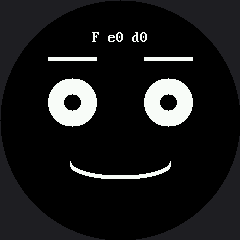
Here's the mouth mid-animation, with the debug erase color switched on:

Simulated output of 29-partial-redraw.py

The Opposite Answer From the OLED Kit

The OLED kit ran this exact lab, and its honest conclusion was "you optimized the cheap part" — the driver shipped its entire frame buffer down the wire every time regardless of how little changed, so the saving was real but small. Here there is no buffer at all: every pixel you skip is a pixel that's never sent. Same optimization, same shape of code, and a completely different payoff — which is the whole reason the measuring step in this lab is not optional. An optimization isn't fast or slow on its own; it's fast or slow on something, and looking is the only way to know which you have.

Turn on the debug erase color and the difference stops being a number you have to trust — a full wipe lights up the entire circle every frame; partial redraw lights up one small rectangle around the mouth. It costs nothing to look: a colored pixel and a black one are both the same two bytes.

Tip

Pixel When a number surprises you, don't just believe it — make it visible. A colored erase box turns "trust me, it's faster" into something you can watch happen.