Drawing Rectangles
Rectangles are the workhorse shape of this kit — not because robot faces are boxy, but because a filled rectangle is how you erase on a display with no frame buffer. Almost every animation in these labs is built on that one idea.
This driver splits what framebuf combined into a single call:
1 2 | |
There is no separate "erase" command anywhere in this kit. Drawing in black is erasing, and
fill_rect(..., BLACK) is the fastest eraser you have, because it is the one call that sends long
runs of identical pixels.
The Fastest Eraser You Have
 Wiping my whole screen means sending 259,200 bytes. Wiping just the box around my mouth is 11,664. Same result on the glass, about one twenty-second of the work — and that is the difference between a smooth animation and a flicker.
Sample Program Code
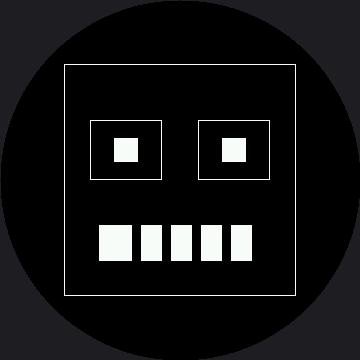
This program draws a border pulled well inside the safe radius, a retro blocky face with square eye sockets, and a mouth bar with teeth erased out of it in black.
1 2 3 4 5 6 7 8 9 10 11 12 13 14 15 16 17 18 19 20 21 22 23 24 25 26 27 28 29 30 | |
Here's what that program draws on the display:
The Teeth Are the Lesson
Those teeth were never drawn. The program painted one solid white bar and then painted five black bars on top of it, and what is left over reads as a mouthful of teeth.
That is the same layering trick as the catchlight in the pixel lab, and it is how nearly every detail in this kit gets made: draw the big shape, then take pieces back out with black.
| Goal | Approach |
|---|---|
| Solid block of color | fill_rect(x, y, w, h, color) |
| Outline | rect(x, y, w, h, color) — no fill flag exists |
| Erase a region | fill_rect(x, y, w, h, BLACK) |
| Carve detail out of a shape | Draw the shape, then draw black on top |
| Erase everything | display.fill(BLACK) — the most expensive call in the kit |
One Call Takes the Mouth Back
 Add
Add display.fill_rect(99, 225, 162, 36, BLACK) at the end. The mouth disappears and nothing else on screen moves. That single line is the trick the Only Redraw What Changed lab is built on.
Things to Try
- Widen the border to
display.rect(15, 15, 330, 330, WHITE)and run it again. The corners land about 233 px from the center, past the 180 px glass edge, so you are left with four disconnected arcs instead of a box. - Erase just the mouth, as in the tip above —
fill_rect(99, 225, 162, 36, BLACK)— and confirm the eyes are untouched. Note that the eraser has to match the shape it erases exactly, 162×36; an eraser that is a size behind is the classic source of leftover smears on a display with no frame buffer. - Change the tooth spacing in the
range(132, 261, 30)step from 30 to 20. More teeth, no new code — the loop does the counting. - Time the two erasers. Compare
display.fill(BLACK)against the mouth-sizedfill_rect()withticks_us(). Write both numbers down; you'll want them again at the Only Redraw What Changed lab.
References
- Drawing Pixels — the same layering idea, at the smallest possible scale
- Only Redraw What Changed — where erasing one box instead of the screen becomes a measured optimization
- Eye Scanner — the first animation that depends on erasing a box, with real measured timing on this panel
- Drawing Rectangles on the 1.2" kit — the same lab at 240×240, before the corner math changed the border's width