Only Redraw What Changed
Every animation in this kit so far has wiped the entire screen and rebuilt the entire face, dozens of times a second, in order to move one curve. The eyes did not change. The eyebrows did not change. You redrew them anyway, because it was easier than thinking about it.
Thinking about it is this lesson — and so is finding out whether the thinking paid off.
Which pixels actually changed?
 That one question is the whole optimization. The second question — did it actually help? — is the one most people forget to ask, and it's the more important of the two.
The Decomposition Question
Ask which pixels actually change between one frame and the next, and a face full of moving parts turns out to be mostly still. In this program only the mouth animates, so only the mouth needs erasing.
Instead of face.clear(), which blacks out all 8192 pixels, you black out one rectangle:
1 2 3 4 5 6 7 8 9 10 11 12 13 14 | |
The eyes and eyebrows are simply left alone. They are already correct in the frame buffer from the previous frame, and the buffer keeps whatever you last put in it.
This is exactly how video codecs, game engines, and every windowing system on your computer stay fast. None of them redraws the whole screen to move a cursor.
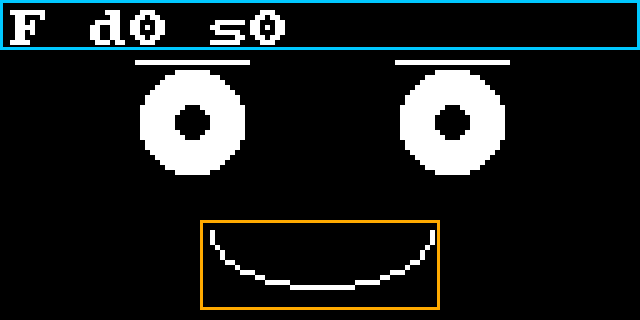
The picture below shows the two regions that draw_changed_only() erases and redraws on every
frame: the orange box around the mouth, and the blue strip across the top for the readout. Every
pixel outside those two boxes is left alone.
Get the Box Wrong and It Ghosts
 Set
Set MOUTH_BOX_W to 20 and watch the grin's corners smear off the edges of the box you forgot to erase. That's the ghosting bug from the broken-faces lesson wearing a disguise — partial redraw fails loudly when the geometry is wrong.
Partial redraw only works if the pixels you are not touching are already right. That means laying down one complete, correct frame before the optimization takes over:
1 2 3 4 5 6 7 8 9 | |
Now Measure It
Button A toggles between full and partial redraw while the screen reports two timings in microseconds. Splitting the measurement into two numbers is the important design choice here.
| Number | What it measures |
|---|---|
d (draw) |
Time spent putting pixels into the frame buffer in RAM |
s (show) |
Time spent shipping that buffer down the SPI wire to the glass |
1 2 3 4 5 6 7 8 9 10 | |
ticks_us() counts microseconds instead of milliseconds, because drawing a face is fast enough
that milliseconds are too coarse to see the difference.
One more detail matters. The program averages over twenty frames before reporting:
1 2 3 4 | |
A single reading of anything this fast is mostly noise. An average is a measurement. Toggle between modes and watch both numbers.
What You Should Find
Predict the result before you press the button, then look. Most people guess wrong, and being wrong here is the point of the lesson.
The d number drops sharply in partial mode, because you really did stop drawing most of the
face. The s number barely moves at all.
Here is why. This display driver ships all 1024 bytes of the frame buffer down the wire on every
single show(), whether one pixel changed or all of them did. The SSD1306 has no idea you were
clever about the mouth. Your optimization made the cheap half of the work cheaper, and left the
expensive half exactly as it was.
Optimize the Expensive Part
 The optimization worked exactly as designed, and the overall speedup is still small — because the part you sped up wasn't the part costing the most time. That's not a failure. That's the most important lesson in performance work.
People who skip the measuring step never learn this. They make a change that sounds faster, feel good about it, and assume they got faster. The measurement is what turns an opinion into a fact.
Attacking the Expensive Part Instead
If show() is where the time goes, then that is where a real speedup lives. The display talks
over SPI at a speed you choose, and the default is conservative. In config.py:
1 | |
Run the program again and watch the s number this time. Attacking the expensive part beats
optimizing the cheap one, every time — and you only knew which was which because you measured.
Things to Try
- Predict first. Write down how much faster you expect partial mode to be, then look. Getting it wrong is normal and is exactly the point.
- Break the box. Set
MOUTH_BOX_Wto 20 and watch the smear appear at the corners. - Speed up the wire. Add the
baudratetoconfig.pyand watch thesnumber instead of thednumber. - Add the pupils to the animation so the eyes sweep as well. You now need a third box. At what point does tracking boxes become harder than just redrawing the screen? There is no single right answer, and knowing that is the skill.
- Work out the theoretical time. At 1 MHz, how long should 1024 bytes take to send? Compare
your answer to the measured
snumber.
You measured instead of assuming
 You made a real optimization, measured it honestly, found out it wasn't where the time went, and then found where the time actually went. That's the whole job.
References
- Trace and Watch — where the measure-don't-guess habit was introduced
- Five Broken Faces — the ghosting bug that a wrong bounding box recreates
- Rectangle —
fill_rect()and erasing a region by drawing it black - MicroPython Framebuf Documentation — the frame buffer that keeps its contents between frames
- MicroPython SPI Documentation — the
baudratesetting that controls how fastshow()can run