Eye Scanner
A pupil that drifts slowly back and forth is one of the cheapest, most convincing signals a robot
can send — it reads instantly as thinking. This lab builds that sweep by looping an x offset
and redrawing both pupils on every step, dozens of times a second.
It is also the lab where this kit's color display changes the rules for good. The strategy it teaches — touch only the pixels that actually moved — is not a trick saved for later here. It is how every animation in this book works from this point on.
Watch me look around
 Moving eyes are the first thing that makes a screen feel like a face instead of a picture of one. Let's make some pixels move.
Why This Lab Can't Wipe the Screen
On the OLED kit, every frame started with oled.fill(BLACK) and nobody worried about the cost —
the wipe happened in a RAM frame buffer, and the screen only ever saw the finished picture.
This display has no frame buffer at all. A full wipe means pushing all 129,600 pixels — 259,200 bytes of RGB565 color — down the SPI wire, one command at a time, and you watch it happen. Do that on every frame and the animation flickers hard and crawls.
So this lab erases only the two eye boxes instead:
| Approach | Pixels repainted per frame | Result |
|---|---|---|
| Wipe the whole screen | 129,600 | Visible flicker, low frame rate |
| Erase two eye boxes | 23,184 | Smooth, no flicker, identical picture |
Under a fifth of the work for the same result — the same ratio the 1.2" kit's eye scanner gets from its own two boxes, just at a quarter the raw pixel count (10,304 out of 57,600 there, versus 23,184 out of 129,600 here). Scale the screen up and the ratio doesn't move — only the absolute cost does. On this hardware that saving is not an optimization you save for later — it is the price of admission, which is why it arrives at lab 11 instead of waiting for lab 29.
Sample Program Code
Notice the split: draw_static_parts() runs once, and draw_eyes() runs on every frame and
touches nothing but the two eye boxes.
1 2 3 4 5 6 7 8 9 10 11 12 13 14 15 16 17 18 19 20 21 22 23 24 25 26 27 28 29 30 31 32 33 34 35 36 37 38 39 40 41 42 43 44 45 46 47 48 49 50 51 52 53 54 55 56 57 58 59 60 61 62 63 64 65 66 67 68 69 70 71 72 73 74 75 76 77 78 79 | |
Here is one frame of the animation, with both pupils sitting near the center of their sweep:
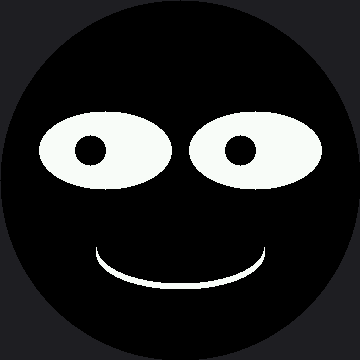
The mouth in that picture was drawn exactly once, before the loop started. Every frame after that touched only the two rectangles around the eyes.
Make the Invisible Visible
Here is the best trick in this kit. Erasing paints black onto black, so the single most important thing your program does is completely invisible.
Change one line:
1 | |
Now every box your program repaints lights up as a red rectangle with the eyes drawn on top of it, and everything the program leaves alone stays black. You can see your optimization working.
Color Is Free Here
 A red pixel and a black pixel are both two bytes of RGB565 here, same as ever. Making my program explain itself costs nothing — a bug you can see beats a bug you can only reason about.
What This Costs on Real Hardware
Most labs in this kit have only run in a simulator that proves they draw inside the screen bounds and nothing more. Lab 11 is the exception. A separate measurement session ran the exact code above on a real Raspberry Pi Pico wired to a real GC9B72 panel and counted exactly what one frame costs:
| What lab 11 does each frame | Cost |
|---|---|
| Blank two 138 × 84 eye boxes | 23,184 pixels |
| Rebuild both white eye ellipses | 16,310 pixels |
| Draw both pupils back on top | 1,458 pixels |
| Total | 40,952 pixels in 222 drawing calls |
One frame took 455 milliseconds — about two frames per second. That is measured, on-glass data, not an estimate, and it is slow enough to see with your own eyes: the sweep will visibly step rather than glide.
Every one of those 222 drawing calls carries a fixed cost before a single pixel moves down the wire, which turns out to be exactly the problem Making the Eye Scanner Fast solves next — taking this same lab from 455 ms down to 4.2 ms per frame.
Things to Try
- Break it the OLED way. Replace
draw_eyes()with a version that callsdisplay.fill(OFF)and redraws everything. Run it. The flicker and the frame rate together are the answer to "why does this kit care about partial redraw so early?" - Shrink the erase box to just the pupil's travel and see whether it still looks right. It will not, quite — and finding out why is the point.
- Change
EYE_WIDTHto 75 without touchingEYE_BOX_Xand watch leftovers pile up at the edges. An erase box has to be sized for the largest thing that can appear in it. - Do exercise 3 again with
ERASE_COLOR = config.RED. Now the leftover pixels are visibly outside a rectangle you can see the edges of. That is debugging made easy, for free.
References
- Drawing Rectangles — where
fill_rect()as an eraser was introduced - Only Redraw What Changed — the same idea, measured in microseconds
- Five Broken Faces — where a missing erase becomes a bug to diagnose
- Eye Scanner — the same lab on the smaller 1.2" kit, at a quarter the pixels
- Making the Eye Scanner Fast — this exact lab, measured and sped up from 455 ms to 4.2 ms per frame