Drawing Circles
A circle is just a special case of the framebuf ellipse function where the horizontal and vertical radii are equal. Circles can be drawn as an outline or filled, and in either color, which lets you place a dark shape on a light background or a light shape on a dark background.
Sample Program Code
This program draws four circles, one in each quadrant of the screen, so you can compare all four combinations at once:
 1
 2
 3
 4
 5
 6
 7
 8
 9
10
11
12
13
14
15
16
17
18
19
20
21
22
23
24
25
26
27
28
29
30
31
32
33
34
35
36
37
38
39
40
41
42
43
44
45
46
47
48 | # Test of the micropython ellipse function drawing circles
# A circle is just an ellipse with equal horizontal and vertical radii
from machine import Pin
import ssd1306
WIDTH = 128
HEIGHT = 64
clock=Pin(2) #SCL
data=Pin(3) #SDA
RES = machine.Pin(4)
DC = machine.Pin(5)
CS = machine.Pin(6)
spi=machine.SPI(0, sck=clock, mosi=data)
oled = ssd1306.SSD1306_SPI(WIDTH, HEIGHT, spi, DC, RES, CS)
WHITE = 1
BLACK = 0
NO_FILL = 0
FILL = 1
RADIUS = 12
QUARTER_WIDTH = int(WIDTH / 4)
HALF_WIDTH = int(WIDTH / 2)
QUARTER_HEIGHT = int(HEIGHT / 4)
HALF_HEIGHT = int(HEIGHT / 2)
# start with a black screen
oled.fill(BLACK)
# top-left: black circle outline on a white background
oled.fill_rect(0, 0, HALF_WIDTH, HALF_HEIGHT, WHITE)
oled.ellipse(QUARTER_WIDTH, QUARTER_HEIGHT, RADIUS, RADIUS, BLACK, NO_FILL)
# top-right: white circle outline on a black background
oled.ellipse(HALF_WIDTH + QUARTER_WIDTH, QUARTER_HEIGHT, RADIUS, RADIUS, WHITE, NO_FILL)
# bottom-left: black filled circle on a white background
oled.fill_rect(0, HALF_HEIGHT, HALF_WIDTH, HALF_HEIGHT, WHITE)
oled.ellipse(QUARTER_WIDTH, HALF_HEIGHT + QUARTER_HEIGHT, RADIUS, RADIUS, BLACK, FILL)
# bottom-right: white filled circle on a black background
oled.ellipse(HALF_WIDTH + QUARTER_WIDTH, HALF_HEIGHT + QUARTER_HEIGHT, RADIUS, RADIUS, WHITE, FILL)
oled.show()
|
Here's what that program draws on the display:
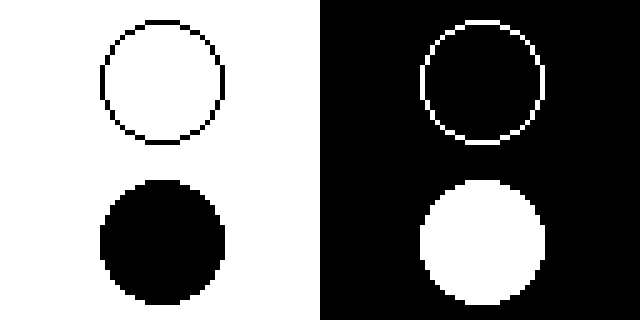
The Four Combinations
| Quadrant |
Background |
Circle Color |
Fill |
| Top-left |
White |
Black |
Outline |
| Top-right |
Black |
White |
Outline |
| Bottom-left |
White |
Black |
Filled |
| Bottom-right |
Black |
White |
Filled |
The whole display starts out black, so the two right-hand circles need no background fill at all. To put a white background behind a circle, use fill_rect() to paint that quadrant white before drawing the black circle on top of it.
References
MicroPython Framebuf Documentation