Your First Face
This is the moment the kit has been building toward. Everything so far has been one shape at a time; here they come together into an expression a stranger can read from across the room.
The whole face is three small functions — draw_eyes(), draw_eyebrows(), and a curved mouth.
Every later lab reuses this exact pattern with different numbers to draw every other emotion, so
it is worth understanding completely before you move on.
Let's draw some feelings
 Two eyes, two eyebrows, and one curve. That is the entire vocabulary — and it is enough to make somebody smile back at a machine. Every pixel tells a story!
The Face Finally Gets To Be Face-Shaped
The numbers in this lab are bigger than the OLED kit's, and not by a simple factor. The OLED was 128 wide and 64 tall — twice as wide as it was tall — so its faces had to be squashed to fit. This screen is square, and round, so the proportions can be honest.
| Feature | OLED kit | This kit |
|---|---|---|
| Screen | 128 × 64 rectangle | 240 × 240 circle |
| Eye spacing from center | 26 | 48 |
| Eye radius | 10 | 24 |
| Stroke width | 1 pixel | 4 pixels |
That last row matters more than it looks. One pixel is invisible on a screen this size. Every
line and arc in this kit is drawn several times, a pixel apart, to thicken it — look for
for offset in range(STROKE) and you will see it everywhere from here on.
Sample Program Code
Read the three drawing functions first, then look at how few lines it takes to combine them.
1 2 3 4 5 6 7 8 9 10 11 12 13 14 15 16 17 18 19 20 21 22 23 24 25 26 27 28 29 30 31 32 33 34 35 36 37 38 39 40 41 42 43 44 45 46 47 48 49 50 51 52 53 54 55 56 57 58 59 60 61 62 63 64 65 66 | |
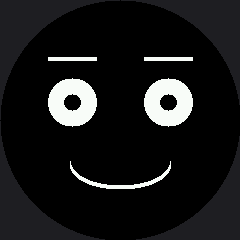
Here's what that program draws on the display:
Three Functions, One Face
Look at draw_happy_face(). It is four lines, and every one of them is a decision about feeling
rather than about pixels:
| Line | The decision it makes |
|---|---|
display.fill(BLACK) |
Start from a clean screen |
draw_eyes(24, 24) |
Round, relaxed eyes — not wide, not squashed |
draw_eyebrows(lift=5) |
Brows sitting slightly high, which reads as pleased |
draw_mouth_curve(50, 24, BOTTOM_HALF) |
A wide, gentle smile — mask 12 curves up |
That separation is the reason every emotion in this kit is only a handful of numbers away. Change
24, 24 to 24, 12 and the same face looks annoyed. Change BOTTOM_HALF to TOP_HALF and it
looks disappointed.
The Wipe Is the Expensive Part
 Count how long the face takes to appear. Most of that is
 display.fill(BLACK) — 115,200 bytes of black going down the wire. Comment it out, run twice in a row, and you will see how fast the face itself really is.
Things to Try
- Time the wipe, as in the tip above. Write the number down; it comes back in almost every animation lab.
- Move
EYE_Yfrom 102 to 60. The eyes climb toward the rim and start losing their outer edges, because the screen gets narrower the further you get from the middle. - Make it angry with three edits. Change the eyes to
(24, 12), the lift to-5, and the mouth mask to3. Same functions, opposite mood. - Add a catchlight to each eye with
fill_rect(), using the trick from the pixel lab. Two tiny white squares change how alive the face looks.
References
- Drawing Ellipses — the quadrant masks that make the mouth curve up or down
- Eye Scanner — the next lab, where this face starts moving
- The Face Module — where these three functions move into one shared file